
Medium Formatting
Linking Images in a Medium Article
How to link the images in your Medium article to any external website
Medium does a fantastic job displaying images. Whether its formatting the sizing of a single image or the configuration of a grid of images, Medium has greatly simplified the process of adding visuals to your writing.
However, one key feature, which many authors do not utilize, is Medium's image linking feature.
Any image, including the featured image at the top of an article, can be hyperlinked to an external website.
To make an image in your story a clickable link, click on it, giving it a green border, and then press Ctrl + K (Windows) / Cmd + K (Mac).
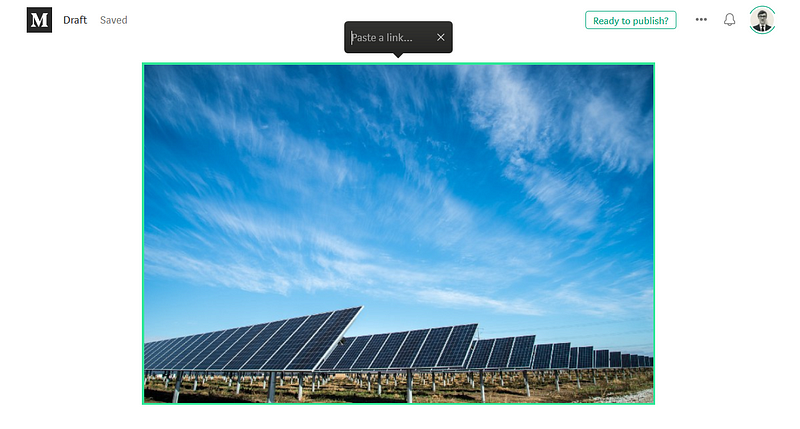
Although this is a simple tip, it can be extremely useful to authors:
- Many authors just hyperlink the text of a caption below an image, but this is actually the proper place for image attribution.
- Clickable images allow for the creation of buttons or other creative uses of space, in otherwise bland articles:


- Clickable images are ideal when promoting a product or trying to invite readers to learn more about something that you wish to promote on a site other than Medium.

Thanks for reading this article! Leave a comment below if you have any questions. Be sure to sign up for the Blogging Guide newsletter, to get the latest tips, tricks, and news about writing on Medium and to join our Facebook group, Medium Writing, to share your latest Medium posts and connect with other writers.
If you liked this article, here are some other articles you may enjoy:

Casey Botticello is a partner at Black Edge Consulting. Black Edge Consulting is a strategic communications firm, specializing in online reputation management, digital marketing, and crisis management. Prior to founding Black Edge Consulting, he worked for BGR Group, a bipartisan lobbying and strategic communications firm.
Casey is the founder of the Cryptocurrency Alliance, a Super PAC dedicated to cryptocurrency and blockchain advocacy. He is a graduate of The University of Pennsylvania, where he received his B.A. in Urban Studies.
You can connect with him on LinkedIn, Twitter, Facebook, or by visiting his website, Blogging Guide.


