avatarSuntonu Bhadra

Free AI web copilot to create summaries, insights and extended knowledge, download it at here

4573

Abstract

ing your excellent experience with the relevant personnel in a story. <b>• LinkedIn has a ‘Kudos’ option, where you can nominate or acknowledge your peer or connection for a specific cause.</b></p><figure id="1c89"><img src="https://cdn-images-1.readmedium.com/v2/resize:fit:800/1*90yt_gs3FT8wx59T1g75DA.png"><figcaption>(a) Created from the Author’s LinkedIn Profile as an illustration ()</figcaption></figure><figure id="c0ea"><img src="https://cdn-images-1.readmedium.com/v2/resize:fit:800/1*ZND1-jQR3-fk_tD41ZdzIA.png"><figcaption>(b) Created from the Author’s LinkedIn Profile as an illustration ()</figcaption></figure><h1 id="ae3d">Showcase your best works in the feature section.</h1><h2 id="f08b">Why?</h2><p id="8b41">It will show the diversified range of areas you have expertise on and also will increase the chance of being notified.</p><h2 id="1aa6">What to put in feature section?</h2><p id="7f2a">Outside portfolio link, photos of your teamwork/achievement/projects, media, article, etc.</p><figure id="1d27"><img src="https://cdn-images-1.readmedium.com/v2/resize:fit:800/1*o2wuH73vAOQILTEpdlNiLg.png"><figcaption>From the author’s LinkedIn page (other images are blurred to protect privacy) ()</figcaption></figure><h1 id="972b">Please remove the buzzwords.</h1><h2 id="559a">Why?</h2><p id="9313">As guilty as I am. My profile still contains some of the buzzwords, which I require to replace with different wordings. When you fill your information, experience, and other details with these buzzwords, your profile will not stand-out in the search. ATS can find and not take your profile for a relevant career opportunity.</p><h2 id="59fd">What are the buzzwords?</h2><figure id="be91"><img src="https://cdn-images-1.readmedium.com/v2/resize:fit:800/1*Ka1frzqVAhf06_Q-GqsONA.png"><figcaption>Collected from LinkedIn post (link provided below) (**)</figcaption></figure><h2 id="e656">How to remove or what to place?</h2><p id="df38">There are so many alternatives that you can put instead of these words.</p><p id="5484"><i>For example, instead of ‘Strategic,’ we can use ‘significant, consequential, high-priority’ based on the sentence.</i></p><p id="0541"><b><i>Even if you write these buzzwords, you can highlight it with relevant projects, works, media, and links to suffice your claim.</i></b></p><h1 id="630c">If possible, add personalized video in your profile section (media).</h1><figure id="e636"><img src="https://cdn-images-1.readmedium.com/v2/resize:fit:800/1*zAlfNvO-EfXfCiXW4K6X9g.png"><figcaption>From the author’s LinkedIn Page ()</figcaption></figure><h2 id="190b">Why?</h2><p id="9ceb">It will make you stand-out in your industry. Also, it will show the confidence that you are upfront in what you can offer to the word.</p><h2 id="7b66">What to put and how to put it?</h2><p id="debd">You can mention your career journey (in short), what are your expertise and how you will be helping others with your expertise. <b><i>You can record your personalized video from your cell-phone, you can edit it (there are numerous apps out there) and then you can upload it in your profile section.</i></b></p><h1 id="a5a9">Keywords and search terms to add in the skills section.</h1><figure id="7d2f"><img src="https://cdn-images-1.readmedium.com/v2/resize:fit:800/1*o1EkcDj8X-syULBIQQpMiQ.png"><figcaption>Content shared from the author’s LinkedIn page (person’s name and organizations names are blurred for privacy) (*)</figcaption></figure><h2 id="6c95">Why?</h2><p id="4f30">To be on the top of the search list in ATS for the relevant job.</p><h2 id="02bb">How?</h2><p id="f335">• The easiest way is to look for the roles you are aspiring to move and identify the keywords or main responsibilities the position has to offer. • The other way is to look into the industry experts’ profiles and to look into their ‘Skills’ section.</p><p id="8c7d" type="7">One thing to be clear, add only those relevant skills which you have expertise.</p><h1 id="26ce">Reach out to industry specialists or clients by sending ‘Add request’ and include a ‘Personalized Note.’</h1><h2 id="2969">Why?</h2><p id="5e8c">To increase your connectivity and to learn from them.</p><h2 id="f476">How?</h2><p id="d5a9">You can utilize the search button of LinkedIn and can identify who is the relevant person that you should connect with (from an organization, from a group, etc.). Then, you can click ‘More’ and then click the ‘Connect’ button. There will be an option to ‘add a note,’ so write a personalized message of why you are reaching out to connect and then

Options

‘send.’</p><figure id="18f7"><img src="https://cdn-images-1.readmedium.com/v2/resize:fit:800/1*Mw8hLdFyBKeOfYhKX14RPw.png"><figcaption>Content from LinkedIn (name, image and relevant organizations are blurred for protecting privacy) ()</figcaption></figure><h1 id="c1d4">Accept ‘Add request’ with a personalized reply.</h1><figure id="dbce"><img src="https://cdn-images-1.readmedium.com/v2/resize:fit:800/1*7rtDZsfUn1y0plnhVOusqw.png"><figcaption>LinkedIn message options to add contents (taken from the author’s LinkedIn page) ()</figcaption></figure><h2 id="9bc2">Why?</h2><p id="f1b4"><b>Courtesy brings courtesy. </b>If you are humble, it should reflect in your actions. As they are reaching out to you for a connection, you should accept with an appropriate response to a human being.</p><h2 id="60eb">How?</h2><p id="9259">After accepting the request, you can send a written message to the person.</p><p id="a07a"><b>The new thing you can do (and should explore to do) is to send a video or audio message with your ‘Thank you’ remarks.</b></p><h1 id="5381">Other generic habits to incorporate.</h1><p id="7913"><i>· Make a habit of giving 5 ‘Likes’ or ‘Thumbs up’ for your connections’ relevant posts every day and provide comment on at least 2 of those. Make sure your comments are adding value or asking questions or promoting a new idea.</i></p><p id="f05f"><i>· Make sure to use your ‘Status’ option (not only to share content but also to add a professional story/experience of yours).</i></p><p id="667b"><i>· Be engaged in active causes that you care about.</i></p><p id="bce8"><i>· Provide recommendations and referrals, and in return, please ask for yours.</i></p><p id="38b4"><i>· After searching for a profile, you can also identify who can be other relevant personnel within the same industry or organization by utilizing the ‘People also viewed’ section.</i></p><p id="1401"><i>· For more connectivity, you can always put your career interests on, which is to set your profile as ‘Open to opportunities’ — where recruiters can connect with you based on your settings.</i></p><p id="ab8b"><i>· Use the ‘Salary insight’ part to incorporate your current role information (LinkedIn says, it is confidential), as it will provide you a snippet of the salary and compensation within the same industry for different roles.</i></p><h1 id="5ae8">Don’t forget to recheck basic sections.</h1><p id="4e5a">And, the above ones will be successful only if the basic sections are already in great shape. To provide a quick checklist of the basic sections, please view the following chart.</p><figure id="5c4c"><img src="https://cdn-images-1.readmedium.com/v2/resize:fit:800/1*2cfgl9j2UeCqSoUWPgf7JA.png"><figcaption>Example with the relevant basic sections for LinkedIn profile ()</figcaption></figure><h2 id="cc50">Overall, consider the LinkedIn platform for a long-term perspective and identify what you want to achieve with this tool. Based on your objective, you have to plan and execute. It may change your daily habits, engagement frequency, and other social media engagement. How you want to use this tool is entirely up to you.</h2><figure id="e44a"><img src="https://cdn-images-1.readmedium.com/v2/resize:fit:800/1*NYCtT9z8u7bpxzgPKu3XMg.jpeg"><figcaption>Photo by Marc-Olivier Jodoin on Unsplash</figcaption></figure><h2 id="c5da">Sources used (not for marketing or affiliated links purposes)</h2><p id="b7b8"><b> Author’s LinkedIn Profile.</b> Link: <a href="https://www.linkedin.com/in/suntonubhadra"><i>https://www.linkedin.com/in/suntonubhadra</i></a> <b>* LinkedIn. </b>Link: <a href="https://www.linkedin.com/home"><i>https://www.linkedin.com/home</i></a> <b>** Harvard Business Review Ascend.</b> Link: <a href="https://hbrascend.org/topics/how-to-be-an-empathetic-manager-infographic/?utm_source=LinkedIn_website&amp;medium=website_share"><i>https://hbrascend.org/topics/how-to-be-an-empathetic-manager-infographic/?utm_source=LinkedIn_website&amp;medium=website_share</i></a> <b>*** Medium Article.</b> Link: <a href="https://readmedium.com/so-you-are-working-from-home-what-to-follow-for-maintaining-a-sane-remote-work-scenario-698bb64bff36"><i>https://readmedium.com/so-you-are-working-from-home-what-to-follow-for-maintaining-a-sane-remote-work-scenario-698bb64bff36</i></a> <b>**** LinkedIn article.</b> Link: <a href="https://www.linkedin.com/pulse/15-buzzwords-remove-from-your-linkedin-profile-right-now-lathrop/"><i>https://www.linkedin.com/pulse/15-buzzwords-remove-from-your-linkedin-profile-right-now-lathrop/</i></a></p></article></body>

LinkedIn ALL-STAR Profile Techniques To Attain Your Desired Connectivity

with bonus suggestions to embed for more engagements

Photo by Aziz Acharki on Unsplash

As professionals in relevant fields, we all know about LinkedIn and its importance in the business world. Connection building, career development, and job hunting are a couple of significant parts for the LinkedIn page.

Yet, most of the professionals fail to keep their LinkedIn profile up-to-date, which makes them lose to achieve the desired outcome.

As a Business Consultant, I have to engage with multiple client touch-points. As LinkedIn is one of the major platforms I use to reach out to business professionals, I have to conduct necessary adjustments to keep it updated.
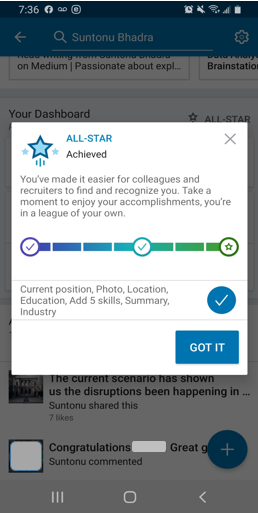
LinkedIn Profile Status (Author) (*)

There is always room to improve. So I’m overhauling my whole Profile in this weekend and thought of sharing the relevant techniques that can help others to achieve the ALL-STAR profile.

Let’s get started.

Post & share regularly.
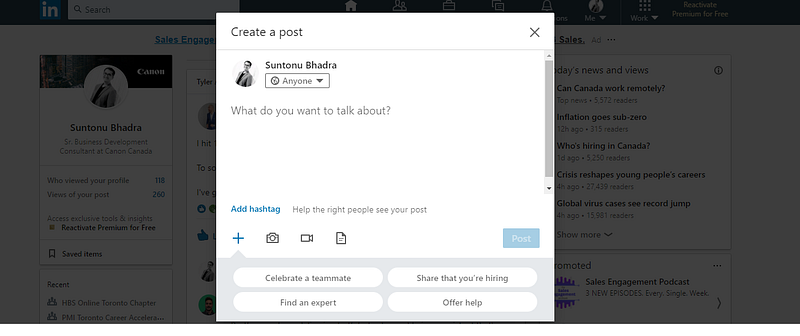
Content from Author’s LinkedIn Profile (*)

Why?

To be on the top-of-the searches and top of the minds of industry experts.

How frequently you should post?

Post contents regularly (if possible, daily).

What you should post?

• Status update with an example, case study, story, experience, etc. • Relevant contents, using an outside link option (i.e., Medium article link). • Relevant to the industry or, appropriate to the business.
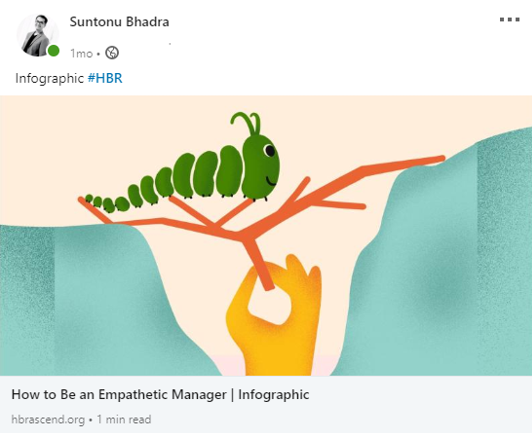
Content shared by the author in LinkedIn, from HBR ASCEND (links attached below) (**)

Do not Sale on LinkedIn. But you can share how you can help the connections (in short).

Why?

It is a trap. If you start to make sales pitches in your communications or post, people start to notice these things. And 99.99% of the time, people tend to avoid ‘screaming sales pitches.’

What you shouldn’t share?

A sales pitch, sales post, your daily journal, etc.

What you should post?

You can share your solution information in a short note, which should mention what the problems are and how it is going to solve. If anyone requires to solve the issue, they will connect accordingly.
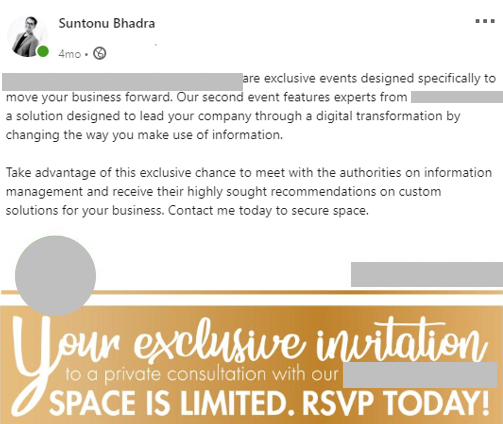
Content shared by the author in LinkedIn (Organization name, logo and event name omitted for copyright purposes) (*)

Share tips or expert opinion in your status, supported by content or article. Teach something essential and share it with your connections.
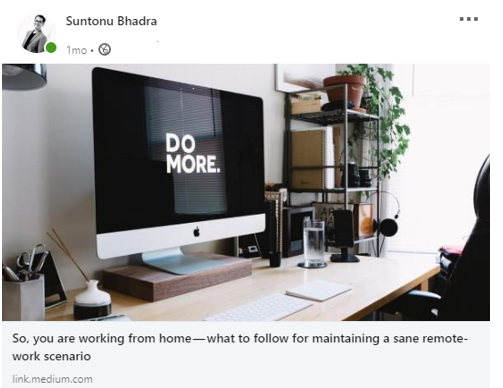
A Medium article shared by the author on LinkedIn (***)

Why?

Because tips or expert’s opinions can solve someone’s problem.

How to share?

Through storytelling, experience sharing, or sharing articles with summarized notes. You can share a relevant journey on how you have faced an issue and what are the ways you have resolved it.

Acknowledge others and their achievements.

Why?

Because it shows how genuine you are, acknowledging the hard work of people. That means you are a team player. It also encourages people to acknowledge others; in turn, it might be you.

How to acknowledge in LinkedIn?

• You can write a private message on LinkedIn or any other media to that specific person with a ‘Thank you’ note. • You can write a good note on your status, sharing your excellent experience with the relevant personnel in a story. • LinkedIn has a ‘Kudos’ option, where you can nominate or acknowledge your peer or connection for a specific cause.
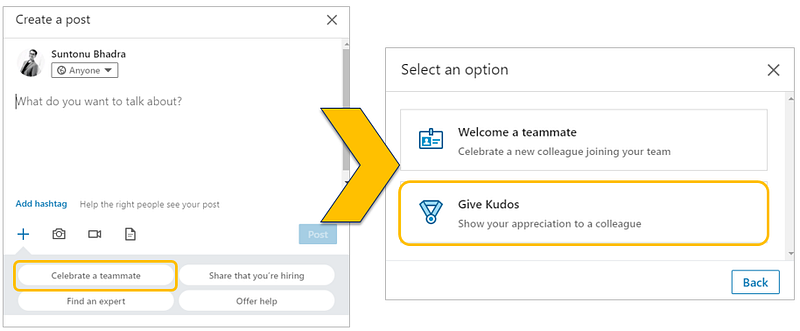
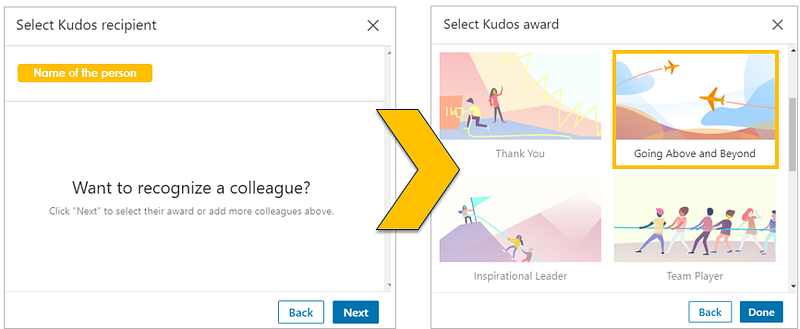
(a) Created from the Author’s LinkedIn Profile as an illustration (*)
(b) Created from the Author’s LinkedIn Profile as an illustration (*)

Showcase your best works in the feature section.

Why?

It will show the diversified range of areas you have expertise on and also will increase the chance of being notified.

What to put in feature section?

Outside portfolio link, photos of your teamwork/achievement/projects, media, article, etc.
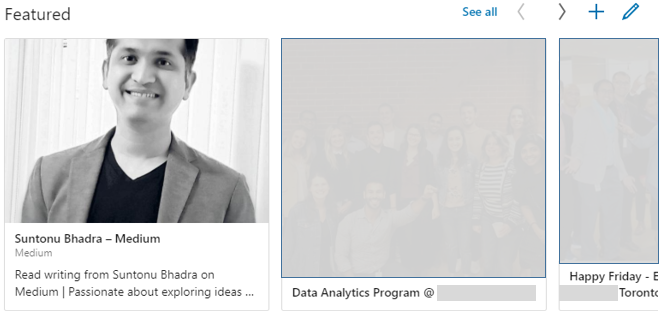
From the author’s LinkedIn page (other images are blurred to protect privacy) (*)

Please remove the buzzwords.

Why?

As guilty as I am. My profile still contains some of the buzzwords, which I require to replace with different wordings. When you fill your information, experience, and other details with these buzzwords, your profile will not stand-out in the search. ATS can find and not take your profile for a relevant career opportunity.

What are the buzzwords?
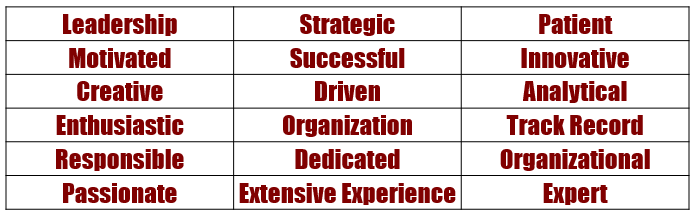
Collected from LinkedIn post (link provided below) (****)

How to remove or what to place?

There are so many alternatives that you can put instead of these words.

For example, instead of ‘Strategic,’ we can use ‘significant, consequential, high-priority’ based on the sentence.

Even if you write these buzzwords, you can highlight it with relevant projects, works, media, and links to suffice your claim.

If possible, add personalized video in your profile section (media).
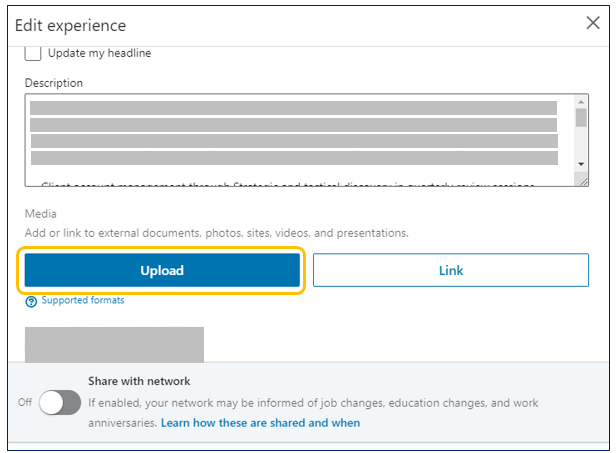
From the author’s LinkedIn Page (*)

Why?

It will make you stand-out in your industry. Also, it will show the confidence that you are upfront in what you can offer to the word.

What to put and how to put it?

You can mention your career journey (in short), what are your expertise and how you will be helping others with your expertise. You can record your personalized video from your cell-phone, you can edit it (there are numerous apps out there) and then you can upload it in your profile section.

Keywords and search terms to add in the skills section.
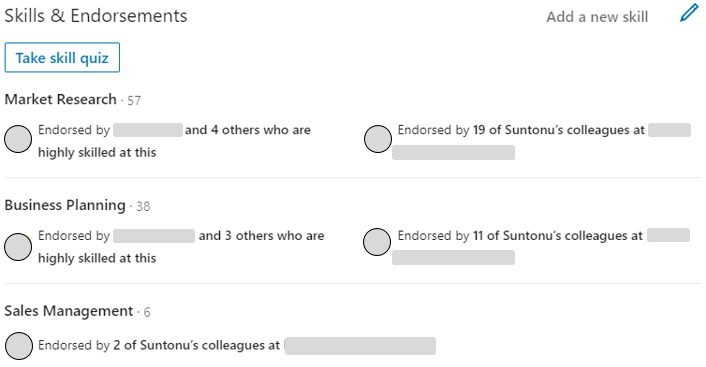
Content shared from the author’s LinkedIn page (person’s name and organizations names are blurred for privacy) (*)

Why?

To be on the top of the search list in ATS for the relevant job.

How?

• The easiest way is to look for the roles you are aspiring to move and identify the keywords or main responsibilities the position has to offer. • The other way is to look into the industry experts’ profiles and to look into their ‘Skills’ section.

One thing to be clear, add only those relevant skills which you have expertise.

Reach out to industry specialists or clients by sending ‘Add request’ and include a ‘Personalized Note.’

Why?

To increase your connectivity and to learn from them.

How?

You can utilize the search button of LinkedIn and can identify who is the relevant person that you should connect with (from an organization, from a group, etc.). Then, you can click ‘More’ and then click the ‘Connect’ button. There will be an option to ‘add a note,’ so write a personalized message of why you are reaching out to connect and then ‘send.’
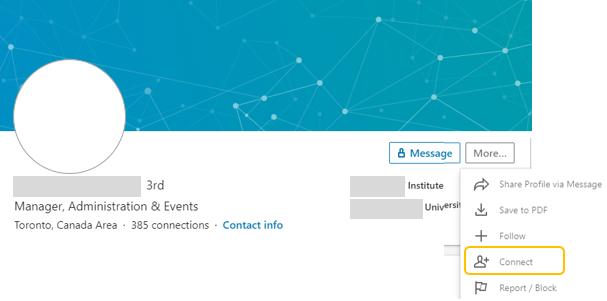
Content from LinkedIn (name, image and relevant organizations are blurred for protecting privacy) (*)

Accept ‘Add request’ with a personalized reply.
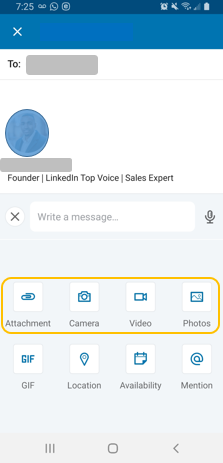
LinkedIn message options to add contents (taken from the author’s LinkedIn page) (*)

Why?

Courtesy brings courtesy. If you are humble, it should reflect in your actions. As they are reaching out to you for a connection, you should accept with an appropriate response to a human being.

How?

After accepting the request, you can send a written message to the person.

The new thing you can do (and should explore to do) is to send a video or audio message with your ‘Thank you’ remarks.

Other generic habits to incorporate.

· Make a habit of giving 5 ‘Likes’ or ‘Thumbs up’ for your connections’ relevant posts every day and provide comment on at least 2 of those. Make sure your comments are adding value or asking questions or promoting a new idea.

· Make sure to use your ‘Status’ option (not only to share content but also to add a professional story/experience of yours).

· Be engaged in active causes that you care about.

· Provide recommendations and referrals, and in return, please ask for yours.

· After searching for a profile, you can also identify who can be other relevant personnel within the same industry or organization by utilizing the ‘People also viewed’ section.

· For more connectivity, you can always put your career interests on, which is to set your profile as ‘Open to opportunities’ — where recruiters can connect with you based on your settings.

· Use the ‘Salary insight’ part to incorporate your current role information (LinkedIn says, it is confidential), as it will provide you a snippet of the salary and compensation within the same industry for different roles.

Don’t forget to recheck basic sections.

And, the above ones will be successful only if the basic sections are already in great shape. To provide a quick checklist of the basic sections, please view the following chart.
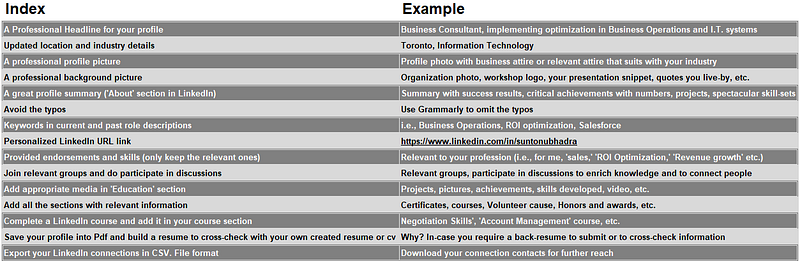
Example with the relevant basic sections for LinkedIn profile (*)

Overall, consider the LinkedIn platform for a long-term perspective and identify what you want to achieve with this tool. Based on your objective, you have to plan and execute. It may change your daily habits, engagement frequency, and other social media engagement. How you want to use this tool is entirely up to you.

Photo by Marc-Olivier Jodoin on Unsplash

Sources used (not for marketing or affiliated links purposes)

* Author’s LinkedIn Profile. Link: https://www.linkedin.com/in/suntonubhadra * LinkedIn. Link: https://www.linkedin.com/home ** Harvard Business Review Ascend. Link: https://hbrascend.org/topics/how-to-be-an-empathetic-manager-infographic/?utm_source=LinkedIn_website&medium=website_share *** Medium Article. Link: https://readmedium.com/so-you-are-working-from-home-what-to-follow-for-maintaining-a-sane-remote-work-scenario-698bb64bff36 **** LinkedIn article. Link: https://www.linkedin.com/pulse/15-buzzwords-remove-from-your-linkedin-profile-right-now-lathrop/

Careers
Social Media
Work
Leadership
Technology
Recommended from ReadMedium