
Leveraging Facebook Python API for Marketing Analytics
Purpose
There is multiple purpose to leverage Facebook Advertising data:
- Performance Measurement
- Analytics Insight (such Attribution Modeling)
- Customer Profile Enrichment
All of these require a different frequency or set of information from Facebook. While there are possibilities to exports campaign performance data directly from Facebook’s Ads Manager backend, the process can quickly become extremely time intensive and cumbersome if you are running operations at scale and use multiple advertising accounts.
Leveraging Facebook’s API allows us to automate the process of sourcing the data to empower these use cases. Performance monitoring can then be done on a daily level, merging the data with other channel information. Ad Spend time series can then be used to automate the training of an attribution model, and Customer Profile can then be automatically populated based on targeting information from Facebook.
API
Facebook provides an extensive API to interact with its platform and fetch the required information. They also offer a python SDK: Facebook Business Python SDK, which can be installed by the following pip command:
For marketing analytics, two different types of API calls are of particular interest, Insight reports and targeting.
The Business SDK interacts with the Facebook Ads API based on a user access token. The different objects to interact with the API needs to be imported as below:
And Ad account users can be instantiated with using the id me. This will instantiate the ad account user from the perspective of the user associated with the access_token.
From this instantiated object it is possible to get the list of ad account the user has access to:
This result in a list of AdAccount objects:
Ad Insight Reports
Ad insight reports can be run from the Ad API. These provide performance reports for your specific account and allow you to define the fields you want to extract as well as the granularity of the information. These can be defined in a parameters dictionary:
For large datasets it is recommended to fetch the information using an async API call such as below:
Once instantiated, it is possible to get a sense of the status of the request using the following command.
Once the job is completed, we only have to be fetching the results:
These come as a list of AdsInsights objects, which contain the fields and granularity requested in your params dictionary.
This dataset provides a holistic of the performance of our ads across different metrics; previously defined custom metrics would also fall within the actions dictionary. Higher granularity is achievable, metrics such as link_click can be further broken down, and hourly extracts are also available.
Targeting Settings
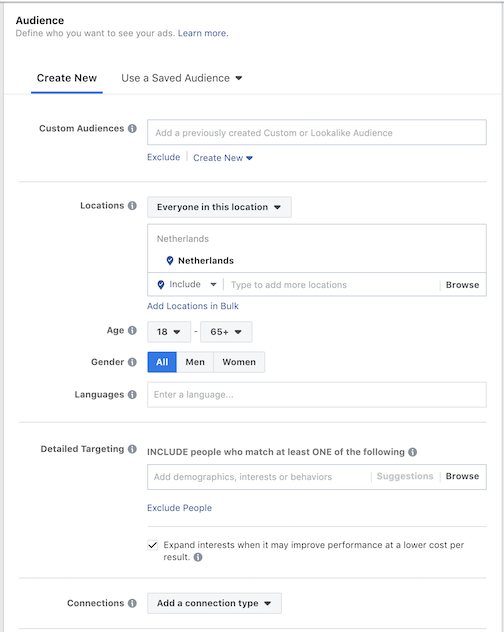
Facebook offers extensive targeting options for their ads, from the basic targeting setting such location, age, gender, and language to more advanced like those based on custom audiences or behavioral or interest-based characteristics.
These options offer a trove of data on user demographic and behavioral characteristics that can help personalize the website or get a better hang on the performance of the campaign using these characteristics to gaining an understanding of lifetime value for different user segments.
Facebook offers a way to obtain these targeting settings, for instance, using the Fb graph explorer and calling the following endpoint:
act_{account_id}/ads?fields=name, adset{destination_type, targeting}Or through the python SDK:
The result obtained is the following:
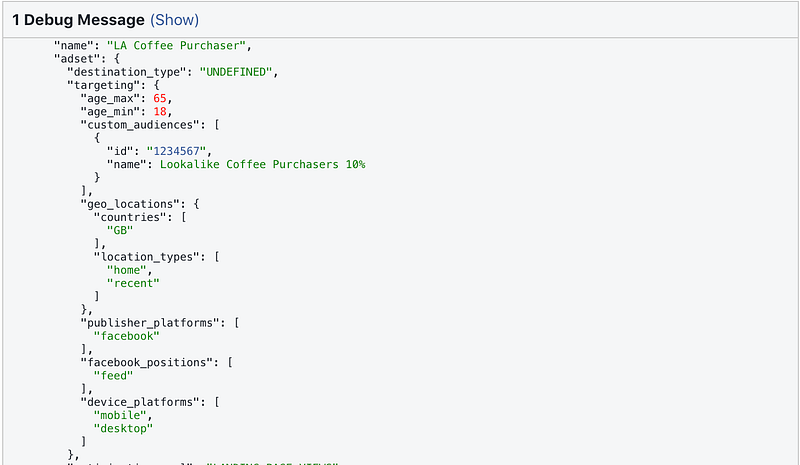
Exclusion settings can also be defined in these targeting rules such as:
"excluded_publisher_categories": [
            "dating",
            "gambling",
            "debated_social_issues",
            "mature_audiences",
            "tragedy_and_conflict"
          ]
By enabling dynamic URL parameters and setting them up as part of the URL tags in your ads as described on Facebook’s help page:
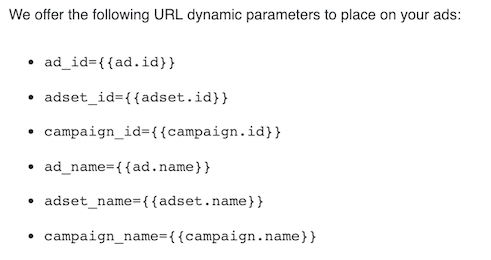
Using these parameters, it is possible to tie the advertising parameters to website visits based on ad or adset ids. These data-points can then be used to enrich a customer profile.
Wrapping Up
It is possible to do quite a lot with the data provided through the Facebook’s Python API. From generating standard performance report, combining it with other data to run attribution models, or to giving personalization on the website for users which have been targeted.
More from me on Hacking Analytics:


