
Level Up Your Code Quality: Integrating SonarQube with Spring Boot and Jacoco

In our previous blog post, we explored the critical role of code coverage in ensuring the robustness and maintainability of software projects. We unpacked the benefits of using the Jacoco plugin with Spring Boot applications and demonstrated how to generate and interpret code coverage reports. (Link to previous blog post here).
Now, let’s take this a step further by integrating SonarQube, a powerful static code analysis platform, to analyze code quality and gain deeper insights into potential issues. This blog post will guide you through utilizing SonarQube in conjunction with Jacoco and your Spring Boot application, empowering you to enhance code quality and maintain a healthy codebase.
This blog will cover following points,
- Introduction of SonarQube
- How to integrate SpringBoot application with SonarQube Server
- Information in SonarQube report
- Best practices
Introduction of SonarQube
Imagine SonarQube as a code gym for your Spring Boot application. Just like a gym helps you identify areas for improvement in your physical fitness, SonarQube analyzes your code to pinpoint weaknesses and opportunities for better coding practices.
Here’s how it works:
- Code Inspector: SonarQube acts like a meticulous inspector, meticulously examining your code for bugs, potential security vulnerabilities, code smells (sections with complex or redundant logic), and adherence to coding standards. It’s like having a super-focused code reviewer constantly scanning for issues.
- Metrics Coach: Based on its inspection, SonarQube provides you with insightful metrics, similar to how a gym trainer tracks your progress. These metrics tell you things like code coverage (how much of your code is actually tested), duplication (redundant code blocks), and complexity (how difficult it is to understand and maintain the code).
- Actionable Insights: SonarQube doesn’t just point out problems; it also offers suggestions for improvement. Think of it as personalized training tips. It might recommend refactoring complex code sections, simplifying logic, or adding more tests to ensure better code health.
Let’s get started
First we need to download and install SonarQube from official site. Community edition should be fine to start learning.
- Start SonarQube Server: Run the SonarQube server and ensure it’s accessible on
http://localhost:9000by default. - Generate a SonarQube API Token for local project :
Log in to your SonarQube server default creds admin/admin.
In step of create local project you will get API token and command to run the sonar scanner
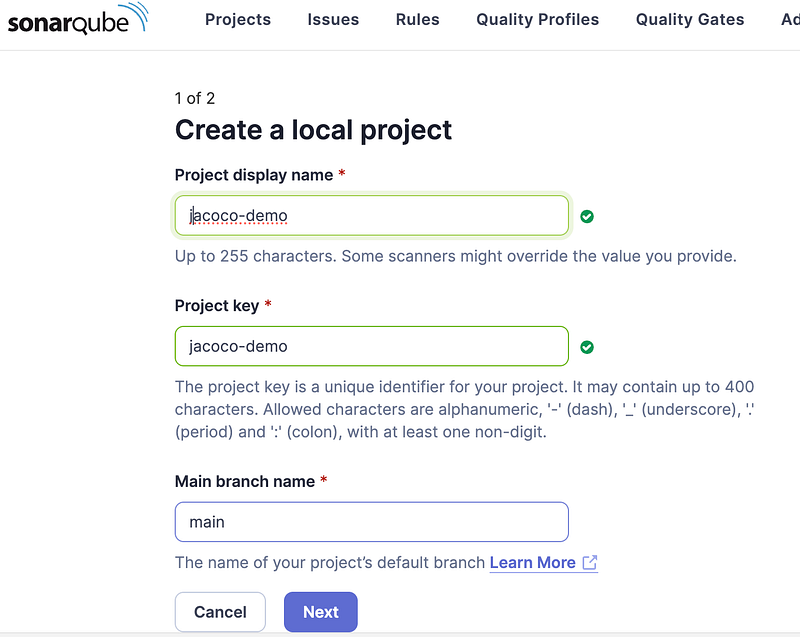
3. Run SonarScanner and Analyze Code:
Navigate to your project directory in the terminal and run below. For this demonstration, I have used project with Jacoco enabled. Refer on Github.
mvn clean verify sonar:sonar \
  -Dsonar.projectKey={PROJECT_KEY} \
  -Dsonar.projectName={'PROJECT_NAME'} \
  -Dsonar.host.url=http://localhost:9000 \
  -Dsonar.token={API_TOKEN}
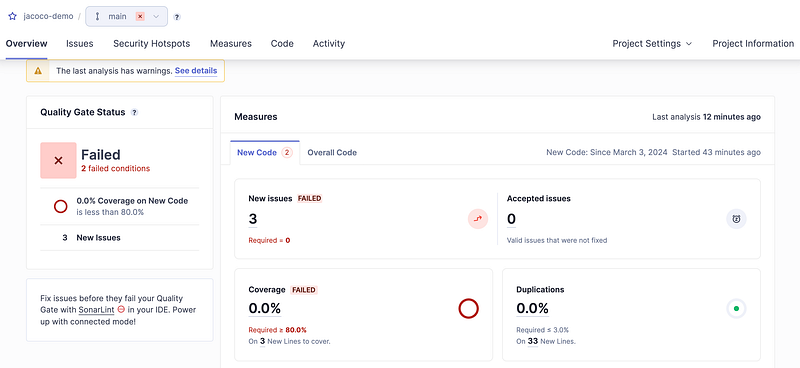
Once build is finished you can review the Sonar Report, here is sample report screenshot of my run.
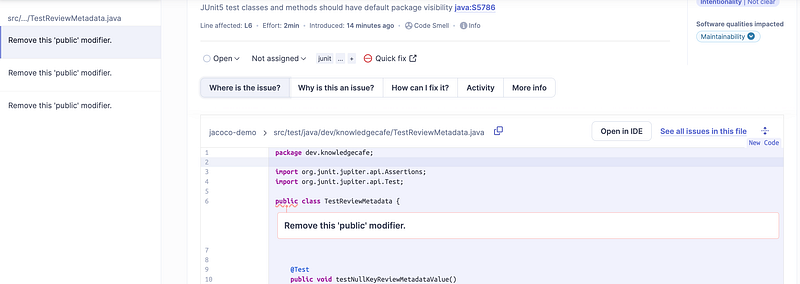
Issue detail page will explain about what is the issue, why is it issue, and how to fix it and some more documentation.
Best Practices
SonarQube is a powerful tool for improving code quality, but using it effectively requires a strategic approach. Here are some best practices to get the most out of your SonarQube experience:
1. Define clear quality standards: Establish coding standards for your team and configure SonarQube to enforce them. This ensures consistency, clarity, and maintainability across your codebase.
2. Start small and iterate: Don’t try to fix everything at once. Focus on a few key metrics (e.g., code coverage, bugs) and gradually address them. Celebrate small improvements and iterate on your goals.
3. Integrate with your workflow: Integrate SonarQube with your CI/CD pipeline to automatically analyze code quality upon changes. This provides early feedback and prevents regressions.
4. Prioritize issues effectively: Not all issues flagged by SonarQube are equally critical. Evaluate the severity and potential impact of each issue to prioritize them effectively.
5. Encourage ownership and collaboration: Foster a culture of code ownership where developers are responsible for the quality of their code. Use SonarQube to facilitate discussions and collaboration on identified issues.
Bonus
🎉 Congratulations! You have made it to the end of the article! And here’s an exciting bonus 🎁 for you! You can get a FREE book 📚 with over 200 Spring interview questions! 💯💻
If you want to master tricky Spring topics and ace your next interview, don’t miss out on my eBook “Spring Interview Questions”. 🚀 Click on the link to download your copy and gain valuable insights for your next interview. 😍 Happy coding!


