
Let’s Place Order and See Order History in E-commerce app using Vue
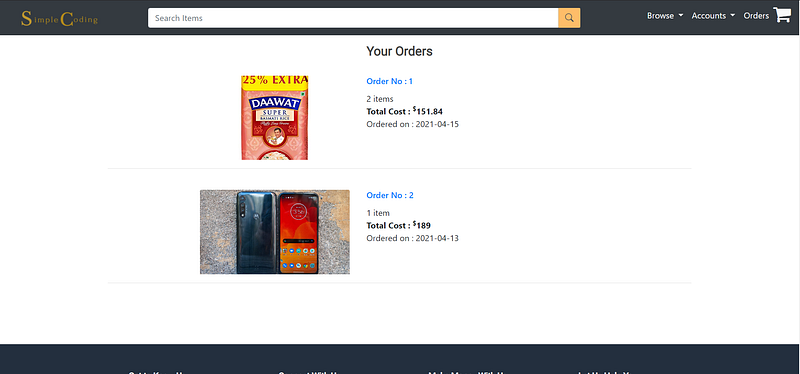
In this tutorial, we will learn how to display the order history of the user
Introduction
We are building an e-commerce app from scratch using Vue.js in the frontend and Java with Springboot for the backend. You can check out the first frontend tutorial of this series here.
We will be building an order feature which is a continuation of our previous tutorial.
You can find the complete code at Github.
Live Demo
https://infallible-swartz-b50174.netlify.app/
Pre-requisites
- Knowledge of Vuejs
- Visual Studio Code — open-source (Recommended)
- A good browser — (Chrome — recommended)
API we will be using
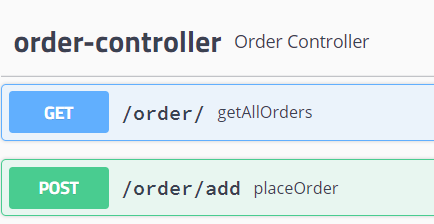
For explanation and implementation of these APIs please refer to this tutorial.
Project Structure
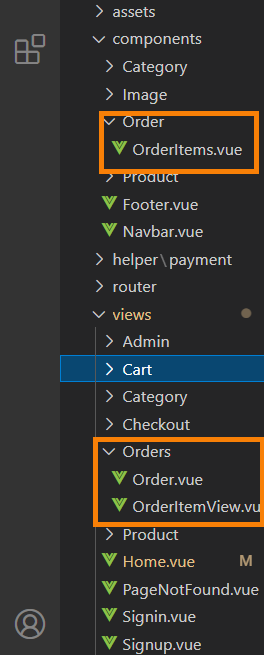
The flow of the tutorial
Displaying order history
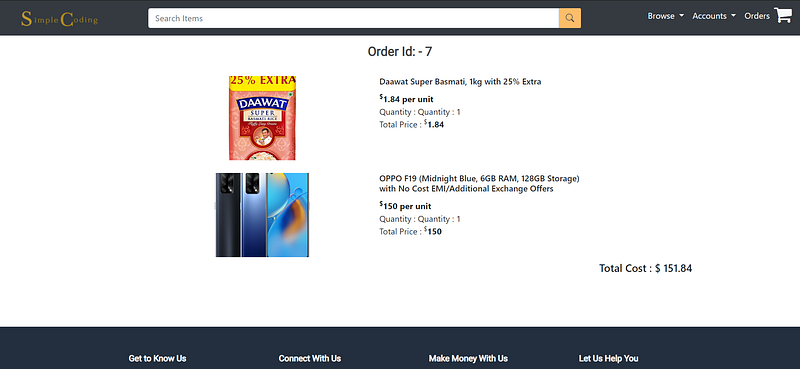
Displaying details for specific order
Now let’s begin with coding
So in the checkout tutorial, we implemented the Vue component Success in which we call the add order API like this
And then we redirect the user to the order component where we display the order history.
Order Component (displaying order history)
So let’s create the Ordercomponent in the src/views/Orders folder and register the route in the index.js file of the src/router folder.
You may refer to this.
First, we declare the data variables to store data from the backend API response.
orders: to store the response data
len: to store the number of orders in the user’s order history
orderList: an array to store the list of orders
totalCost: to store the total Price of the order
orderdate: to store the date at which the order was placed
We need a method that will call the backend API for listing the orders which we implemented in the previous tutorial. So, create a method and call the API using Axios get method.
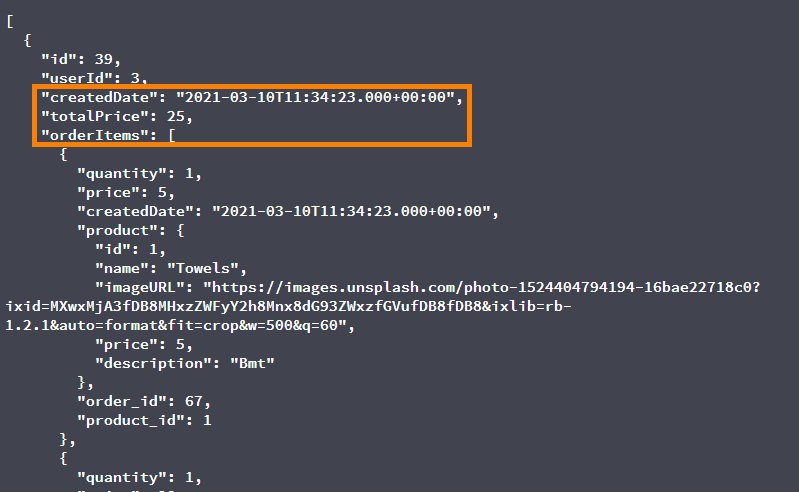
In the response, we get the created date in the java format but we just need the format like yyyy/mm/dd hence we took the substring and stored it in the orderdate data variable.
Also, we do not store the details of order items in the order list instead we just store the id of that order.
Why do we do this?
The idea is to display the details of that order if and only if the user clicks on that order. So as a route param we pass the id so that we display the items in that order according to the id received through the route parameter.
Now when do we call this method?
As soon as the order component is mounted we call this method.
mounted() {
this.token = localStorage.getItem("token")
this.listOrders()
}
Now in the same component, in the template tag, we write the HTML part.
Now we display the order history (using the v-if directive) if and only if we do not get the response data as null.
Why will the response data be null? Suppose a user(not logged) tries to fetch the order history, the null token will be passed to the API and hence we won’t get any response data to display.
If we get a response then we iterate through the orders using the v-for directive. And for each order, we implement a router link that will redirect the user to the details of that order according to the order id passed.
Refer complete code for this component here.
Order Item component (for displaying the details of a specific order)
In the same folder we are working on, create a Vue component named OrderItem . This component will be rendered when a user clicks on a particular order.
So firstly register this route like this:
{
path:'/order/:id',
name:'OrderItemView',
component:OrderItemView
}
Now we require one more component to actually display the products of that order. So in this component, we render that component let’s name it as OrderItems to which we the two props:
- id: this is the same id we passed from the Order component as a route parameter
- baseURL: the URL for our backend API
We obtain the orderID from the route parameter.
Displaying the order details
Now since we render OrderItems component to display the order details the next step is to implement OrderItems component.
So in the src/components folder create Order folder and in that create OrderItems Vue component.
First of all, we will catch the props we received like this:
props:[“orderID”,”baseURL”]Now let’s create data variables.
lengthofOrderItems: number pf,orderProducts: store the products of an orderproducts: store the response datatoken: a token of the user
Now we display the products of the order whose order id is the same as the one we receive as the route parameter.
As evident from the above-mentioned code, we call the backend API for listing that specific order by passing the order id to the API URL.
One important point to be noted here is, we receive the parameter in string datatype but in the response, we have id in integer datatype. Hence we convert the string id into integer id and then start the comparison.
Once we retreive the specific order using the API, we iterate through orderItems array and the product array.
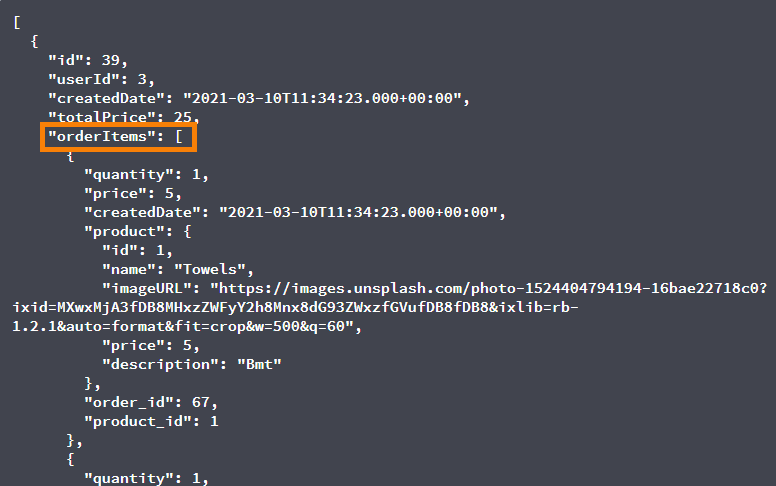
Now for displaying the HTML part, we need to loop through the order items array using v-for and then display each specification like image, product name, quantity, the price per unit, the total price of that product.
Congratulations!
You have now successfully implemented the feature for displaying the order history and details for a specific order.
Read All the Articles in this Ecommerce Series
- Let’s Develop an E-Commerce Application From Scratch Using Java and Spring
- Let’s Link Products With Category for our E-Commerce App
- Let’s Develop File Upload Service From Scratch Using Java and Spring Boot
- Let’s Create a WishList for Our e-Commerce App using Java and Spring Boot
- Let’s Create a Frontend for our eCommerce App with Vue.js
- Let’s Add Products for our eCommerce App Using JavaScript
- Android UI for E-Commerce User Profile Backend
- Lets’ Add a Shopping Cart feature for our E-Commerce App using Vuejs
- Let’s add a Checkout feature in Spring Boot for our Ecommerce App
- Let’s add a Checkout Feature in Vue.js for Our Ecommerce App
- Let’s add the Place Order feature to our E-commerce app using Spring Boot