avatarChristopher Laine

Free AI web copilot to create summaries, insights and extended knowledge, download it at here

6956

Abstract

ljs-keyword">private</span> <span class="hljs-built_in">string</span> _registrationResult;</pre></div><p id="3ffe">Now, we need to wire up the Javascript file we added to our index.html to this razor functionality. In order to do so, we need to override a method. All razor pages and components extend from the class <a href="https://docs.microsoft.com/en-us/dotnet/api/microsoft.aspnetcore.components.componentbase?view=aspnetcore-5.0"><b>ComponentBase</b></a>. This class has a variety of functionality about rendering a component, its state, and so on. In this case, it exposes a method known as <b>Task OnAfterRenderAsync(bool firstRender). </b>This method, if overridden, allows you to do specific things when the component has finished rendering. In this case, we want to hook up our IJSObjectReference _jsModule the first time the page is rendered.</p><div id="f438"><pre><span class="hljs-function"><span class="hljs-keyword">protected</span> <span class="hljs-keyword">override</span> <span class="hljs-keyword">async</span> Task <span class="hljs-title">OnAfterRenderAsync</span>(<span class="hljs-params"><span class="hljs-built_in">bool</span> firstRender</span>)</span> { <span class="hljs-keyword">if</span> (firstRender) { _jsModule = <span class="hljs-keyword">await</span> JsRuntime.InvokeAsync<IJSObjectReference>(<span class="hljs-string">"import"</span>, <span class="hljs-string">"./scripts/jsExamples.js"</span>); } }</pre></div><p id="47e5">As you can see, we’re creating a reference to our jsExamples.js script file so we can call the functions found in this Javascript file. That’s it. Now you have a hook to your Javascript functions which can now be called in C#.</p><p id="a0c7">How do we do this? Well, let’s create a .NET function in our <pagename>.razor.cs to call our email registration JS code.</pagename></p><div id="1df1"><pre><span class="hljs-function"><span class="hljs-keyword">private</span> <span class="hljs-keyword">async</span> Task <span class="hljs-title">RegisterEmail</span>()</span> => _registrationResult = <span class="hljs-keyword">await</span> _jsModule.InvokeAsync<<span class="hljs-built_in">string</span>>(<span class="hljs-string">"emailRegistration"</span>, <span class="hljs-string">"Please provide your email"</span>);</pre></div><p id="18ec">A few things are going on here. We’re attempting to invoke the emailRegistration function, and our second argument is the parameters / arguments we want to pass to this function. The return type is a string, thus the InvokeAsync<string> method we’re calling on our _jsModule.</string></p><p id="dcfd">So now we just need to wire this .NET function up in our razor page.</p><div id="e373"><pre><<span class="hljs-keyword">div</span> <span class="hljs-built_in">class</span>=<span class="hljs-string">"row"</span>> <<span class="hljs-keyword">div</span> <span class="hljs-built_in">class</span>=<span class="hljs-string">"col-md-2"</span>> <button type=<span class="hljs-string">"button"</span> <span class="hljs-built_in">class</span>=<span class="hljs-string">"btn btn-info"</span> @onclick=<span class="hljs-string">"RegisterEmail"</span>>Register Email</button> </<span class="hljs-keyword">div</span>> <<span class="hljs-keyword">div</span> <span class="hljs-built_in">class</span>=<span class="hljs-string">"col-md-4"</span>> @_registrationResult </<span class="hljs-keyword">div</span>> </<span class="hljs-keyword">div</span>></pre></div><p id="5723">Super simple razor logic. A button to click which calls our <b>RegisterEmail </b>C# method, and a div with a reference to our <b>_registrationResult </b>string property to be displayed on screen.</p><figure id="61a0"><img src="https://cdn-images-1.readmedium.com/v2/resize:fit:800/1*nROA_5o7DbmAdfoxf60hUw.gif"><figcaption></figcaption></figure><p id="984f">It’s that easy!</p><h1 id="23ac">Javascript-> Blazor</h1><p id="d4fe">So let’s flip it on its head. Now I want to call my .NET code from inside my Javascript. Useful, clearly, because now you have the power of Javascript but with the extra oomph of .NET logic behind it. You can do things in C# with about 1/10th the required Javascript code.</p><p id="da57">So here we go:</p><p id="3bee">First, you need to create a <b>static </b>method in your Blazor code-behind file. It must be marked with the “JsInvokable” attribute for it to be called by Javascript code. (there are ways to call instantiated instances’ methods, but let’s go simple for our example)</p><div id="556d"><pre>[<span class="hljs-meta">JSInvokable</span>] <span class="hljs-function"><span class="hljs-keyword">public</span> <span class="hljs-keyword">static</span> <span class="hljs-built_in">string</span> <span class="hljs-title">CalculateSquareRoot</span>(<span class="hljs-params"><span class="hljs-built_in">int</span> number</span>)</span> { <span class="hljs-keyword">var</span> result = Math.Sqrt(number); <span class="hljs-keyword">return</span> <span class="hljs-string">$"The square from <span class="hljs-subst">{number}</span> is <span class="hljs-subst">{result}</span>"</span>; }</pre></div><p id="44e6">Sure, you can calculate a square root in Javascript. This is just an example.</p><p id="7c11">The JSInvokable method attribute should be self-explanatory. It allows Javascript to call this method. That’s it.</p><p id="c609">Now for the Javascript to call our method. Let’s add a new .js file to our wwwroot/scripts folder named <b>jsExamplesDotNet.js</b></p><p id="392d">First, let’s link it in our index.html as we did with the jsExamples.js above</p><figure id="10e8"><img src="https://cdn-images-1.readmedium.com/v2/resize:fit:800/1*ZK6Scri46T6PHdtDjZXZXQ.png"><figcaption></figcaption></figure><p id="12a3">Now let’s write the Javascript function to call our .NET code.</p><div id="e677"><pre><span class="hljs-keyword">var</span> jsFunctions = {};

 jsFunctions.<span class="hljs-property">calculateSquareRoot</span> = <span class="hljs-keyword">function</span> (<span class="hljs-params"></span>) {
     <span class="hljs-keyword">const</span> <span class="hljs-built_in">number</span> = <span class="hljs-title function_">prompt</span>(<span class="hljs-string">"Enter your number, and I'll give you its square root"</span>);
 <span class="hljs-title class_">DotNet</span>.<span class="hljs-title function_">invokeMethodAsync</span>(<span class="hljs-string">"BlazorWasmJSInteropExamples"</span>, <span class="hljs-string">"CalculateSquareRoot"</span>, <span class="hljs-built_in">parseInt</span>(<span class="hljs-built_in">number</span>))
    .<span class="hljs-title function_">then</span>(<span class="hljs-function"><span class="hljs-params">result</span> =&gt;</span> {
        <span class="hljs-keyword">var</span> el = <span c

Options

lass="hljs-variable language_">document</span>.<span class="hljs-title function_">getElementById</span>(<span class="hljs-string">"string-result"</span>); el.<span class="hljs-property">innerHTML</span> = result; }); }</pre></div><p id="e1d2">A bunch is taking place above, but the important part is in <b>bold.</b></p><p id="94c0">We call the <b>DotNet.invokeMethodAsync</b> method. The DotNet object is included as part of the Blazor framework, and built into the <b>_framework/blazor.webassembly.js. </b>This manages the communication between your .NET code and your Javascript code.</p><p id="edd5">And you can call more than just code inside your Blazor app. If you look closely at the above example, we’re passing 3 variables:</p><div id="889b"><pre><span class="language-xml">DotNet.invokeMethodAsync('</span><span class="hljs-template-variable">{ASSEMBLY NAME}</span><span class="language-xml">', '</span><span class="hljs-template-variable">{.NET METHOD ID}</span><span class="language-xml">', </span><span class="hljs-template-variable">{ARGUMENTS}</span><span class="language-xml">);</span></pre></div><p id="6bf1">Any library which is loaded into your Blazor app and which has methods available can be called with this same syntax.</p><p id="e6b0">For a complete listing of how you can call .NET from Javascript inside Blazor WASM, check out the Microsoft docs</p><div id="c5f7" class="link-block"> <a href="https://docs.microsoft.com/en-us/aspnet/core/blazor/javascript-interoperability/call-dotnet-from-javascript?view=aspnetcore-5.0"> <div> <div> <h2>Call .NET methods from JavaScript functions in ASP.NET Core Blazor</h2> <div><h3>Learn how to invoke .NET methods from JavaScript functions in Blazor apps.</h3></div> <div><p>docs.microsoft.com</p></div> </div> <div> <div style="background-image: url(https://miro.readmedium.com/v2/resize:fit:320/0*yrO6Ha1kFqEj64e8)"></div> </div> </div> </a> </div><p id="6add">Here’s our code in the Razor page. It looks very much like our Razor markdown above, but this is pure HTML</p><div id="73c5"><pre><<span class="hljs-keyword">div</span> <span class="hljs-built_in">class</span>=<span class="hljs-string">"col-md-2"</span>> <button type=<span class="hljs-string">"button"</span> <span class="hljs-built_in">class</span>=<span class="hljs-string">"btn btn-success"</span> onclick=<span class="hljs-string">"jsFunctions.calculateSquareRoot()"</span>> Calculate </button> </<span class="hljs-keyword">div</span>> <<span class="hljs-keyword">div</span> <span class="hljs-built_in">class</span>=<span class="hljs-string">"col-md-4"</span>> <span <span class="hljs-built_in">id</span>=<span class="hljs-string">"string-result"</span> <span class="hljs-built_in">class</span>=<span class="hljs-string">"form-text"</span>></span> </<span class="hljs-keyword">div</span>></pre></div><p id="992a">And when we call it?</p><figure id="75be"><img src="https://cdn-images-1.readmedium.com/v2/resize:fit:800/1*BGaTsW0l-01qLkVloJqnVQ.gif"><figcaption></figcaption></figure><p id="63b0">Nice!</p><h1 id="46a2">Wrapping up and Source Material</h1><p id="4f50">So what I’ve shown you is only scratching the surface of the power you have in Blazor using the JS Interop. You can call browser functionality, wrap Razor components with javascript libraries that get called when your component does something. The possibilities are near endless to combine the power of the two languages into the best possible experiences you can create.</p><p id="dfa6">If you want to get to know these and other amazing capabilities you can build into your Blazor pages and components, I really recommend you go check out <a href="https://code-maze.com/author/marinko/">Marinko Spasojevic</a>’s CodeMaze tutorials I mentioned at the start of the article. I learned a great deal from them and so will you.</p><p id="623b">Hope this helps</p><div id="bf78" class="link-block"> <a href="https://code-maze.com/how-to-call-javascript-code-from-net-blazor-webassembly/"> <div> <div> <h2>How to Call JavaScript Functions with C# in Blazor WebAssembly</h2> <div><h3>In this article, we are going to learn how to call JavaScript functions with C# using the JSInterop features in Blazor…</h3></div> <div><p>code-maze.com</p></div> </div> <div> <div style="background-image: url(https://miro.readmedium.com/v2/resize:fit:320/0*Qqv3yuqdSd6_JQlM)"></div> </div> </div> </a> </div><div id="26d7" class="link-block"> <a href="https://code-maze.com/how-to-call-csharp-methods-from-javascript-in-blazor-webassembly"> <div> <div> <h2>How to Call C# Methods from JavaScript in Blazor WebAssembly</h2> <div><h3>In the previous two articles of this series, we have learned how to call JavaScript functions from C#. Now, as a…</h3></div> <div><p>code-maze.com</p></div> </div> <div> <div style="background-image: url(https://miro.readmedium.com/v2/resize:fit:320/0*obzeg1WieEWFW5Gi)"></div> </div> </div> </a> </div><div id="cb0a" class="link-block"> <a href="https://code-maze.com/use-browser-functionalities-with-blazor-webassembly/"> <div> <div> <h2>How to Use Browser Functionalities with Blazor WebAssembly</h2> <div><h3>There are a lot of browser functionalities that we can use in our Blazor WebAssembly application like local storage…</h3></div> <div><p>code-maze.com</p></div> </div> <div> <div style="background-image: url(https://miro.readmedium.com/v2/resize:fit:320/0*CYXmuQCAQGUh_Irc)"></div> </div> </div> </a> </div><div id="0b5b" class="link-block"> <a href="https://code-maze.com/wrapping-javascript-libraries-with-csharp-in-blazor-webassembly/"> <div> <div> <h2>Wrapping JavaScript Libraries with C# in Blazor WebAssembly</h2> <div><h3>Up until now, in this series of articles, we have learned how to call JavaScript code from C#, how to call C# code from…</h3></div> <div><p>code-maze.com</p></div> </div> <div> <div style="background-image: url(https://miro.readmedium.com/v2/resize:fit:320/0*aCCzoT67vrztzUVn)"></div> </div> </div> </a> </div></article></body>

Let’s Learn Blazor: Blazor Javascript Communications with JS Interop

Using the JSInterop library, you can have your Blazor app communicate with Javascript and vice-versa
This is one of several articles on Blazor I’ll be writing, all so engineers can get familiar with the capabilities and tricks of this burgeoning and exciting web technology

So in our last session, we saw how easy it was to build, package and deploy a Blazor WebAssembly application and have this run directly in our browser.

For today’s session, we’ll be taking a look at one of the most compelling tools in your Blazor toolkit, the Javascript Interop library, and how this can help you connect these two technologies seamlessly.

I’ve added a repo in GitHub with all the code from this article, so you can pull this down and try all the things I’m about to show you.

All of the code you’ll find in here comes from articles written by Marinko Spasojevic from CodeMaze. Having followed the tutorials Marinko created, I have learned a great deal about the Javascript Interop functionality, and will link those tutorials at the end if you want to follow along with step-by-step instructions on what is going on and how to do so yourself. If this technology intrigues you, I highly recommend going through these amazing tutorials .

JS Interop: What is it?

When building a Blazor application, there are times when you want to be able to do things with the browser which just may be outside your power to do in C#, or which are done far more easily in Javascript.

The creators of Blazor recognised this, and so made it very easy for you to wire your C# Blazor code up to Javascript code and libraries by using the JS Interop.

From Microsoft’s docs:

A Blazor app can invoke JavaScript (JS) functions from .NET methods and .NET methods from JS functions. These scenarios are called JavaScript interoperability (JS interop).

In essence, JS Interop is a .NET library you can use in your code to allow for this kind of .NET -> JS, JS ->.NET interoperability.

Let’s have a look.

Blazor -> Javascript

Let’s assume you want to throw up a dialog box from the browser to get some bit of input from the user which you then process in some way. This is a very common scenario and easily handled in Javascript. Here’s a Javascript function of us requesting a user’s email address.

export function emailRegistration(message) {
    const result = prompt(message);
    if (result === '' || result === null)
        return 'Please provide an email'

    const returnMessage = 'Hi ' + result.split('@')[0] + ' your email: ' + result + ' has been accepted.';
    return returnMessage;
}

Simple as could be. You get the input from the prompt, then return back some kind of message you can display on the screen somewhere.

So how do we wire this to our Blazor code?

First thing, you’ll need to ensure your _Imports.razor contains a reference to the JSInterop package

@using Microsoft.JSInterop

Next, let’s add our function to a javascript file in wwwroot/scripts/jsExample.js

Now, let’s make sure this .js file is included in our Blazor’s wwwroot/index.html file as so

Great! Now that we’ve done this, let’s go ahead and open up our razor page.

Now, in this scenario, we’re collecting more and more .NET code than in our previous session, so now it makes sense to NOT have our C# inline at the bottom of the Razor page. Once your logic grows to a certain size, it makes editing a lot easier if you separate the markup (presentation) from your code (logic).

To do so, you can simply create your <pagename>.razor razor page, and then create a code class for it named <pagename>.razor.cs which indicates to the compiler that the razor page and the .cs file are linked in terms of functionality.

Let’s start with the .cs code. At the top of the cs file, add an injection reference to the JSInterop IJSRuntime interface. Then add the IJSObjectReference interface (which is the hook to our jsExample.js file above). We’ll also add a reference to the string the user will provide (their email address).

[Inject]
public IJSRuntime JsRuntime { get; set; }
private IJSObjectReference _jsModule;
private string _registrationResult;

Now, we need to wire up the Javascript file we added to our index.html to this razor functionality. In order to do so, we need to override a method. All razor pages and components extend from the class ComponentBase. This class has a variety of functionality about rendering a component, its state, and so on. In this case, it exposes a method known as Task OnAfterRenderAsync(bool firstRender). This method, if overridden, allows you to do specific things when the component has finished rendering. In this case, we want to hook up our IJSObjectReference _jsModule the first time the page is rendered.

protected override async Task OnAfterRenderAsync(bool firstRender)
        {
            if (firstRender)
            {
                _jsModule = await JsRuntime.InvokeAsync<IJSObjectReference>("import", "./scripts/jsExamples.js");
            }
        }

As you can see, we’re creating a reference to our jsExamples.js script file so we can call the functions found in this Javascript file. That’s it. Now you have a hook to your Javascript functions which can now be called in C#.

How do we do this? Well, let’s create a .NET function in our .razor.cs to call our email registration JS code.

private async Task RegisterEmail() =>
            _registrationResult = await _jsModule.InvokeAsync<string>("emailRegistration", "Please provide your email");

A few things are going on here. We’re attempting to invoke the emailRegistration function, and our second argument is the parameters / arguments we want to pass to this function. The return type is a string, thus the InvokeAsync method we’re calling on our _jsModule.

So now we just need to wire this .NET function up in our razor page.

<div class="row">
    <div class="col-md-2">
        <button type="button" class="btn btn-info" @onclick="RegisterEmail">Register Email</button>
    </div>
    <div class="col-md-4">
        @_registrationResult
    </div>
</div>

Super simple razor logic. A button to click which calls our RegisterEmail C# method, and a div with a reference to our _registrationResult string property to be displayed on screen.
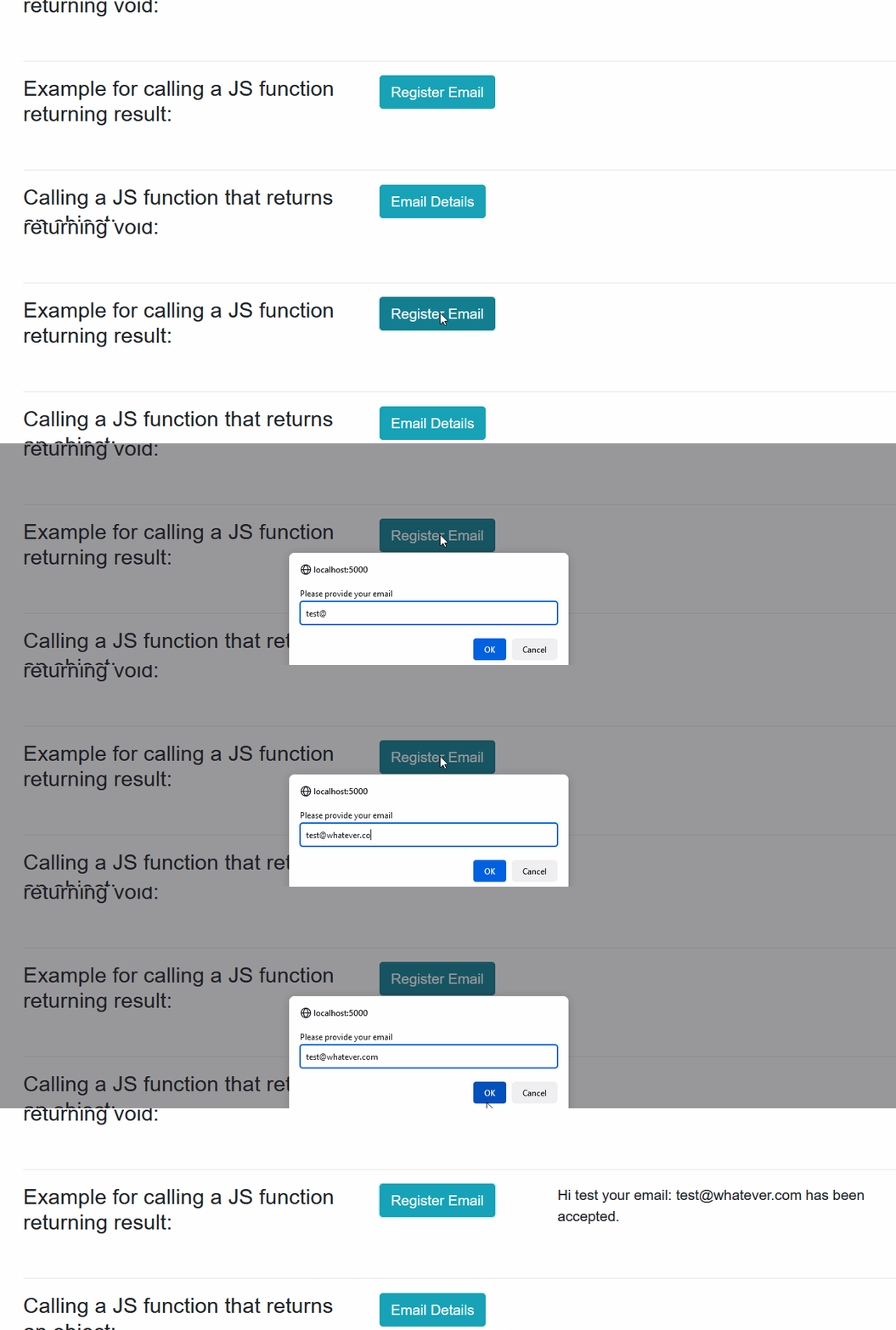
It’s that easy!

Javascript-> Blazor

So let’s flip it on its head. Now I want to call my .NET code from inside my Javascript. Useful, clearly, because now you have the power of Javascript but with the extra oomph of .NET logic behind it. You can do things in C# with about 1/10th the required Javascript code.

So here we go:

First, you need to create a static method in your Blazor code-behind file. It must be marked with the “JsInvokable” attribute for it to be called by Javascript code. (there are ways to call instantiated instances’ methods, but let’s go simple for our example)

[JSInvokable]
public static string CalculateSquareRoot(int number)
{
     var result = Math.Sqrt(number);
     return $"The square from {number} is {result}";
 }

Sure, you can calculate a square root in Javascript. This is just an example.

The JSInvokable method attribute should be self-explanatory. It allows Javascript to call this method. That’s it.

Now for the Javascript to call our method. Let’s add a new .js file to our wwwroot/scripts folder named jsExamplesDotNet.js

First, let’s link it in our index.html as we did with the jsExamples.js above

Now let’s write the Javascript function to call our .NET code.

var jsFunctions = {};

     jsFunctions.calculateSquareRoot = function () {
         const number = prompt("Enter your number, and I'll give you its square root");
     DotNet.invokeMethodAsync("BlazorWasmJSInteropExamples", "CalculateSquareRoot", parseInt(number))
        .then(result => {
            var el = document.getElementById("string-result");
            el.innerHTML = result;
        });
}

A bunch is taking place above, but the important part is in bold.

We call the DotNet.invokeMethodAsync method. The DotNet object is included as part of the Blazor framework, and built into the _framework/blazor.webassembly.js. This manages the communication between your .NET code and your Javascript code.

And you can call more than just code inside your Blazor app. If you look closely at the above example, we’re passing 3 variables:

DotNet.invokeMethodAsync('{ASSEMBLY NAME}', '{.NET METHOD ID}', {ARGUMENTS});

Any library which is loaded into your Blazor app and which has methods available can be called with this same syntax.

For a complete listing of how you can call .NET from Javascript inside Blazor WASM, check out the Microsoft docs

Here’s our code in the Razor page. It looks very much like our Razor markdown above, but this is pure HTML

<div class="col-md-2">
        <button type="button" class="btn btn-success" onclick="jsFunctions.calculateSquareRoot()">
            Calculate
        </button>
    </div>
    <div class="col-md-4">
        <span id="string-result" class="form-text"></span>
    </div>

And when we call it?
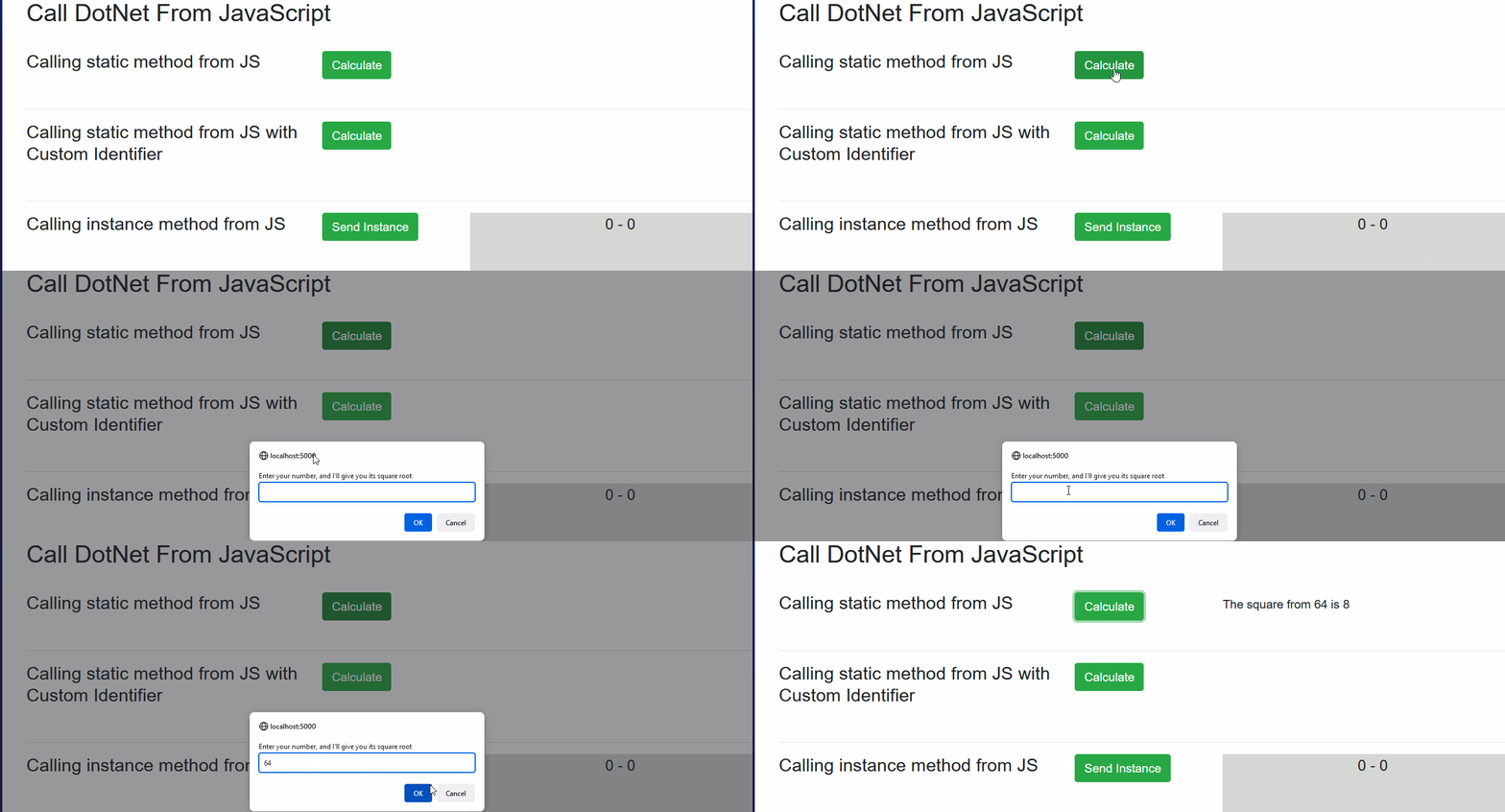
Nice!

Wrapping up and Source Material

So what I’ve shown you is only scratching the surface of the power you have in Blazor using the JS Interop. You can call browser functionality, wrap Razor components with javascript libraries that get called when your component does something. The possibilities are near endless to combine the power of the two languages into the best possible experiences you can create.

If you want to get to know these and other amazing capabilities you can build into your Blazor pages and components, I really recommend you go check out Marinko Spasojevic’s CodeMaze tutorials I mentioned at the start of the article. I learned a great deal from them and so will you.

Hope this helps

Software Development
Programming
Aspnetcore
Dotnet Core
Front End Development
Recommended from ReadMedium