avatarJiadong Chen

Free AI web copilot to create summaries, insights and extended knowledge, download it at here

2098

Abstract

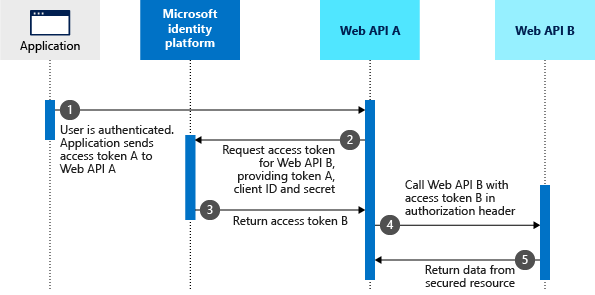
such as authorization code flow, client credentials flow, implicit grant flow, and On-Behalf-Of flow.</p><p id="4a85">🔒 <b>Authorization Code Flow</b>: This flow starts with the client application directing the user to the authorization server. The user authenticates and authorizes the application to access specific resources. The authorization server then redirects the user back to the client application with an authorization code. The client application exchanges this code for an access token by making a POST request to the token endpoint of the authorization server. The access token can then be used by the client application to access the authorized resources on behalf of the user.</p><ul><li><a href="https://learn.microsoft.com/azure/active-directory/develop/v2-oauth2-auth-code-flow?WT.mc_id=DT-MVP-5001664">https://learn.microsoft.com/azure/active-directory/develop/v2-oauth2-auth-code-flow?WT.mc_id=DT-MVP-5001664</a></li></ul><figure id="404c"><img src="https://cdn-images-1.readmedium.com/v2/resize:fit:800/1*CHgvaHgsXSch_C3ysdKjLg.png"><figcaption></figcaption></figure><p id="71e7">🔑 <b>Client Credentials Flow</b>: In this flow, the client application authenticates itself to the authorization server using its own credentials (client ID and client secret or certificate) and requests an access token to access its own resources, or resources owned by a user on which it has been granted access. The authorization server validates the client credentials and, if valid, issues an access token.</p><ul><li><a href="https://learn.microsoft.com/azure/active-directory/develop/v2-oauth2-client-creds-grant-flow?WT.mc_id=DT-MVP-5001664">https://learn.microsoft.com/azure/active-directory/develop/v2-oauth2-client-creds-grant-flow?WT.mc_id=DT-MVP-5001664</a></li></ul><figure id="b256"><img src="https://cdn-images-1.readmedium.com/v2/resize:fit:800/1*xPCObkQ0oQRMOkUQQKVhcg.png"><figcaption></figcaption></figure><p id="00b6">📃 <b>Implicit Grant Flow</b>: This flow is similar to the authorization code flow, but it’s simplified for single-page apps and desktop apps, where the c

Options

lient's secret confidentiality can’t be guaranteed. Instead of receiving an authorization code that needs to be exchanged for an access token, the client receives the access token directly as a result of the authorization request. This flow is less secure than the authorization code flow and is no longer recommended for use.</p><ul><li><a href="https://learn.microsoft.com/en-us/azure/active-directory/develop/v2-oauth2-implicit-grant-flow?WT.mc_id=DT-MVP-5001664">https://learn.microsoft.com/en-us/azure/active-directory/develop/v2-oauth2-implicit-grant-flow?WT.mc_id=DT-MVP-5001664</a></li></ul><figure id="f3b9"><img src="https://cdn-images-1.readmedium.com/v2/resize:fit:800/1*VOG6qckf1oiJfnc7F5B1uw.png"><figcaption></figcaption></figure><p id="c658">🔄 <b>On-Behalf-Of Flow</b>: This flow is used when a client application needs to make a request to a resource server on behalf of the user, but the request needs to go through a middle-tier service or API. The middle-tier service requests an access token from the authorization server using the token of the client application. The authorization server validates the tokens and, if valid, issues a new token for the middle-tier service to access the resource server on behalf of the user. This flow is typically used in microservice architectures.</p><ul><li><a href="https://learn.microsoft.com/azure/active-directory/develop/v2-oauth2-on-behalf-of-flow?WT.mc_id=DT-MVP-5001664">https://learn.microsoft.com/azure/active-directory/develop/v2-oauth2-on-behalf-of-flow?WT.mc_id=DT-MVP-5001664</a></li></ul><figure id="1127"><img src="https://cdn-images-1.readmedium.com/v2/resize:fit:800/1*qBiiihBV--fpfO5MIPi05Q.png"><figcaption></figcaption></figure><p id="3b4d">Understanding different OAuth2.0 flows is crucial for designing secure applications. It allows developers to choose the best authentication method based on their specific needs, ensuring user data privacy and protection!</p><p id="c88b">If you found this post useful, don’t forget to repost and follow! Stay tuned for more posts like this. Happy coding! 🚀</p></article></body>

Let’s dive into the world of OAuth2.0 tokens and flows on the Microsoft identity platform!
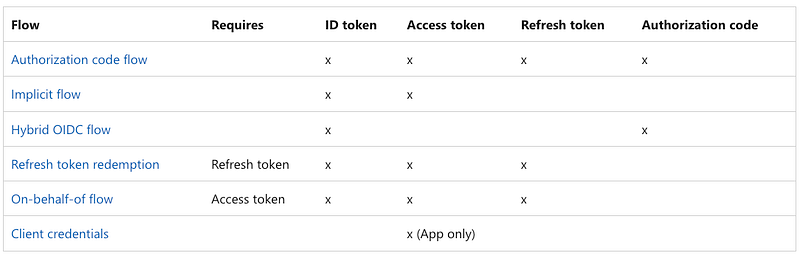
source: Microsoft

This post will be your guide to understanding OAuth2.0 tokens such as Access, Refresh, and ID tokens, and OAuth2.0 flow types, such as authorization code flow, client credentials flow, implicit grant flow, and On-Behalf-Of flow. Understanding OAuth2.0 tokens and flows is crucial for developers working with apps having global users. It helps to securely authenticate users and provide them access to protected resources. Read on to learn how it works on the Microsoft identity platform!

OAuth2.0 tokens such as Access, Refresh, and ID tokens play a pivotal role in security. They authenticate users and allow client applications to access protected resources on a resource server. Let’s break it down! 👇

  • 🔑 Access Token: This is like a digital key. When you sign in to an app, the app gets this key from Microsoft. The key has information about you and the app uses this key to get into certain areas that are locked, like web APIs and other resources that need protection.
  • 🔄 Refresh Token: Access tokens don’t last forever, they expire after a while. So, the Microsoft system sometimes gives the app a refresh token along with the access token. When the access token expires, the app uses the refresh token to get a new access token.
  • 🆔 ID Token: This is a bit like an ID card. It’s given to the app when you sign in and it helps the app know that you are who you say you are. The app can get this ID token at the same time as or instead of an access token.

https://learn.microsoft.com/azure/active-directory/develop/security-tokens?WT.mc_id=DT-MVP-5001664

Then, let’s demystify OAuth2.0 flow types, such as authorization code flow, client credentials flow, implicit grant flow, and On-Behalf-Of flow.

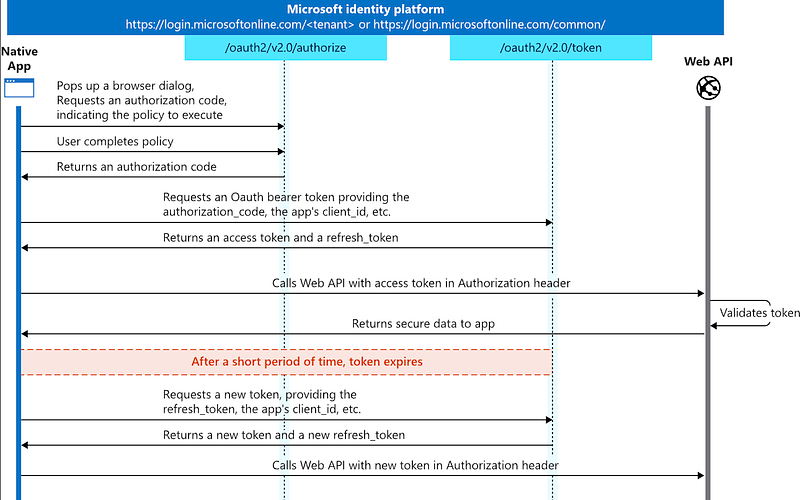
🔒 Authorization Code Flow: This flow starts with the client application directing the user to the authorization server. The user authenticates and authorizes the application to access specific resources. The authorization server then redirects the user back to the client application with an authorization code. The client application exchanges this code for an access token by making a POST request to the token endpoint of the authorization server. The access token can then be used by the client application to access the authorized resources on behalf of the user.
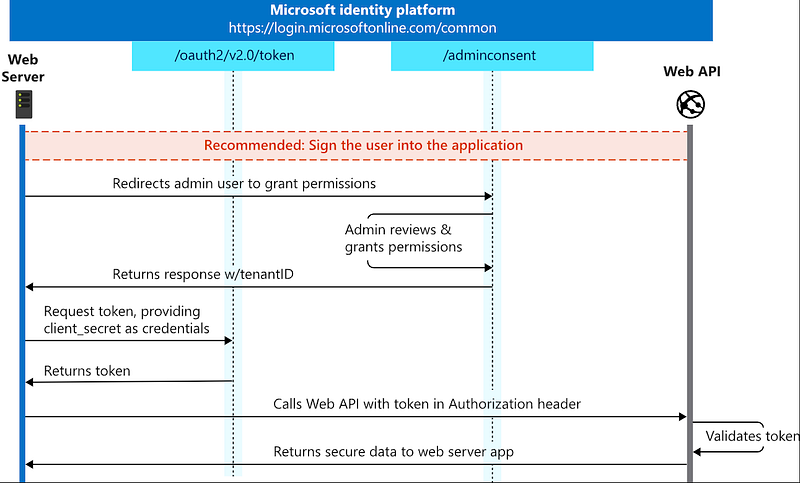
🔑 Client Credentials Flow: In this flow, the client application authenticates itself to the authorization server using its own credentials (client ID and client secret or certificate) and requests an access token to access its own resources, or resources owned by a user on which it has been granted access. The authorization server validates the client credentials and, if valid, issues an access token.
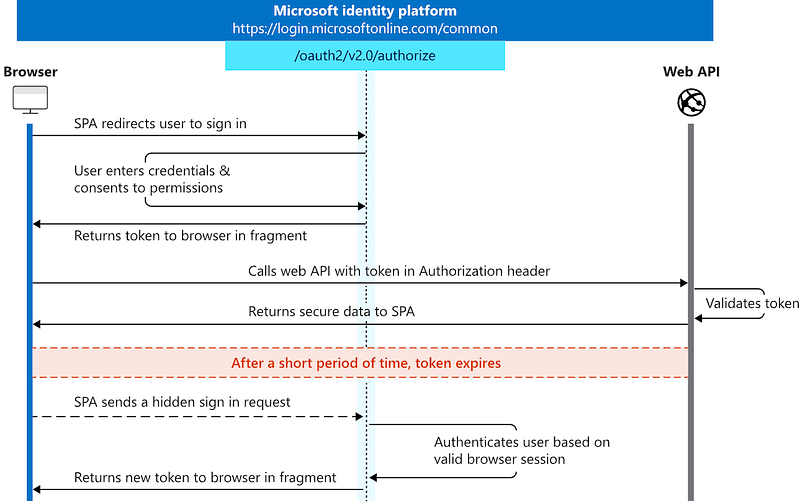
📃 Implicit Grant Flow: This flow is similar to the authorization code flow, but it’s simplified for single-page apps and desktop apps, where the client's secret confidentiality can’t be guaranteed. Instead of receiving an authorization code that needs to be exchanged for an access token, the client receives the access token directly as a result of the authorization request. This flow is less secure than the authorization code flow and is no longer recommended for use.
🔄 On-Behalf-Of Flow: This flow is used when a client application needs to make a request to a resource server on behalf of the user, but the request needs to go through a middle-tier service or API. The middle-tier service requests an access token from the authorization server using the token of the client application. The authorization server validates the tokens and, if valid, issues a new token for the middle-tier service to access the resource server on behalf of the user. This flow is typically used in microservice architectures.
Understanding different OAuth2.0 flows is crucial for designing secure applications. It allows developers to choose the best authentication method based on their specific needs, ensuring user data privacy and protection!

If you found this post useful, don’t forget to repost and follow! Stay tuned for more posts like this. Happy coding! 🚀

Azure
Cloud Computing
Cybersecurity
Authentication
Oauth2
Recommended from ReadMedium