
Let’s Create an Agentic Multimodal Chatbot from Scratch.
A model to generate images, understand images, generate audio, generate and understand text.
One day I saw an article titled “Building GPT2o”, I wanted to do the same thing but after a few tests with GPT2, I realized that it was really dumb! It would take hours and hours of fine-tuning to make it usable as a chatbot, hours that I didn’t have.
But I can still do the same thing with a more powerful model (like Gemma).
So let’s do it! In this series of articles, I will aim to create an agentic multimodal chatbot with as few parameters as possible, and open-source models (as much as possible).
Details
I will create an agentic multimodal chatbot. But what is it?
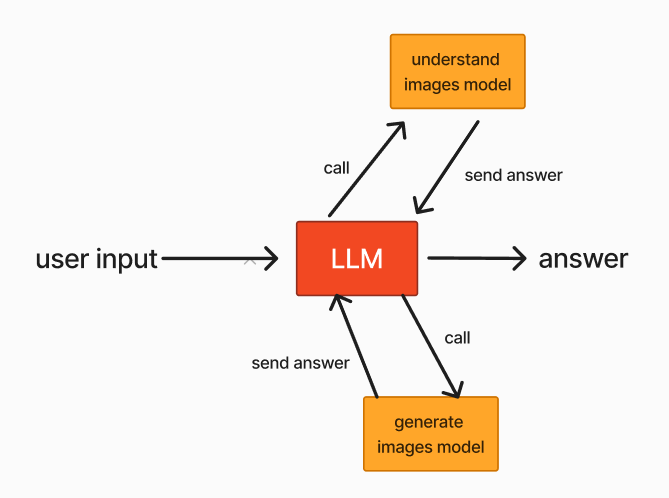
What I call an “agentic multimodal chatbot” is a system with a chatbot (an LLM) that can understand, generate images, generate text, and generate audio. But not with one unique model, with multiple agents, each with its own modality (like generating image or audio), controlled by a unique LLM.
Chatbot
The first step to creating this model (which I’ll call Odel for Omni-Model), is to set up a powerful mini chatbot to answer questions. I think the ideal candidate is Gemma 2 2b from Google, with 2.61 Billion parameters and 51.1 on the MMLU benchmark.
So let’s test it.
from transformers import AutoModelForCausalLM, AutoTokenizer, pipeline
import torch
from transformers import TextIteratorStreamer
from threading import Thread
device = 'cuda' if torch.cuda.is_available() else 'cpu'
model_id = "google/gemma-2-2b-it"
tokenizer = AutoTokenizer.from_pretrained(model_id)
model = AutoModelForCausalLM.from_pretrained(model_id)
model = model.to(device)chat = [
{ "role": "user", "content": "Hello, how are you?"},
]
question = tokenizer.apply_chat_template(chat, tokenize=False, add_generation_prompt=True)
question = tokenizer(question, return_tensors="pt").to(device)
streamer = TextIteratorStreamer(tokenizer, skip_prompt=True)
generation_kwargs = dict(question, streamer=streamer, max_new_tokens=1500)
thread = Thread(target=model.generate, kwargs=generation_kwargs)Note: you need to connect at your Hugginface account to access at Gemma
Here I use a thread to stream the model output, this will come in handy later when we want to make function calls to generate images, for example.
thread.start()
for new_text in streamer:
    print(new_text, end="")
I’m doing well, thank you! 😊 How are you today?
Nice, it works. I don’t use GPU to generate this sentence, I think it generates approximately 1.5 tokens/second. A little slow but it is on the CPU, the GPU will be faster.
Now I’ll do a function to answer multiple prompts like a conversation.
def generate(model, tokenizer):
    history = ""
    question = input("user:")
    while question != "x":
        chat = [
            { "role": "user", "content": question},
        ]
        question = tokenizer.apply_chat_template(chat, tokenize=False, add_generation_prompt=True)
        discussion = history + question
        history = history + question

        discussion = tokenizer(discussion, return_tensors="pt").to(device)
        streamer = TextIteratorStreamer(tokenizer, skip_prompt=True)
        generation_kwargs = dict(discussion, streamer=streamer, max_new_tokens=1500)

        thread = Thread(target=model.generate, kwargs=generation_kwargs)
        print("Asssistant: ", end="")
        thread.start()
        for new_text in streamer:
            print(new_text, end="")
            history += new_text

        question = input("user:")
user: hello
Asssistant:Hello! 👋 How can I help you today? 😊
RAG
A chatbot is good but a chatbot with a rag is even better.
What is a RAG?
A RAG (Retriever Augmented Generation) is a system that helps the LLM by providing context and some information about the question.
How it works?
A RAG is composed of a database containing text about different things cut into chunks of a specific length (1000 basically). When you give it a sentence it retrieves in its database the nearest text to return it at the LLM.
To do this the RAG uses an embedding model to convert the texts into a list of floats. After that when the user enters a query the RAG applies the embedding model to the query, parkours the database, and calculates the similarity between each text and the query. And to finish it takes the text with the highest similarity to give it to the LLM.
Implementation
So let’s implement one. To create a RAG we need:
- a dataset (databricks-dolly-15k)
- an embedding model (sentence-transformers/all-MiniLM-l6-v2)
- a library to retrieve information (Faiss)
So first, we need to install Langchain, sentence-transformers, langchain-community, and FAISS.
# install faiss-cpu if you are on cpu and faiss-gpu if you are on gpu
pip install -q langchain sentence-transformers langchain-community faiss-cpu faiss-gpu
And import the libraries.
from langchain.document_loaders import HuggingFaceDatasetLoader
from langchain.text_splitter import RecursiveCharacterTextSplitter
from langchain.embeddings import HuggingFaceEmbeddings
from langchain.vectorstores import FAISS
Then, we can download the dataset and split it into chunks.
dataset_name = "databricks/databricks-dolly-15k"
page_content_column = "context"
loader = HuggingFaceDatasetLoader(dataset_name, page_content_column)
data = loader.load()

text_splitter = RecursiveCharacterTextSplitter(chunk_size=1000, chunk_overlap=150)
docs = text_splitter.split_documents(data)
The databricks-dolly-15k dataset is an open-source dataset of instruction-following records generated by thousands of Databricks employees, including brainstorming, classification, closed QA, generation, information extraction, open QA, and summarization.
The rows are composed of an instruction, a response, and a context. We’re interested in the context part. It contains text on different subjects to help the model answer the question. But we’re not going to use the dataset to fine-tune a model, we’re just going to use the contexts to put them into the RAG.
Now all we need is the embedding model to create the database. For that, I use all-MiniLM-L6-v2 which has 22M parameters and has been downloaded more than 43M times this month 🤯.
An embedding model is a model that converts text into numbers. This model converts any sentence into 384 numbers between -1 and 1. It enable to calculate the similarity between two texts, in the context of RAG, finds the text most similar to the query.
modelPath = "sentence-transformers/all-MiniLM-l6-v2"
model_kwargs = {'device':'cpu'} # you need to change cpu by gpu if you want to use a gpu
encode_kwargs = {'normalize_embeddings': False}
embeddings_model = HuggingFaceEmbeddings(
    model_name=modelPath,
    model_kwargs=model_kwargs,
    encode_kwargs=encode_kwargs
)
embeddings_model.embed_query("hello")# len: 384
output: [-0.062771737575531, 0.05495881289243698, 0.05216481536626816, 0.08578997850418091, -0.0827489048242569, -0.07457295805215836, 0.06855472922325134, …]
So now let’s create the database.
db = FAISS.from_documents(docs, embeddings_model)
Here FAISS will apply the embedding model to all chunks
The db takes a few seconds to be created on the GPU but can take several minutes if you run on a CPU.
We can test the database by running the following code.
question = "what is python"
searchDocs = db.similarity_search(question)
print(searchDocs[0].page_content)
Python is a high-level, general-purpose programming language. Its design philosophy emphasizes code readability with the use of significant indentation via the off-side rule.\n\nPython is dynamically typed and garbage-collected. It supports multiple programming paradigms, including structured (particularly procedural), object-oriented and functional programming. It is often described as a \”batteries included\” language due to its comprehensive standard library.\n\nGuido van Rossum began working on Python in the late 1980s as a successor to the ABC programming language and first released it in 1991 as Python 0.9.0. Python 2.0 was released in 2000. Python 3.0, released in 2008, was a major revision not completely backward-compatible with earlier versions. Python 2.7.18, released in 2020, was the last release of Python 2.\n\nPython consistently ranks as one of the most popular programming languages.
Cool, it works well.
To avoid having to re-create the RAG every time, you can save it locally.
# save
db.save_local("MyRAG")
# load
new_db = FAISS.load_local("MyRAG", embeddings_model, allow_dangerous_deserialization=True)
And now it’s time to create a RAG integration in our function.
First, I create a function to download the embedding model.
def download_embd_model(name, device="cpu"):
    modelPath = name
    model_kwargs = {'device':device}
    encode_kwargs = {'normalize_embeddings': False}
    embeddings_model = HuggingFaceEmbeddings(
        model_name=modelPath,
        model_kwargs=model_kwargs,
        encode_kwargs=encode_kwargs
    )
    return embeddings_model
Then, I set up the database.
def generate(model, tokenizer, use_rag=True, embd_model_name="sentence-transformers/all-MiniLM-l6-v2", RAG_folder="path/to/your/folder"):
    history = ""
    if use_rag:
        embeddings_model = download_embd_model(name=embd_model_name)
        db = FAISS.load_local(RAG_folder, embeddings_model, allow_dangerous_deserialization=True)
To finish I add a prompt system and the result of the RAG on the model’s input.
def generate(model, tokenizer, use_rag=True, embd_model_name="sentence-transformers/all-MiniLM-l6-v2", RAG_folder="path/to/your/folder"):
    history = ""
    if use_rag:
        embeddings_model = download_embd_model(name=embd_model_name)
        db = FAISS.load_local(RAG_folder, embeddings_model, allow_dangerous_deserialization=True)

    question = input("user:")
    while question != "x":
        context = db.similarity_search(question)[0].page_content
        prompt = """
### Context: {context}
### System: With the precedent context, discussion, and your personal knowledge answer the following question.
### Question: {question}
        """.format(context=context, question=question)

        chat = [
            { "role": "user", "content": prompt},
        ]
        question = tokenizer.apply_chat_template(chat, tokenize=False, add_generation_prompt=True)
        discussion = history + question
        history = history + question

#### rest of the code....it’s already the end
user: hello, what is python?
Asssistant: Python is a powerful and versatile programming language known for its readability and ease of use.
Here’s a breakdown of what makes Python special:
**Key Features:**
* **High-level:** It’s designed to be easy for humans to understand and write, making it accessible to beginners.
* **General-purpose:** You can use Python for a wide range of tasks, from web development and data analysis to machine learning and scientific computing.
* **Dynamically Typed:** You don’t need to explicitly declare the data type of a variable; Python figures it out automatically.
* **Garbage Collected:** Python automatically manages memory, freeing you from manual memory management.
* **Multiple Paradigms:** You can use Python in various ways, including procedural, object-oriented, and functional programming.
* **Comprehensive Standard Library:** Python comes with a vast collection of pre-built modules and functions, saving you time and effort.
**History:** * Developed by Guido van Rossum in the late 1980s. * First released in 1991 as Python 0.9.0. * Python 2.0 was released in 2000. * Python 3.0, a major revision, was released in 2008. * Python 2.7.18 was the final version of Python 2, released in 2020. **Popularity:** Python consistently ranks among the most popular programming languages worldwide, thanks to its versatility, ease of use, and large and active community. Let me know if you’d like to know more about specific aspects of Python!
And voila, it works perfectly.
Understand images
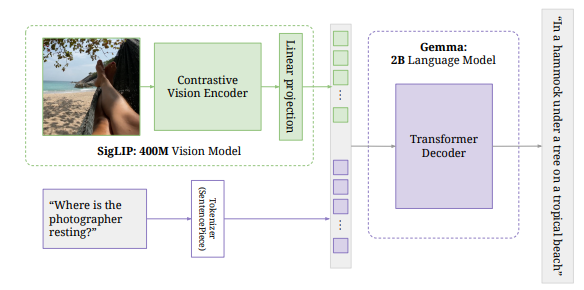
Now it’s time to attack the multimodal part. For that, we need a model to understand images. For this task, I chose Pali Gemma, a model with 3 billion parameters.
PaliGemma is the composition of a Transformer decoder and a Vision Transformer image encoder, with a total of 3 billion params. The text decoder is initialized from Gemma-2B. The image encoder is initialized from SigLIP-So400m/14. PaliGemma is trained following the PaLI-3 recipes.
First I just quantize it in 4 bits using bitsandbytes to use less memory.
!pip install -q -U accelerate bitsandbytes
model_id = "google/paligemma-3b-mix-224"

# create the config for the quantization
from transformers import AutoProcessor, PaliGemmaForConditionalGeneration
from transformers import BitsAndBytesConfig

nf4_config = BitsAndBytesConfig(
    load_in_4bit=True,
    bnb_4bit_quant_type="nf4",
    bnb_4bit_use_double_quant=True,
    bnb_4bit_compute_dtype=torch.bfloat16
)

# load the model with the config
model = PaliGemmaForConditionalGeneration.from_pretrained(model_id,
                                                          torch_dtype=torch.bfloat16,
                                                          quantization_config=nf4_config,
                                                          )
processor = AutoProcessor.from_pretrained(model_id)

# push to the hub
model.push_to_hub("Arthur-LAGACHERIE/PaliGemma-4bit")
processor.push_to_hub("Arthur-LAGACHERIE/PaliGemma-4bit")
And after we can test it. We start by downloading it.
model_id = "Arthur-LAGACHERIE/PaliGemma-4bit"
model = PaliGemmaForConditionalGeneration.from_pretrained(model_id).eval()
processor = AutoProcessor.from_pretrained(model_id)
And then, run it on a car image.
url = "https://huggingface.co/datasets/huggingface/documentation-images/resolve/main/transformers/tasks/car.jpg?download=true"
image = Image.open(requests.get(url, stream=True).raw)

prompt = "describe the photo"
model_inputs = processor(text=prompt, images=image, return_tensors="pt")
input_len = model_inputs["input_ids"].shape[-1]

with torch.inference_mode():
    generation = model.generate(**model_inputs, max_new_tokens=100, do_sample=False)
    generation = generation[0][input_len:]
    decoded = processor.decode(generation, skip_special_tokens=True)
    print(decoded)
In this image we can see a car on the road. In the background of the image there is a building, trees and sky.
Ok, it works.👍
Integration
Like the RAG I create an external function to run the bulk of the program (describe images).
def describe_image(text, model, processor):
    img_path_or_URL = text.split("<img>")[1]
    print("\033[91m=> searching image at", img_path_or_URL, "\033[0m")

    if "http" in img_path_or_URL: # URL
        image = Image.open(requests.get(img_path_or_URL, stream=True).raw)
    else:
        image = Image.open(img_path_or_URL)

    prompt = "describe this image"
    model_inputs = processor(text=prompt, images=image, return_tensors="pt")
    input_len = model_inputs["input_ids"].shape[-1]

    with torch.inference_mode():
        generation = model.generate(**model_inputs, max_new_tokens=128, do_sample=False)
        generation = generation[0][input_len:]
        decoded = processor.decode(generation, skip_special_tokens=True)

    return decoded
And then I add this code to the function “generate”.
def generate(model, tokenizer, use_rag=True, use_img_desc=True, embd_model_name="sentence-transformers/all-MiniLM-l6-v2", RAG_folder="path/to/your/folder"):
    history = ""
    if use_rag:
        print("\033[91m=> download RAG\033[0m")
        embeddings_model = download_embd_model(name=embd_model_name)
        db = FAISS.load_local(RAG_folder, embeddings_model, allow_dangerous_deserialization=True)

    img_desc_load = False

    question = input("user:")
    while question != "x":

        # RAG
        context = db.similarity_search(question)[0].page_content

        # understand images
        if "<img>" in question and use_img_desc:
            if not img_desc_load:
                print("\033[91m=> download image descriptor\033[0m")
                model_id = "Arthur-LAGACHERIE/PaliGemma-4bit"
                model_img = PaliGemmaForConditionalGeneration.from_pretrained(model_id).eval()
                processor = AutoProcessor.from_pretrained(model_id)
                img_desc_load = True

            print("\033[91m=> get image description\033[0m")
            img_desc = describe_image(copy.deepcopy(question), model_img, processor)
            print(img_desc)

            list_question = question.split("<img>")
            list_question.append(" .")
            question = list_question[0] + ''.join(list_question[1:])
            context = ""

##### rest of the code
To detect if the user gives an image I use the tag “”:
URL or path to the image
I also change a little the prompt.
# Prompt
prompt = """
### Context: {context}
### Image description: {img_desc}
### System: With the precedent context, discussion, and your personal knowledge answer at the following question.
If the question is to describe an image use the Image Description.
### Question: {question}
""".format(context=context, question=question, img_desc=img_desc)
Inference
User: describe the images
https://huggingface.co/datasets/huggingface/documentation-images/resolve/main/transformers/tasks/car.jpg?download=true
Asssistant: The image shows a car driving on a road. The road is paved and there are trees lining the sides. A building can be seen in the background, possibly a small town or a residential area. The sky is a clear blue with a few fluffy white clouds.
Image Generation
Now our chatbot can understand images it would be nice that it can generate images. To do that we are gonna use stable-diffusion-v1–5 but not the basic model, I will use the pruned version to use less memory.
So let’s test it.
!pip install diffusers

import torch
from diffusers import StableDiffusionPipeline
from diffusers import DPMSolverMultistepScheduler
import random

device = 'cuda' if torch.cuda.is_available() else 'cpu'

model_id = "runwayml/stable-diffusion-v1-5"

pipe = StableDiffusionPipeline.from_single_file("https://huggingface.co/runwayml/stable-diffusion-v1-5/blob/main/v1-5-pruned-emaonly.safetensors")

pipe.scheduler = DPMSolverMultistepScheduler.from_config(pipe.scheduler.config)
pipe = pipe.to(device)

prompt = "a lion on the beach"
generator = torch.Generator(device).manual_seed(random.randint(0, 1500))

image = pipe(prompt, generator=generator, num_inference_steps=50, num_images_per_prompt=1).images[0]
image
Integration
Now let’s integrate it into our multimodal system. To do that I create two external functions. One for loading the model, and the other to generate an image.
def generate_img(prompt, pipe):
    generator = torch.Generator(device).manual_seed(random.randint(0, 1500))
    image = pipe(prompt, generator=generator, num_inference_steps=50, num_images_per_prompt=1).images[0]
    return image

def load_sd(device="cuda"):
    pipe = StableDiffusionPipeline.from_single_file("https://huggingface.co/runwayml/stable-diffusion-v1-5/blob/main/v1-5-pruned-emaonly.safetensors")
    pipe.scheduler = DPMSolverMultistepScheduler.from_config(pipe.scheduler.config)
    pipe = pipe.to(device)
    return pipe
Then I integrate it into the main function. Gemma will call the model to generate images by putting the tag “
like:
the prompt
def generate(model, tokenizer, use_rag=True, use_img_desc=True, use_img_gen=True, embd_model_name="sentence-transformers/all-MiniLM-l6-v2", RAG_folder="path/to/your/folder"):
    history = ""
    if use_rag:
        print("\033[91m=> download RAG\033[0m")
        embeddings_model = download_embd_model(name=embd_model_name)
        db = FAISS.load_local(RAG_folder, embeddings_model, allow_dangerous_deserialization=True)

    img_desc_load = False
    pipe_loaded = False

    question = input("User:")
    while question != "x":
        img_generated = False

        # RAG
        context = db.similarity_search(question)[0].page_content

        # understand images
        img_desc = "None"
        if "<img>" in question and use_img_desc:
            if not img_desc_load:
                print("\033[91m=> download image descriptor\033[0m")
                model_id = "Arthur-LAGACHERIE/PaliGemma-4bit"
                model_img = PaliGemmaForConditionalGeneration.from_pretrained(model_id).eval()
                processor = AutoProcessor.from_pretrained(model_id)
                img_desc_load = True

            print("\033[91m=> get image description\033[0m")
            img_desc = describe_image(copy.deepcopy(question), model_img, processor)
            print(img_desc)

            list_question = question.split("<img>")
            list_question.append(" .")
            question = list_question[0] + ''.join(list_question[1:])
            context = ""

        # Prompt
        prompt = """
### Context: {context}
### Image description: {img_desc}
### System: With the precedent context, discussion, and your personal knowledge answer at the following question.
If the question is to describe an image use the Image Description.
You can generate an image by writing "<imggen>prompt for generation<imggen>"
### Question: {question}
        """.format(context=context, question=question, img_desc=img_desc)

        chat = [
            { "role": "user", "content": prompt},
        ]
        question = tokenizer.apply_chat_template(chat, tokenize=False, add_generation_prompt=True)
        discussion = history + question
        history = history + question

        discussion = tokenizer(discussion, return_tensors="pt").to(device)
        streamer = TextIteratorStreamer(tokenizer, skip_prompt=True)
        generation_kwargs = dict(discussion, streamer=streamer, max_new_tokens=1500)

        thread = Thread(target=model.generate, kwargs=generation_kwargs)
        print("Asssistant: ", end="")
        thread.start()
        answer = ""
        for new_text in streamer:
            print(new_text, end="")
            answer += new_text
            history += new_text

            if answer.count("<imggen>") == 2 and not img_generated:
                if not pipe_loaded:
                    pipe_img_gen = load_sd()
                    pipe_loaded = True

                prompt = answer.split("<imggen>")[1]
                print("\033[91m=> generate image of {prompt}\033[0m".format(prompt=prompt))
                image = generate_img(prompt, pipe_img_gen)
                plt.imshow(image)
                plt.show()

                img_generated = True


        question = input("User:")
User: generate an image of a lion on the beach Asssistant:
A majestic lion, with a golden mane flowing in the wind, stands proudly on a sandy beach. The sun sets in the background, casting a warm orange glow on the scene. The lion’s eyes are piercing and fierce, reflecting the power and majesty of its presence. The sand is soft and white, contrasting with the dark, rugged rocks in the foreground.
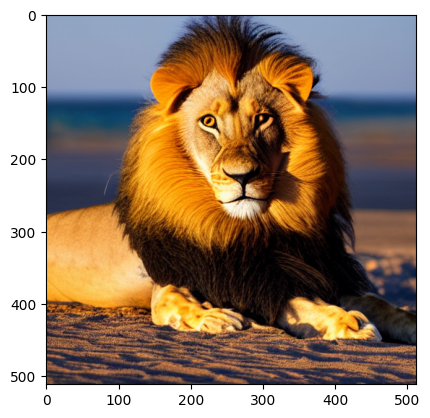
Nice, it works very well. Gemma is very good at following instructions.
Audio Generation
It’s time for the last modality, the audio.
Generate audio
To generate a voice I use gTTS (google Text-To-Speech), it doesn’t use the GPU, and it’s very fast.
!pip install gTTS
from gtts import gTTS
import IPython

tts = gTTS('hello, how are you? I am fine thank you')

for i in tts.stream():
IPython.display.display(IPython.display.Audio(i, autoplay=True))👌 Perfect. Now let’s integrate it into the generate function.
def generate_audio(text):
    audio = gTTS(text)
    audio.save('audio.mp3')
    IPython.display.display(IPython.display.Audio("audio.mp3", autoplay=True))

def generate(model, tokenizer, use_rag=True, use_img_desc=True, use_img_gen=True, use_audio_gen=False, embd_model_name="sentence-transformers/all-MiniLM-l6-v2", RAG_folder="path/to/your/folder"):
    # rest of the code
    if use_audio_gen:
           generate_audio(answer.replace('<end_of_turn>', ''))

    question = input("User:")
User: hello how are you Asssistant: hello! I’m doing well, thank you. 😊 How are you?
To play the answer I use autoplay=True in IPython.display.Audio, is the simplest way I found.
Record audio
To run this code I am on Kaggle for free GPU but I don’t record audio because Kaggle is a website and I didn’t succeed. But I will give you the code to record the audio.
!sudo apt-get install -y libasound-dev portaudio19-dev libportaudio2 libportaudiocpp0
!pip install recorder

from recorder import Recorder
r = Recorder(input_device_index=0)
r.record(5, output='out.wav')

import IPython
IPython.display.display(IPython.display.Audio("out.wav", autoplay=True))
After that, you can use Whisper to convert the audio into text.
from transformers import WhisperProcessor, WhisperForConditionalGeneration
from datasets import load_dataset

# load model and processor
processor = WhisperProcessor.from_pretrained("openai/whisper-small")
model = WhisperForConditionalGeneration.from_pretrained("openai/whisper-small")
model.config.forced_decoder_ids = None

# load dummy dataset and read audio files
ds = load_dataset("hf-internal-testing/librispeech_asr_dummy", "clean", split="validation")
sample = ds[0]["audio"]
input_features = processor(sample["array"], sampling_rate=sample["sampling_rate"], return_tensors="pt").input_features

# generate token ids
predicted_ids = model.generate(input_features)
# decode token ids to text
transcription = processor.batch_decode(predicted_ids, skip_special_tokens=False)

transcription = processor.batch_decode(predicted_ids, skip_special_tokens=True)
It’s already the end. I hope you’ve enjoyed this article because I spent a lot of time writing it. If you did, you can clap it = ).
You can find all the code here.


