avatarSeungjun (Josh) Kim

Free AI web copilot to create summaries, insights and extended knowledge, download it at here

12830

Abstract

            <span class="hljs-attr">num_topics</span> = <span class="hljs-number">4</span>,
                                <span class="hljs-attr">id2word</span> = dic,
                                  <span class="hljs-attr">passes</span> = <span class="hljs-number">10</span>,
                                  <span class="hljs-attr">workers</span> = <span class="hljs-number">2</span>)</pre></div><div id="e27e"><pre>lda_model.save(<span class="hljs-symbol">'model4</span>.gensim')</pre></div><p id="68e6">Once we trained the LDA model, we look at the top ten words that are most important in each topic extracted from the corpus.</p><div id="8a15"><pre><span class="hljs-comment"># We print words occuring in each of the topics as we iterate through them</span></pre></div><div id="bedf"><pre><span class="hljs-keyword">for</span> idx, topic <span class="hljs-keyword">in</span> lda_model.print_topics(<span class="hljs-attribute">num_words</span>=10):    
<span class="hljs-built_in">print</span>(<span class="hljs-string">'Topic: {} \nWords: {}'</span>.format(idx, topic))</pre></div><p id="d2dc">The output is as follows.</p><div id="36ca"><pre><span class="hljs-attribute">Topic</span>: <span class="hljs-number">0</span>  Words: <span class="hljs-number">0</span>.<span class="hljs-number">008</span>*<span class="hljs-string">"The"</span> + <span class="hljs-number">0</span>.<span class="hljs-number">007</span>*<span class="hljs-string">"would"</span> + <span class="hljs-number">0</span>.<span class="hljs-number">006</span>*<span class="hljs-string">"one"</span> + <span class="hljs-number">0</span>.<span class="hljs-number">006</span>*<span class="hljs-string">"From"</span> + <span class="hljs-number">0</span>.<span class="hljs-number">006</span>*<span class="hljs-string">"people"</span> + <span class="hljs-number">0</span>.<span class="hljs-number">005</span>*<span class="hljs-string">"writes"</span> + <span class="hljs-number">0</span>.<span class="hljs-number">005</span>*<span class="hljs-string">"Subject"</span> + <span class="hljs-number">0</span>.<span class="hljs-number">005</span>*<span class="hljs-string">"Lines"</span> + <span class="hljs-number">0</span>.<span class="hljs-number">005</span>*<span class="hljs-string">"Organization"</span> + <span class="hljs-number">0</span>.<span class="hljs-number">005</span>*<span class="hljs-string">"article"</span></pre></div><div id="815b"><pre><span class="hljs-attribute">Topic</span>: <span class="hljs-number">1</span>  Words: <span class="hljs-number">0</span>.<span class="hljs-number">008</span>*<span class="hljs-string">"The"</span> + <span class="hljs-number">0</span>.<span class="hljs-number">007</span>*<span class="hljs-string">"Subject"</span> + <span class="hljs-number">0</span>.<span class="hljs-number">007</span>*<span class="hljs-string">"From"</span> + <span class="hljs-number">0</span>.<span class="hljs-number">007</span>*<span class="hljs-string">"Lines"</span> + <span class="hljs-number">0</span>.<span class="hljs-number">007</span>*<span class="hljs-string">"Organization"</span> + <span class="hljs-number">0</span>.<span class="hljs-number">004</span>*<span class="hljs-string">"use"</span> + <span class="hljs-number">0</span>.<span class="hljs-number">004</span>*<span class="hljs-string">"file"</span> + <span class="hljs-number">0</span>.<span class="hljs-number">003</span>*<span class="hljs-string">"one"</span> + <span class="hljs-number">0</span>.<span class="hljs-number">003</span>*<span class="hljs-string">"would"</span> + <span class="hljs-number">0</span>.<span class="hljs-number">003</span>*<span class="hljs-string">"get"</span></pre></div><div id="28e0"><pre><span class="hljs-attribute">Topic</span>: <span class="hljs-number">2</span>  Words: <span class="hljs-number">0</span>.<span class="hljs-number">007</span>*<span class="hljs-string">"From"</span> + <span class="hljs-number">0</span>.<span class="hljs-number">007</span>*<span class="hljs-string">"Organization"</span> + <span class="hljs-number">0</span>.<span class="hljs-number">007</span>*<span class="hljs-string">"Lines"</span> + <span class="hljs-number">0</span>.<span class="hljs-number">006</span>*<span class="hljs-string">"The"</span> + <span class="hljs-number">0</span>.<span class="hljs-number">006</span>*<span class="hljs-string">"Subject"</span> + <span class="hljs-number">0</span>.<span class="hljs-number">005</span>*<span class="hljs-string">"game"</span> + <span class="hljs-number">0</span>.<span class="hljs-number">005</span>*<span class="hljs-string">"University"</span> + <span class="hljs-number">0</span>.<span class="hljs-number">005</span>*<span class="hljs-string">"team"</span> + <span class="hljs-number">0</span>.<span class="hljs-number">004</span>*<span class="hljs-string">"year"</span> + <span class="hljs-number">0</span>.<span class="hljs-number">003</span>*<span class="hljs-string">"writes"</span></pre></div><div id="6594"><pre><span class="hljs-attribute">Topic</span>: <span class="hljs-number">3</span>  Words: <span class="hljs-number">0</span>.<span class="hljs-number">013</span>*<span class="hljs-string">"MAXAXAXAXAXAXAXAXAXAXAXAXAXAXAX"</span> + <span class="hljs-number">0</span>.<span class="hljs-number">009</span>*<span class="hljs-string">"The"</span> + <span class="hljs-number">0</span>.<span class="hljs-number">006</span>*<span class="hljs-string">"From"</span> + <span class="hljs-number">0</span>.<span class="hljs-number">006</span>*<span class="hljs-string">"Subject"</span> + <span class="hljs-number">0</span>.<span class="hljs-number">005</span>*<span class="hljs-string">"Lines"</span> + <span class="hljs-number">0</span>.<span class="hljs-number">005</span>*<span class="hljs-string">"key"</span> + <span class="hljs-number">0</span>.<span class="hljs-number">005</span>*<span class="hljs-string">"Organization"</span> + <span class="hljs-number">0</span>.<span class="hljs-number">004</span>*<span class="hljs-string">"writes"</span> + <span class="hljs-number">0</span>.<span class="hljs-number">004</span>*<span class="hljs-string">"article"</span> + <span class="hljs-number">0</span>.<span class="hljs-number">003</span>*<span class="hljs-string">"Israel"</span></pre></div><p id="850f">Maybe topic 2 is somewhat related to the word “University”. Other than that, we do not see anything significant. What is happening here? Notice that there are words that occur very frequently across all the topics. They are words including subject, article, and organization. They are words that are the in the very beginning part of each news article that lists out the author, affiliation and title. This is why they are dominating every topic. In other words, they are uninformative noise that do not add much value to the LDA model we built. <b>This speaks to the importance of text cleaning and pre-processing in tandem with the objective of your NLP project!</b></p><h1 id="c583">Evaluation</h1><p id="2454">As I mentioned earlier, there is no surefire way to find out what number of topics would be optimal. One way is to simply eyeball some key words in each topic to see if they seem coherent with one another. But this is definitely not a objective or rigorous way for evaluation. A slightly more rigorous way is to use the coherence score.</p><p id="6195">This score measures the degree of semantic similarity between high scoring words in each topic. There exist several algorithms including C_v, C_p, C_uci, C_umass and so on. C_v and C_umass are two of the more widely used approaches.</p><p id="dd06">The coherence score for C_v ranges from 0 to 1 where the higher the value, the better coherence it has. The C_umass method returns negative values. The tricky part here is that there is no clear consensus or interpretation of what value constitutes a “good coherence”. There has been some attempts from scholars such as <a href="https://www.amazon.com/Doing-Computational-Social-Science-Introduction/dp/1526468190">John McLevey who argued any score above 0.5 for the C_v method is reasonably good</a>. If you peek into some forums for data science, however, there are some varying opinions. This <a href="https://stackoverflow.com/questions/54762690/evaluation-of-topic-modeling-how-to-understand-a-coherence-value-c-v-of-0-4">post </a>from Stackoverflow suggests the following rubric.</p><ul><li>0.3 is bad</li><li>0.4 is low</li><li>0.55 is okay</li><li>0.65 might be as good as it is going to get</li><li>0.7 is nice</li><li>0.8 is unlikely and</li><li>0.9 is probably wrong</li></ul><p id="ed4e">For the u_mass method, it gets even more confusing. Take a look at the discussion that happened in this <a href="https://www.reddit.com/r/learnmachinelearning/comments/9bcr77/coherence_score_u_mass/">Reddit forum</a>. It says the coherence score can be very volatile as we increase the number of topics to be extracted. The general idea most data science users are suggesting I think is that the C_v method is usually more reliable than the C_umass method although the final verdict is on the user.</p><p id="b7cb">Nevertheless, I think the key takeaways from all these information on coherence evaluation are:</p><ul><li>Coherence score is not an absolute metric for evaluating the quality of the topics modeled. Never rely on one method alone. Use the coherence score as a baseline and then make sure you eye ball through the documents in each topic and their key words to get your “own” sense of the degree of coherence in each topic.</li><li>For the C_v method for calculating the coherence score, check if the score of your model is neither too high nor too low. Anywhere between 0.5 and 0.7 would a decent range.</li><li>For the C_umass method for calculating the coherence score, check if the absolute value of the score is reasonably close to 0.</li></ul><p id="acdd">Let us evaluate our model using the C_v method. The gensim package’s models class contains the CoherenceModel which comes in handy for calculating coherence scores.</p><div id="4fe1"><pre><span class="hljs-keyword">from</span> gensim.models <span class="hljs-keyword">import</span> CoherenceModel</pre></div><div id="6f29"><pre><span class="hljs-comment"># instantiate topic coherence model</span></pre></div><div id="4195"><pre>cm = CoherenceModel(<span class="hljs-attribute">model</span>=lda_model, <span class="hljs-attribute">corpus</span>=bow_corpus, <span class="hljs-attribute">texts</span>=corpus, <span class="hljs-attribute">coherence</span>=<span class="hljs-string">'c_v'</span>)</pre></div><div id="0c2f"><pre><span class="hljs-comment"># get topic coherence score</span></pre></div><div id="40d0"><pre><span class="hljs-attr">coherence_lda</span> = cm.get_coherence()</pre></div><div id="04b8"><pre><span class="hljs-function"><span class="hljs-title">print</span><span class="hljs-params">(coherence_lda)</span></span>

>> <span class="hljs-number">0.49725706360481475</span></pre></div><p id="c65d">0.497 is not bad but not decent either. We want to know if the coherence score varies depending on the number of topics to be extracted from the corpus. We iterate from numbers 2 to 6 for the number of topics and store each coherence score in the variable called score which is initialized as an empty list. We then visualize this into a line graph using Python’s matplotlib package.</p><div id="2d2f"><pre><span class="hljs-keyword">import</span> matplotlib.pyplot <span class="hljs-keyword">as</span> plt</pre></div><div id="a88d"><pre><span class="hljs-attribute">topics</span> <span class="hljs-operator">=</span> []</pre></div><div id="709a"><pre><span class="hljs-attribute">score</span> <span class="hljs-operator">=</span> []</pre></div><div id="7f92"><pre><span class="hljs-keyword">for</span> i <span class="hljs-keyword">in</span> range(2,7,1): lda = gensim.models.LdaMulticore(<span class="hljs-attribute">corpus</span>=bow_corpus, <span class="hljs-attribute">id2word</span>=dic, <span class="hljs-attribute">iterations</span>=10, <span class="hljs-attribute">num_topics</span>=i, workers = 3, <span class="hljs-attribute">passes</span>=10, <span class="hljs-attribute">random_state</span>=42)</pre></div><div id="c193"><pre> cm = CoherenceModel(<span class="hljs-attribute">model</span>=lda, <span class="hljs-attribute">corpus</span>=bow_corpus, <span class="hljs-attribute">texts</span>=corpus, <span class="hljs-attribute">coherence</span>=<span class="hljs-string">'c_v'</span>)</pre></div><div id="bd3d"><pre> topics.<span class="hljs-built_in">append</span>(i) # <span class="hljs-built_in">Append</span> number of topics modeled</pre></div><div id="def2"><pre> <span class="hljs-keyword">score.append(cm.get_coherence()) </span><span class="hljs-comment"># Append coherence scores to list</span></pre>

Options

</div><div id="6565"><pre>plt.<span class="hljs-keyword">plot</span>(topics, <span class="hljs-keyword">score</span>)</pre></div><div id="dc56"><pre>plt<span class="hljs-selector-class">.xlabel</span>(<span class="hljs-string">'# of Topics'</span>)</pre></div><div id="60b4"><pre>plt<span class="hljs-selector-class">.ylabel</span>(<span class="hljs-string">'Coherence Score'</span>)</pre></div><div id="9e16"><pre>plt.<span class="hljs-keyword">show</span>()</pre></div><figure id="be22"><img src="https://cdn-images-1.readmedium.com/v2/resize:fit:800/1*THmu40Y27ukC3GK9znnnnA.png"><figcaption>Source: From the Author</figcaption></figure><p id="6800">We see that the coherence score the highest when there are two topics to be extracted. It constantly decreases as the number of topics increases.</p><p id="05c7">We build the new LDA model based on two topics now.</p><div id="4f64"><pre><span class="hljs-comment"># LDA model with two topics</span> <span class="hljs-attr">lda_model2</span> = gensim.models.LdaMulticore(bow_corpus, <span class="hljs-attr">num_topics</span> = <span class="hljs-number">2</span>, <span class="hljs-attr">id2word</span> = dic, <span class="hljs-attr">passes</span> = <span class="hljs-number">8</span>, <span class="hljs-attr">workers</span> = <span class="hljs-number">3</span>)</pre></div><div id="9227"><pre>lda_model2.save(<span class="hljs-symbol">'model2</span>.gensim') </pre></div><div id="7517"><pre><span class="hljs-comment"># We print words occuring in each of the topics as we iterate through them</span></pre></div><div id="c339"><pre><span class="hljs-keyword">for</span> idx, topic <span class="hljs-keyword">in</span> lda_model2.print_topics(<span class="hljs-attribute">num_words</span>=20):</pre></div><div id="ca50"><pre><span class="hljs-function"><span class="hljs-title">print</span><span class="hljs-params">(<span class="hljs-string">'Topic: {} \nWords: {}'</span>.format(idx, topic)</span></span>)</pre></div><p id="252b">Resulting Output:</p><div id="e715"><pre><span class="hljs-attribute">Topic</span>: <span class="hljs-number">0</span> Words: <span class="hljs-number">0</span>.<span class="hljs-number">007</span>*<span class="hljs-string">"The"</span> + <span class="hljs-number">0</span>.<span class="hljs-number">005</span>*<span class="hljs-string">"MAXAXAXAXAXAXAXAXAXAXAXAXAXAXAX"</span> + <span class="hljs-number">0</span>.<span class="hljs-number">004</span>*<span class="hljs-string">"From"</span> + <span class="hljs-number">0</span>.<span class="hljs-number">004</span>*<span class="hljs-string">"Subject"</span> + <span class="hljs-number">0</span>.<span class="hljs-number">004</span>*<span class="hljs-string">"Lines"</span> + <span class="hljs-number">0</span>.<span class="hljs-number">004</span>*<span class="hljs-string">"Organization"</span> + <span class="hljs-number">0</span>.<span class="hljs-number">003</span>*<span class="hljs-string">"one"</span> + <span class="hljs-number">0</span>.<span class="hljs-number">002</span>*<span class="hljs-string">"get"</span> + <span class="hljs-number">0</span>.<span class="hljs-number">002</span>*<span class="hljs-string">"year"</span> + <span class="hljs-number">0</span>.<span class="hljs-number">002</span>*<span class="hljs-string">"game"</span> + <span class="hljs-number">0</span>.<span class="hljs-number">002</span>*<span class="hljs-string">"like"</span> + <span class="hljs-number">0</span>.<span class="hljs-number">002</span>*<span class="hljs-string">"would"</span> + <span class="hljs-number">0</span>.<span class="hljs-number">002</span>*<span class="hljs-string">"time"</span> + <span class="hljs-number">0</span>.<span class="hljs-number">002</span>*<span class="hljs-string">"University"</span> + <span class="hljs-number">0</span>.<span class="hljs-number">002</span>*<span class="hljs-string">"writes"</span> + <span class="hljs-number">0</span>.<span class="hljs-number">002</span>*<span class="hljs-string">"team"</span> + <span class="hljs-number">0</span>.<span class="hljs-number">002</span>*<span class="hljs-string">"article"</span> + <span class="hljs-number">0</span>.<span class="hljs-number">002</span>*<span class="hljs-string">"dont"</span> + <span class="hljs-number">0</span>.<span class="hljs-number">002</span>*<span class="hljs-string">"This"</span> + <span class="hljs-number">0</span>.<span class="hljs-number">002</span>*<span class="hljs-string">"people"</span> </pre></div><div id="540f"><pre><span class="hljs-attribute">Topic</span>: <span class="hljs-number">1</span> Words: <span class="hljs-number">0</span>.<span class="hljs-number">009</span>*<span class="hljs-string">"The"</span> + <span class="hljs-number">0</span>.<span class="hljs-number">007</span>*<span class="hljs-string">"From"</span> + <span class="hljs-number">0</span>.<span class="hljs-number">007</span>*<span class="hljs-string">"Subject"</span> + <span class="hljs-number">0</span>.<span class="hljs-number">007</span>*<span class="hljs-string">"Lines"</span> + <span class="hljs-number">0</span>.<span class="hljs-number">007</span>*<span class="hljs-string">"Organization"</span> + <span class="hljs-number">0</span>.<span class="hljs-number">005</span>*<span class="hljs-string">"would"</span> + <span class="hljs-number">0</span>.<span class="hljs-number">005</span>*<span class="hljs-string">"writes"</span> + <span class="hljs-number">0</span>.<span class="hljs-number">005</span>*<span class="hljs-string">"one"</span> + <span class="hljs-number">0</span>.<span class="hljs-number">004</span>*<span class="hljs-string">"article"</span> + <span class="hljs-number">0</span>.<span class="hljs-number">003</span>*<span class="hljs-string">"people"</span> + <span class="hljs-number">0</span>.<span class="hljs-number">003</span>*<span class="hljs-string">"know"</span> + <span class="hljs-number">0</span>.<span class="hljs-number">003</span>*<span class="hljs-string">"like"</span> + <span class="hljs-number">0</span>.<span class="hljs-number">003</span>*<span class="hljs-string">"University"</span> + <span class="hljs-number">0</span>.<span class="hljs-number">003</span>*<span class="hljs-string">"dont"</span> + <span class="hljs-number">0</span>.<span class="hljs-number">003</span>*<span class="hljs-string">"get"</span> + <span class="hljs-number">0</span>.<span class="hljs-number">003</span>*<span class="hljs-string">"think"</span> + <span class="hljs-number">0</span>.<span class="hljs-number">002</span>*<span class="hljs-string">"This"</span> + <span class="hljs-number">0</span>.<span class="hljs-number">002</span>*<span class="hljs-string">"use"</span> + <span class="hljs-number">0</span>.<span class="hljs-number">002</span>*<span class="hljs-string">"time"</span> + <span class="hljs-number">0</span>.<span class="hljs-number">002</span>*<span class="hljs-string">"say"</span></pre></div><p id="5be3">The output above shows that topic 0 is somewhat related to games and teams while topic 1 is more associated with action verbs including know, like, use and say. Since we have not removed those frequently appearing pronouns or articles that only serve their grammatical purposes but do not add much meaning or value to the model, the noise is still pretty rampant in both topics. Nevertheless, even with eye balling, we can get a slightly better sense of what each of the topics is about which usually suggests better coherence.</p><h1 id="ccfb">Visualizing LDA Results</h1><p id="7ea4">Using another package called pyLDAvis, we can visualize the LDA results.</p><div id="b008"><pre>!pip <span class="hljs-keyword">install</span> pyldavis</pre></div><div id="67c1"><pre><span class="hljs-keyword">import</span> pyLDAvis</pre></div><div id="65b4"><pre><span class="hljs-keyword">import</span> pyLDAvis.gensim_models</pre></div><p id="2a76">Please note that there has been an update to the pyLDAvis package and so the pyLDAvis.gensim module people used to know has now become <b>pyLDAvis.gensim_models </b>instead<b>.</b></p><div id="637a"><pre><span class="hljs-comment"># Loading the dictionary and corpus files we saved earlier</span> <span class="hljs-attr">dictionary</span> = gensim.corpora.Dictionary.load(<span class="hljs-string">'dictionary.gensim'</span>)</pre></div><div id="7a6b"><pre><span class="hljs-attr">corpus</span> = pickle.load(open(<span class="hljs-string">'corpus.pkl'</span>, <span class="hljs-string">'rb'</span>))</pre></div><div id="bae2"><pre><span class="hljs-comment"># Loading the num_of_topics = 2 model we saved earlier</span> <span class="hljs-attr">lda</span> = gensim.models.ldamodel.LdaModel.load(<span class="hljs-string">'model2.gensim'</span>)</pre></div><div id="e97c"><pre>pyLDAvis<span class="hljs-selector-class">.enable_notebook</span>()</pre></div><div id="2e19"><pre><span class="hljs-attr">vis</span> = pyLDAvis.gensim_models.prepare(lda, bow_corpus, dic, sort_topics=<span class="hljs-literal">False</span>)</pre></div><div id="180a"><pre>pyLDAvis.<span class="hljs-keyword">display</span>(vis)</pre></div><figure id="8809"><img src="https://cdn-images-1.readmedium.com/v2/resize:fit:800/1*aw67iBAoes36gtV2ATBb8Q.png"><figcaption>Source: From the Author</figcaption></figure><p id="991e">On the left side of the the pyLDAvis dashboard which I have screenshot above, the area of each circle represents the importance of the topic relative to the corpus. In addition, the distance between the center of the circles indicates the similarity between the topics.</p><figure id="9b00"><img src="https://cdn-images-1.readmedium.com/v2/resize:fit:800/1*EcwPe0MOoqdsr74YJnZk6Q.png"><figcaption>Source: From the Author</figcaption></figure><p id="3396">Now on the right side of the dashboard, as you see right above, the top 30 relevant words of each topic are displayed in a histogram with the red portion of the bar representing the estimated term frequency within the selected topic (saliency) and the light blue portion representing the overall term frequency.</p><h1 id="88ff">Bonus</h1><p id="1e25">LDA has various versions. LDA Mallet, for instance, is another version of LDA that uses <a href="https://towardsdatascience.com/gibbs-sampling-8e4844560ae5">Gibbs Sampling</a> which improves performance compared to the plain LDA model I showcased above. One downside of the LDA Mallet model is its computational inefficiency relative to its original counterpart and so for huge datasets, it may not be the most suitable.</p><p id="99ad">Please take a look at the last part of this <a href="https://neptune.ai/blog/pyldavis-topic-modelling-exploration-tool-that-every-nlp-data-scientist-should-know">article</a> to get to know more about the LDA Mallet model.</p><h1 id="7cb8">Conclusion</h1><p id="c16b">In this article, I introduced to you what topic modeling is and what the LDA model can do to perform topic modeling. I also walked you through step by step on how to clean and pre-process text data and then build the LDA model on top of it. Lastly, I elaborated on how to evaluate your LDA model and how to visualize the results.</p><p id="8e21">One main point that the readers should bear in mind is that pre-processing is more important than you think to increase topic coherence. Some ways to ensure not too much noise is in the text data is to filter out extremely high or low frequency tokens and exclude specific Part-of-Speech (PoS) tagged words such as IN (e.g. upon, except) and MD (e.g. may, must). The latter, of course, must be preceded with the PoS tagging which is a separate NLP task in itself which I will introduce in another article.</p><p id="c794">If you found this post helpful, consider supporting me by signing up on medium via the following link : )</p><p id="c9ea"><a href="https://joshnjuny.medium.com/membership">joshnjuny.medium.com</a></p><p id="c778">You will have access to so many useful and interesting articles and posts from not only me but also other authors!</p><h1 id="2ffd">About the Author</h1><p id="85a0"><i>Data Scientist. 1st Year PhD student in Informatics at UC Irvine.</i></p><p id="4509"><i>Former research area specialist at the Criminal Justice Administrative Records System (CJARS) economics lab at the University of Michigan, working on statistical report generation, automated data quality review, building data pipelines and data standardization &amp; harmonization. Former Data Science Intern at Spotify. Inc. (NYC).</i></p><p id="bc51"><i>He loves sports, working-out, cooking good Asian food, watching kdramas and making / performing music and most importantly worshiping Jesus Christ, our Lord. Checkout his <a href="http://seungjun-data-science.github.io">website</a>!</i></p></article></body>

Let us Extract some Topics from Text Data — Part I: Latent Dirichlet Allocation (LDA)

Learn what topic modelling entails and its implementation using Python’s nltk, gensim, sklearn, and pyLDAvis packages

Free for Use Photo from Pexels

Introduction

Topic modeling is a type of Natural Language Processing (NLP) task that utilizes unsupervised learning methods to extract out the main topics of some text data we deal with. The word “Unsupervised” here means that there are no training data that have associated topic labels. Instead, the algorithms try to discover the underlying patterns, in this case, the topics, directly from the data itself.

There are various kinds of algorithms that are widely used for topic modelling. In the next series of articles, I plan to introduce them one by one. In this article, we look at what the Latent Dirichlet Allocation (LDA) algorithm is, how it works and how to implement it using multiple Python packages.

What is LDA?

LDA is a model for topic modeling that is frequently used owing to its relative simplicity and efficiency compared to, say, extremely convoluted neural networks that might perform the same task.

I will refer to the text data we deal with as the “corpus” and each of the text observation as the “document”. The basic assumption for LDA is that each of the document can be represented by the distribution of topics which in turn can be represented by some word distribution. Please make note of the word “distribution”. LDA assumes that each document is comprised of not just one topic but several topics. Hence, the LDA model will breakdown the percentage contribution of each topic towards that document. For example, if we set the number of topics to be 5, then document A can be denoted like the following:

document_A = 0.2 x Topic1 + 0.1 x Topic2 + 0.1 x Topic3 + 0.5 x Topic4 + 0.1 x Topic5 

I will not go into depths of the math of this algorithm but for those are interested, please take a look at this paper from the original inventors of this algorithm.

One heads up I would give to the readers is a warning not to confuse Latent Dirichlet Allocation with the Linear discriminant analysis model which is a classification algorithm since both of them are often abbreviated into LDA.

Now, let us look at some actual code to see how LDA can be implemented.

Cleaning Text

We start by importing the nltk package and downloading a list of relevant corpus that will be used to things like removing stop words, stemming and lemmatization.

import nltk
from nltk.stem import *
nltk.download(‘punkt’) # For Stemming
nltk.download(‘wordnet’) # For Lemmatization
nltk.download(‘stopwords’) # For Stopword Removal
nltk.download(‘omw-1.4’)

We also store a list of English stop words to be used later in a variable named stopwords.

stopwords = set(nltk.corpus.stopwords.words('english'))

It is time to load in some data. Here, we use the open source 20 News Groups dataset that is available to everyone in the sklearn package interface. It uses the Apache Version 2.0 License.

import pandas as pd
import numpy as np
from sklearn.datasets import fetch_20newsgroups
fetch20newsgroups = fetch_20newsgroups(subset='train')
# Store in a pandas dataframe
df = pd.DataFrame(fetch20newsgroups.data, columns=['text'])

Next, we do some cleaning of text such as removal of some extraneous words or expressions. We remove URLs, mentions and hash tags. To do this, we import the regular expression package and then use the sub function which removes parts of the string that match with the specified regular expression. Remember that “\S” matches a single character other than white space. If you look at the code below, we are matching with expressions including “https”, “@” and “#” which correspond to the strings that we want to remove from the text.

# Remove URLs
import re # Import regular expression package
def remove_url(text):
    return re.sub(r'https?:\S*','',text)
df.text = df.text.apply(remove_url)
# Remove mentions and hashtags
import re
def remove_mentions_and_tags(text):
     text = re.sub(r'@\S*','',text)
     return re.sub(r'#\S*','',text)
df.text = df.text.apply(remove_mentions_and_tags)

Now, we want to tokenize the documents we have and transform them into some dictionary form that can be used as an input for our gensim model.

Pre-Processing

We use the following custom function to pre-process the documents in the corpus.

def text_preprocessing(df):
    corpus=[]
    
    lem = WordNetLemmatizer() # For Lemmatization
    for news in df['text']:
        words=[w for w in nltk.tokenize.word_tokenize(news) if (w not in stopwords)] # word_tokenize function tokenizes text on each word by default
        words=[lem.lemmatize(w) for w in words if len(w)>2]
        corpus.append(words)
    return corpus
# Apply this function on our data frame
corpus = text_preprocessing(df)

As you can see from the code above, we are looping over each document and applying tokenization and lemmatization in sequential order. Tokenization means breaking down documents into small units of analysis called tokens which are often words. Lemmatization refers to the process of reverting the words into their original base form called the “lemma”. Changing multiple forms of the same verb depending on its tense into its base form would be an example of lemmatization.

We make use of the gensim package in Python to proceed with steps 3 and further.

Install the gensim package using the following command.

!pip install -U gensim==3.8.3

The reason why I am installing a specific version of gensim (3.8.3) is because some of the different LDA implementations such as the LDA Mallet model have been removed in the later versions.

We first create a gensim dictionary object using the corpus that we already pre-processed and then create a variable called “bow_corpus” in which we store the Bag-of-Words (bow) transformed documents. This step is necessary because of the way the gensim package accepts inputs. Then, we save the bow_corpus and dictionary using the pickle package for later use.

import gensim
# Transform to gensim dictionary
dic = gensim.corpora.Dictionary(corpus) 
bow_corpus = [dic.doc2bow(doc) for doc in corpus]
import pickle # Useful for storing big datasets
pickle.dump(bow_corpus, open('corpus.pkl', 'wb'))
dic.save('dictionary.gensim')

The Actual Model

Next, we use the LDAMulticore function from the gensim.models class to instantiate our LDA model. Some people may ask what the difference is between the LDAMulticore function and the basic LDAmodel function. They are basically the same but the former supports multi-processing which can save your running time and so why not use it over the basic one? Note that we can specify the number of processors that will participate in the multi-processing operation via the “workers” argument. We also specify the number of topics to be extracted from the corpus through the “num_topics” argument. Unfortunately, there is no way of finding out what number of topics would be the optimal value unless you have some domain knowledge about the corpus beforehand.

lda_model = gensim.models.LdaMulticore(bow_corpus,
                                   num_topics = 4,
                                    id2word = dic,
                                      passes = 10,
                                      workers = 2)
lda_model.save('model4.gensim')

Once we trained the LDA model, we look at the top ten words that are most important in each topic extracted from the corpus.

# We print words occuring in each of the topics as we iterate through them
for idx, topic in lda_model.print_topics(num_words=10):    
    print('Topic: {} \nWords: {}'.format(idx, topic))

The output is as follows.

Topic: 0  Words: 0.008*"The" + 0.007*"would" + 0.006*"one" + 0.006*"From" + 0.006*"people" + 0.005*"writes" + 0.005*"Subject" + 0.005*"Lines" + 0.005*"Organization" + 0.005*"article"
Topic: 1  Words: 0.008*"The" + 0.007*"Subject" + 0.007*"From" + 0.007*"Lines" + 0.007*"Organization" + 0.004*"use" + 0.004*"file" + 0.003*"one" + 0.003*"would" + 0.003*"get"
Topic: 2  Words: 0.007*"From" + 0.007*"Organization" + 0.007*"Lines" + 0.006*"The" + 0.006*"Subject" + 0.005*"game" + 0.005*"University" + 0.005*"team" + 0.004*"year" + 0.003*"writes"
Topic: 3  Words: 0.013*"MAXAXAXAXAXAXAXAXAXAXAXAXAXAXAX" + 0.009*"The" + 0.006*"From" + 0.006*"Subject" + 0.005*"Lines" + 0.005*"key" + 0.005*"Organization" + 0.004*"writes" + 0.004*"article" + 0.003*"Israel"

Maybe topic 2 is somewhat related to the word “University”. Other than that, we do not see anything significant. What is happening here? Notice that there are words that occur very frequently across all the topics. They are words including subject, article, and organization. They are words that are the in the very beginning part of each news article that lists out the author, affiliation and title. This is why they are dominating every topic. In other words, they are uninformative noise that do not add much value to the LDA model we built. This speaks to the importance of text cleaning and pre-processing in tandem with the objective of your NLP project!

Evaluation

As I mentioned earlier, there is no surefire way to find out what number of topics would be optimal. One way is to simply eyeball some key words in each topic to see if they seem coherent with one another. But this is definitely not a objective or rigorous way for evaluation. A slightly more rigorous way is to use the coherence score.

This score measures the degree of semantic similarity between high scoring words in each topic. There exist several algorithms including C_v, C_p, C_uci, C_umass and so on. C_v and C_umass are two of the more widely used approaches.

The coherence score for C_v ranges from 0 to 1 where the higher the value, the better coherence it has. The C_umass method returns negative values. The tricky part here is that there is no clear consensus or interpretation of what value constitutes a “good coherence”. There has been some attempts from scholars such as John McLevey who argued any score above 0.5 for the C_v method is reasonably good. If you peek into some forums for data science, however, there are some varying opinions. This post from Stackoverflow suggests the following rubric.

  • 0.3 is bad
  • 0.4 is low
  • 0.55 is okay
  • 0.65 might be as good as it is going to get
  • 0.7 is nice
  • 0.8 is unlikely and
  • 0.9 is probably wrong

For the u_mass method, it gets even more confusing. Take a look at the discussion that happened in this Reddit forum. It says the coherence score can be very volatile as we increase the number of topics to be extracted. The general idea most data science users are suggesting I think is that the C_v method is usually more reliable than the C_umass method although the final verdict is on the user.

Nevertheless, I think the key takeaways from all these information on coherence evaluation are:

  • Coherence score is not an absolute metric for evaluating the quality of the topics modeled. Never rely on one method alone. Use the coherence score as a baseline and then make sure you eye ball through the documents in each topic and their key words to get your “own” sense of the degree of coherence in each topic.
  • For the C_v method for calculating the coherence score, check if the score of your model is neither too high nor too low. Anywhere between 0.5 and 0.7 would a decent range.
  • For the C_umass method for calculating the coherence score, check if the absolute value of the score is reasonably close to 0.

Let us evaluate our model using the C_v method. The gensim package’s models class contains the CoherenceModel which comes in handy for calculating coherence scores.

from gensim.models import CoherenceModel
# instantiate topic coherence model
cm = CoherenceModel(model=lda_model, corpus=bow_corpus, texts=corpus, coherence='c_v')
# get topic coherence score
coherence_lda = cm.get_coherence()
print(coherence_lda)
>> 0.49725706360481475

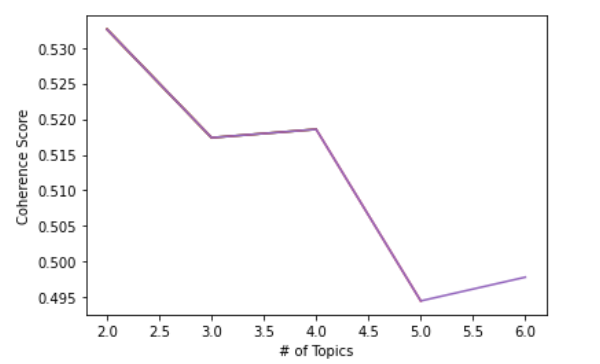
0.497 is not bad but not decent either. We want to know if the coherence score varies depending on the number of topics to be extracted from the corpus. We iterate from numbers 2 to 6 for the number of topics and store each coherence score in the variable called score which is initialized as an empty list. We then visualize this into a line graph using Python’s matplotlib package.

import matplotlib.pyplot as plt
topics = []
score = []
for i in range(2,7,1):
     lda = gensim.models.LdaMulticore(corpus=bow_corpus, id2word=dic, iterations=10, num_topics=i, workers = 3, passes=10, random_state=42)
     cm = CoherenceModel(model=lda, corpus=bow_corpus, texts=corpus, coherence='c_v')
     topics.append(i) # Append number of topics modeled
     score.append(cm.get_coherence()) # Append coherence scores to list
plt.plot(topics, score)
plt.xlabel('# of Topics')
plt.ylabel('Coherence Score')
plt.show()
Source: From the Author

We see that the coherence score the highest when there are two topics to be extracted. It constantly decreases as the number of topics increases.

We build the new LDA model based on two topics now.

# LDA model with two topics
lda_model2 = gensim.models.LdaMulticore(bow_corpus,
                                    num_topics = 2,
                                     id2word = dic,
                                        passes = 8,
                                       workers = 3)
lda_model2.save('model2.gensim')
# We print words occuring in each of the topics as we iterate through them
for idx, topic in lda_model2.print_topics(num_words=20):
print('Topic: {} \nWords: {}'.format(idx, topic))

Resulting Output:

Topic: 0  Words: 0.007*"The" + 0.005*"MAXAXAXAXAXAXAXAXAXAXAXAXAXAXAX" + 0.004*"From" + 0.004*"Subject" + 0.004*"Lines" + 0.004*"Organization" + 0.003*"one" + 0.002*"get" + 0.002*"year" + 0.002*"game" + 0.002*"like" + 0.002*"would" + 0.002*"time" + 0.002*"University" + 0.002*"writes" + 0.002*"team" + 0.002*"article" + 0.002*"dont" + 0.002*"This" + 0.002*"people" 
Topic: 1  Words: 0.009*"The" + 0.007*"From" + 0.007*"Subject" + 0.007*"Lines" + 0.007*"Organization" + 0.005*"would" + 0.005*"writes" + 0.005*"one" + 0.004*"article" + 0.003*"people" + 0.003*"know" + 0.003*"like" + 0.003*"University" + 0.003*"dont" + 0.003*"get" + 0.003*"think" + 0.002*"This" + 0.002*"use" + 0.002*"time" + 0.002*"say"

The output above shows that topic 0 is somewhat related to games and teams while topic 1 is more associated with action verbs including know, like, use and say. Since we have not removed those frequently appearing pronouns or articles that only serve their grammatical purposes but do not add much meaning or value to the model, the noise is still pretty rampant in both topics. Nevertheless, even with eye balling, we can get a slightly better sense of what each of the topics is about which usually suggests better coherence.

Visualizing LDA Results

Using another package called pyLDAvis, we can visualize the LDA results.

!pip install pyldavis
import pyLDAvis
import pyLDAvis.gensim_models

Please note that there has been an update to the pyLDAvis package and so the pyLDAvis.gensim module people used to know has now become pyLDAvis.gensim_models instead.

# Loading the dictionary and corpus files we saved earlier
dictionary = gensim.corpora.Dictionary.load('dictionary.gensim')
corpus = pickle.load(open('corpus.pkl', 'rb'))
# Loading the num_of_topics = 2 model we saved earlier
lda = gensim.models.ldamodel.LdaModel.load('model2.gensim')
pyLDAvis.enable_notebook()
vis = pyLDAvis.gensim_models.prepare(lda, bow_corpus, dic, sort_topics=False)
pyLDAvis.display(vis)
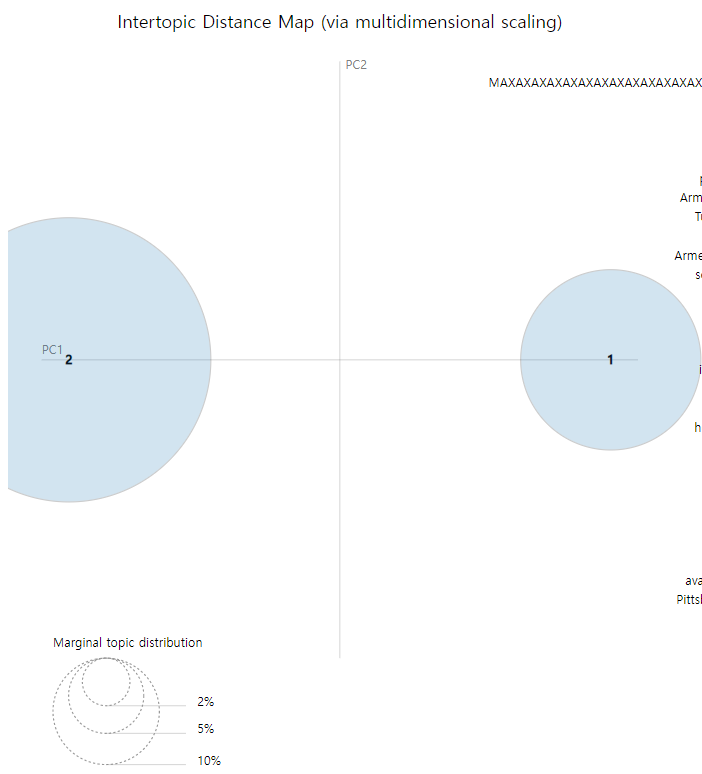
Source: From the Author

On the left side of the the pyLDAvis dashboard which I have screenshot above, the area of each circle represents the importance of the topic relative to the corpus. In addition, the distance between the center of the circles indicates the similarity between the topics.
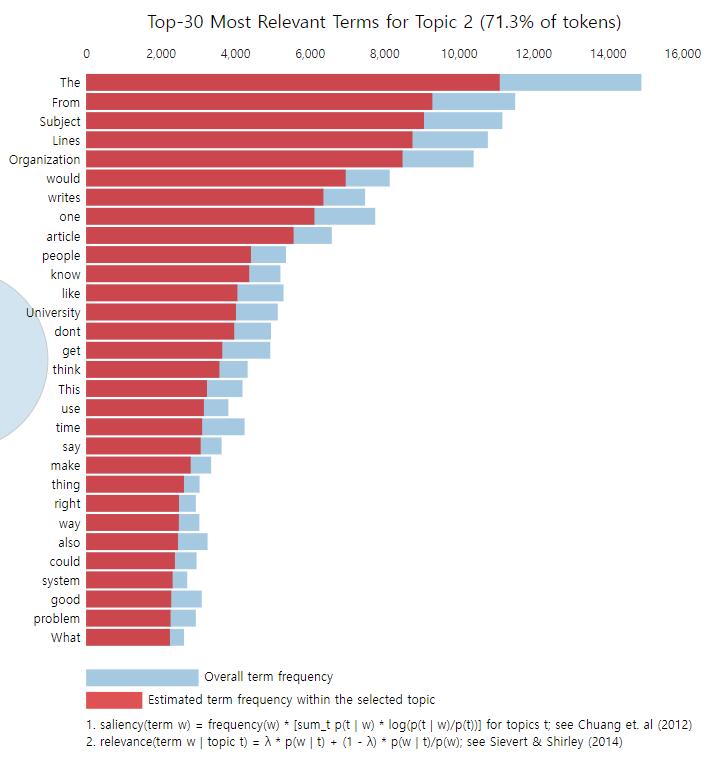
Source: From the Author

Now on the right side of the dashboard, as you see right above, the top 30 relevant words of each topic are displayed in a histogram with the red portion of the bar representing the estimated term frequency within the selected topic (saliency) and the light blue portion representing the overall term frequency.

Bonus

LDA has various versions. LDA Mallet, for instance, is another version of LDA that uses Gibbs Sampling which improves performance compared to the plain LDA model I showcased above. One downside of the LDA Mallet model is its computational inefficiency relative to its original counterpart and so for huge datasets, it may not be the most suitable.

Please take a look at the last part of this article to get to know more about the LDA Mallet model.

Conclusion

In this article, I introduced to you what topic modeling is and what the LDA model can do to perform topic modeling. I also walked you through step by step on how to clean and pre-process text data and then build the LDA model on top of it. Lastly, I elaborated on how to evaluate your LDA model and how to visualize the results.

One main point that the readers should bear in mind is that pre-processing is more important than you think to increase topic coherence. Some ways to ensure not too much noise is in the text data is to filter out extremely high or low frequency tokens and exclude specific Part-of-Speech (PoS) tagged words such as IN (e.g. upon, except) and MD (e.g. may, must). The latter, of course, must be preceded with the PoS tagging which is a separate NLP task in itself which I will introduce in another article.

If you found this post helpful, consider supporting me by signing up on medium via the following link : )

joshnjuny.medium.com

You will have access to so many useful and interesting articles and posts from not only me but also other authors!

About the Author

Data Scientist. 1st Year PhD student in Informatics at UC Irvine.

Former research area specialist at the Criminal Justice Administrative Records System (CJARS) economics lab at the University of Michigan, working on statistical report generation, automated data quality review, building data pipelines and data standardization & harmonization. Former Data Science Intern at Spotify. Inc. (NYC).

He loves sports, working-out, cooking good Asian food, watching kdramas and making / performing music and most importantly worshiping Jesus Christ, our Lord. Checkout his website!

Topic Modeling
Naturallanguageprocessing
NLP
Machine Learning
Data Science
Recommended from ReadMedium