
Learning Kubernetes the Right Way In 2024
Do you know OpenAI is deployed on Kubernetes and scaling to 7,500 worker nodes? When we talk about Kubernetes slots into microservices architecture, when we talk about a single unit of the loosely coupled unit, putting it into a container or leveraging Serverless functions are both viable solutions.
A container is a way to package and isolate an application and its dependencies in a way that allows them to be easily moved from one computing environment to another, a.k .a. portability. Plus, it makes deploying apps consistent and reliable, regardless of their computer setup.
It’s pretty straightforward handling just a few containers for testing or development. But things get tricky when dealing with hundreds or thousands, especially in enterprise-grade environments, managing networking, deployments, configuration, etc. Suddenly, everything becomes a struggle. That’s where the container orchestrator, such as Kubernetes, comes in.
So, in this blog post, let’s dig into Kubernetes and what makes it such a big deal in managing this container chaos.
Containers vs Virtual Machines in the real world
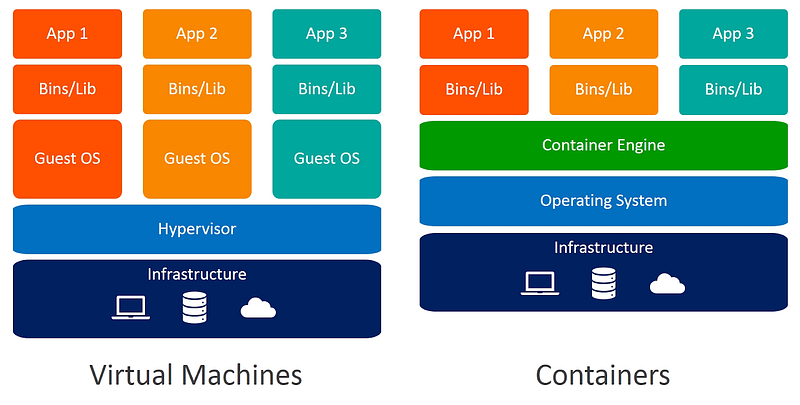
Compared to traditional virtual machines, containers offer greater density and enhanced infrastructure utilization compared to applications deployed on physical servers or VMs. Containers enable multiple lightweight instances on the same server, each utilizing minimal resources. This facilitates a higher density of applications without performance compromises.
For instance, imagine a physical server with 32GB of RAM and 8 CPU cores. In a virtual machine setup, you might allocate 8GB of RAM and 2 CPU cores to each virtual machine, limiting simultaneous applications. Your overall capacity is determined by the total resources minus the reserved resources that are needed by the OS system requirements and virtual machine management software. Not to mention, VM scaling is a painful process.
However, with containers, multiple lightweight instances run on the same server, each consuming a fraction of the resources. This allows for a higher density of applications without performance sacrifices, and you can easily define the resources needed for each container, and scaling is a much less stressful task.
The primary advantage of containerization is its ability to isolate applications from each other and the underlying operating system, enhancing stability and reliability. This isolation allows multiple applications to run on the same host without conflicts, facilitating effortless scaling to accommodate changing needs.
Imagine a flash sale on an e-commerce site. Containers enable the application to swiftly scale up by deploying extra instances across various hosts to manage the surge in traffic. After the event, these additional containers can be quickly scaled down or terminated, optimizing resource utilization. Containers’ inherent scalability and adaptability streamline the adaptation to shifting demands, ensuring a responsive and efficient system architecture.
Containers or Serverless ?
In recent years, cloud-native practices and serverless computing have significantly empowered developers and enterprises. By definition, serverless is an integral part of the broader cloud-native landscape. However, as technology progresses, the demarcation between these two realms is becoming more defined.
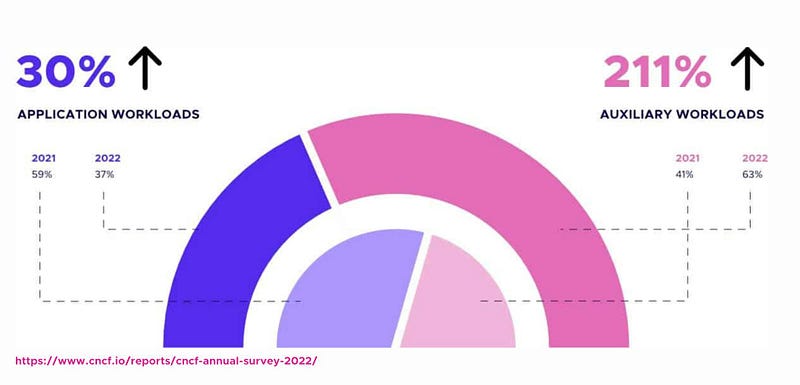
A growing number of enterprise users are leveraging Kubernetes to abstract server functionalities, ensuring the seamless containerization of applications and code in a cloud-native fashion.
Kubernetes isn’t just a platform for running application workloads, it’s now an integral part of handling auxiliary tasks. This includes managing security controls, service meshes, messaging systems, observability, and CI/CD tools. The versatility of Kubernetes extends beyond the primary function of application hosting.
On the other hand, serverless computing takes abstraction a step further. It allows developers to concentrate solely on crafting business logic without the burden of infrastructure concerns. Notably, some clients are reverting from microservices to monolithic architectures, primarily due to underestimated costs associated with storage, data transfer, and related factors. This shift reflects a nuanced evaluation of practical considerations in the pursuit of efficient and cost-effective development strategies. This blog posts to help you get up to speed about Serverless on Kubernetes in 2024.
Why Kubernetes matter
Looking back, several open-source container orchestrators have gained popularity in the market. Although Docker Swarm and Mesosphere’s DC/OS (the Distributed Cloud Operating System) are still talked about, Kubernetes stands out as the leading container orchestration tool. It’s an open-source platform designed for managing and deploying containerized workloads with its unfair advantages :
Scalability and Flexibility
Kubernetes stands out in managing complex, large-scale container deployments and efficiently handling extensive container counts across numerous machines.
Granular Resource Management
Kubernetes provides advanced resource management, allowing precise control over resources for each container and offering fine-grained allocation.
Fault Tolerance and High Availability
Kubernetes excels in fault tolerance and high availability, featuring auto-scaling and self-healing mechanisms for resilient applications.
What made Kubernetes so unique?
Kubernetes stands out in the cloud-native world thanks to its adaptable and highly flexible architecture, which we covered in the last section of this blog post. In addition, it is highly configurable and extensible on the following layers :
Container Runtime
The container runtime is the lowest software virtualization layer running containers. This layer supports a variety of runtimes in the market thanks to the Container Runtime Interface(CRI) plugin. CRI contains a set of protocol buffers, specifications, grpc API , libraries, and tools. We’ll cover how to cooperate with different runtimes when provisioning the Kubernetes cluster. Containerd is a lightweight container runtime that is designed to be efficient and scalable. It is also well-integrated with Kubernetes, making it a good choice for running containers on Kubernetes clusters. It became the default runtime for Kubernetes in version 1.24. This makes containerd is now the preferred way to run containers on Kubernetes and also makes it even more popular than ever before.
Networking
The networking layer in Kubernetes is governed by Kubenet or the Container Network Interface (CNI). This layer is tasked with configuring network interfaces specifically for Linux containers, primarily Kubernetes pods. The CNI is a project under the Cloud Native Computing Foundation (CNCF) and encompasses CNI specifications, plugins, and a library.
Storage
The storage layer in Kubernetes posed significant challenges before the introduction of the Container Storage Interface (CSI) as a standard interface for exposing block and file storage systems. Earlier, storage volumes were managed by storage drivers customized by storage vendors, which were initially integrated into Kubernetes’ source code. With CSI-compatible volume drivers now available, users can utilize CSI volumes to attach or mount them onto running pods within a Kubernetes cluster.
Kubernetes cluster architecture
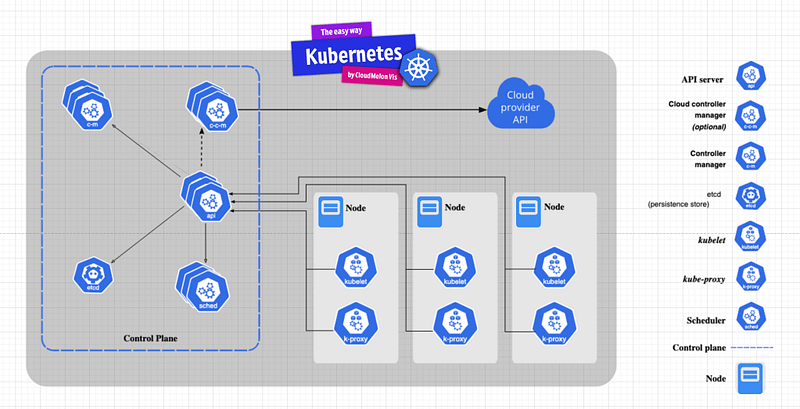
Kubernetes interpreted the master-slave architecture. The Kubernetes master node, or control plane, responds to cluster events and houses vital components:
- API Server: The core of the Kubernetes control plane, kube-apiserver, acts as the communication manager, exposing the REST API for seamless interaction among Kubernetes components.
- ETCD: A distributed key-value store storing cluster state, encompassing nodes, pods, configmaps, secrets, and more.
- Kubernetes Scheduler: Responsible for pod-node scheduling, kube-scheduler functions like a postal officer, dispatching pod info to nodes for workload provisioning by the kubelet agent.
- Controllers: These align Kubernetes with desired states, operating within the kube-controller-manager and encompassing replication, endpoint, and namespace controllers. In Kubernetes, In Kubernetes, controllers act as control loops. They continuously monitor the cluster’s status and initiate or ask for alterations when necessary. Each controller aims to align the present cluster condition with the desired state.
Additionally, every worker node in a Kubernetes cluster running workloads includes:
- kubelet: An agent on each worker node receiving pod specs ( basically information about this pod ) from the API server or locally ( in case it is a static pod ), then provisioning containerized workloads.
- Container Runtime: Facilitating container execution within pods on each node, e.g., Docker, CRI-O, or Containerd.
- kube-proxy: Implements network rules and traffic forwarding for deployed service objects in the Kubernetes cluster, operating on each worker node.
How those components play together
A typical workflow in Kubernetes demonstrates how its components collaborate.
- Using kubectl commands, YAML specifications, or other API calls triggers the API server to create a pod definition. The scheduler then identifies an available node, using filtering and scoring to find the best placement for the new pod.
- The API server communicates this information to the kubelet agent on the chosen worker node. The kubelet then creates the pod and instructs the container runtime to deploy the application image. Once completed, the kubelet reports the status back to the API server, which updates the data in the etcd store, notifying the user of the pod’s creation.
That mechanism repeats every time tasks are executed. Tasks such as using Kubectl commands or deploying YAML definitions. All interactions between components and external user commands involve REST API calls handled by the API server, treated as API Objects within Kubernetes, as shown in the following diagram :
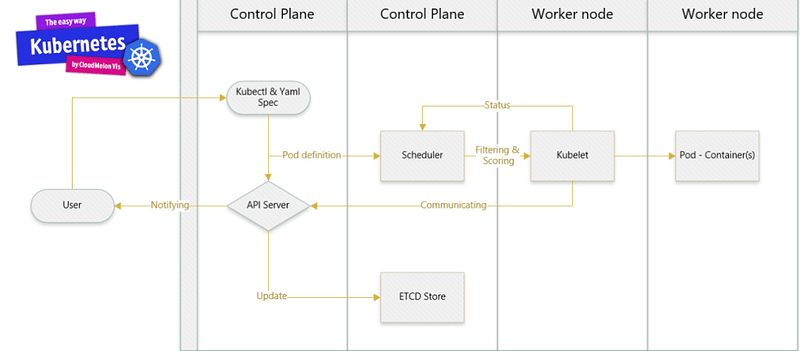
In Kubernetes, executing a kubectl command involves reaching out to the Kube-apiserver. This server authenticates and validates requests, updates information in ETCD, and retrieves the requested information.
On each worker node, the kubelet agent utilizes PodSpecs, which are primarily provided by the API server. It provisions containerized workloads, ensuring they match the PodSpecs’ descriptions. PodSpecs, represented in YAML and translated into JSON objects, outline workload specifications.
Check out this video to get an idea about how to start with Minikube in a matter of minutes :
If you’re keen to pass the CKA ( Certified Kubernetes Administrator ) Exam to get certified by CNCF, there are many resources available in the community; I will see an opportunity to write a post about this when it represents itself. Check out my book, CKA Exam Guide by Packt Publishing, which’ll walk you through this exam and get a comprehensive view of the skills required to be a Kubernetes administrator.
Looking forward
As we see, cloud-native technologies can be leveraged to create powerful software solutions that are both efficient and reliable. If you enjoy learning and entrepreneurship, you can follow me on my YouTube channel or Medium as I’m here to practice my entrepreneurship muscle every week! Stay tuned, and see you in the next one!


