Learning Go: Part Thirteen — Kafka with Go
This presents an overview of using Kafka with Go. They make a powerful combination for your event processing needs.

Learn Go Series
- Part One — Basic Concepts
- Part Two — Types, Loops and Flow Control
- Part Three — Functions and Pointers
- Part Four — Collections, Arrays, Maps and Slices
- Part Five — Interfaces, Structs and File Processing
- Part Six — Command Line Processing and Config Files
- Part Seven — Project Structure, Packages and Modules
- Part Eight — Concurrency and Channels
- Part Nine — Generics and Error Handling
- Part Ten — Builder Pattern, Logging & Testing
- Part Eleven- Web APIs & Services
- Part Twelve — Database Interaction
- Part Thirteen — Kafka with Go — this article
Introduction
This is Part Thirteen in the Learning Go series. This will cover interfacing to Kafka from Go. We will do this through a straight forward example where we produce a message to a topic on Kafka and then with another process we consume that message.
We will use a few external packages for this which will be explained as we get into details in the article.
Kafka Overview
First let’s introduce Kafka and discuss some basic concepts. If you are familiar with Kafka feel free to skip to the next section as this will likely be information you are already aware of. This article is coming from a direction of a Go programmer so I don’t want to assume Kafka knowledge before proceeding.
Kafka is an open-source distributed event streaming platform used for high-performance data pipelines, streaming analytics, data integration, and other mission-critical applications.
Kafka consists of several components. Kafka is run as a cluster of one or more servers. Some of these servers form the storage layer, called the brokers. The newer version of Kafka soon to be the default has a concept of controller brokers that are used for metadata management and not for storage. Previously with the use of Zookeeper, as we do in our docker compose file. Starting Kafka in the new mode requires a couple of extra steps we want to avoid since this is an article focused more on Go than Kafka.
An event is what is stored in Kafka and records the fact that “something happened” in the world that should be noted. It is also called record or message. When you read or write data to Kafka, you do this using events. An event has a key, value, timestamp, and optionally headers.
Producers are the client applications that publish (write) events to Kafka.
Consumers are the entities (clients) that subscribe (read) these events.
Events are organized and durably stored in topics. Topics in Kafka are always multi-producer and multi-subscriber: a topic can have zero, one, or many producers that write events to it, as well as zero, one, or many consumers that subscribe to these events. Events in a topicm unlike in other messaging systems, can be read as often as needed. They are not deleted after they are consumed. But instead, you can define for how long Kafka should retain your events (default is 7 days).
Finally, topics are partitioned, meaning a topic is spread over a number of locations on different Kafka brokers. Events with the same event key (e.g., a project id, or session id) are written to the same partition, and Kafka makes sure that any consumer of a given topic-partition will always read that partition’s events in exactly the same order as they were written.
Running Kafka
Code for this article can be found in my Github repository here.
So now we are familiar with Kafka, let’s start our Kafka cluster so we can use it from our Go application. Ours will be a simple cluster with a single broker. It will also start a single Zookeeper node for metadata managements.
This is our docker-compose.yml file contents for running Kafka.
version: "3"
services:
  zookeeper:
    image: 'bitnami/zookeeper:latest'
    ports:
      - '2181:2181'
    environment:
      - ALLOW_ANONYMOUS_LOGIN=yes
  kafka:
    image: 'bitnami/kafka:3.2'
    ports:
      - '9092:9092'
    environment:
      - KAFKA_BROKER_ID=1
      - KAFKA_CFG_LISTENERS=PLAINTEXT://:9092
      - KAFKA_CFG_ADVERTISED_LISTENERS=PLAINTEXT://localhost:9092
      - KAFKA_CFG_ZOOKEEPER_CONNECT=zookeeper:2181
      - ALLOW_PLAINTEXT_LISTENER=yes
      - KAFKA_CFG_LOG_RETENTION_HOURS=6
    depends_on:
      - zookeeper
It uses a well known Docker image from Bitnami and starts one broker listening on port 9092 (the default port for Kafka).
Running this command will start the single broker.
docker-compose up
The first time it will download the docker images and then you should see the following output.
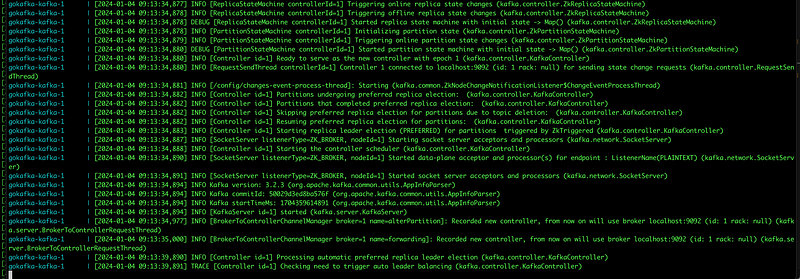
Where within the last few lines you will see this.
[KafkaServer id=1] started (kafka.server.KafkaServer)
Which tells you Kafka was successfully started.
If you have any Kafka tool available, I use Offset Explorer for Zookeeper based kafka installs. It can be found here. https://www.kafkatool.com/
Configure your zookeeper host and port to localhost:2181 and under the advanced tab brokers to localhost:9092 and select Connect. At this point you won’t be able to see much as our cluster has no topics.
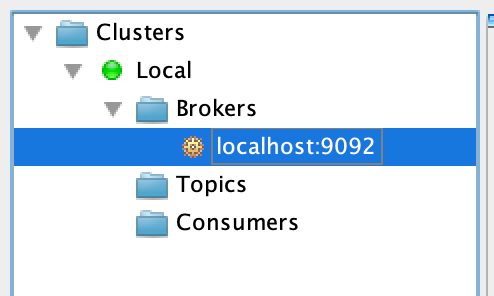
But, we have verified the cluster is up and running and we can proceed to code our producer and consumer for publishing and reading from Kafka.
Producer
Our producer will consist of three components. The first part defines the event structure we will be writing to Kafka. The second is the mechanism how these events will be produced and the third is the actual Kafka producer code to push the message onto the Kafka topic. We will look at each of these in order and then bring it altogether.
Event Structure
Our event is simulating writing information related to a project. To do this we are tracking some information like title, description, category. The structure in Go is defined as follows.
type Project struct {
 Id          string `form:"text" json:"id"`
 Title       string `form:"text" json:"title"`
 Category    string `form:"text" json:"category"`
 Description string `form:"text" json:"description"`
}
Since we will be passing the information as Json and returning it as Json we have defined the Json structure along with the Go struct type.
API
The next part of our producer is an external API that we can send events to our producer that will be forwarded to Kafka. To do this we will use Fiber. Fiber is a Go web framework built on top of Fasthttp. It is an easy way to quickly setup external APIs and routes for handling the requests.
For more information on Fiber you can read my last installment on Database interaction where we went into detail on building an API on top of a database interface.
To create our API we supply the following code within our main.
 app := fiber.New()
 api := app.Group("/api/") // /api

 api.Post("/projects", createProject)

 app.Listen(":3000")
The createProject function is a route handler and is defined as follows.
// create Project handler
func createProject(c *fiber.Ctx) error {

 // Instantiate new Message struct
 prj := new(Project)

 //  Parse body into project struct
 if err := c.BodyParser(prj); err != nil {
  log.Println(err)
  c.Status(400).JSON(&fiber.Map{
   "success": false,
   "message": err,
  })
  return err
 }
 // convert body into bytes and send it to kafka
 cmtInBytes, _ := json.Marshal(prj)
 PushProjectToTopic("projects", cmtInBytes)

 // Return project in JSON format
 err := c.JSON(&fiber.Map{
  "success": true,
  "message": "Project pushed successfully",
  "project": prj,
 })
 if err != nil {
  c.Status(500).JSON(&fiber.Map{
   "success": false,
   "message": "Error creating project message",
  })
  return err
 }
 return err
}
The majority of the code is concerned with taking the incoming request and converting it into our project structure, returning a response with the new project event info or error handling. The two lines related to kafka within this function are these.
// convert body into bytes and send it to kafka
 prjInBytes, _ := json.Marshal(prj)
 PushProjectToTopic("projects", prjInBytes)
The PushProjectToTopic function we will look at in the next section.
Write To Kafka
This portion of the producer discussion is covering the actual writing to kafka. Below is the code where this is done. It consists of two functions.
func ConnectProducer(brokersUrl []string) (sarama.SyncProducer, error) {

 config := sarama.NewConfig()
 config.Producer.Return.Successes = true
 config.Producer.RequiredAcks = sarama.WaitForAll
 config.Producer.Retry.Max = 3

 conn, err := sarama.NewSyncProducer(brokersUrl, config)
 if err != nil {
  return nil, err
 }

 return conn, nil
}

func PushProjectToTopic(topic string, message []byte) error {

 brokersUrl := []string{"localhost:9092"}
 producer, err := ConnectProducer(brokersUrl)
 if err != nil {
  return err
 }

 defer producer.Close()

 msg := &sarama.ProducerMessage{
  Topic: topic,
  Value: sarama.StringEncoder(message),
 }

 partition, offset, err := producer.SendMessage(msg)
 if err != nil {
  return err
 }

 fmt.Printf("Message is stored in topic(%s)/partition(%d)/offset(%d)\n", topic, partition, offset)

 return nil
}
The first, ConnectProducer makes the connection to Kafka. We are using the sarama package which was originally developed by Shopify, but is now maintained by IBM. Github for it is here. This is a complete Package for Go applications to interface with Kafka.
PushProjectToTopic received as parameter the topic name and a byte stream of the event. After connecting via the ConnectProducer function, it finalizes the producer configuration and sends the message to Kafka. Any error this is returned otherwise the information on the message stored is printed.
This is our complete producer.
Consumer
Our consumer is much smaller in size as it must only open a connection and then in a endless loop listen on the topic until the connection is ended. It prints a message each time a message is received. Interesting are two items in the consumer.
The consumer portion runs in a Goroutine that will run until a special signal channel called doneCh recieves a message. Then the main function will exist and the consumer application will end. Let’s see the code.
package main

import (
 "fmt"
 "os"
 "os/signal"
 "syscall"

 "github.com/Shopify/sarama"
)

func main() {

 topic := "projects"
 worker, err := connectConsumer([]string{"localhost:9092"})
 if err != nil {
  panic(err)
 }

 // Calling ConsumePartition.
 // It will open one connection per broker and share it for all
 // partitions that live on it.  Using OffsetOldest to start from beginning offset
 consumer, err := worker.ConsumePartition(topic, 0, sarama.OffsetOldest)
 if err != nil {
  panic(err)
 }

 fmt.Println("Consumer started ")
 sigchan := make(chan os.Signal, 1)
 signal.Notify(sigchan, syscall.SIGINT, syscall.SIGTERM)
 // Count how many message processed
 msgCount := 0

 // Get signal for finish
 doneCh := make(chan struct{})
 go func() {
  for {
   select {
   case err := <-consumer.Errors():
    fmt.Println(err)
   case msg := <-consumer.Messages():
    msgCount++
    fmt.Printf("Received message Count %d: | Topic(%s) | Message(%s) \n", msgCount, string(msg.Topic), string(msg.Value))
   case <-sigchan:
    fmt.Println("Interrupt is detected")
    doneCh <- struct{}{}
   }
  }
 }()

 <-doneCh
 fmt.Println("Processed", msgCount, "messages")

 if err := worker.Close(); err != nil {
  panic(err)
 }
}

func connectConsumer(brokersUrl []string) (sarama.Consumer, error) {
 config := sarama.NewConfig()
 config.Consumer.Return.Errors = true

 conn, err := sarama.NewConsumer(brokersUrl, config)
 if err != nil {
  return nil, err
 }
 return conn, nil
}
Once the consumer is connection in the connectConsumer function and created within the main, all the work is accomplished within the anonymous Goroutine. This continues until an interrupt is detected and then the program exits.
Testing
Let’s see this in action. First we need to start our producer.
From the root directory run.
go run producer/producer.goThe following will be shown on the screen.
brianenochson@Brians-MacBook-Pro gokafka % go run producer/producer.go

 ┌───────────────────────────────────────────────────┐
 │                    Fiber v2.3.2                   │
 │               http://127.0.0.1:3000               │
 │                                                   │
 │ Handlers ............. 1  Processes ........... 1 │
 │ Prefork ....... Disabled  PID ............. 45992 │
 └───────────────────────────────────────────────────┘
This shows our API is running on port 3000.
Next let’s start our consumer.
go run consumer/consumer.goWhich simply prints “Consumer Started” to the screen.
Now we need to send a message to our producer. The API call is a POST to http://localhost:3000/api/projects.
The body looks as follows.
{
    "title": "Go Web API",
    "category": "Software Development",
    "description": "Software development project in Go"
}
In postman I am using the following.
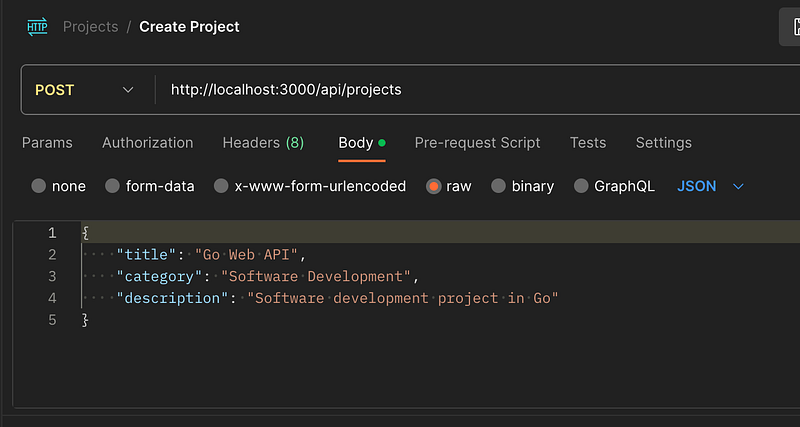
Pressing Send and I get the following Response.
{
    "message": "Project pushed successfully",
    "project": {
        "id": "",
        "title": "Go Web API",
        "category": "Software Development",
        "description": "Software development project in Go"
    },
    "success": true
}
Also, in the window where my Consumer was running I see the following.

Showing the output from my consumer.
Finally, pressing Ctrl^C in the consumer Window I see the interrupt signal is sent and the final message is displayed.

This verifies our consumer and producer are working correctly and we have successfully connected our Go application with Kafka.
Summary
This was the thirteenth article in the Learning Go series. In this article we first looked at Kafka and some basic concepts. We then ran through how to start a single Kafka broker. Next we dove into the code for our producer and consumer. Finally, we tested it all out by sending data via an API that was sent to Kafka and consumed from our topic.
Thanks for coming along on this Learning Go Odyssey.
Code for this article can be found in my Github repository here.
Enjoy the journey.
🔔 If you enjoyed this, subscribe to my future articles, follow me if you like or view already published articles here. 🚀
📝 Have questions or suggestions or any ideas for topics? Leave a comment or message me through Medium.
Thank you for your support! 🌟


