
Medium formatting
Learn To Format Your Story. I Don’t Read a Wall of Text
My tips for new Medium writers
Hello and welcome new Medium writers. I want to tell you this about writing stories on Medium: I don’t read a wall of text. No matter how good your story is, I will never read it if you overwhelm me.
My advice
Spend time formatting your story to make it as easy to read as possible.
Invite me into your text and make it delicate to look at. Design your layout in such a way that I’m floating effortlessly through your story. Don’t make me give up when I try to get through the first paragraph.
How To Format Your Story
White space
White space is the absence of content. Use it intentionally. Allow me to process your words. White space throughout your story could avoid giving your reader information fatigue.
Medium’s story editor
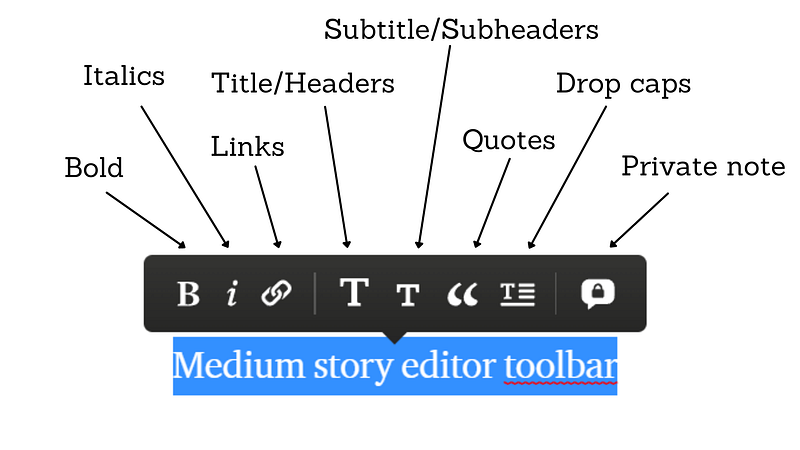
Use Medium's story editor to format your story. Create life to your text by using titles, subtitles, headers, subheaders, images, bold, italics, links, quotes, lists, etc.
Select your text and choose a feature from the story editor toolbar. The toolbar is described in the image below.
Read all about how to use the formatting options in this story:
Dear new writer, spend time designing your text. This is not just an empty phrase. I have stopped reading many stories due to the lack of readability. I will read your text if you make it easy to read.
This story is written in response to Ellie Jacobson great prompt What Are Your Tips for New Medium Writers?
My latest story, about anxiety and mental health:
Do you want to become a part of the Medium community? If you’re not a member yet, I’ll be very happy if you sign up via my referral link. It’s $5 a month, giving you unlimited access to all stories on Medium. I’ll get a small commission at no additional cost for you.


