avatarCostas Andreou

Free AI web copilot to create summaries, insights and extended knowledge, download it at here

10188

Abstract

">back</span> <span class="hljs-variable">these</span> <span class="hljs-variable">many</span> <span class="hljs-variable">days</span>',<span class="hljs-variable">w</span>)</span> <span class="hljs-punctuation">#</span><span class="hljs-keyword">remember</span> to add an extra day as percentage difference will leave first value blank (days +1 = scenario numbers) return(today - datetime.timedelta(days = w1.04 + 1)) <span class="hljs-punctuation">#</span>4% is an arbitrary number I've calculated the holidays to be in 500days.</pre></div><p id="53de">Next up, we need to value our portfolio.</p><div id="10d4"><pre>def <span class="hljs-symbol">ValuePortfolio</span>(): <span class="hljs-symbol">HistData</span>[<span class="hljs-string">'PortValue'</span>] = <span class="hljs-number">0</span> i=<span class="hljs-number">0</span> if info == <span class="hljs-number">1</span>: print(<span class="hljs-string">'[INFO] Calculating the portfolio value for each day'</span>) while i<= len(data): stock = data[<span class="hljs-string">'Stocks'</span>][i] quantity = data[<span class="hljs-string">'Quantity'</span>][i] <span class="hljs-symbol">HistData</span>[<span class="hljs-string">'PortValue'</span>] = <span class="hljs-symbol">HistData</span>[stock] * quantity + <span class="hljs-symbol">HistData</span>[<span class="hljs-string">'PortValue'</span>] i = i+<span class="hljs-number">1</span></pre></div><p id="7c75">which results in:</p><figure id="0191"><img src="https://cdn-images-1.readmedium.com/v2/resize:fit:800/1*gd1VUruzLWrZf4twaKZ6iw.png"><figcaption></figcaption></figure><p id="8477">So now, we can go ahead and calculate the percentage change:</p><div id="00d8"><pre>def CalculateVaR(): <span class="hljs-keyword">if</span> <span class="hljs-built_in">info</span> == 1: <span class="hljs-built_in">print</span>(<span class="hljs-string">'[INFO] Calculating Daily % Changes'</span>) HistData[<span class="hljs-string">'Perc_Change'</span>] = HistData[<span class="hljs-string">'PortValue'</span>].pct_change() #calculating percentage change</pre></div><p id="9081">Then the portfolio’s valuation change:</p><div id="92da"><pre>HistData[<span class="hljs-string">'DollarChange'</span>] = HistData.<span class="hljs-keyword">loc</span>[HistData.<span class="hljs-built_in">index</span>.<span class="hljs-built_in">max</span>()][<span class="hljs-string">'PortValue'</span>] * HistData[<span class="hljs-string">'Perc_Change'</span>] #calculate money <span class="hljs-keyword">change</span> based <span class="hljs-keyword">on</span> current valuation <span class="hljs-keyword">if</span> info == <span class="hljs-number">1</span>: <span class="hljs-keyword">print</span>(<span class="hljs-string">'[INFO] Picking'</span>, <span class="hljs-built_in">round</span>(HistData.<span class="hljs-keyword">loc</span>[HistData.<span class="hljs-built_in">index</span>.<span class="hljs-built_in">max</span>()][<span class="hljs-string">'PortValue'</span>],<span class="hljs-number">2</span>),<span class="hljs-string">' value from '</span>, HistData.<span class="hljs-built_in">index</span>.<span class="hljs-built_in">max</span>().<span class="hljs-built_in">strftime</span>(<span class="hljs-string">'%Y-%m-%d'</span>), <span class="hljs-string">' as the latest valuation to base the monetary returns'</span>)</pre></div><p id="d1a1">Then determine the n-th value we need to pick for our confidence interval:</p><div id="d3bb"><pre>ValueLocForPercentile = round(len(HistData) * (1 - (Percentile / 100))) <span class="hljs-keyword">if</span> <span class="hljs-built_in">info</span> == 1: <span class="hljs-built_in">print</span>(<span class="hljs-string">'[INFO] Picking the'</span>, ValueLocForPercentile, <span class="hljs-string">'th highest value'</span>)</pre></div><p id="b49c">Sort the data and select the value:</p><div id="ed9b"><pre>global SortedHistData SortedHistData = HistData.sort_values(by=[<span class="hljs-string">'DollarChange'</span>]) <span class="hljs-keyword">if</span> <span class="hljs-built_in">info</span> == 1: <span class="hljs-built_in">print</span>(<span class="hljs-string">'[INFO] Sorting the results by highest max loss'</span>)</pre></div><p id="64e2">and finally, calculate our portfolio’s VaR value:</p><div id="40f4"><pre>VaR_Result = SortedHistData.iloc[ValueLocForPercentile + <span class="hljs-number">1</span>,len(SortedHistData.<span class="hljs-built_in">columns</span>)-<span class="hljs-number">1</span>] * <span class="hljs-built_in">np</span>.<span class="hljs-built_in">sqrt</span>(VarDaysHorizon)</pre></div><div id="d78a"><pre>print('The portfolio's VaR is:', round(<span class="hljs-name">VaR_Result</span>,<span class="hljs-number">2</span>))</pre></div><p id="1a09">Resulting in:</p><figure id="313f"><img src="https://cdn-images-1.readmedium.com/v2/resize:fit:800/1*glmgziVkFhdluoFcVldT4A.png"><figcaption></figcaption></figure><p id="7c07">Putting it all together gives:</p><div id="4b34"><pre><span class="hljs-title">from</span> tiingo <span class="hljs-keyword">import</span> TiingoClient <span class="hljs-keyword">import</span> pandas <span class="hljs-keyword">as</span> pd, datetime, numpy <span class="hljs-keyword">as</span> np <span class="hljs-keyword">import</span> matplotlib.pyplot <span class="hljs-keyword">as</span> plt</pre></div><div id="a622"><pre><span class="hljs-keyword">import</span> warnings warnings.filterwarnings(<span class="hljs-string">'ignore'</span>) #Tiingo API <span class="hljs-keyword">is</span> <span class="hljs-keyword">returning</span> a <span class="hljs-built_in">warning</span> due <span class="hljs-keyword">to</span> an upcoming pandas <span class="hljs-keyword">update</span></pre></div><div id="1015"><pre><span class="hljs-comment">#User Set Up</span> <span class="hljs-attr">data</span> = {<span class="hljs-string">'Stocks'</span>:[<span class="hljs-string">'GOOGL'</span>, <span class="hljs-string">'TSLA'</span>,<span class="hljs-string">'AAPL'</span>], <span class="hljs-string">'Quantity'</span>:[<span class="hljs-number">100</span>, <span class="hljs-number">50</span>, <span class="hljs-number">300</span>]} <span class="hljs-comment">#Define your holdings</span> <span class="hljs-attr">ScenariosNo</span> = <span class="hljs-number">500</span> <span class="hljs-comment">#Define the number of scenarios you want to run</span> <span class="hljs-attr">Percentile</span> = <span class="hljs-number">99</span> <span class="hljs-comment">#Define your confidence interval</span> <span class="hljs-attr">VarDaysHorizon</span> = <span class="hljs-number">1</span> <span class="hljs-comment">#Define your time period</span> <span class="hljs-attr">info</span> = <span class="hljs-number">1</span> <span class="hljs-comment">#1 if you want more info returned by the script</span></pre></div><div id="fc5b"><pre><span class="hljs-comment"># Create a DataFrame of holdings</span> df = pd.DataFrame(data) <span class="hljs-built_in">print</span>(<span class="hljs-string">'[INFO] Calculating the max amount of money the portfolio will lose within'</span>, VarDaysHorizon, <span class="hljs-string">'days'</span>, Percentile, <span class="hljs-string">'percent of the time.'</span>)</pre></div><div id="0db7"><pre><span class="hljs-attribute">today</span> <span class="hljs-operator">=</span> datetime.date.today() - datetime.timedelta(days<span class="hljs-operator">=</span><span class="hljs-number">1</span>)</pre></div><div id="59f6"><pre>def <span class="hljs-built_in">is_business_day</span>(<span class="hljs-built_in">date</span>): <span class="hljs-keyword">return</span> <span class="hljs-keyword">bool</span>(<span class="hljs-built_in">len</span>(pd.<span class="hljs-built_in">bdate_range</span>(<span class="hljs-built_in">date</span>, <span class="hljs-built_in">date</span>)))</pre></div><div id="e641"><pre>def dateforNoOfScenarios(date): i=0 w=0 while i < ScenariosNo: if (is_business_day(today - datetime.timedelta(days = w)) == True): i = i+1 w = w+1 else: w = w+1 continue <span class="hljs-punctuation">#</span><span class="hljs-keyword">print</span><span class="hljs-params">('<span class="hljs-variable">gotta</span> <span class="hljs-variable">go</span> <span class="hljs-variable">back</span> <span class="hljs-variable">these</span> <span class="hljs-variable">many</span> <span class="hljs-variable">business</span> <span class="hljs-variable">days</span>',<span class="hljs-variable">i</span>)</span> <span class="hljs-punctuation">#</span><span class="hljs-keyword">print</span><span class="hljs-params">('<span class="hljs-variable">gotta</span> <span class="hljs-variable">go</span> <span class="hljs-variable">back</span> <span class="hljs-variable">these</span> <span class="hljs-variable">many</span> <span class="hljs-variable">days</span>',<span class="hljs-variable">w</span>)</span> <span class="hljs-punctuation">#</span><span class="hljs-keyword">remember</span> to add an extra day (days +1 = scenario numbers) return(today - datetime.timedelta(days = w1.04 + 1)) <span class="hljs-punctuation">#</span>4% is an arbitary number i've calculated the holidays to be in 500days.</pre></div><div id="1be5"><pre>def SourceHistoricPrices(): <span class="hljs-keyword">if</span> <span class="hljs-built_in">info</span> == 1: <span class="hljs-built_in">print</span>(<span class="hljs-string">'[INFO] Fetching stock prices for portfolio holdings'</span>) #<span class="hljs-built_in">Set</span> Up <span class="hljs-keyword">for</span> Tiingo <span class="hljs-built_in"> config </span>= {} config[<span class="hljs-string">'session'</span>] = <span class="hljs-literal">True</span> config[<span class="hljs-string">'api_key'</span>] = <span class="hljs-string">'private key'</span> <span class="hljs-built_in"> client </span>= TiingoClient(config) #Create a list of tickers <span class="hljs-keyword">for</span> the API call Tickers = [] <span class="hljs-attribute">i</span>=0 <span class="hljs-keyword">for</span> ticker <span

Options

class="hljs-keyword">in</span> data: <span class="hljs-keyword">while</span> i <= len(data): Tickers.append(data[ticker][i]) <span class="hljs-attribute">i</span>=i+1 <span class="hljs-keyword">if</span> <span class="hljs-built_in">info</span> == 1: <span class="hljs-built_in">print</span>(<span class="hljs-string">'[INFO] Portfolio Holdings determined as'</span>, Tickers) <span class="hljs-keyword">if</span> <span class="hljs-built_in">info</span> == 1: <span class="hljs-built_in">print</span>(<span class="hljs-string">'[INFO] Portfolio Weights determined as'</span>, data[<span class="hljs-string">'Quantity'</span>]) #Call the API <span class="hljs-keyword">and</span> store the data global HistData HistData = client.get_dataframe(Tickers, <span class="hljs-attribute">metric_name</span>=<span class="hljs-string">'close'</span>, <span class="hljs-attribute">startDate</span>=dateforNoOfScenarios(today), <span class="hljs-attribute">endDate</span>=today) <span class="hljs-keyword">if</span> <span class="hljs-built_in">info</span> == 1: <span class="hljs-built_in">print</span>(<span class="hljs-string">'[INFO] Fetching stock prices completed.'</span>, len(HistData), <span class="hljs-string">'days.'</span>) return(HistData)</pre></div><div id="08bd"><pre>def <span class="hljs-symbol">ValuePortfolio</span>(): <span class="hljs-symbol">HistData</span>[<span class="hljs-string">'PortValue'</span>] = <span class="hljs-number">0</span> i=<span class="hljs-number">0</span> if info == <span class="hljs-number">1</span>: print(<span class="hljs-string">'[INFO] Calculating the portfolio value for each day'</span>) while i<= len(data): stock = data[<span class="hljs-string">'Stocks'</span>][i] quantity = data[<span class="hljs-string">'Quantity'</span>][i] <span class="hljs-symbol">HistData</span>[<span class="hljs-string">'PortValue'</span>] = <span class="hljs-symbol">HistData</span>[stock] * quantity + <span class="hljs-symbol">HistData</span>[<span class="hljs-string">'PortValue'</span>] i = i+<span class="hljs-number">1</span></pre></div><div id="9a82"><pre>def CalculateVaR(): <span class="hljs-keyword">if</span> info == <span class="hljs-number">1</span>: <span class="hljs-keyword">print</span>(<span class="hljs-string">'[INFO] Calculating Daily % Changes'</span>) #calculating percentage <span class="hljs-keyword">change</span> HistData[<span class="hljs-string">'Perc_Change'</span>] = HistData[<span class="hljs-string">'PortValue'</span>].pct_change() #calculate money <span class="hljs-keyword">change</span> based <span class="hljs-keyword">on</span> current valuation HistData[<span class="hljs-string">'DollarChange'</span>] = HistData.<span class="hljs-keyword">loc</span>[HistData.<span class="hljs-built_in">index</span>.<span class="hljs-built_in">max</span>()][<span class="hljs-string">'PortValue'</span>] * HistData[<span class="hljs-string">'Perc_Change'</span>] <span class="hljs-keyword">if</span> info == <span class="hljs-number">1</span>: <span class="hljs-keyword">print</span>(<span class="hljs-string">'[INFO] Picking'</span>, <span class="hljs-built_in">round</span>(HistData.<span class="hljs-keyword">loc</span>[HistData.<span class="hljs-built_in">index</span>.<span class="hljs-built_in">max</span>()][<span class="hljs-string">'PortValue'</span>],<span class="hljs-number">2</span>),<span class="hljs-string">' value from '</span>, HistData.<span class="hljs-built_in">index</span>.<span class="hljs-built_in">max</span>().<span class="hljs-built_in">strftime</span>(<span class="hljs-string">'%Y-%m-%d'</span>), <span class="hljs-string">' as the latest valuation to base the monetary returns'</span>) ValueLocForPercentile = <span class="hljs-built_in">round</span>(<span class="hljs-built_in">len</span>(HistData) * (<span class="hljs-number">1</span> - (Percentile / <span class="hljs-number">100</span>))) <span class="hljs-keyword">if</span> info == <span class="hljs-number">1</span>: <span class="hljs-keyword">print</span>(<span class="hljs-string">'[INFO] Picking the'</span>, ValueLocForPercentile, <span class="hljs-string">'th highest value'</span>) <span class="hljs-keyword">global</span> SortedHistData SortedHistData = HistData.sort_values(by=[<span class="hljs-string">'DollarChange'</span>]) <span class="hljs-keyword">if</span> info == <span class="hljs-number">1</span>: <span class="hljs-keyword">print</span>(<span class="hljs-string">'[INFO] Sorting the results by highest max loss'</span>) VaR_Result = SortedHistData.iloc[ValueLocForPercentile + <span class="hljs-number">1</span>,<span class="hljs-built_in">len</span>(SortedHistData.columns)-<span class="hljs-number">1</span>] * np.<span class="hljs-built_in">sqrt</span>(VarDaysHorizon) <span class="hljs-keyword">print</span>(<span class="hljs-string">'The portfolio'</span>s VaR <span class="hljs-keyword">is</span>:<span class="hljs-string">', round(VaR_Result,2))</span></pre></div><div id="475f"><pre>def <span class="hljs-built_in">CalculateES</span>(): ValueLocForPercentile = <span class="hljs-built_in">round</span>(<span class="hljs-built_in">len</span>(HistData) * (<span class="hljs-number">1</span> - (Percentile / <span class="hljs-number">100</span>))) ES_Result = <span class="hljs-built_in">round</span>(SortedHistData[<span class="hljs-string">'DollarChange'</span>].<span class="hljs-built_in">head</span>(ValueLocForPercentile).<span class="hljs-built_in">mean</span>(axis=<span class="hljs-number">0</span>),<span class="hljs-number">2</span>) * np.<span class="hljs-built_in">sqrt</span>(VarDaysHorizon) <span class="hljs-built_in">print</span>(<span class="hljs-string">'The portfolios's Expected Shortfall is'</span>, ES_Result)</pre></div><div id="6c9c"><pre><span class="hljs-function"><span class="hljs-title">SourceHistoricPrices</span><span class="hljs-params">()</span></span> <span class="hljs-function"><span class="hljs-title">ValuePortfolio</span><span class="hljs-params">()</span></span> <span class="hljs-function"><span class="hljs-title">CalculateVaR</span><span class="hljs-params">()</span></span> <span class="hljs-function"><span class="hljs-title">CalculateES</span><span class="hljs-params">()</span></span></pre></div><p id="a00d">Finally, we can also use a histogram to see how our portfolio returns fit with the assumption that we’ve made in point 6 above:</p><blockquote id="8840"><p>The reason we can extend 1 day VaR or ES by multiplying by the Square Root of days, it is because the returns are assumed to be independently and identically distributed (normal with mean 0)</p></blockquote><div id="bae3"><pre><span class="hljs-keyword">import</span> scipy <span class="hljs-keyword">import</span> scipy.stats, matplotlib.pyplot <span class="hljs-keyword">as</span> plt</pre></div><div id="79bf"><pre>def plotme(): data1 = HistData[<span class="hljs-string">'Perc_Change'</span>] num_bins = 50 # the histogram of the data n, bins, patches = plt.hist(data1, num_bins, <span class="hljs-attribute">normed</span>=1, <span class="hljs-attribute">facecolor</span>=<span class="hljs-string">'green'</span>, <span class="hljs-attribute">alpha</span>=0.5) # <span class="hljs-built_in">add</span> a <span class="hljs-string">'best fit'</span> line sigma = HistData[<span class="hljs-string">'Perc_Change'</span>].std() data2 = scipy.stats.norm.pdf(bins, 0, sigma) plt.plot(bins, data2, <span class="hljs-string">'r--'</span>) plt.xlabel(<span class="hljs-string">'Percentage Change'</span>) plt.ylabel(<span class="hljs-string">'Probability/Frequency'</span>) # Tweak spacing <span class="hljs-keyword">to</span> prevent clipping of ylabel plt.subplots_adjust(<span class="hljs-attribute">left</span>=0.15) plt.show()</pre></div><div id="105e"><pre><span class="hljs-function"><span class="hljs-title">plotme</span><span class="hljs-params">()</span></span></pre></div><p id="5765">Returning:</p><figure id="801c"><img src="https://cdn-images-1.readmedium.com/v2/resize:fit:800/1*oEsouoIoGevR09YEz9guog.png"><figcaption></figcaption></figure><p id="a0ba">We are hence validating our assumption.</p><p id="865f">If you liked this blog post, you might also like:</p><div id="0352" class="link-block"> <a href="https://towardsdatascience.com/an-introduction-to-credit-var-cvar-c7793c1170e4"> <div> <div> <h2>An Introduction to Credit VaR (CVaR)</h2> <div><h3>Learn the basics of CVaR in under 5 minutes</h3></div> <div><p>towardsdatascience.com</p></div> </div> <div> <div style="background-image: url(https://miro.readmedium.com/v2/resize:fit:320/0*i5N2AZU1oW1IKTHN)"></div> </div> </div> </a> </div><div id="4d78" class="link-block"> <a href="https://readmedium.com/frtb-an-overview-578c0947f375"> <div> <div> <h2>FRTB: An Overview</h2> <div><h3>What is the Fundamental Review of the Trading Book regulation?</h3></div> <div><p>medium.com</p></div> </div> <div> <div style="background-image: url(https://miro.readmedium.com/v2/resize:fit:320/0*Wh3QrLLqfCC_q0_C)"></div> </div> </div> </a> </div><div id="9a6e" class="link-block"> <a href="https://readmedium.com/introduction-to-enterprise-risk-management-823d06cb6098"> <div> <div> <h2>Introduction to Enterprise Risk Management</h2> <div><h3>ERM: Learn what it is and how it can work in under 3 mins</h3></div> <div><p>medium.com</p></div> </div> <div> <div style="background-image: url(https://miro.readmedium.com/v2/resize:fit:320/0*DWHVdmCfsvkZkqKn)"></div> </div> </div> </a> </div></article></body>

Learn to Calculate Your Portfolio’s Value at Risk

Step by Step Guide to Risk Managing Your Portfolio with Historical VaR and Expected Shortfall

In this article, we are going to learn about risk management and how we can apply it to our equity portfolios. We are going to do that by learning about two risk management metrics, Value at Risk (VaR) and Expected Shortfall (ES) while also going through a step by step guide on how you can build a model to calculate these metrics specifically for your portfolio.

Photo by Nathan Dumlao on Unsplash

What is VaR?

The best way to explain VaR is to pose the question it helps answer:

What is the maximum loss I can expect my portfolio to have with a time horizon X and a certainty of Y%?

In other words, a one day 99% VaR of $100, means that my portfolio’s one-day maximum loss for 99% of the times, would be less than $100.

We can essentially calculate VaR from the probability distribution of the portfolio losses.
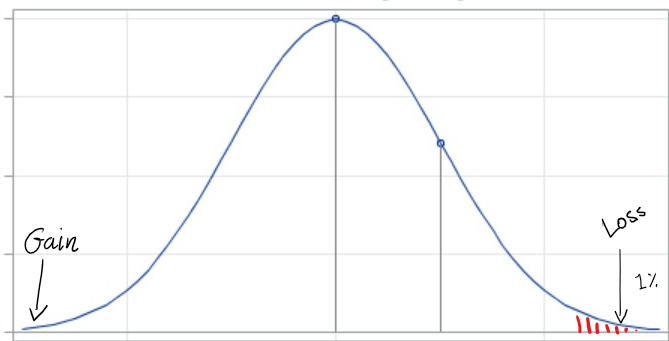
Visual representation of the portfolio returns probability distribution.

How do you calculate VaR?

There are several different methodologies that one can use to calculate VaR. The three most common ones are:

  • Historical Simulation
  • Monte Carlo
  • Variance Covariance

In this blog, we will only cover Historical Simulation.

What is VaR Historical Simulation?

The Historical Simulation Method entails calculating daily portfolio changes in value to determine the probability distribution of returns. It does that by looking at how your portfolio would have behaved historically.

Once you have your portfolio’s returns or losses, you can calculate within a confidence interval the worst possible outcome.

What are the mechanics of calculating VaR using Historical Simulation?

  1. Using historical data, determine your portfolio’s value for a number of days (typically around 500)
  2. Calculate the % change between each day
  3. Using your current portfolio valuation, calculate the monetary impact of the % change.
  4. Sort your results from the highest loss to most profit
  5. Depending on your confidence interval, the nth value that corresponds to that percentage — This is your one day VaR.
  6. Multiply it by the square root of the number of days you want your time horizon to be, i.e. 5day VaR = 1day VaR * sqr(5) (This is because the returns are assumed to be independently and identically distributed (normal with mean 0)) (Note: I will show you how we can check this at the end of our implementation)

What are the limitations of VaR?

As with any metric, there are advantages and disadvantages. VaR is so widely used because it’s straightforward to understand. However, it does come with some drawbacks:

  • VaR assumes slim tails, i.e. Tail risk is not sufficiently captured.
  • VaR doesn’t consider black swan events, i.e. things that happen rarely and unexpectedly (unless within your look-up set)
  • Historical VaR is slow to capturing changing market conditions as it assumes past performance represents future performance.

What is Expected Shortfall (ES)?

Expected Shortfall, is a risk metric that attempts to address one of the drawbacks of VaR. VaR assumes that the risk in the tail-end of the distribution is improbable with a thin tail. However, not surprisingly, in the real world we have seen distributions where the tail is quite fat:
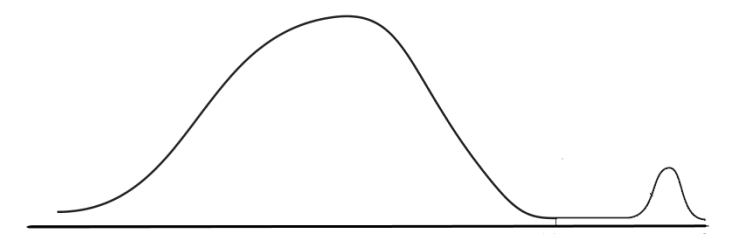
To address that, ES takes the average of the tail.

Calculating the Historical VaR and ES for our portfolio in Python

First up, we need to define our portfolio holdings.

import pandas as pd
data = {'Stocks':['GOOGL', 'TSLA','AAPL'], 'Quantity':[100, 50, 300]} #Define your holdings
# Create a DataFrame of holdings
df = pd.DataFrame(data)

With our holdings defined, we need to source historic prices for each of our stocks that will allow us to value our portfolio (if you need to see different options and sourcing for sourcing historical data, check out my previous blog). In this instance, I am using the Tiingo API, which will result in a pandas dataframe:

from tiingo import TiingoClient
def SourceHistoricPrices():
    if info == 1: print('[INFO] Fetching stock prices for portfolio holdings')
    #Set Up for Tiingo
    config = {}
    config['session'] = True
    config['api_key'] = 'private key'
    client = TiingoClient(config)
    #Create a list of tickers for the API call
    Tickers = []
    i=0
    for ticker in data:
        while i <= len(data):
            Tickers.append(data[ticker][i])
            i=i+1
    if info == 1: print('[INFO] Portfolio Holdings determined as', Tickers)
    if info == 1: print('[INFO] Portfolio Weights determined as', data['Quantity'])
    #Call the API and store the data
    global HistData
    HistData = client.get_dataframe(Tickers, metric_name='close', startDate=dateforNoOfScenarios(today), endDate=today)
    if info == 1: print('[INFO] Fetching stock prices completed.', len(HistData), 'days.')
    return(HistData)

One thing to note here is that we need to define the start and end date by which we require historical data which will drive the number of historical simulations. This should be a user-defined input. A slight problem with that, however, is that the stock market is not open every day. Hence, we need to calculate the business days involved. Without include, a holiday calendar is quite hard to be precise, but for our purposes, a quick approximation should suffice.

ScenariosNo = 500 #Define the number of scenarios you want to run
today = datetime.date.today() - datetime.timedelta(days=1)
def is_business_day(date):
    return bool(len(pd.bdate_range(date, date)))
def dateforNoOfScenarios(date):
    i=0
    w=0
    while i < ScenariosNo:
        if (is_business_day(today - datetime.timedelta(days = w)) == True):
            i = i+1
            w = w+1
        else:
            w = w+1
            continue
    #print('gotta go back these many business days',i)
    #print('gotta go back these many days',w)
    #remember to add an extra day as percentage difference will leave first value blank (days +1 = scenario numbers)
    return(today - datetime.timedelta(days = w*1.04 + 1)) #4% is an arbitrary number I've calculated the holidays to be in 500days.

Next up, we need to value our portfolio.

def ValuePortfolio():
    HistData['PortValue'] = 0
    i=0
    if info == 1: print('[INFO] Calculating the portfolio value for each day')
    while i<= len(data):
        stock = data['Stocks'][i]
        quantity = data['Quantity'][i]
        HistData['PortValue'] = HistData[stock] * quantity + HistData['PortValue']
        i = i+1

which results in:
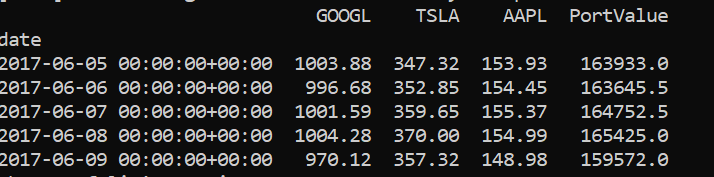
So now, we can go ahead and calculate the percentage change:

def CalculateVaR():
    if info == 1: print('[INFO] Calculating Daily % Changes')
    HistData['Perc_Change'] = HistData['PortValue'].pct_change() #calculating percentage change

Then the portfolio’s valuation change:

HistData['DollarChange'] = HistData.loc[HistData.index.max()]['PortValue'] * HistData['Perc_Change'] #calculate money change based on current valuation
if info == 1: print('[INFO] Picking', round(HistData.loc[HistData.index.max()]['PortValue'],2),' value from ', HistData.index.max().strftime('%Y-%m-%d'), ' as the latest valuation to base the monetary returns')

Then determine the n-th value we need to pick for our confidence interval:

ValueLocForPercentile = round(len(HistData) * (1 - (Percentile / 100)))
if info == 1: print('[INFO] Picking the', ValueLocForPercentile, 'th highest value')

Sort the data and select the value:

global SortedHistData
SortedHistData = HistData.sort_values(by=['DollarChange'])
if info == 1: print('[INFO] Sorting the results by highest max loss')

and finally, calculate our portfolio’s VaR value:

VaR_Result = SortedHistData.iloc[ValueLocForPercentile + 1,len(SortedHistData.columns)-1] * np.sqrt(VarDaysHorizon)
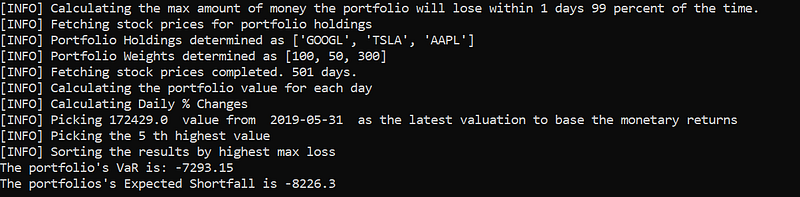
print('The portfolio\'s VaR is:', round(VaR_Result,2))

Resulting in:

Putting it all together gives:

from tiingo import TiingoClient
import pandas as pd, datetime, numpy as np
import matplotlib.pyplot as plt
import warnings
warnings.filterwarnings('ignore') #Tiingo API is returning a warning due to an upcoming pandas update
#User Set Up
data = {'Stocks':['GOOGL', 'TSLA','AAPL'], 'Quantity':[100, 50, 300]} #Define your holdings
ScenariosNo = 500 #Define the number of scenarios you want to run
Percentile = 99 #Define your confidence interval
VarDaysHorizon = 1 #Define your time period
info = 1 #1 if you want more info returned by the script
# Create a DataFrame of holdings
df = pd.DataFrame(data)
print('[INFO] Calculating the max amount of money the portfolio will lose within', VarDaysHorizon, 'days', Percentile, 'percent of the time.')
today = datetime.date.today() - datetime.timedelta(days=1)
def is_business_day(date):
    return bool(len(pd.bdate_range(date, date)))
def dateforNoOfScenarios(date):
    i=0
    w=0
    while i < ScenariosNo:
        if (is_business_day(today - datetime.timedelta(days = w)) == True):
            i = i+1
            w = w+1
        else:
            w = w+1
            continue
    #print('gotta go back these many business days',i)
    #print('gotta go back these many days',w)
    #remember to add an extra day (days +1 = scenario numbers)
    return(today - datetime.timedelta(days = w*1.04 + 1)) #4% is an arbitary number i've calculated the holidays to be in 500days.
def SourceHistoricPrices():
    if info == 1: print('[INFO] Fetching stock prices for portfolio holdings')
    #Set Up for Tiingo
    config = {}
    config['session'] = True
    config['api_key'] = 'private key'
    client = TiingoClient(config)
    #Create a list of tickers for the API call
    Tickers = []
    i=0
    for ticker in data:
        while i <= len(data):
            Tickers.append(data[ticker][i])
            i=i+1
    if info == 1: print('[INFO] Portfolio Holdings determined as', Tickers)
    if info == 1: print('[INFO] Portfolio Weights determined as', data['Quantity'])
    #Call the API and store the data
    global HistData
    HistData = client.get_dataframe(Tickers, metric_name='close', startDate=dateforNoOfScenarios(today), endDate=today)
    if info == 1: print('[INFO] Fetching stock prices completed.', len(HistData), 'days.')
    return(HistData)
def ValuePortfolio():
    HistData['PortValue'] = 0
    i=0
    if info == 1: print('[INFO] Calculating the portfolio value for each day')
    while i<= len(data):
        stock = data['Stocks'][i]
        quantity = data['Quantity'][i]
        HistData['PortValue'] = HistData[stock] * quantity + HistData['PortValue']
        i = i+1
def CalculateVaR():
    if info == 1: print('[INFO] Calculating Daily % Changes')
    #calculating percentage change
    HistData['Perc_Change'] = HistData['PortValue'].pct_change()
    #calculate money change based on current valuation
    HistData['DollarChange'] = HistData.loc[HistData.index.max()]['PortValue'] * HistData['Perc_Change'] 
    if info == 1: print('[INFO] Picking', round(HistData.loc[HistData.index.max()]['PortValue'],2),' value from ', HistData.index.max().strftime('%Y-%m-%d'), ' as the latest valuation to base the monetary returns')
    ValueLocForPercentile = round(len(HistData) * (1 - (Percentile / 100)))
    if info == 1: print('[INFO] Picking the', ValueLocForPercentile, 'th highest value')
    global SortedHistData
    SortedHistData = HistData.sort_values(by=['DollarChange'])
    if info == 1: print('[INFO] Sorting the results by highest max loss')
    VaR_Result = SortedHistData.iloc[ValueLocForPercentile + 1,len(SortedHistData.columns)-1] * np.sqrt(VarDaysHorizon)
    print('The portfolio\'s VaR is:', round(VaR_Result,2))
def CalculateES():
    ValueLocForPercentile = round(len(HistData) * (1 - (Percentile / 100)))
    ES_Result = round(SortedHistData['DollarChange'].head(ValueLocForPercentile).mean(axis=0),2) * np.sqrt(VarDaysHorizon)
    print('The portfolios\'s Expected Shortfall is', ES_Result)
SourceHistoricPrices()
ValuePortfolio()
CalculateVaR()
CalculateES()

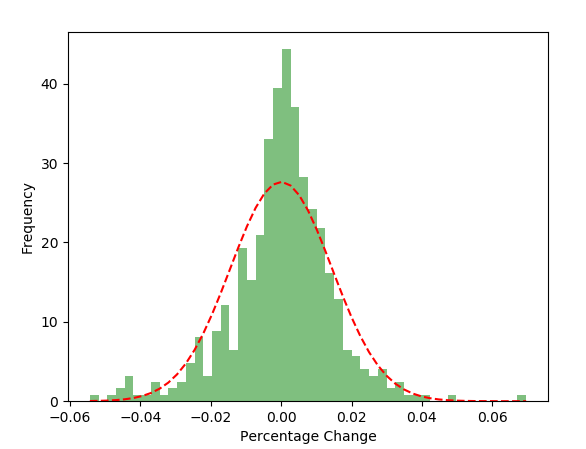
Finally, we can also use a histogram to see how our portfolio returns fit with the assumption that we’ve made in point 6 above:

The reason we can extend 1 day VaR or ES by multiplying by the Square Root of days, it is because the returns are assumed to be independently and identically distributed (normal with mean 0)

import scipy
import scipy.stats, matplotlib.pyplot as plt
def plotme():
    data1 = HistData['Perc_Change']
    num_bins = 50
    # the histogram of the data
    n, bins, patches = plt.hist(data1, num_bins, normed=1, facecolor='green', alpha=0.5)
    # add a 'best fit' line
    sigma = HistData['Perc_Change'].std()
    data2 = scipy.stats.norm.pdf(bins, 0, sigma)
    plt.plot(bins, data2, 'r--')
    plt.xlabel('Percentage Change')
    plt.ylabel('Probability/Frequency')
    # Tweak spacing to prevent clipping of ylabel
    plt.subplots_adjust(left=0.15)
    plt.show()
plotme()

Returning:

We are hence validating our assumption.

If you liked this blog post, you might also like:

Python
Stocks
Personal Finance
Fintech
Risk
Recommended from ReadMedium