
Lazy.nvim: The Blazingly Fast Neovim Package Manager
Lazy.nvim is a plugin manager create by folke. He creates many Neovim plugins including the popular colorscheme tokyonight. Lazy.nvim is very new (as of December 22, 2022), but the speeds and features are quite amazing. (Sidenote: If you consider using this, I would just back up any dotfiles so it is easy to revert back to if something breaks).
Furthermore, I will be comparing lazy.nvim to packer.nvim as it was the one I use previously and the one I feel like most people use.
Speeds
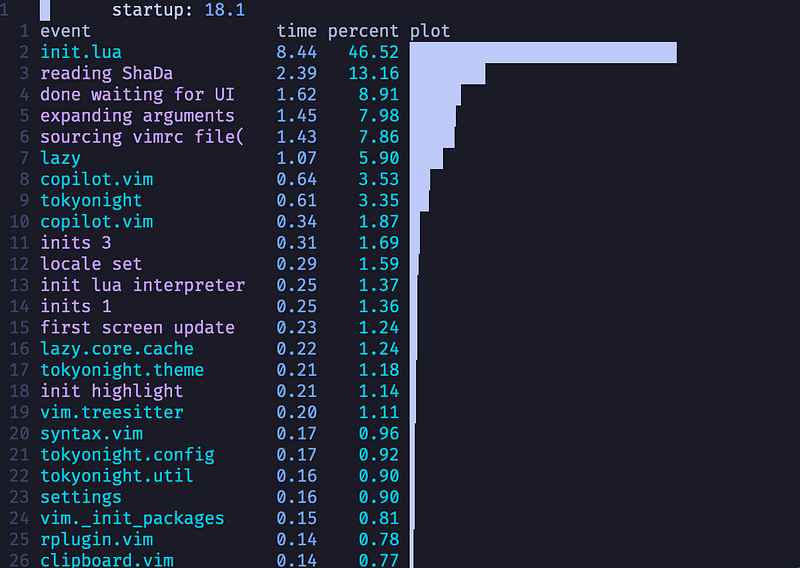
The following speed tests used dstein64/vim-startuptime.
lazy.nvim
packer.nvim
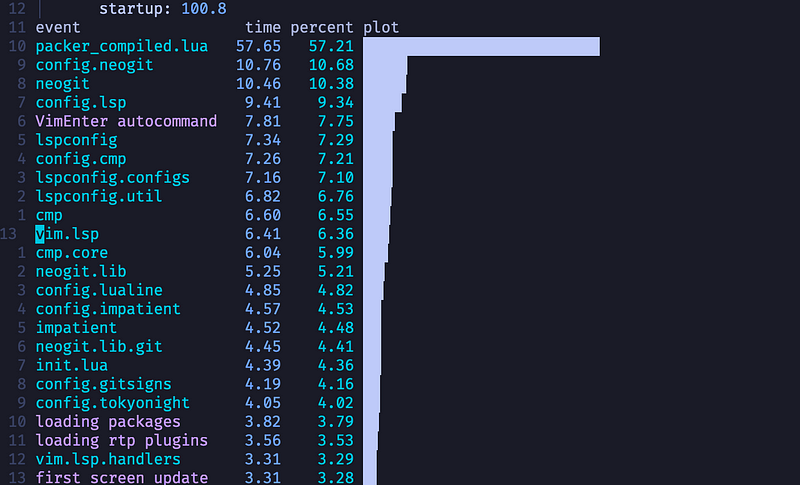
These two screenshots run roughly the same plugins, however, I will mention the screenshot with packer.nvim has significantly less lazy-loading, partially due to the configuration being a bit more cumbersome.
As it can be seen from these two screenshots, Neovim’s startup time with lazy.nvim is more than five times faster than the one with packer.nvim. Continuing, lazy.nvim has many other features, not just speed. Some of my favorite features are:
- Profiling
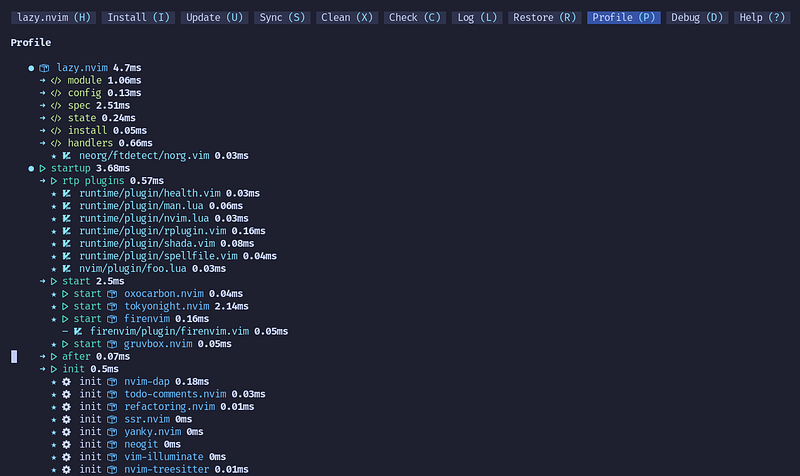
- Debugging
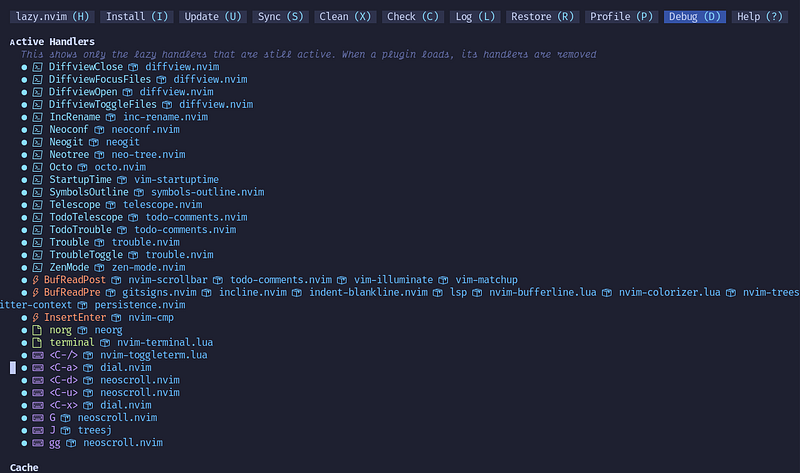
- Easy lazy-loading
- No manual compiling
- Automatic updates
In short, lazy.nvim takes the manual work and turns it automatic aka. lazy. I wasn’t convinced by these features when I checkout the GitHub page, but once I tried it I was blown away. I hope you are willing to try this crazy good package manager and be equally blown away.
Installation
The installation of lazy.nvim is quite simple. Just add the following code to the init.lua.
local lazypath = vim.fn.stdpath("data") .. "/lazy/lazy.nvim"
if not vim.loop.fs_stat(lazypath) then
  vim.fn.system({
    "git",
    "clone",
    "--filter=blob:none",
    "--single-branch",
    "https://github.com/folke/lazy.nvim.git",
    lazypath,
  })
end
vim.opt.runtimepath:prepend(lazypath)
Next, we will be adding the setup:
require("lazy").setup("plugins", {
 defaults = { lazy = true },
 install = { colorscheme = { "tokyonight" } },
 checker = { enabled = true },
 change_detection = {
  notify = false,
 },
 performance = {
  rtp = {
   disabled_plugins = {
    "gzip",
    "matchit",
    "matchparen",
    "netrwPlugin",
    "tarPlugin",
    "tohtml",
    "tutor",
    "zipPlugin",
   },
  },
 },
})
This bit of code has a little few configuration options — most are self-explanatory. For more information on these options check out this.
The part we mainly care about is right after setup. This is the directory/file we will put our plugin installations and configurations. I like it to be plugins. Moreover, I will be getting into the setup of plugins in a little bit, but I would first recommend adding the following to further speed up Neovim:
Edit: the following code is not needed as it's what config.performance.rtp.disabled_plugins does. The startuptime is also faster, 15ms to 12ms. The final config has been edited accordingly. (See the first comment)
-- local builtins = {
--  "gzip",
--  "zip",
--  "zipPlugin",
--  "fzf",
--  "tar",
--  "tarPlugin",
--  "getscript",
--  "getscriptPlugin",
--  "vimball",
--  "vimballPlugin",
--  "2html_plugin",
--  "matchit",
--  "matchparen",
--  "logiPat",
--  "rrhelper",
--  "netrw",
--  "netrwPlugin",
--  "netrwSettings",
--  "netrwFileHandlers",
-- }
--
-- for _, plugin in ipairs(builtins) do
--  vim.g["loaded_" .. plugin] = 1
-- end
All this code does is remove these builtin plugins, like gzip and netrw.
We can also require any file because its lua. Finally, the config should look something like this:
require("settings")

local lazypath = vim.fn.stdpath("data") .. "/lazy/lazy.nvim"
if not vim.loop.fs_stat(lazypath) then
 vim.fn.system({
  "git",
  "clone",
  "--filter=blob:none",
  "--single-branch",
  "https://github.com/folke/lazy.nvim.git",
  lazypath,
 })
end

vim.opt.runtimepath:prepend(lazypath)

require("lazy").setup("plugins", {
 defaults = { lazy = true },
 install = { colorscheme = { "tokyonight" } },
 checker = { enabled = true },
 performance = {
  rtp = {
   disabled_plugins = {
    "gzip",
    "matchit",
    "matchparen",
    "netrwPlugin",
    "tarPlugin",
    "tohtml",
    "tutor",
    "zipPlugin",
   },
  },
 },
 -- debug = true,
})

vim.api.nvim_create_autocmd("User", {
 pattern = "VeryLazy",
 callback = function()
  require("keymaps")
  require("commands")
 end,
})
Plugins
Remember that name we put after setup? We now create a file and/or directory with that name. If we create a file at the desired location (./lua/plugins.lua), it will serve as the main plugin page. If we create a directory at the desired location (./lua/plugins/), lazy.nvim will automatically merge it with the main plugin page (it doesn’t actually merge it just considers both of them). Adding both is perfectly fine and is actually useful.
plugins.lua
In the plugins.lua file we can put our installation and configuration. I recommend only putting plugins with minimal configuration because plugins with extensive configuration will become crowded which makes it more efficient to place them in the ./lua/plugins/ directory. For example, this is my config for ./lua/plugins.lua:
return {
 "MunifTanjim/nui.nvim",
 "nvim-lua/plenary.nvim",
 { "github/copilot.vim", lazy = false },

 { "rebelot/kanagawa.nvim", event = "VeryLazy" },
 {
  "catppuccin/nvim",
  name = "catppuccin",
  event = "VeryLazy",
 },
 { "EdenEast/nightfox.nvim", event = "VeryLazy" },
 { "ellisonleao/gruvbox.nvim", event = "VeryLazy" },
 {
  "mbbill/undotree",
  cmd = { "UndotreeShow", "UndotreeToggle", "UndotreeHide", "UndotreeFocus" },
 },
 { "NvChad/nvim-colorizer.lua", ft = { "css" } },
 {
  "dstein64/vim-startuptime",
  cmd = "StartupTime",
  config = function()
   vim.g.startuptime_tries = 10
  end,
 },
}
It only contains plugins with minimal configurations like colorschemes.
plugins directory
The ./lua/plugins/directory is where things get more confortable. It allows for more configuration without the file looking completely horrendous. The files in this directory have the exact same configuration style as the plugins in theplugins.lua file. I personally like a similar but different way of configuring a plugin.
local M = {
 "hrsh7th/nvim-cmp",
 event = "InsertEnter",
 dependencies = {
  "hrsh7th/cmp-buffer",
  "hrsh7th/cmp-nvim-lsp",
  "hrsh7th/cmp-path",
  "hrsh7th/cmp-nvim-lua",
  "L3MON4D3/LuaSnip",
  "onsails/lspkind-nvim",
 },
}

function M.config()
 local cmp = require("cmp")
 local lspkind = require("lspkind")
 cmp.setup({
 })
end

return M
I took out some of the configurations in the M.config() because it was irrelevant to lazy.nvim. As you can see we have the same configurations but in variable form. I prefer having separate files and separate blocks for each part because I feel like it's more versatile.
Hopefully, you were able to get it lazy.nvim setup. There are bound to be bugs at this moment, but that’s all part of the process. Once most of them are roughened out, I think lazy.nvim will be an exceptional plugin manager.
Overall, lazy.nvim is a highly customizable, blazingly fast package manager for Neovim. I would definitely give it a try.
Hope you learned something new and keep vimming.


