
Lattics — The Note-Taking App That Helps You Think Smarter
A review of this “brain-like” knowledge management application

In the world of note-taking applications, there is everything. Whether it’s Obsidian, a text editor that allows you to do fantastic things in markdown, or Notion, allowing you to create and customize your own workspace…
There is also Lattics, an application focusing on the Zettelkasten method and visual writing. In fact, Lattics is based on “Brain-like” knowledge management, which refers to the process of managing your knowledge in a way that mimics the way the human brain works.
Let’s discover this application today!
An Overview of Lattics
First of all, Lattics works on a principle of “projects”. In fact, a project is simply a collection of several documents that are supposed to be linked.
Once a project is created, you can start adding documents to it. A document is either a note or a file that you create.
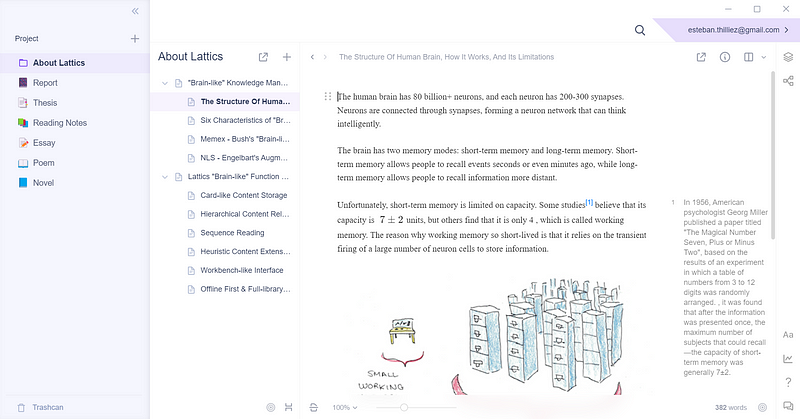
The main idea of Lattics is to organize your documents in a hierarchical way. Indeed, Lattics provides a project outline supporting unlimited hierarchy. So you can create as many outline levels as you want. This is very useful for complicated projects requiring a high level of organization.
To organize things around, you can also use the graphical views of Lattics. There are 3 of them, each with its own specificities. For example, here is the “mind map” view which allows you to organize graphically your documents and to create new ones.
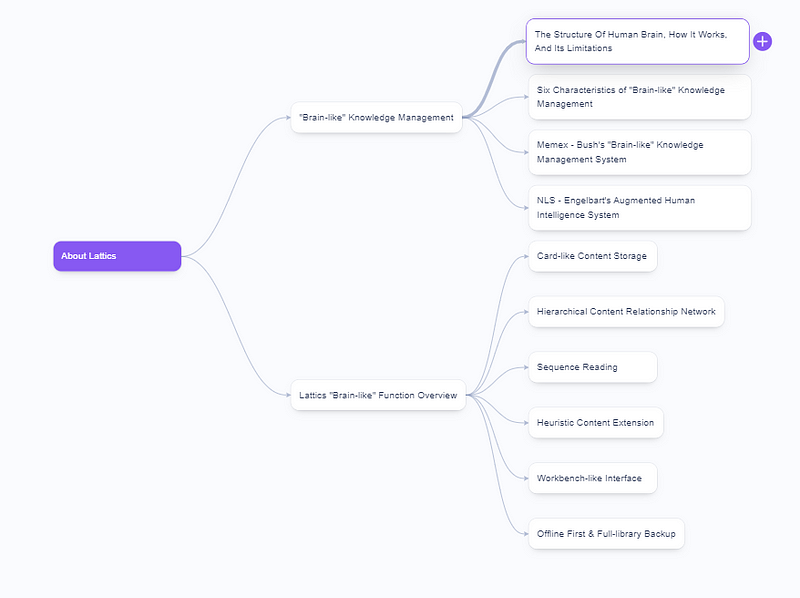
There are some useful features for graph views, such as the ability to change the colors of the elements, to filter them to display only certain types of documents, etc…
An important point also: Lattics is local-based. Your notes are not stored on the cloud (you can enable sync with the cloud, but the point is data is yours). But they are stored in a file type specific to Lattics, so to use them outside the application, you just have to export them in Markdown, Word, PDF, TXT, etc… from the application. Fortunately, you can export a whole project at once.
Organizing your Knowledge
On top of the basic hierarchical structure, Lattics allows you to organize your knowledge in different ways.
You can for example use tags, allowing you to mark articles from different projects as belonging to the same category.
You can also reference documents to each other by dragging and dropping them from the project outline or by typing “@” and filling in the name of your document.
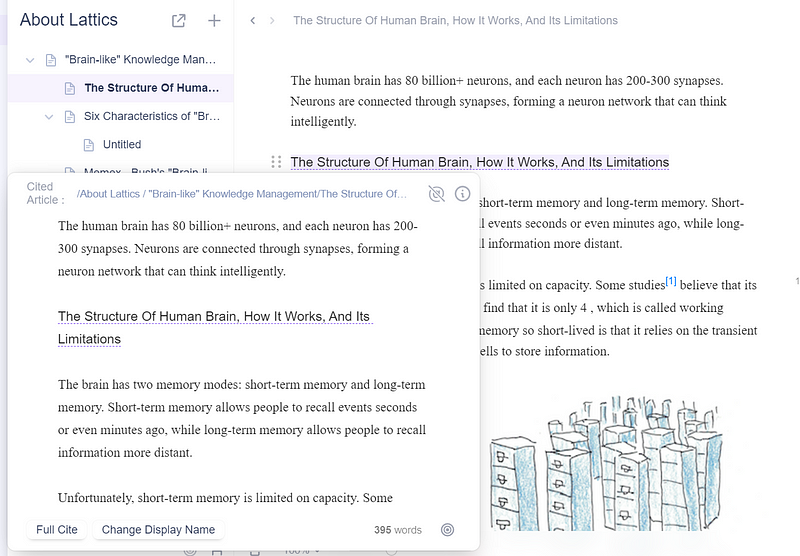
Then, when you have referenced documents, you can see the backlinks and forward links directly from your document information, allowing you to easily navigate through your knowledge base.
Cards
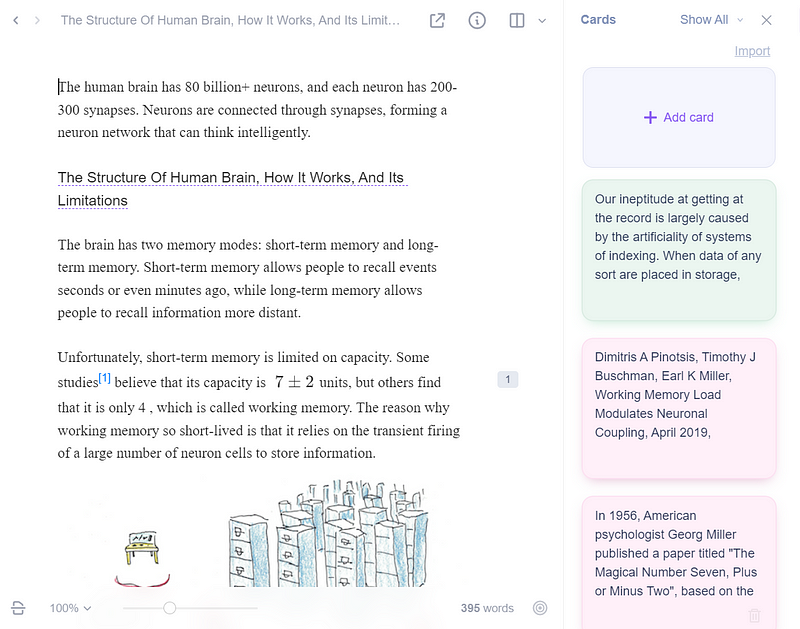
Sometimes you may want to keep track of information that doesn’t necessarily require projects.
With Lattics, you can simply store this information in what is called a “Card”. These cards behave like any other document, you can drag and drop them to reference them, they can be displayed in certain graphical views, etc…
Blocks
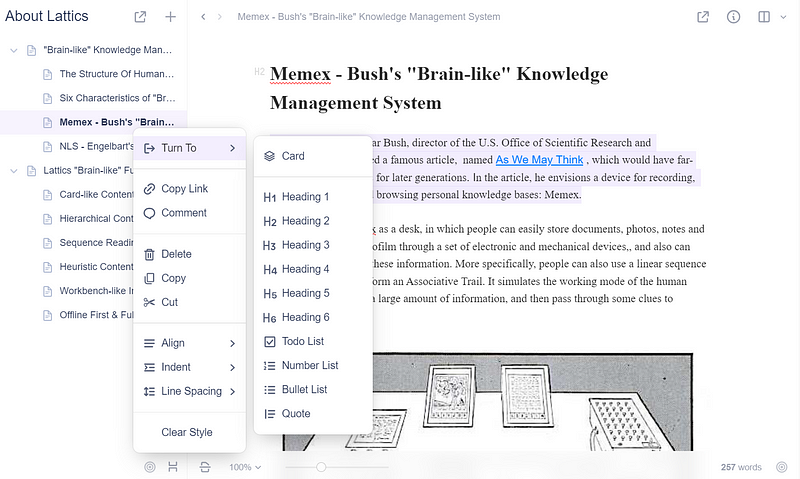
Lattics works on a block principle. That is, each element of a note is a block, which you can edit independently of the rest and drag and drop. If you know Notion, it’s pretty much the same thing.
It’s a great feature that allows you to quickly reorganize and edit your notes if needed.
There are many types of blocks. For example, all headings from H1 to H6 have their type, images also, Markdown tables, also code blocks, etc…
A Lot of Cool Features
Lattics provides many useful features allowing for a smooth user experience.
One I like a lot is the feature allowing you to completely navigate through all the notes of a project without interruption. You can just scroll with your mouse and all the notes will be automatically linked according to the project outline.
Also, Lattics interacts very well with the file explorer and allows you to simply drag and drop files from it wherever you want.
Then you have a search feature, it’s classic but very useful to find quickly what you need.
You can also customize Lattics as you wish, either in the text editor with the possibility to change colors, fonts, or the style of the characters, or directly concerning the whole application with the possibility to change the font at the global level. You can add emojis to projects or note names. You can also use note templates allowing you to modify the style of a note according to a template.
There are other interesting features I haven’t mentioned, feel free to download Lattics to discover them for yourself!
My Opinion on Lattics
Well, after trying Lattics a bit, I find it to be a solid application. I had never heard of it and it doesn’t look very well known, yet the software is of high quality.
The user experience is very pleasant, which is important for a knowledge management application. In fact, it’s nice to be able to move our notes and files as we want, import new ones easily, etc…
The customization options are interesting and I like the dark theme (which I did not use for the images above).
I also like how this application allows us to organize knowledge, using a hierarchical structure without being too rigid (although I tend to prefer an atomic structure, like a single folder with all the files inside tagged correctly to navigate).
The visualization options are interesting, although I didn’t use them too much because I’m not really visual.
Some functionalities are anecdotal, for example, it is possible to set a goal of words to write before a certain deadline (this is not relevant for me but it is perhaps for some people like writers?).
Finally, the fact that the application is local-based is really a strong point for me, because I like to have control of my data. Especially since the export functionality makes it easy to port your notes to other formats and other applications if ever.
Overall, Lattics is a good app, which may not replace the ones I already use, but it does make it a good addition and I can already imagine some use cases. I’m glad I discovered it.
Final Note
I encourage you to try Lattics. It’s a solid and interesting app, so don’t hesitate to give it a shot!
If you want more information about it, you can find the official website here. And here is the application’s documentation if you’ve downloaded it and want some help to get started.
This article is from a collaboration with Lattics
To explore more of my stories, click here!
If you want to be notified every time I publish a new story, subscribe to me via email by clicking here!
If you’re not subscribed to medium yet and wish to support me or get access to all my stories, you can use my link:


