
How to logout a user from all devices on Laravel Passport? Super easy way
A little ago I was told by my restaurant app client to change a user password and log out the user from all devices and force it to login again with a new password. He wants to make sure that any old employee does not have access to their turnover and can not control the app. Then I thought to just change the password of that user and the problem will be solved. But, this did not do! I used the Laravel Passport oauth2 library to authenticate API users and when the password is changed no users will be logged out because of active access tokens. Even I deleted the tokens and tested that refresh token on the front and will just call endpoint to create a new access token and the user will continue to use the app without responding to the password change. So I decided to solve the problem and fix the issue for my client. Luckily, I found a way!
After a little research, I see that revoking an access token will force a user to use a refresh token and get a new token to continue auth API endpoints. There is a revoke() function to do so. But we need to terminate all active sessions and I have created a minor function to solve this problem. Firstly, I want to show the main part of the function:
If you use Laravel Passport there is a trait called HasApiTokens. It must be imported and used in order to gain access tokens property. So, inside of foreach loop first, we found the User by $id. This lets us use this function anywhere without need to login into change requested user profile. Secondly, we call $token->revoke() for each active tokens for selected user. This function update revoked column to true for the selected user on oauth_access_tokens table. So when the user uses the current token to gain access to an auth API endpoint he will see a token expired error on the response. And we use refresh token to generate new, not revoked access token for the current user. As I mentioned above this process prevents us to get full control over the user by changing his password. So, we should also delete the refresh token for the deleted access tokens. To do so, we use another function provided by Laravel Passport. It is called as RefreshTokenRepository and the function is revokeRefreshTokensByAccessTokenId. As you can see the function needs an access token id to delete the connected refresh token and we provide it also.
In the first line, we created a variable called $refreshTokenRepository and initialized the repository for our application. After token revoking we immediately add the function by knowing $token->id . Whola! Our selected user by $id is fully logged out. The full function of my User model is below:
I have created this function to work on laravel tinker artisan console and it works like a charm. So you can also do it:
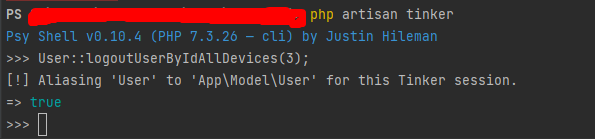
php artisan tinker — log in to tinker session in a terminal. (just deleted my path on the image:)
User::logoutUserByIdAllDevices(3); — called the function and logged the user out from all devices which ID in my case is 3.
And we have one more thing to do before logging out the user. We should change the password of the user then use this function to log out him. So the user can not log in with an older password.
$user = User::find(3);
$user->password = Hash::make('secret_new');
$user->save();
We are done. Great job!
- Laravel Passport documentation — https://laravel.com/docs/8.x/passport
- Get 100$ free credit on DigitalOcean by registering this link — https://m.do.co/c/460c21eea24d


