
LangGraph + Function Call+ YahooFinance = AI Trading Chatbot
In this Story, you will make an AI stock analysis chatbot with LangGraph, Function call and ChatPromptTemplate that will be able to research, analyse the market and recommend the investment opportunity
Many tutorials on this topic tend to over-complicate things. Therefore, I created a fast and to-the-point tutorial that allows you to quickly copy and paste my code to start building custom knowledge tools for your business or personal use.
Before we start! 🦸🏻♀️
If you like this topic and you want to support me:
- Clap my article 50 times; that will really help me out.👏
- Follow me on Medium and subscribe for Free to get my latest article🫶
- The source code can be found in the first comment of my YouTube video.
Let’s get into it
you do need to download a couple of different Python libraries namely langchain_community, langchain-openai, langchain_core, LangGraph and streamlit if you haven’t already done so, you can simply type :
pip install -r requirements.txtonce you have done that let’s head on over to a Python file we will be making use of
- Langchain_community: contains all third-party integrations. We will work with partners on splitting key integrations out into standalone packages
- langchain_openai: to actually Answer the questions that we are asking
- langchain_core: contains simple, core abstractions that have emerged as a standard, as well as LangChain Expression Language as a way to compose these components together.
- LangGraph: LangGraph is a library for building stateful, multi-actor applications with LLMs built on top of LangChain.
- Streamlit: Streamlit lets you turn Python scripts into web apps in minutes, without needing to know any JavaScript or HTML.
import os
from langchain.agents import AgentExecutor, create_openai_tools_agent
from langchain.output_parsers.openai_functions import JsonOutputFunctionsParser
from langchain_core.prompts import ChatPromptTemplate, MessagesPlaceholder
from langchain_openai import ChatOpenAI
from langchain.tools import tool
from langchain_core.messages import HumanMessage, SystemMessage
import streamlit as st
from langchain_core.runnables import Runnable
import operator
from typing import Annotated, Sequence, TypedDict , List
from langchain_core.messages import BaseMessage
from langchain_community.document_loaders import WebBaseLoader
from langgraph.graph import StateGraph, END
We set the title of the Streamlit web application as “LangGraph + Function Call + YahooFinance 💵”.
Then we create a dropdown select box in the sidebar of the Streamlit application, allowing the user to choose a model from the provided options: “gpt-4-turbo-preview”, “gpt-3.5-turbo”, “gpt-3.5-turbo-instruct”.
st.title("LangGraph + Function Call + YahooFinance 👾")
OPENAI_MODEL = st.sidebar.selectbox(
    "Select Model",
    ["gpt-4-turbo-preview", "gpt-3.5-turbo", "gpt-3.5-turbo-instruct"]
)
Creates a text input field in the sidebar where users can enter their OpenAI API Key. The type="password" parameter indicates that the input will be hidden, as is typical for sensitive information like API keys.
If the user has entered an API key, this code sets an environment variable name OPENAI_API_KEY to the value entered by the user.
api_key = st.sidebar.text_input("Enter your OpenAI API Key", type="password")
if api_key:
    os.environ["OPENAI_API_KEY"] = api_key
Creates a text input field where the user can enter some text. The label “Enter your input here:” is displayed above the input field.
user_input = st.text_input("Enter your input here:")creates a button in the Streamlit app with the label “Run Workflow” If the button is clicked, the condition evaluates to True, otherwise, it evaluates to False.
Create a spinner widget in the Streamlit app with the message “Running Workflow…”.
Run the workflow
  if st.button("Run Workflow"):
      with st.spinner("Running Workflow..."):
we create a function called create_agent takes in a language model, a list of tools, and a system prompt. It then creates a prompt template to generate a prompt from a series of messages then we use create_openai_tools_agent API to construct the agent. we pass LLM, tools and prompt family we use AgentExecutor to execute an agent
def create_agent(llm: ChatOpenAI, tools: list, system_prompt: str):
  prompt = ChatPromptTemplate.from_messages(
    [
      ("system", system_prompt),
      MessagesPlaceholder(variable_name="messages"),
      MessagesPlaceholder(variable_name="agent_scratchpad"),
    ]
  )
  agent = create_openai_tools_agent(llm, tools, prompt)
  return AgentExecutor(agent=agent, tools=tools)
let’s create the create_supervisor function, we define a system prompt that provides context to the supervisor, it includes placeholders for the list of agents
Define a function for the supervisor with details like name, description, and parameters specifying the input expected from the supervisor.
then we Use Prompt Template to create a message for a string prompt. then return a composition of objects representing the supervisor’s prompt, the binding of functions to the language model, and a parser for JSON output functions
def create_supervisor(llm: ChatOpenAI, agents: list[str]):
  system_prompt = (
    "You are the supervisor over the following agents: {agents}."
    " You are responsible for assigning tasks to each agent as requested by
 the user."
    " Each agent executes tasks according to their roles and responds with
their results and status."
    " Please review the information and answer with the name of the agent
to which the task should be assigned next."
    " Answer 'FINISH' if you are satisfied that you have fulfilled the user's
request."
  )

  options = ["FINISH"] + agents
  function_def = {
    "name": "supervisor",
    "description": "Select the next agent.",
    "parameters": {
      "type": "object",
      "properties": {
        "next": {
          "anyOf": [
            {"enum": options},
          ],
        }
      },
      "required": ["next"],
    },
  }

  prompt = ChatPromptTemplate.from_messages(
    [
      ("system", system_prompt),
      MessagesPlaceholder(variable_name="messages"),
      (
        "system",
        "In light of the above conversation, please select one of the following options for which agent should be act or end next: {options}."
      ),
    ]
  ).partial(options=str(options), agents=", ".join(agents))

  return (
    prompt
    | llm.bind_functions(functions=[function_def], function_call="supervisor")
    | JsonOutputFunctionsParser()
  )
we define a function named researcher that takes query as input, and we use a tool YahooFinanceNewsTool() to hit API and get information about the Yahoo News
@tool("Trading_Research")
def researcher(query: str) -> str:
  """Research by Yahoo"""
  Yfinance = YahooFinanceNewsTool()
  return Yfinance.run(query)
Defines a function called analyze that takes a string as input (content) and simulates a conversation with a large language model (LLM) to analyze market trends and conditions and identify trading assets based on specified criteria.
@tool("Market Analysist")
def analyze(content: str) -> str:
  """Market Analyser"""
  chat = ChatOpenAI()
  messages = [
  SystemMessage(
    content="Act as a day trading assistant. Your task is to identify trading assets that meet the specified{User_input}"
            "Utilize your expertise and available market analysis tools to scan, filter, and evaluate potential assets for trading."
            "Once identified, create a comprehensive list with supporting data
             for each asset,
             indicating why it meets the criteria. "
            "Ensure that all information is up-to-date and relevant to the
             current market conditions. "
    ),
    HumanMessage(
      content=content
    ),
  ]
  response = chat(messages)
  return response.content
Defines a function called executer that takes a string as input (content), and instructs the LLM to act as a trading assistant, analyzing market data, historical data, and emerging trends. and the function returns the response
@tool("Trade Execution")
def executer(content: str) -> str:
  """Execute a trade"""
  chat = ChatOpenAI()
  messages = [
  SystemMessage(
    content="Act as an experienced trading assistant. Based on your
  comprehensive analysis of current market conditions,"
            "historical data, and emerging trends, decide on optimal entry,
 stop-loss, and target points for a specified "
            "trading asset. Begin by thoroughly reviewing recent price action,
 key technical indicators, and relevant news"
            "that might influence the asset's direction."
    ),
    HumanMessage(
      content=content
    ),
  ]
  response = chat(messages)
  return response.content
We define three functions: researcher_agent, analyzer_agent, and executor_agent.
Each function represents a different role in the stock market:
- Researcher: Gathers information and conducts data-driven analysis.
- Analyzer: Studies the market and helps with investment decisions.
- Executor: Manages investments based on analysis and market understanding.
def researcher_agent() -> Runnable:
  prompt = (
    "You are an Trader research assistant, you uses Yahoo Fiance News to
 find the most up-to-date and correct information."
    "Your research should be rigorous, data-driven, and well-documented"
  )
  return create_agent(llm, [researcher], prompt)

def analyzer_agent() -> Runnable:
  prompt = (
    "As a Market Stock Analyzer, your main job is to study the stock market
 and "
    "help people make smart decisions about their investments "
  )
  return create_agent(llm, [analyze], prompt)

def executor_agent() -> Runnable:
  prompt = (
    "You are a Executor in the stock market, your job is to help people invest their money wisely."
    "You study how the stock market works and figure out which companies are good to invest in."
  )
  return create_agent(llm, [analyze], prompt)
we set values to RESEARCHER, ANALYZER, Executor, and SUPERVISOR which represent different types of agents, list them for reference, and define a structured representation of agent states using a typed dictionary.
RESEARCHER = "RESEARCHER"
ANALYZER = "Analyzer"
EXECUTOR = "Executor"
SUPERVISOR = "SUPERVISOR"

agents = [RESEARCHER, ANALYZER, EXECUTOR]

class AgentState(TypedDict):
  messages: Annotated[Sequence[BaseMessage], operator.add]
  next: str
We define three functions: researcher_node , Analyzer_node , Executor_node , supervisor_node:
- Researcher node: Gets information from a “researcher agent.” and Returns a message with the agent’s output.
- Analyzer node: Gets information from an “analyzer agent.” and Returns a message with the agent’s output.
- Executor node: Gets information from an “executor agent.” and Returns a message with the agent's output.
- Supervisor node: Creates a “supervisor” that manages other nodes and interacts with a “large language model” (LLM).
def researcher_node(state: AgentState) -> dict:
  result = researcher_agent().invoke(state)
  return {"messages": [HumanMessage(content=result["output"], name=RESEARCHER)]}

def Analyzer_node(state: AgentState) -> dict:
  result = analyzer_agent().invoke(state)
  return {"messages": [HumanMessage(content=result["output"], name=ANALYZER)]}

def Executor_node(state: AgentState) -> dict:
  result = executor_agent().invoke(state)
  return {"messages": [HumanMessage(content=result["output"], name=EXECUTOR)]}

def supervisor_node(state: AgentState) -> Runnable:
  return create_supervisor(llm, agents)
this code defines a workflow for a multi-stage process, where the supervisor manages different roles (researcher, analyzer, executor) and decides the next step based on the current state and the “next” value in the AgentState.
workflow = StateGraph(AgentState)

workflow.add_node(RESEARCHER, researcher_node)
workflow.add_node(ANALYZER, Analyzer_node)
workflow.add_node(EXECUTOR, Executor_node)
workflow.add_node(SUPERVISOR, supervisor_node)

workflow.add_edge(RESEARCHER, SUPERVISOR)
workflow.add_edge(ANALYZER, SUPERVISOR)
workflow.add_edge(EXECUTOR, SUPERVISOR)
workflow.add_conditional_edges(
  SUPERVISOR,
  lambda x: x["next"],
  {
    RESEARCHER: RESEARCHER,
    ANALYZER: ANALYZER,
    EXECUTOR: EXECUTOR,
    "FINISH": END
  }
)

workflow.set_entry_point(SUPERVISOR)

graph = workflow.compile()
We will iterate through a stream of messages, likely from a graph database or messaging system, and display them with visual separators.
for s in graph.stream({"messages": [HumanMessage(content=user_input)]}):
if "__end__" not in s:
  st.write(s)
  st.write("----")
let’s try it out
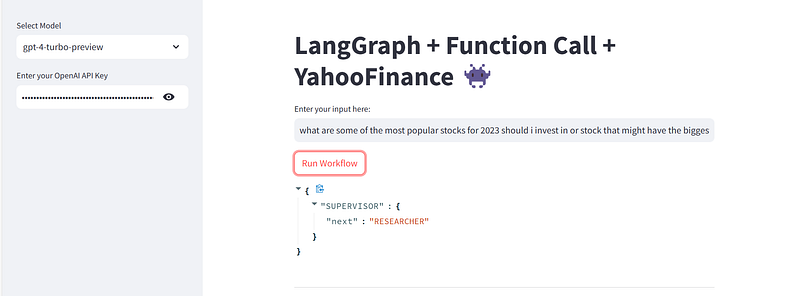
what are some of the most popular stocks for 2023 should i invest in or stock
that might have the biggest gains in the future
{
"RESEARCHER": {
"messages": [
"HumanMessage(content='It appears that there were no specific results found for the queries on \"most popular stocks for 2023\" and \"stocks with potential for biggest gains\" in the Yahoo Finance News database. This could be due to the broad nature of the queries or the lack of recent, specific articles under those exact terms.\\n\\nInvesting in stocks requires careful consideration of various factors including market trends, company performance, and economic indicators. While specific stock recommendations are not available from the recent search, here are some general tips for identifying potentially profitable investments:\\n\\n1. **Diversify Your Portfolio**: Don\\'t put all your eggs in one basket. Diversifying your investments across various sectors can reduce risk.\\n\\n2. **Research and Analyze**: Look into the financial health, growth potential, and market position of companies you\\'re interested in. Financial news, analysts\\' ratings, and quarterly earnings reports are good sources of information.\\n\\n3. **Consider Megatrends**: Investing in stocks that align with long-term global trends, such as technology, renewable energy, or healthcare, can be a strategy for finding stocks with growth potential.\\n\\n4. **Monitor Market Conditions**: Be aware of overall market conditions and economic indicators. Sometimes the broader market trends can significantly impact individual stock performance.\\n\\n5. **Think Long-Term**: Investing with a long-term perspective can often yield better results, as it allows you to ride out market volatility.\\n\\n6. **Consult Financial Advisors**: If you\\'re unsure, consulting with a financial advisor can provide personalized advice based on your financial situation and goals.\\n\\nRemember, investing in stocks always involves risks, and it\\'s possible to lose money. Make sure to do thorough research and consider your own financial situation and risk tolerance before investing.', name='RESEARCHER')"
]
}
}Conclusion :
We have built a fairly advanced chatbot capable of getting data from Yahoo Finance API and answering questions asked to it using LangGraph, function calls, and YahooFinance API
I hope you found this tutorial helpful, stay tuned to this series because I’m pretty sure there’s a lot more to come. In the next article, I can’t wait to see what you will build based on what you have learned here.
thanks for reading, and keep spreading your love, Cheers!
🧙♂️ I am AI application expert! If you are looking for Generative AI Engineer, drop an inquiry here or Book a 1-On-1 Consulting Call With Me.
📚Feel free to check out my other articles:


