

LANGCHAIN — Grouped Monitoring Charts
Technology alone is not enough. It’s technology married with the liberal arts, married with the humanities, that yields the results that make our hearts sing. — Steve Jobs.
LangSmith has introduced a new feature, Grouped Monitoring Charts, that allows users to compare metrics of logged traces containing different tags or metadata. This provides the ability to analyze and compare the performance of different versions of applications. In this tutorial, we will explore how to send traces with tags and metadata using LangChain and LangSmith SDK or API, and also look at a case study of testing different LLM providers in Chat LangChain.
Sending Traces With Tags and Metadata
LangChain
If using LangChain, you can send a dictionary with tags and/or metadata in invoke to any Runnable. The same concept works in TypeScript as well.
chain.invoke({"input": "What is the meaning of life?"}, {"metadata": {"my_key": "My Value"}})  # sending custom metadata

chain.invoke({"input": "Hello, World!"}, {"tags": ["shared-tags"]})  # sending custom tags
LangSmith SDK / API
If you’re not using LangChain, you can either use the SDK or API to log traces with custom tags and/or metadata.
# Using the Python SDK
import openai
from langsmith.run_helpers import traceable

@traceable(
    run_type="llm",
    name="My LLM Call",
    tags=["tutorial"],
    metadata={"githash": "e38f04c83"},
)
def call_openai(
    messages: List[dict], model: str = "gpt-3.5-turbo", temperature: float = 0.0
) -> str:
    return openai.ChatCompletion.create(
        model=model,
        messages=messages,
        temperature=temperature,
    )
// Using the TypeScript SDK
import { RunTree, RunTreeConfig } from "langsmith";
const parentRunConfig: RunTreeConfig = {
name: "My Chat Bot",
run_type: "chain",
inputs: {
text: "Summarize this morning's meetings.",
},
extra: {
metadata: {"githash": "e38f04c83"}
},
tags=["tutorial"]
};
const parentRun = new RunTree(parentRunConfig);
await parentRun.postRun();# Using the REST API (in Python)
requests.post(
"https://api.smith.langchain.com/runs",
json={
"id": run_id,
"name": "My Run",
"run_type": "chain",
"inputs": {"text": "Foo"},
"start_time": datetime.datetime.utcnow().isoformat(),
"session_name": project_name,
"tags": ["langsmith", "rest", "my-example"],
"extra": {
"metadata": {"my_key": "My value"},
},
},
headers={"x-api-key": _LANGSMITH_API_KEY},
)Case Study: Testing Different LLM Providers in Chat LangChain
We can use metadata and tagging in LangSmith to group data into different categories and analyze performance metrics for each category alongside each other.
LLM Latency
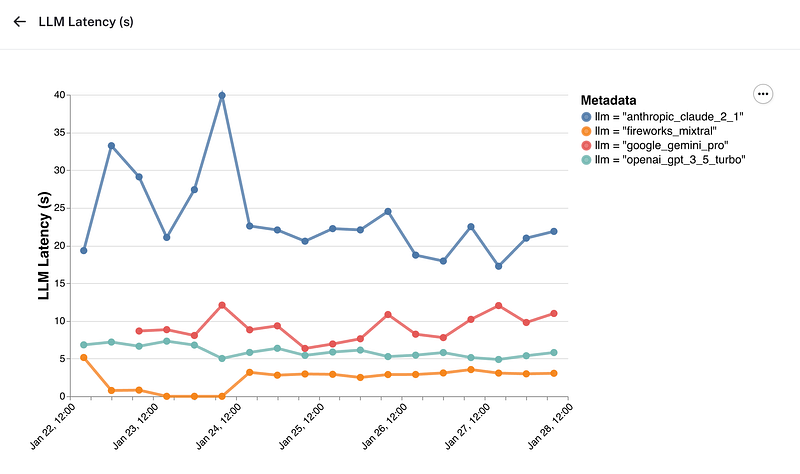
Chart in LangSmith showing LLM latency over time
Time to First Token
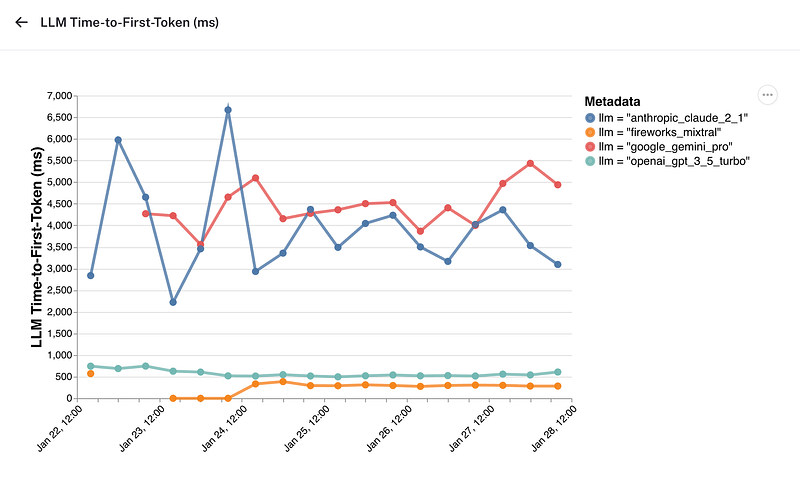
Chart in LangSmith showing time-to-first-token over time
Feedback
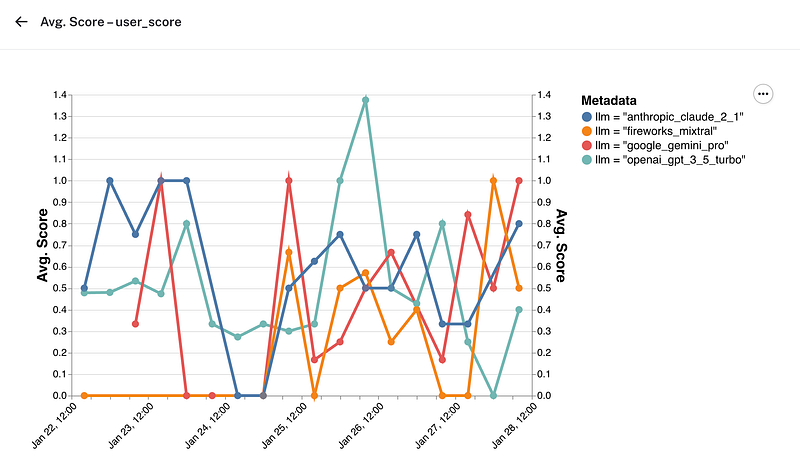
Chart in LangSmith showing User Score (binary) over time
These charts demonstrate the capability to identify variations or discrepancies between different LLM providers and make data-driven decisions about the application.
Other Use-Cases
The grouping feature in LangSmith can be applied to other use-cases:
A/B Testing with Revisions
By sending up a revision identifier in the metadata and grouping by this revision in your charts, you can clearly see how each version performs with respect to each other.
Enhancing User Experience
By grouping data using user_id or conversation_id in metadata, you can gain an in-depth understanding of how different users are experiencing the application and identify any user-specific issues or trends.
These examples just scratch the surface of what’s possible with LangSmith’s new grouping feature. For more information and to sign up for LangSmith,