
LangChain 0.1 Release is on Fire: Improvements in Observability, Composability, Streaming, Tools, RAG, and Agents
After engaging with hundreds of developers, the LangChain team has rolled out substantial enhancements that promise to elevate the developer experience.
LangChain 0.1 brings significant improvements on:
- Observability
- Composability
- Streaming
- Tool Usage
- RAG
- Agents
In this article, we will break down each element and look at a few code examples to give you a hands-on understanding of the changes. At the end, I’ll share other resources if you want to dig deeper into any of these areas.
Let’s go!
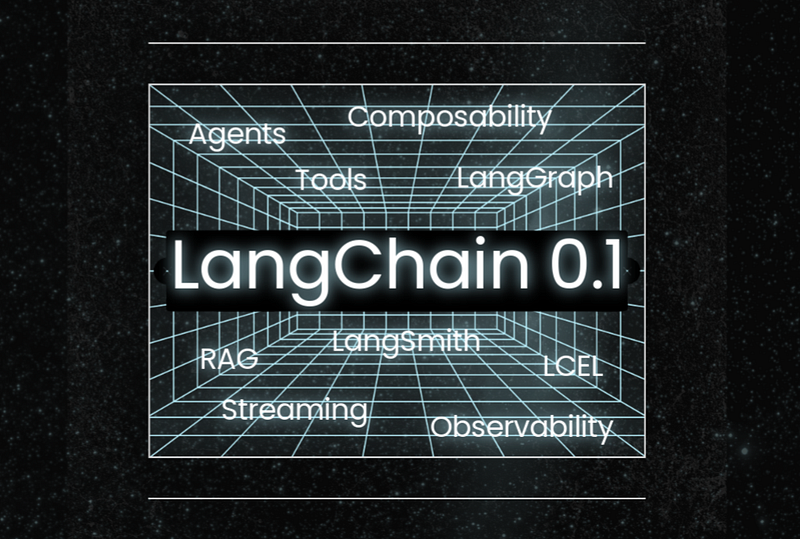
LangChain 0.1 Overview
Toward the 0.1 release, the LangChain team talked to 100s of developers to deliver meaningful changes. As with any fast-growing initiative, there were hiccups, such as breaking changes or unstable features.
They needed to earn the trust of the developer community.
To enhance foundational capabilities, they split the framework into 3 packages:
- langchain-core forms the backbone, encompassing the primary abstractions, interfaces, and core functionalities, including the LangChain Expression Language (LCEL).
- langchain-community is aimed at better managing dependencies, this package includes third-party integrations, enhancing the robustness and scalability of LangChain, and improving the overall developer experience.
- langchain is focused on higher-level applications, this package deals with specific use cases involving chains, agents, and retrieval algorithms.
“All done in a backwards compatible way.”
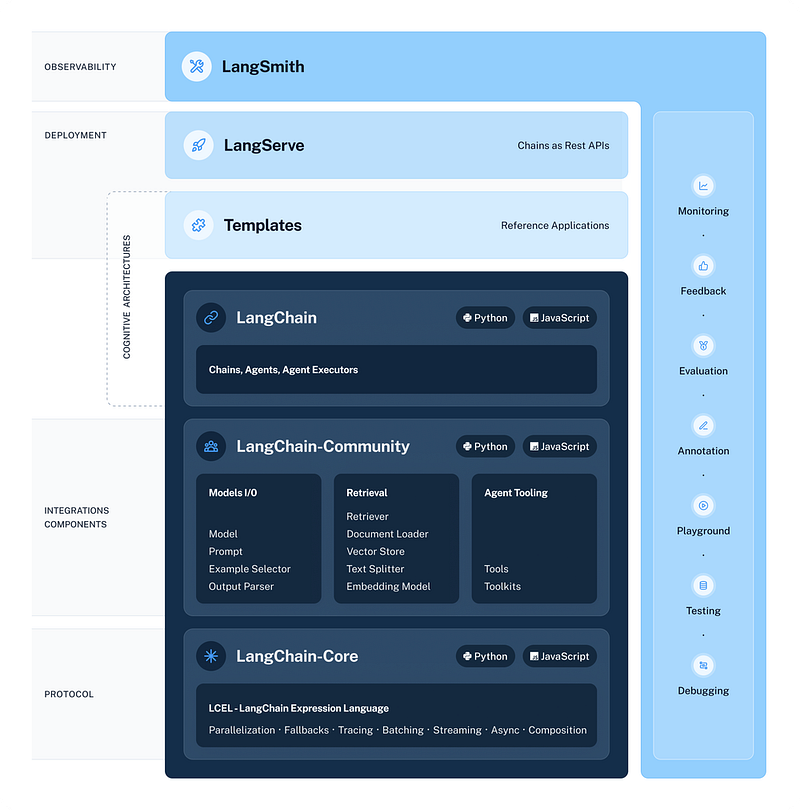
LangChain 0.1 also introduces a clear versioning strategy to maintain backward compatibility:
- Minor version bumps (second digit) will signal any breaking changes to the public API.
- Patch version bumps (third digit) will indicate bug fixes or new feature additions.
OK, let’s dive into the capabilities.
Observability
To gain insights into the inner workings of LangChain applications, you can already use set_verbose and set_debug to see what’s going on under the hood.
from langchain.globals import set_debug

set_verbose(False)
set_debug(True)

prompt = hub.pull("hwchase17/openai-functions-agent")
llm = ChatOpenAI(model="gpt-3.5-turbo", temperature=0)
search = TavilySearchResults()
tools = [search]
agent = create_openai_functions_agent(llm, tools, prompt)
agent_executor = AgentExecutor(agent=agent, tools=tools)

agent_executor.invoke({"input": "what is the weather in sf?"})
[chain/start] [1:chain:AgentExecutor] Entering Chain run with input:
{
"input": "what is the weather in sf?"
}
[chain/start] [1:chain:AgentExecutor > 2:chain:RunnableSequence] Entering Chain run with input:
{
"input": "what is the weather in sf?",
"intermediate_steps": []
}
[chain/start] [1:chain:AgentExecutor > 2:chain:RunnableSequence > 3:chain:RunnableAssign<agent_scratchpad>] Entering Chain run with input:
{
"input": "what is the weather in sf?",
"intermediate_steps": []...
...
[chain/end] [1:chain:AgentExecutor > 2:chain:RunnableSequence > 6:prompt:ChatPromptTemplate] [0ms] Exiting Prompt run with output:
{
"lc": 1,
"type": "constructor",
"id": [
"langchain",
"prompts",
"chat",
"ChatPromptValue"
],
"kwargs": {
"messages": [
{
"lc": 1,
"type": "constructor",
"id": [
"langchain",
"schema",...LangChain team also built LangSmith to provide a best-in-class debugging experience for LLM applications. LangSmith is in private beta now and hopefully will be in public beta in a few months.
import os
import getpass

os.environ["LANGCHAIN_TRACING_V2"]="true"
os.environ["LANGCHAIN_ENDPOINT"]="https://api.smith.langchain.com"
os.environ["LANGCHAIN_API_KEY"] = getpass.getpass()

set_debug(False)

agent_executor.invoke({"input": "what is the weather in sf?"})

# {'input': 'what is the weather in sf?',
# 'output': "I'm sorry, but I couldn't find the current weather in San Francisco. However, you can check the weather forecast for San Francisco on websites like Weather.com or AccuWeather.com."}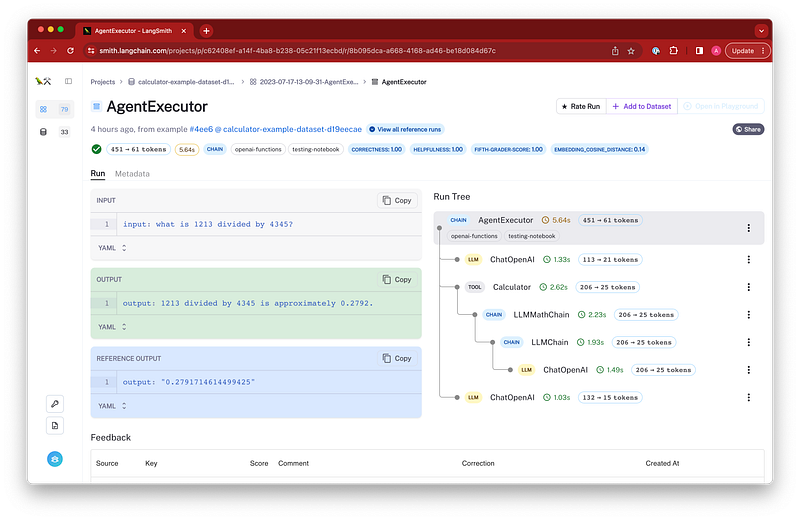
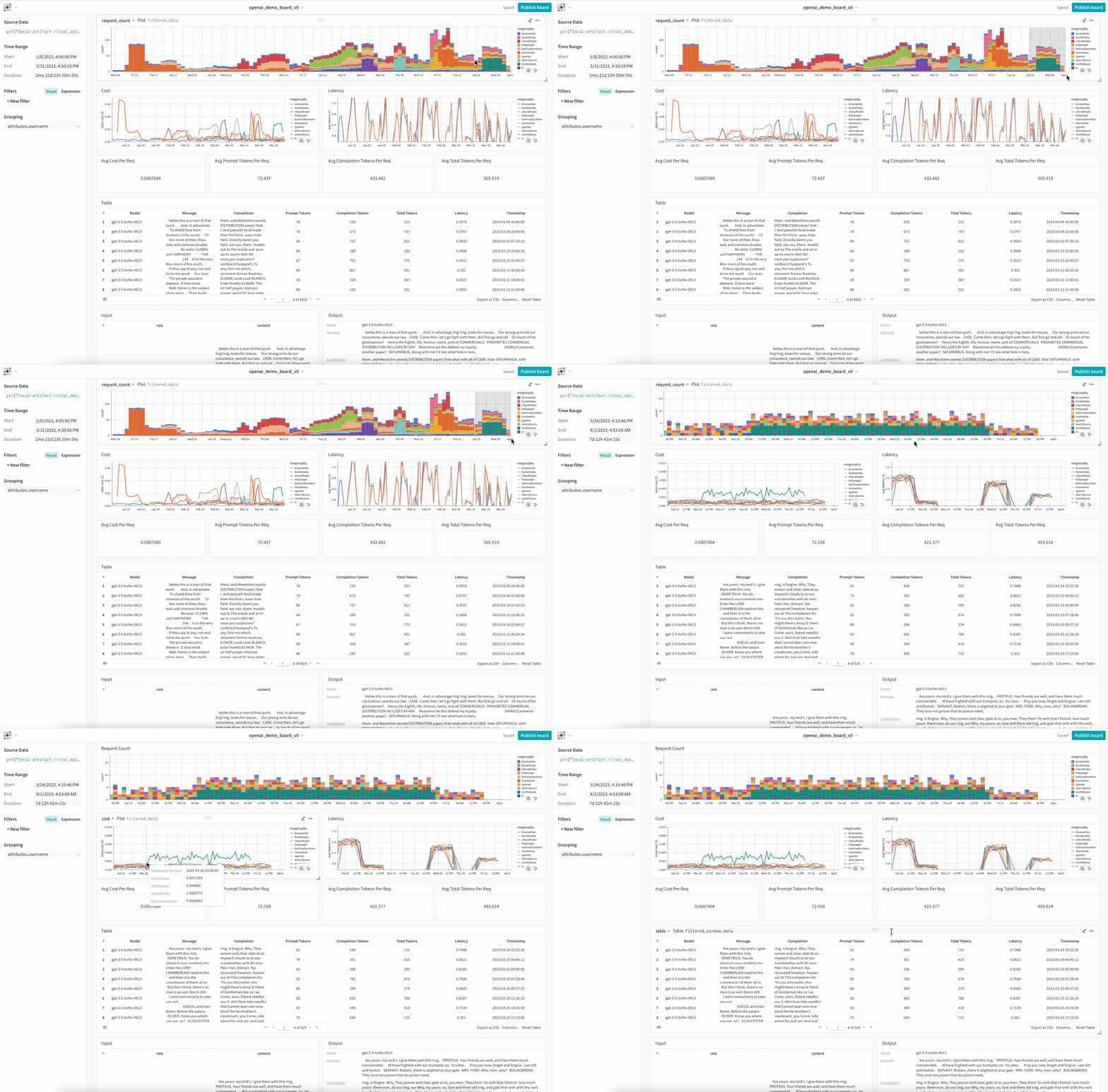
If you are not in LangSmith’s private beta, you can also use WandB to track your LLM applications.
Composability
The team invested heavily in LangChain Expression Language (LCEL) in recent months to enable better orchestration since we all need an easy and declarative way to compose chains together.
LCEL provides numerous advantages:
- Streaming support
- Async support
- Optimized parallel execution
- Retries and fallbacks
- Accessing intermediate results
- Validating input and output schemas
We’ve seen folks successfully run LCEL chains with 100s of steps in production.
Let’s have a look at a simple example:
from langchain_community.retrievers.tavily_search_api import TavilySearchAPIRetriever

retriever= TavilySearchAPIRetriever()

prompt = ChatPromptTemplate.from_template("""Answer the question based only on the context provided:

Context: {context}

Question: {question}""")
chain = prompt | model | output_parser
question = "what is langsmith"
context = "langsmith is a testing and observability platform built by the langchain team"
chain.invoke({"question": question, "context": context})
# 'Langsmith is a testing and observability platform developed by the Langchain team.'

from langchain_core.runnables import RunnablePassthrough

retrieval_chain = RunnablePassthrough.assign(
    context=(lambda x: x["question"]) | retriever
) | chain
retrieval_chain.invoke({"question": "what is langsmith"})
# 'LangSmith is a platform that helps trace and evaluate language model applications and intelligent agents. It allows users to debug, test, evaluate, and monitor chains and intelligent agents built on any Language Model (LLM) framework. LangSmith seamlessly integrates with LangChain, an open source framework for building with LLMs.'
Note that the components for LCEL are in langchain-core, and they will gradually replace pre-existing (now “Legacy”) chains.
Streaming
All chains constructed with LCEL expose standard stream and astream methods, and also a standard astream_log method which streams all steps in the LCEL chain which can be filtered to easily get intermediate steps taken and other information.
from langchain_openai import ChatOpenAI
from langchain_core.prompts import ChatPromptTemplate
from langchain_core.output_parsers import StrOutputParser
prompt = ChatPromptTemplate.from_template("Tell me a joke about {topic}")
model = ChatOpenAI()
output_parser = StrOutputParser()
chain = prompt | model | output_parser
for s in chain.stream({"topic": "bears"}):
    print(s)
Why
don
't
bears
wear
shoes
?
Because
they
have
bear
feet
!Tool Usage
Making sure that an LLM returns information in a structured format that can be used in downstream applications is crucial for enabling LLMs to take actions.
LangChain provides many output parsers for transforming LLM outputs to a more suitable format, which massively helps with any form of structured data, and many of them support streaming partial results from structured formats like JSON, XML and CSV.
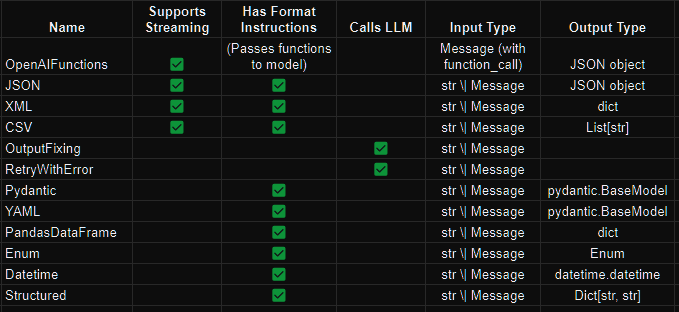
You can specify the output format (using Pydantic, JSON schema, or even a function) and also easily work with the response.
from langchain.utils.openai_functions import (
    convert_pydantic_to_openai_function,
)
from langchain_core.prompts import ChatPromptTemplate
from langchain_core.pydantic_v1 import BaseModel, Field, validator

class Joke(BaseModel):
    """Joke to tell user."""

    setup: str = Field(description="question to set up a joke")
    punchline: str = Field(description="answer to resolve the joke")


openai_functions = [convert_pydantic_to_openai_function(Joke)]

from langchain.output_parsers.openai_functions import JsonOutputFunctionsParser

parser = JsonOutputFunctionsParser()
chain = prompt | model.bind(functions=openai_functions) | parser
chain.invoke({"topic": "bears"})
# {'setup': "Why don't bears wear shoes?",
# 'punchline': 'Because they have bear feet!'}
All output parsers come equipped with a get_format_instructions method to get instructions to tell the LLM how to respond.
Retrieval Augmented Generation (RAG)
Now, let’s talk about the RAG side, which many of us deal with on an ongoing basis.
Being able to easily combine your data with LLMs is an incredibly important part of LangChain.
On ingestion side, LangChain has 15 different text splitters, provides optimizations for specific document types (like HTML and Markdown)
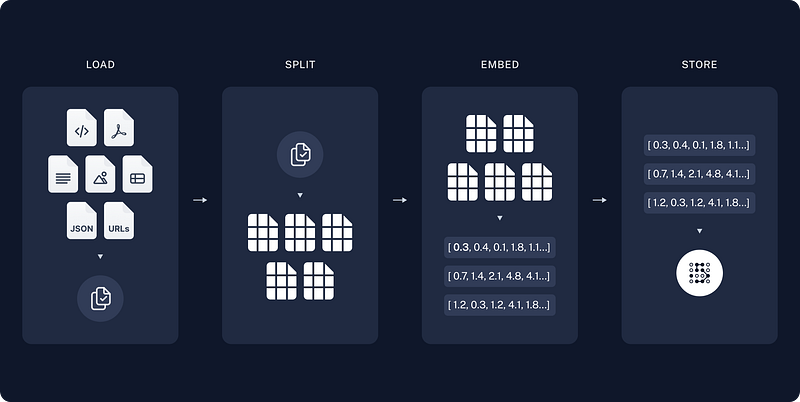
On large scale workloads, LangChain exposes indexing API to allow you to re-ingest content while ignoring pieces that have NOT changed — saving on time and cost for large-volume workloads.
On the retrieval side, there are advanced strategies from academia like FLARE and Hyde, LangChain’s techniques like Parent Document and Self-Query, and adaptations from other industry solutions like Multi-Query.
It also supports production concerns like per-user retrieval — crucial for any application where you are storing documents for multiple users together.
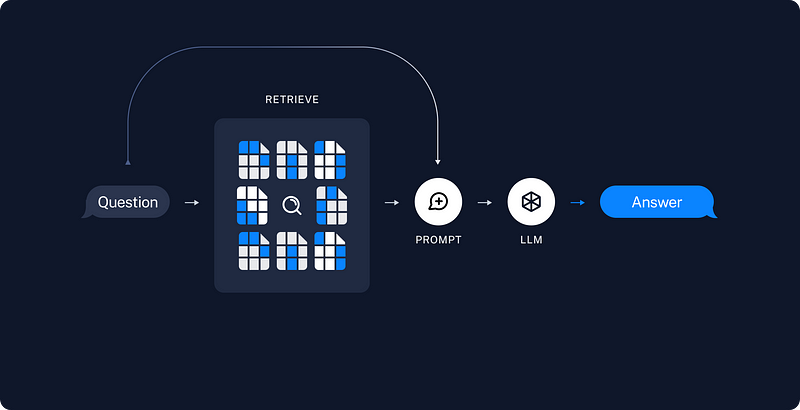
There are also more opinionated approaches to retrieval such as EmbedChain and GPTResearcher.
Agents
Agents will take off this year and LangChain already provides:
- Integrations with 3rd party tools
- Ways to structure LLM responses
- Flexible ways to call tools (LCEL)
- Prompting strategies such as ReAct
- Function and tool calling
Here’s a simple example to show how easy it’s to kick-start with agents using LangChain:
from langchain_community.tools.tavily_search import TavilySearchResults
from langchain_openai import ChatOpenAI
from langchain import hub
from langchain.agents import create_openai_functions_agent
from langchain.agents import AgentExecutor

# Prompt
# Get the prompt to use - you can modify this!
prompt = hub.pull("hwchase17/openai-functions-agent")

# LLM
llm = ChatOpenAI(model="gpt-3.5-turbo", temperature=0)

# Tools
search = TavilySearchResults()
tools = [search]

# Agent
agent = create_openai_functions_agent(llm, tools, prompt)
result = agent.invoke({"input": "what's the weather in SF?", "intermediate_steps": []})
result.tool
# 'tavily_search_results_json'

result.tool_input
# {'query': 'weather in San Francisco'}

result
# AgentActionMessageLog(tool='tavily_search_results_json', tool_input={'query': 'weather in San Francisco'}, log="\nInvoking: `tavily_search_results_json` with `{'query': 'weather in San Francisco'}`\n\n\n", message_log=[AIMessage(content='', additional_kwargs={'function_call': {'arguments': '{\n  "query": "weather in San Francisco"\n}', 'name': 'tavily_search_results_json'}})])

# Agent Executor
agent_executor = AgentExecutor(agent=agent, tools=tools)
agent_executor.invoke({"input": "what is the weather in sf?"})
#{'input': 'what is the weather in sf?',
# 'output': 'The weather in San Francisco is currently not available. However, you can check the weather in San Francisco in January 2024 [here](https://www.whereandwhen.net/when/north-america/california/san-francisco-ca/january/).'}

# Streaming
for step in agent_executor.stream({"input": "what is the weather in sf?"}):
    print(step)

# {'actions': [AgentActionMessageLog(tool='tavily_search_results_json', tool_input={'query': 'weather in San Francisco'}, log="\nInvoking: `tavily_search_results_json` with `{'query': 'weather in San Francisco'}`\n\n\n", message_log=[AIMessage(content='', additional_kwargs={'function_call': {'arguments': '{\n  "query": "weather in San Francisco"\n}', 'name': 'tavily_search_results_json'}})])], 'messages': [AIMe...
A notable addition is langgraph, a new library allowing the creation of language agents as graphs.
langgraph will allow users to create far more custom cyclical behavior by defining:
- Explicit planning steps
- Explicit reflection steps
or hard coding it to call a specific tool first, empowering users to build more complex and efficient language models.
from langgraph.graph import END, Graph

workflow = Graph()

# Add the agent node, we give it name `agent` which we will use later
workflow.add_node("agent", agent)
# Add the tools node, we give it name `tools` which we will use later
workflow.add_node("tools", execute_tools)

# Set the entrypoint as `agent`
# This means that this node is the first one called
workflow.set_entry_point("agent")

# We now add a conditional edge
workflow.add_conditional_edges(
    # First, we define the start node. We use `agent`.
    # This means these are the edges taken after the `agent` node is called.
    "agent",
    # Next, we pass in the function that will determine which node is called next.
    should_continue,
    # Finally we pass in a mapping.
    # The keys are strings, and the values are other nodes.
    # END is a special node marking that the graph should finish.
    # What will happen is we will call `should_continue`, and then the output of that
    # will be matched against the keys in this mapping.
    # Based on which one it matches, that node will then be called.
    {
        # If `tools`, then we call the tool node.
        "continue": "tools",
        # Otherwise we finish.
        "exit": END
    }
)

# We now add a normal edge from `tools` to `agent`.
# This means that after `tools` is called, `agent` node is called next.
workflow.add_edge('tools', 'agent')

# Finally, we compile it!
# This compiles it into a LangChain Runnable,
# meaning you can use it as you would any other runnable
chain = workflow.compile()
langgraph powers also OpenGPTs, a lot more examples and documentation are on the way!
Resources
If you want to dig deeper into these areas, here are some video walk-throughs that LangChain team released last week:
- Verbose debugging in LangChain
- Breadth and depth of integration coverage
- Customizability and control with LCEL
- Streaming with LCEL
- Output parsing in LangChain
- Context-aware retrieval
- Automation with agents and tool use
Hope this helped, see you next time around!


