
Lambda Functions in Python — Filter, Map & Reduce
What is Lambda Function?
Brief Intro
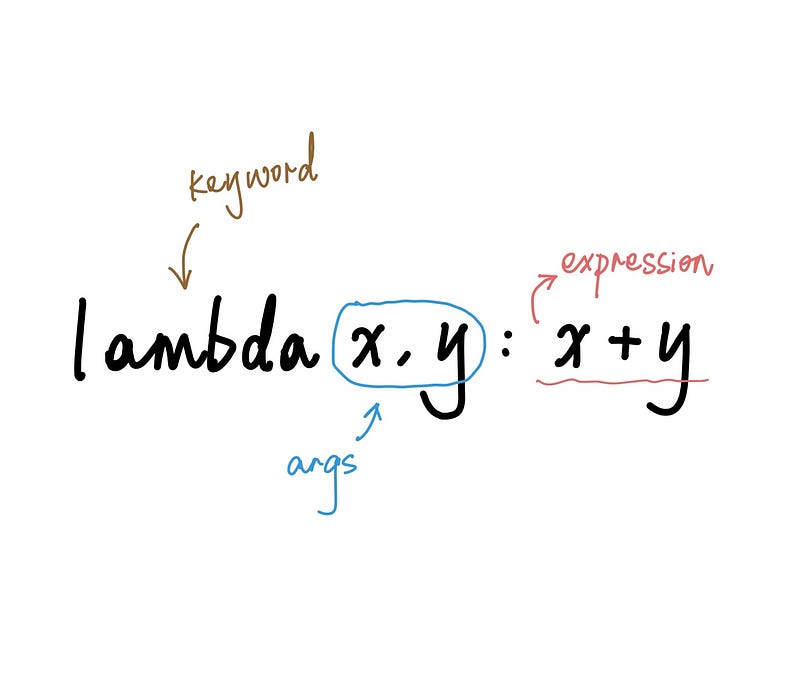
A lambda function is an anonymous function with syntax lambda args: expression . The expression is executed on the arguments and the result is returned. Each lambda function consists of 3 parts:
- Keyword lambda
- A bound variable x
- Body of the expression
Syntax — Single Variable
A simple example: square = lambda x: x**2 is equivalent to the standard Python function definition as follows:
def square(x):
    return x**2
Use cases like square(4) will give the same results in both cases.
Syntax — Multiple Variables
Example for getting the sum of squares of 2 variables:
sum_of_square = lambda x, y: x**2 + y**2Characteristics
As can be seen in the previous examples, a lambda function has the following characteristics:
- It is written as a single line of expression.
- It does not contain statements in the body.
- It does not support type annotations or additional variable declarations.
Why & When to Use Lambda Functions?
- In most cases, lambda functions reduce the number of lines compared to normal Python function definitions using
defkeyword. - They are useful when a function is needed temporarily for a short period of time, often to be used inside another function such as
filter,map,sortandreduce.
1. Filter
The filter function takes on the form filter(function, iterable) . It is used to filter elements satisfying certain conditions from an iterable object such as lists and sets. The function argument is often implemented using a lambda function:
numbers = [1, 2, 3, 4, 5, 6, 7, 8, 9, 10]even_numbers = list(filter(lambda x: x % 2 == 0, numbers))print(even_numbers)
>>> [2, 4, 6, 8, 10]2. Map
The map function takes on a similar format as filter and is used to perform a uniform operation for all elements in a sequence:
letters = ["a", "b", "c", "d", "e", "f", "g"]letters_upper_case = list(map(lambda x: x.upper(), letters))print(letters_upper_case)
>>> ['A', 'B', 'C', 'D', 'E', 'F', 'G']3. Reduce
Syntax: reduce(function, sequence)
The reduce function, like map, is also used to perform an operation function on each element in the sequence. However, it works a bit differently in that the operation is performed among the elements, rather than performed on each element separately.
For example, map is used if you wish to double each element, but reduce is used if you want to get the sum of all elements in the sequence.
lst = [1, 2, 3, 4, 5, 6, 7, 8, 9, 10]
doubles = list(map(lambda x: x*2, lst))print(doubles)
>>> [2, 4, 6, 8, 10, 12, 14, 16, 18, 20]from functools import reduce
sum_all = reduce(lambda x, y: x+y, lst)print(sum_all)
>>> 554. Other Use Cases
For example, if we have a list of prices and volume retrieved from the order book as follows: orders = [[1.21, 34600], [1.22, 56490], [1.25, 3970], [1.28, 127500], [1.3, 87900]] , each element in the list represents a price-volume pair. To sort the list, we could employ lambda functions to specify the key used for sorting.
orders = [[1.21, 34600], [1.22, 56490], [1.25, 3970], [1.28, 127500], [1.3, 87900]]# sort by price
sorted(orders, key=lambda x: x[0])>>> [[1.21, 34600], [1.22, 56490], [1.25, 3970], [1.28, 127500], [1.3, 87900]]
# sort by volume
sorted(orders, key=lambda x: x[1])
>>> [[1.25, 3970], [1.21, 34600], [1.22, 56490], [1.3, 87900], [1.28, 127500]]Final Note
Internally, both lambda and def functions work exactly the same. The dis keyword exposes a readable version of Python bytecode allowing inspection of instructions. Evaluating both versions of square functions defined in the beginning of this article:
# both versions of functions
square_lambda = lambda x: x**2
def square_def(x):
return x**2# evaluation results
import disdis.dis(square_lambda)>>>
1 0 LOAD_FAST 0 (x)
2 LOAD_CONST 1 (2)
4 BINARY_POWER
6 RETURN_VALUEdis.dis(square_def)>>>
3 0 LOAD_FAST 0 (x)
2 LOAD_CONST 1 (2)
4 BINARY_POWER
6 RETURN_VALUEThe processes undertaken by both functions are observed to be exactly the same. So there is no real difference in the way they execute.
More content at PlainEnglish.io. Sign up for our free weekly newsletter. Follow us on Twitter and LinkedIn. Check out our Community Discord and join our Talent Collective.


