
Kubernetes secrets management — External Secrets Operator (ESO)
The solution is suitable not only for Azure but also for AWS and other cloud platforms.
I have implemented secret management in a Kubernetes cluster using Kubeseal, a Kubernetes controller, and a tool for one-way encrypted Secrets.
It works well; however, after implementing and running it for a while, I found it challenging to update secrets (Some of them are configuration JSON files with api keys and other credentials).
* I have to manually generate the secrets, seal them, and commit them to the source code. As a result, I cannot automate the process with a CI/CD Pipeline to easily generate new sealed secrets.
* Additionally, it lacks visibility for developers when they need to review and update the secrets.
* Our operations team finds it difficult to maintain the system when password updates are required.
🐋 Reseach
Then my team agrees to manage Kubernetes secrets with Azure managed service, Key Vault. If you work on AWS, can use similar managed service, suh as SSM parameter store or Secrets manager, to manage the secrets.
There are two popular solutions we can choice from:
I prefer the first one because it is the solution provided and recommended by Azure and is natively supported in AKS. That means we can get support directly from Azure if there are any issues with it.
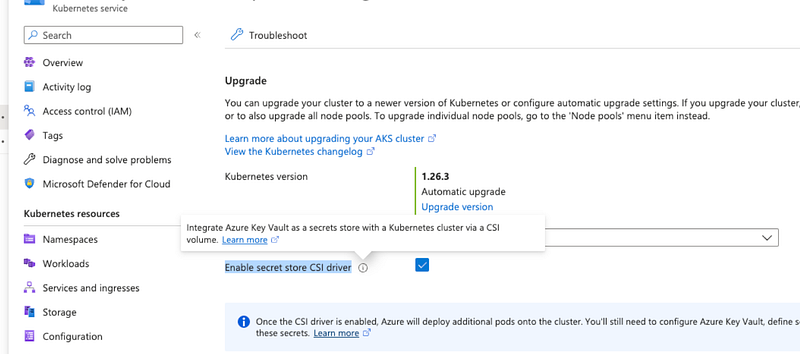
However, after spending several weeks on it, I realized this solution is too complex and unstable. Its documentation is not good enough and hard to follow. I encountered and fixed many issues when implementing the solution in our environment and, in the end, got stuck with this issue.
I gave up on it.
Updates after half year I published this blog Finally, this ticket was closed without any fixes or improvements. This decision was made due to lacks enough contributors to adequately respond. If the owner cannot seriously take care of the project, we wouldn’t
Moving on to the second solution with External Secrets Operator, the implementation goes smoothly, and I managed to set everything up in less than 1 hour for a PoC.
Let’s go with External Secrets Operator.
🦈 What’s External Secrets Operator (ESO)?
Sealed Secrets are a great starting point for securing secrets, but there is an even better way. Using the External Secrets Operator (ESO) and an external secret management system like HashiCorp Vault, AWS Secrets Manager, Google Secrets Manager, or Azure Key Vault. ESO supports many such secret managers and watches for changes to external secret stores and keeps Kubernetes secrets in sync.
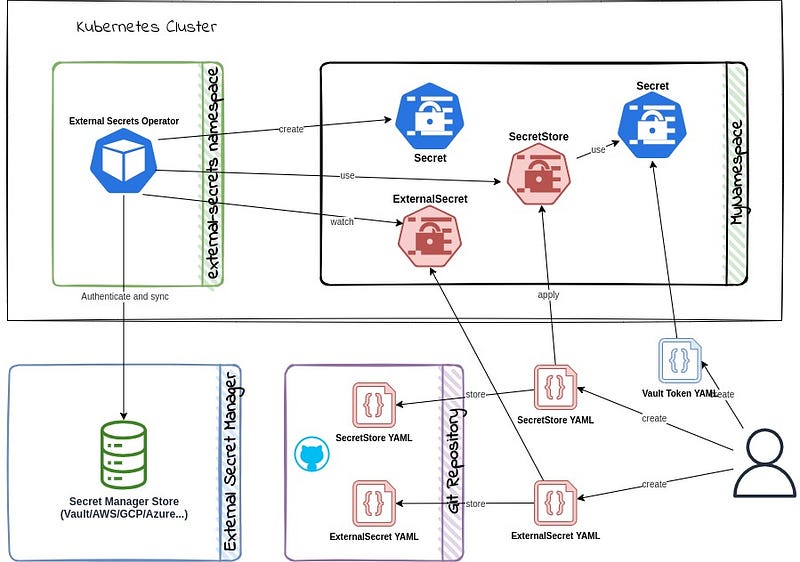
Design explanation, in plain words
- External Secrets Operator: Controller to watch the service requests from ExternalSecret , create and sync secrets
- SecretStore: Sets the secret connection with Azure KeyVault.
- ExternalSecret: Kubernetes secrets with keys references (Mapping).
Instructions
Create secrets in Azure Key Vault
Please follow Azure’s official document to create the KeyVault and secrets in it.
Make sure you set the access configuration to Azure role-based account control on it
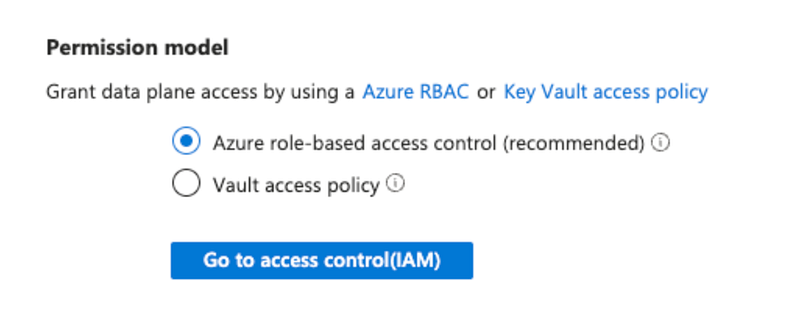
You need add yourself as Key Vault Administator via Access Control (IAM), so you can add secrets in it
Setup managed identity
In the new keyvault, go to Access Control (IAM) → Add role assignment → choice Key Vault Secrets User → Assign access to “Managed identity” → choice AKS Agent Pool (it is a virtual machine scale sets)
Notes: Role and permission of key Vault Secrets user: Read secret contents. Only works for key vaults that use the ‘Azure role-based access control’ permission model.
Save its Application ID (or called Client ID) , it need be used when set SecretStore below
Below is another way to get the client id
$ az vmss identity show -g <mvss_agent_resource_group> -n <vmss_agent_pool_name>  -o yaml

principalId: null
tenantId: null
type: UserAssigned
userAssignedIdentities:
  ? /subscriptions/xxxx/resourceGroups/aks_xxxx_aks_australiaeast/providers/Microsoft.ManagedIdentity/userAssignedIdentities/aks-agentpool
  : clientId: xxxx-xxxx-xxxx-xxxx-xxxx
    principalId: xxxx-xxxx-xxxx-xxxx-xxxx
  ....
Install External Secrets Operator
$ helm repo add external-secrets https://charts.external-secrets.io$ helm install external-secrets \
external-secrets/external-secrets \
-n external-secrets \
--create-namespace
$ helm -n external-secrets listNAME NAMESPACE REVISION UPDATED STATUS CHART APP VERSION
external-secrets external-secrets 1 2023-07-30 23:37:22.525261 +1000 AEST deployed external-secrets-0.9.1 v0.9.1Create SecretStore
apiVersion: external-secrets.io/v1beta1
kind: SecretStore
metadata:
  name: secret-store
spec:
  provider:
    azurekv:
      authType: ManagedIdentity
      identityId: 38f5672c-xxxx-xxxx-xxxx-xxxxxxxx
      vaultUrl: https://xxxxxxxx-secret.vault.azure.net
Notes:
- authType: should be ManagedIdentity which you don’t need provide any extra secret to access Azure Key Vault from Kubernetes Cluster
- identityId: is the Client ID of the service that is allowed to access the KeyVault.
- vaultUrl: is the keyvault URL.
With the SecretStore service, we establish the connection between Azure KeyVault and the Kubernetes Cluster.
Create ExternalSecret
apiVersion: external-secrets.io/v1beta1
kind: ExternalSecret
metadata:
  name: external-secret
spec:
  refreshInterval: 1h
  secretStoreRef:
    kind: SecretStore
    name: secret-store
  target:
    name: pod-secret
    creationPolicy: Owner
  data:
  - secretKey: JAVA_OPTS_APPEND
    remoteRef:
      key: JAVA-OPTS-APPEND
  - secretKey: DB_PASSWORD
    remoteRef:
      key: DB-PASSWORD
  - secretKey: DB_NAME
    remoteRef:
      key: DB-NAME
  ...
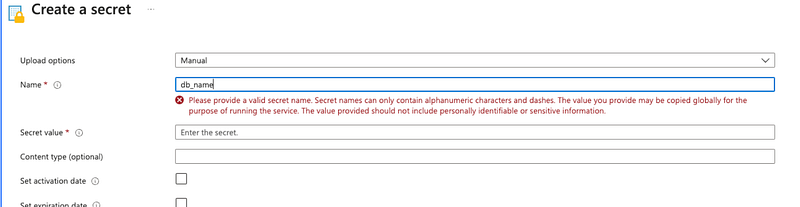
With ExternalSecret we build the mapping of the secret key names between Azure KeyVault and Kubernete Secrets, notice the difference between key and secretKey
The key name in Azure KeyVault can’t be underscore, can only contain alphanumeric characters and dashes
With ExternalSecret, we build the mapping of the secret key names between Azure KeyVault and Kubernetes Secrets. Please note the difference between key and secretKey. The key name in Azure KeyVault can't have underscores; it can only contain alphanumeric characters and dashes.
After applying the above YAML files, a secret is generated automatically.
$ kubectl get secret
pod-secret   Opaque              12     13h
The rest remains the same, and applications will refer to secrets from it.
Update secret
The `spec.refreshInterval` in ExternalSecrets is presently configured for a duration of 1 hour. However, if you need to initiate an immediate refresh — for instance, in the event that you’ve modified the secret and wish to bypass the waiting period — you have that option.
kubectl get es
kubectl annotate es external-secret force-sync=$(date +%s) --overwrite
Note: In situations where the pod operates with the secret configured as environment variables, any attempt to refresh the secret will not affect the pod’s access to the updated information. To integrate the new secret, a pod redeployment becomes necessary.


