
Kubernetes — Objects (Resources/Kinds) Overview
Introduction (Understanding) to Kubernetes Objects/Resources/Kinds.
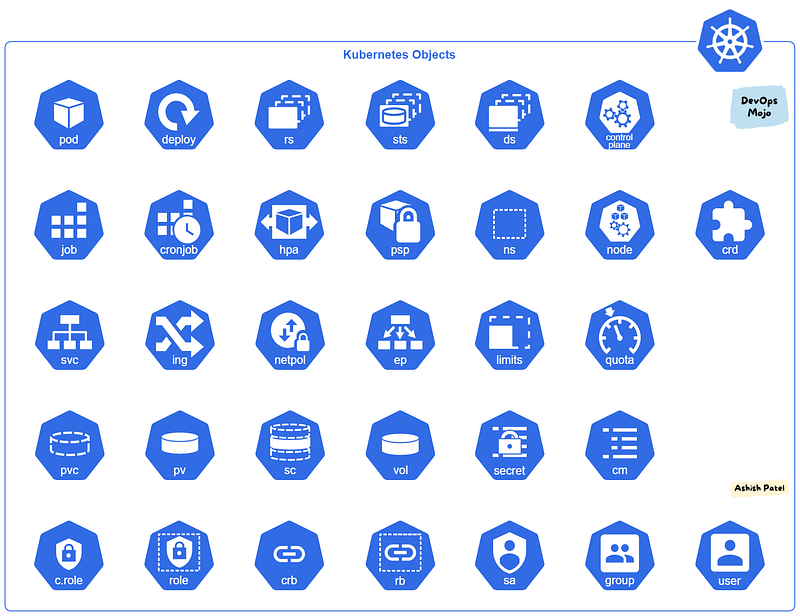
Kubernetes is a system with several concepts. Many of these concepts get manifested as “objects” in the RESTful API (often called “resources” or “kinds”).
Kubernetes Objects are persistent entities in the Kubernetes system that represent state of your cluster. By creating an object, you’re effectively telling the Kubernetes system what you want your cluster’s workload to look like; this is your cluster’s desired state.
Some of them are used to handle problems of container orchestration, like scheduling and self-healing, others are there to solve some inherent problems of containers.
Kubernetes objects can be distinguished between workload-oriented objects that are used for handling container workloads and infrastructure-oriented objects, that for example handle configuration, networking and security. Some of these objects can be put into a namespace, while others are available across the whole cluster.
we can describe these objects in the popular data-serialization language YAML and send them to the api-server, where they get validated before they are created.
Infrastructure Components
Cluster
- Kubernetes cluster consists of at least one main (control) plane, and one or more worker machines, called nodes, that run containerized applications.
Control Plane
- Also known as master node or head node.
- Control plane manages the worker nodes and the Pods in the cluster.
- Control plane receives input from a CLI or UI via an API. i.e. entry point for REST/kubectl.
- Control plane’s components make global decisions about the cluster, as well as detecting and responding to cluster events.
Node
- Also known as worker node or compute node.
- Each node contains the necessary services to run Pods (to run containerized application), managed by the control plane.
- Kubernetes cluster needs at least one worker node, but normally have many.
- Pods are scheduled and orchestrated to run on nodes.
- You can scale up and scale down cluster by adding and removing nodes.
Workloads
Pod
- Pod is the basic unit of work and the smallest deployable unit of computing that you can create and manage in Kubernetes.
- Pod is a group of one or more containers, with shared storage and network resources, and a specification for how to run the containers.
- Pod is a thin wrapper around one or more containers.
Deployment
- Deployment provides declarative updates for Pods (Identical Pods) and ReplicaSets.
- Deployment creates a management object one level higher than a replica set, and enables you to deploy and manage updates for pods in a cluster.
- Deployment handles the ReplicaSet, it gets automatically created with Deployment.
- Deployment is the most common way to get your app on Kubernetes.
- You describe a desired state in a Deployment, and the Deployment Controller changes the actual state to the desired state at a controlled rate.
- Deployment has details of how to roll out (or roll back) across versions of your application.
ReplicaSet
- ReplicaSet’s purpose is to maintain a stable set of replica Pods (Identical Pods) running at any given time.
- ReplicaSet ensures a defined number of pods are always running.
- Kubernetes supports self-healing applications through ReplicaSets and Replication Controllers. The replication controller helps in ensuring that a POD is re-created automatically when the application within the POD crashes. It helps in ensuring enough replicas of the application are running at all times.
- Usually, ReplicaSet should not created directly. However, Deployment is a higher-level concept that manages ReplicaSets and provides declarative updates to Pods.
- It is recommend using Deployments instead of directly using ReplicaSets.
StatefulSet
- StatefulSet is used to manage stateful applications with persistent storage.
- Storage stays associated with replacement pods. Volumes persist when pods are deleted. Pods are deployed/updated individually and in order.
- StatefulSet runs stateful pods with a stable identity and provides guarantees about the ordering and uniqueness of these Pods. Pod names are are retained when rescheduled (app-0, app-1).
- Like a Deployment, a StatefulSet manages Pods that are based on an identical container spec. Unlike a Deployment, a StatefulSet maintains a sticky identity for each of their Pods.
- Pods have fixed DNS names, unlike deployments.
- Pods are created from same specification, but not interchangeable.
- Each Pod has own storage.
DaemonSet
- DaemonSet ensures that all (or some, matching a node selector) Nodes run a copy of a Pod. As nodes are added to the cluster, Pods are added to them. As nodes are removed from the cluster, those Pods are garbage collected. Deleting a DaemonSet will clean up the Pods it created.
- DaemonSet implements a single instance of a pod on all (or filtered subset of) worker node(s).
Some typical uses of a DaemonSet are:
- Running a cluster storage daemon on every node.
- Running a logs collection daemon on every node.
- Running a node monitoring daemon on every node.
Job
- Job runs pods that perform a completable task.
- Job creates one or more Pods and will continue to retry execution of the Pods until a specified number of them successfully terminate.
- Job ensures a pod properly runs to completion.
- Deleting a Job will clean up the Pods it created. Suspending a Job will delete its active Pods until the Job is resumed again.
CronJob
- CronJob creates Jobs on a repeating schedule.
- One CronJob object is like one line of a crontab (cron table) file. It runs a job periodically on a given schedule, written in Cron format.
- CronJobs are meant for performing regular scheduled actions such as backups, report generation, and so on.
Namespace
- Namespaces provides a mechanism for isolating groups of resources within a single cluster.
- Names of resources need to be unique within a namespace, but not across namespaces.
- Namespace-based scoping is applicable only for namespaced objects (e.g. Deployments, Services, etc) and not for cluster-wide objects (e.g. StorageClass, Nodes, PersistentVolumes, etc).
- Namespaces enable organizing resources into non-overlapping groups (for example, per tenant, per environment, per project, per team)
Networking
Service
- Service is used to expose an application deployed on a set of pods using a single endpoint. i.e. It maps a fixed IP address to a logical group of pods.
- Service provides stable networking for pods (ephemeral pods) by bringing stable IP addresses and DNS names, and provide a way to Kubernetes to configuring a proxy to forward traffic to a set of pods.
- Service enables communication between nodes, pods, and users of app, both internal and external, to the cluster. Service also provides load balancing when you have Pod replicas.
- There are four types of Kubernetes services —
ClusterIP,NodePort,LoadBalancerandExternalName.
Ingress
- Ingress manages external access to the services in a cluster, typically HTTP/S.
- Ingress may provide load balancing, SSL termination and name-based virtual hosting.
- Ingress exposes one or more services to external clients through a single externally reachable IP address.
- Traffic routing is controlled by rules defined on the Ingress resource.
- Ingress controller is responsible for fulfilling the Ingress, usually with a load balancer.
Network Policy (NetPol)
- Network Policy isolates the network between pods by specifying which pods can connect to each other, and other network endpoints.
- Network Policy works on OSI Layer 3 and Layer 4.
- Network policies are implemented by the network plugin.
Endpoint
- Endpoint defines which pods (or other servers) are exposed through a service.
- For Kubernetes Services, Kubernetes creates a Endpoint object. This endpoint will have the ip address mapping of the pods. This is created automatically for services with a defined selector.
- Endpoints can also be used to connect to external services like they were internal to the kubernetes cluster.
EndpointSlice
- EndpointSlices provide a simple way to track network endpoints within a Kubernetes cluster.
- EndpointSlices offer a more scalable and extensible alternative to Endpoints.
- EndpointSlice contains references to a set of network endpoints.
Storage
Persistent Volumes (PV)
- PV is a low level representation of a storage volume. It is an abstraction for the physical storage device that attached to the cluster.
- PV can be mounted into a pod through a PVC.
- PV is resource in the cluster that can be provisioned dynamically using Storage Classes, or they can be explicitly created by a cluster administrator.
- PV is independent of the lifecycle of the Pods. It means that data represented by a PV continue to exist as the cluster changes and as Pods are deleted and recreated.
Persistent Volume Claim (PVC)
- PVC is binding between a Pod and PV. Pod request the Volume through the PVC.
- PVC is the request to provision persistent storage with a specific type and configuration.
- PVCs describe the storage capacity and characteristics a pod requires, and the cluster attempts to match the request and provision the desired persistent volume.
- PVC must be in same namespace as the Pod. For each Pod, a PVC makes a storage consumption request within a namespace.
- PVC is similar to a Pod. Pods consume node resources and PVC consume PV resources.
Storage Classes (SC)
- StorageClass allows dynamic provisioning of Persistent Volumes, when PVC claims it.
- StorageClass abstracts underlying storage provider.
- StorageClass is used in conjunction with PVC that allow Pods to dynamically request a new storage.
Configuration
ConfigMaps
- ConfigMap is used to store non-confidential data in key-value pairs.
- Pods can consume ConfigMaps as environment variables, command-line arguments, or as configuration files in a volume.
- ConfigMap allows you to decouple environment-specific configuration from your container images, so that your applications are easily portable.
Secrets
- Secrets are similar to ConfigMaps but are specifically intended to hold confidential data.
- Secret allows you store and manage a small amount of sensitive information such as passwords, tokens, keys, SSH keys, etc.
- With Secret, you don’t need to include confidential data in your application code.
- Secrets can be created independently of the Pods that use them.
Security
Service Account
- Kubernetes uses Service Accounts to authenticate and authorize requests by pods to the Kubernetes API server.
- Service Account provides an identity for processes that run in a Pod.
Role
- Role defines what can be done to Kubernetes Resources.
- Role contains one or more rules that represent a set of permissions.
- Roles are namespaced, meaning Roles work within the constraints of a namespace.
- After creating a Role, you assign it to a user or group of users by creating a RoleBinding.
ClusterRole
- ClusterRole works the same as Role, but they are applied to the cluster as a whole.
- ClusterRoles are not bound to a specific namespace. ClusterRole give access across more than one namespace or all namespaces.
- After creating a ClusterRole, you assign it to a user or group of users by creating a RoleBinding or ClusterRoleBinding.
- ClusterRoles are typically used with service accounts.
RoleBinding
- RoleBinding is used for granting permission to a Subject.
- RoleBinding holds a list of subjects (users, groups, or service accounts), and a reference to the role being granted.
- Role and RoleBinding are used in namespaced scoped.
- RoleBinding may reference any Role in the same namespace.
- Defines who can perform the actions defined in a Role or ClusterRole (within a namespace).
ClusterRoleBinding
- ClusterRole and ClusterRoleBinding function like Role and RoleBinding, except they have wider scope.
- RoleBinding grants permissions within a specific namespace, whereas a ClusterRoleBinding grants access cluster-wide and to multiple namespaces.
- ClusterRoleBinding is binding or associating a ClusterRole with a Subject (users, groups, or service accounts).
Scaling
Horizontal Pod Autoscaler (HPA)
- HPA automatically updates a workload resource (such as a Deployment or StatefulSet), with the aim of automatically scaling the workload to match demand.
- HPA automatically scales number of pod replicas based on CPU usage or another metric.
- HPA controls the scale of a Deployment and its ReplicaSet.
Pod Disruption Budget (PDB)
- PDB limits the number of Pods of a replicated application that are down simultaneously from voluntary disruptions.
- PDB can temporarily halt the eviction process if the number of replicas of an application falls below the declared threshold. Eviction process will continue once the number of available replicas is over the threshold.
- PDB defines the minimum number of pods that must remain running when evacuating nodes.
View more from DevOps Mojo
- Top useful and most popular DevOps Tools
- Provision Amazon EKS Cluster using Terraform
- Kubernetes Ingress Overview
- Kubernetes Architecture Overview
- Kubernetes Service Types Overview
- Kubernetes Storage Overview — PV, PVC and Storage Class
Happy Learning!!!


