Kubernetes — EKS — Upgrade process best practices (on AWS)

This article deals with Kubernetes upgrades, more precisely EKS upgrades, and gives best practices to achieve them avoiding unpleasant surprises.
General information
- Kubernetes new version are released approximately every 4 months
- AWS supports EKS version during 1 year and 2 months in the standard support. At the end of standard support, you automatically switch to extended support which will result in EKS hourly cost increasing from 0,10$ to 0,60$ per hour (monthly from 73$ to 438$) One more reasons to keep the cluster updated ^^
- EKS only allows upgrade to the N+1 version Example: If you want to upgrade from 1.23 to 1.25, you’ll have to upgrade from 1.23 to 1.24 then 1.24 to 1.25.
Check EKS add-on compatibility
Few words about add-on
An add-on is a type of software that furnishes operational support to Kubernetes applications, yet remains agnostic to the specifics of each application. This category includes tools like observability agents or Kubernetes drivers, enabling the cluster to engage with underlying AWS resources related to networking, computing, and storage.
Add-on software is typically developed and upheld by entities such as the Kubernetes community, cloud providers like AWS, or third-party vendors.
In Amazon EKS, self-managed add-ons like the Amazon VPC CNI plugin for Kubernetes, kube-proxy, and CoreDNS are automatically installed for every cluster. Users have the flexibility to modify the default configurations of these add-ons and update them as needed.
Add-ons and EKS upgrade
All add-on version are not compatible with all EKS version.
Before upgrading your EKS cluster, you should check that current add-ons versions are well compatible with the EKS version you’d like to upgrade. If not (or if you just want to update your add-ons versions), you also have to check that the new add-ons version, that you want to install, are well compatible with the current and the new EKS version (because you are going to update the add-ons version on your current EKS version first, then upgrade your EKS cluster version).
To do so, you can use below aws command (from aws-cli tool):
aws eks describe-addon-versions --addon-name {addon_name}As an example, I can check compatibility of the vpc-cni using:
aws eks describe-addon-versions --addon-name vpc-cni
Below, a shortened version of the information returned by the command:
{
    "addons": [
        {
            "addonName": "vpc-cni",
            "type": "networking",
            "addonVersions": [
                {
                    "addonVersion": "v1.16.2-eksbuild.1",
                    "architecture": [
                        "amd64",
                        "arm64"
                    ],
                    "compatibilities": [
                        {
                            "clusterVersion": "1.29",
                            "platformVersions": [
                                "*"
                            ],
                            "defaultVersion": false
                        },
                        {
                            "clusterVersion": "1.28",
                            "platformVersions": [
                                "*"
                            ],
                            "defaultVersion": false
                        },
                        {
                            "clusterVersion": "1.27",
                            "platformVersions": [
                                "*"
                            ],
                            "defaultVersion": false
                        },
                        {
                            "clusterVersion": "1.26",
                            "platformVersions": [
                                "*"
                            ],
                            "defaultVersion": false
                        },
                        {
                            "clusterVersion": "1.25",
                            "platformVersions": [
                                "*"
                            ],
                            "defaultVersion": false
                        },
                        {
                            "clusterVersion": "1.24",
                            "platformVersions": [
                                "*"
                            ],
                            "defaultVersion": false
                        }
                    ],
                    "requiresConfiguration": false
                }
...
Thanks to it, we can notice that vpc-cni add-on version v1.16.2-eksbuild.1 is compatible with EKS version from 1.24 to 1.29.
Concrete example
You want to upgrade your EKS version from 1.23 to 1.24 and also like to upgrade your VPC CNI add-on version (currently v1.10.3-eksbuild.3).
When you describe the VPC CNI add-on version with aws eks describe-addon-versions command you notice that version v1.10.3-eksbuild.3 is not compatible with EKS 1.24
               {
                    "addonVersion": "                {
                    "addonVersion": "v1.10.3-eksbuild.3",
                    "architecture": [
                        "amd64",
                        "arm64"
                    ],
                    "compatibilities": [
                        {
                            "clusterVersion": "1.23",
                            "platformVersions": [
                                "*"
                            ],
                            "defaultVersion": false
                        },
                        {
                            "clusterVersion": "1.22",
                            "platformVersions": [
                                "*"
                            ],
                            "defaultVersion": false
                        },
                        {
                            "clusterVersion": "1.21",
                            "platformVersions": [
                                "*"
                            ],
                            "defaultVersion": false
                        },
                        {
                            "clusterVersion": "1.20",
                            "platformVersions": [
                                "*"
                            ],
                            "defaultVersion": false
                        }
                    ],
                    "requiresConfiguration": false
                }",
                    "architecture": [
                        "amd64",
                        "arm64"
                    ],
                    "compatibilities": [
                        {
                            "clusterVersion": "1.23",
                            "platformVersions": [
                                "*"
                            ],
                            "defaultVersion": false
                        },
                        {
                            "clusterVersion": "1.22",
                            "platformVersions": [
                                "*"
                            ],
                            "defaultVersion": false
                        },
                        {
                            "clusterVersion": "1.21",
                            "platformVersions": [
                                "*"
                            ],
                            "defaultVersion": false
                        },
                        {
                            "clusterVersion": "1.20",
                            "platformVersions": [
                                "*"
                            ],
                            "defaultVersion": false
                        }
                    ],
                    "requiresConfiguration": false
                }
You also notice that the last VPC CNI add-on version is compatible with the version 1.24 but not with your current one (1.23)
                {
                    "addonVersion": "v1.16.2-eksbuild.1",
                    "architecture": [
                        "amd64",
                        "arm64"
                    ],
                    "compatibilities": [
                        {
                            "clusterVersion": "1.29",
                            "platformVersions": [
                                "*"
                            ],
                            "defaultVersion": false
                        },
                        {
                            "clusterVersion": "1.28",
                            "platformVersions": [
                                "*"
                            ],
                            "defaultVersion": false
                        },
                        {
                            "clusterVersion": "1.27",
                            "platformVersions": [
                                "*"
                            ],
                            "defaultVersion": false
                        },
                        {
                            "clusterVersion": "1.26",
                            "platformVersions": [
                                "*"
                            ],
                            "defaultVersion": false
                        },
                        {
                            "clusterVersion": "1.25",
                            "platformVersions": [
                                "*"
                            ],
                            "defaultVersion": false
                        },
                        {
                            "clusterVersion": "1.24",
                            "platformVersions": [
                                "*"
                            ],
                            "defaultVersion": false
                        }
                    ],
                    "requiresConfiguration": false
                }
In our case, the most recent add-on version compatible with both versions 1.23 and 1.24 is v1.15.5-eksbuild.1
                {
                    "addonVersion": "v1.15.5-eksbuild.1",
                    "architecture": [
                        "amd64",
                        "arm64"
                    ],
                    "compatibilities": [
                        {
                            "clusterVersion": "1.29",
                            "platformVersions": [
                                "*"
                            ],
                            "defaultVersion": false
                        },
                        {
                            "clusterVersion": "1.28",
                            "platformVersions": [
                                "*"
                            ],
                            "defaultVersion": false
                        },
                        {
                            "clusterVersion": "1.27",
                            "platformVersions": [
                                "*"
                            ],
                            "defaultVersion": false
                        },
                        {
                            "clusterVersion": "1.26",
                            "platformVersions": [
                                "*"
                            ],
                            "defaultVersion": false
                        },
                        {
                            "clusterVersion": "1.25",
                            "platformVersions": [
                                "*"
                            ],
                            "defaultVersion": false
                        },
                        {
                            "clusterVersion": "1.24",
                            "platformVersions": [
                                "*"
                            ],
                            "defaultVersion": false
                        },
                        {
                            "clusterVersion": "1.23",
                            "platformVersions": [
                                "*"
                            ],
                            "defaultVersion": false
                        }
                    ],
                    "requiresConfiguration": false
                }
Check resource removed API
Few words about removed API
As the Kubernetes API undergoes changes over time, there are periodic reorganizations or upgrades. As the APIs evolve, the older versions are deprecated and, eventually, removed.
Deprecated APIs are still availabled in new EKS version (no breaking change) unlike removed APIs that must be replaced to avoid issue.
Removed API and EKS upgrade
Tools exists to help us list removed and deprecated API in next Kubernetes version:
Let’s deep dive into kubent usage.
Run the kubent command to returns information about deprecated removed API
kubent
Results are organized in 5 columns:
- KIND/ NAMESPACE / NAME: which allows to identify the resources affected
- API_VERSION: the API version removed
- REPLACE_WITH: the new API version to use

Now, you’ll be able to follow remediation steps:
- Check the official Kubernetes deprecation page
- Follow specific steps describe in K8S deprecation page (which mainly consist in changing ApiVersion making few changes in resources declaration).
Example:
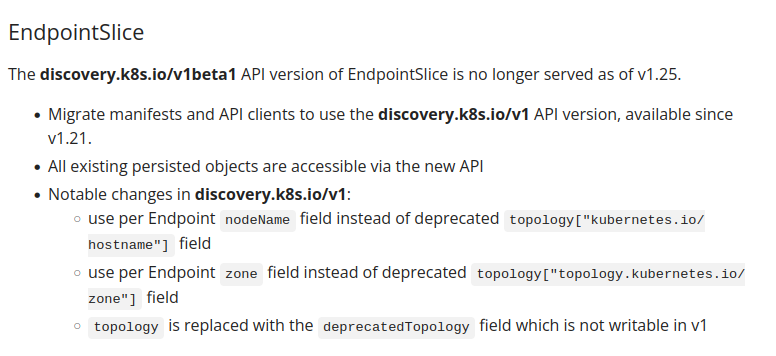
When resources are fully removed from kubernetes version (as an example, PodSecurityPolicy removed from v1.25) the documentation describe steps to follow.
Example:
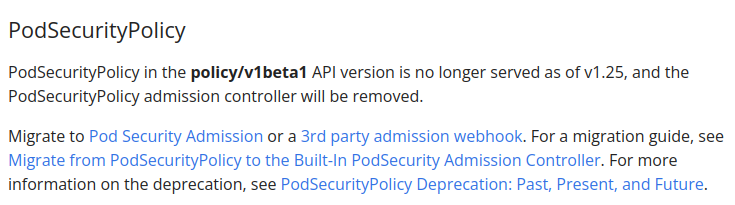
Let’s do it in a real life scenario!
Concrete example
Let’s say, we want to upgrade from 1.24 to 1.25.
Let’s run kubent command and analyze result:
kubent
We can notice that 2 APIs we’ll be removed in version 1.25.
- policy/v1beta1
- batch/v1beta1 (replaced by batch/v1)
For the PodSecurityPolicy (policy/v1beta1) eks.privileged, no more suspense…the update of this specific resource will be performed by AWS (as explain in this FAQ https://docs.aws.amazon.com/eks/latest/userguide/pod-security-policy-removal-faq.html)

So let’s focus on the CronJob API.
1. Check the official Kubernetes deprecation page
Let’s check the CronJob section in https://kubernetes.io/docs/reference/using-api/deprecation-guide/
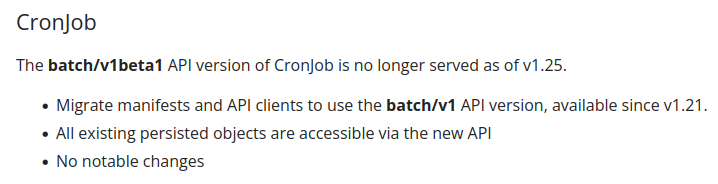
Lucky me! No notable changes have been made so I can simply replace the API version from batch/v1beta1 to batch/v1
2. Follow specific steps describe in K8S deprecation page
Change API Version in YAML resources declaration file from:
apiVersion: batch/v1beta1
kind: CronJob
metadata:
  name: curator
  namespace: elasticsearch
...
To:
apiVersion: batch/v1
kind: CronJob
metadata:
  name: curator
  namespace: elasticsearch
...
Then apply changes.
“False positive” in kubent
kubent get information from last-applied-configuration value (or from apiVersion value if last-applied-configuration is not found).
This can lead to the situation that you have well updated the apiVersion but kubent doesn’t see changes and still display resource in deprecated removed issues.

To avoid this “false positive” behavior, you can replace the resources during apply (when possible…). For us, no big deal! There’s no persistent datas, it’s just a cronJob.
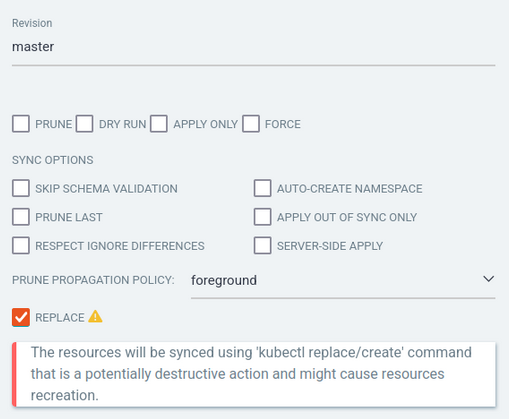
At this step:
- Add-ons are updated and compatible
- ApiVersion resources are updated and compatible
Let’s check critical application compatibility!
Check application compatibility
Before upgrading, we have to check compatibility for application deployed on EKS cluster, more precisely, for applications which interact with kubenetes components (ArgoCD, Cert-manager, nginx-controller,…)
Example: check if ArgoCD is well compatible with the new EKS version and will still be able to do its job (apply, delete, etc.)
Upgrade EKS version
The easiest step.
Just select the new version you want to upgrade to, then let’s AWS sweat for you!
Replace workers nodes
At this step, EKS is now in 1.25 version.
Great! but… if we look at our worker nodes, we can notice that they are still in 1.24 version.
Let’s go for the nodes dance!
Disclaimer
During this step, nodes we’ll be deleted, so pods we’ll be moved to other nodes etc.
This can leads to pod disruption and application outage if deployment haven’t been “configured correctly”.
So, I invite you to read my article which deals with Kubernetes applications High Availability best practices (https://medium.com/@genesta.sebastien/kubernetes-applications-high-availability-on-aws-28297bee46cb) to prevent bad things to happen.
Node replacement
- Cordon the nodes, which means that the node(s) is placed in an unschedulable state which prevent new pods to be affected to it.
- Drain the node, which means that the pods located on the node(s) will be evicted to be gracefully rescheduled on other nodes. I recommend to do it one node by one node to control the process.
N.B: if you are using node provisioner (as an example Karpenter), be careful when removing the node on which karpenter pod is deployed
Important consideration
Before upgrading your production clusters, always test upgrades on dev environments build using the same Infrastructure as Code bases to be able to detect unexpected side effects of the upgrade.
Hope you enjoyed!


