

Kubernetes Cluster Running Out of IP Addresses on AWS EKS
Can you imagine someday your Kubernetes cluster on AWS EKS running into a problem that IP addresses are exhausted? Even though you assigned a CIDR block large enough to host all of Pods, but IP address range of the CIDR block might not be that large as you thought. That is the situation what I met in one of our Kubernetes clusters recently.
After doing some research online, I am not alone with it and this could be considered as a common issue for AWS EKS Kubernetes clusters. Therefore, I would like to share my experience about it, including troubleshooting, some experiments and mitigating solutions.
Environment
The Kubernetes cluster running out of IP addresses was established with CIDR/20 which contains 4096 (2¹²) addresses in theory but it would be reserved some for being used by AWS and Kubernetes.
The number of total running Pods in the cluster is about 1200 including applications, AWS nodes, Kubernetes addons, such as istio, prometheus, grafana, etc. which is not that many for a single cluster, especially comparing to the assigned CIDR/20 block.
Problem
One day, my team (Could Engineering) received several support requests from feature teams that their service deployments failed with similar reason which is strange to us.
The failure messages from Kubernetes events looks like:
Warning FailedCreatePodSandBox 17m kubelet, ip-10-68-207-192.ec2.internal Failed create pod sandbox: rpc error: code = Unknown desc = failed to set up sandbox container "a7c7ce835d262d7a3fd4ab94c66376e0266c03ba2fc39365cb108282f440b01a" network for pod "xxxxx-xxxxxserver-deployment-74f49769c5-nkdpn": networkPlugin cni failed to set up pod "xxxxx-xxxxxserver-deployment-74f49769c5-nkdpn_default" network: add cmd: failed to assign an IP address to containerSo I checked the available IP address of the Subnets in the VPC of this EKS cluster from AWS Console:
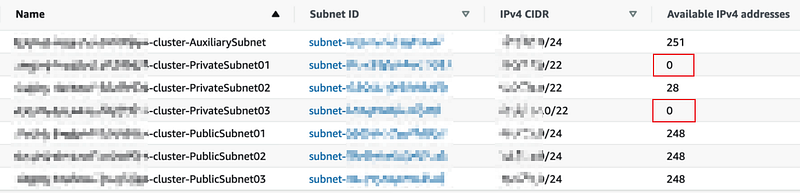
Let’s focus on the 3 private subnets which are used by the Kubernetes worker nodes and 2 of them have no available IP addresses to be used to assign to Pods.
According the CIDR on each Subnet (/22), there should have 1024 (2¹⁰) IP addresses for each and 3072 in total which looks like enough for our 1200 Pods.
Investigation
When I did some research online to understand how AWS CNI works on assigning IP addresses to the Pods, I found this kind of issue already discussed many times. Some articles have been already illustrated very well about the theory and mechanism of it, so if you would like to understand the details, here are some useful links:
- Pod networking (CNI)
- Optimize IP addresses usage by pods in your Amazon EKS cluster
- Optimizing EKS networking for scale
If you’re a fan of “Talk is cheap. Show me the code.”, well, here is the code:
Before going into more details, just have a quick introduction about how AWE EKS Networking works.
EKS Networking
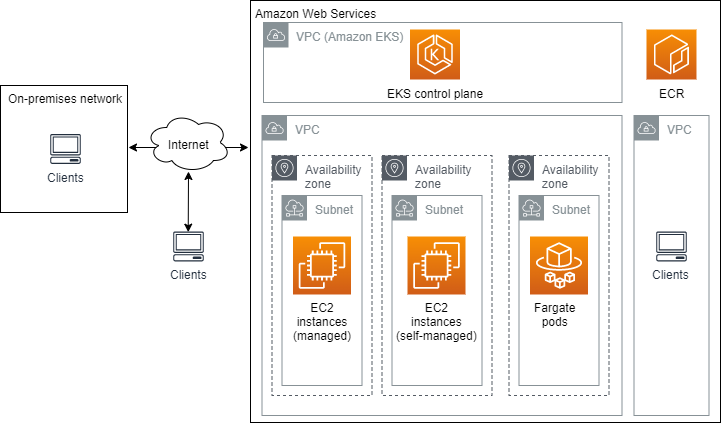
Amazon Elastic Kubernetes Service (Amazon EKS) is a managed service that you can use to run Kubernetes on AWS without needing to install, operate, and maintain your own Kubernetes control plane or nodes.
VPC
In the EKS Kubernetes cluster, the control plane was managed by AWS and all the worker nodes are hosted in a VPC includes several Subnets.
Subnets
Each Subnet is also assigned to a CIDR block so it maintains an IP address pool. When a new ENI gets created, it holds a number of IP addresses from the IP address pool in the corresponding Subnet.
EC2 Instance or Node
When a new Kubernetes node joins to the cluster, it is deployed to one Subnet. The node itself is assigned a private IP address from the Subnet. AWS Pod networking (CNI) is deployed on each node. You could check it by listing all the Pods in the kube-system namespace.
$ kubectl get pod -n kube-systemNAME READY STATUS RESTARTS AGE
aws-node-7s5tz 1/1 Running 0 8d
aws-node-89hbv 1/1 Running 0 8d
aws-node-n2szm 1/1 Running 0 8d
aws-node-ss7zf 1/1 Running 0 8d
aws-node-t2hv4 1/1 Running 0 8d
aws-node-x6l7b 1/1 Running 0 8d
...The AWS CNI is running as a aws-node on each node where a DaemonSet is managing all of the pods.
Pod Networking (CNI)
AWS Container Network Interface (CNI) is responsible for assigning a private IP address to each pod running on the node.
ENI (Elastic Network Interface)
ENI could be considered as a network card for a EC2 instance (or a Kubenetes node). A single EC2 node can have multiple ENIs attached, one primary plus several secondaries.
An ENI itself can hold multiple IP addresses.
When an ENI is created and attached to a EC2 node, it reserves a bunch of IPv4 addresses from the Subnet IP address pool.
EC2 Node Capacity for IP Addresses and Pods
The type of the EC2 node decides:
- How many ENIs in maximum the node can have;
- How many IP address in maximum an ENI can hold on the node.
Here is the full list of this definitions: IP addresses per network interface per instance type.
In my cluster, the EC2 node type is m5.8xlarge so the number should be:
- Max Network Interfaces: 8
- Private IPv4 Addresses per Interface: 30
So ideally an m5.8xlarge node can be assigned 240 (8 x 30) IPv4 addresses in total but it doesn’t mean the node can hold 240 pods. This is because not all the assigned IPv4 address could be used by the pods running on it.
AWS provides a list to tell what the maximum number of pods can be assigned to a node based on the type. For a m5.8xlarge node, it can hold up to 234 pods.
IP Address Allocation
Once understanding the basic concepts of EKS Kubernetes cluster networking, we could dig a bit deeper on the logic of IP address allocation on ENIs and nodes for the pods.
There are three environment variables which controls the number of IP addresses reserved by the ENIs.
WARM_ENI_TARGET
It tells how many full ENIs stand by with available IPs on a node and the default value is 1.
WARM_IP_TARGET
It defines the number of available or unused IP addresses on a node. This variable is better to be used with MINIMUM_IP_TARGET together.
It is not set by default.
MINIMUM_IP_TARGET
It is the minimum number of reserved IP addresses on a node.
When a Pod Scheduled to a Node
- Check if there exists an ENI with unused IP addresses.
- If yes, assign an IP address to the Pod from the ENI.
- If no, create an ENI with reserved IP addresses from Subnet IP address pool and attach it to the node. The number of IPs it reserves depends on WARM_IP_TARGET flag.
- Then, assign an IP address to the Pod from the newly created ENI.
When a Pod Killed/Evicted from a Node
- The Pod IP address is detached from the Pod and marked as unused by the ENI.
- But the IP address is still held by the ENI and does NOT return to the Subnet IP address pool until all IP addresses on the ENI are unused.
The last point is critical that implicates an ENI is possible hold a bunch of unused IP address for a long time if only 1 IP addresses on it is using by a Pod.
Why IP Addresses Exhausted?
Let’s assume an extreme scenario in our EKS Kubernetes cluster and the worker node is m5.8xlarge(128 GiB of Memory, 32 vCPUs, EBS only, 64-bit platform).
- A node can host 100 small Pods and 10 big Pods based on the requests/limits of Pods.
- If a node hosts 100 pods, it provides 100 IP addresses for the pods which needs at least 5 ENIs (100 // 29 + 1, 29 is used because the ENI itself also uses an IPv4 address so only 29 IP addresses available for Pods). So 150 IP addresses are totally held by the node (30 * 5).
- After some times, the 100 small Pods are refreshed out of the node, and in the meantime 10 big Pods are scheduled to the node. Since 10 big Pods already occupied all the resources, no more Pods could be scheduled on this node.
- Let’s still assume the 10 big Pods are hosted on all 5 ENIs and then no ENIs get released. It means the node holds about 150 IP addresses with only 10 Pods, so there are 130+ IP addresses wasted.
- We have about 1200 Pods in total running in the Kubernetes cluster. Let’s say 1000 small Pods and 200 big Pods, and then it needs at least 30 nodes (1000/100 + 200/10) to host all 1200 Pods in the cluster.
- So, in the worst case, 1200 Pods (1000 small Pods + 200 big Pods) hosted on 30 nodes can consume 4500 (150 * 30) IP addresses. It is far more than the number of total IP address in our 3 Subnets (which is about 3000 IP address mentioned above).
Even though it is the worst case where the Pod distribution is extremely unbalanced, it is also possible to running into the situation of exhausting IP addresses in an EKS Kubernetes cluster when the number of services increases gradually.
Possible Solutions
In order to verify the conclusion above, I also deployed a small EKS Kubernetes cluster with smaller instances (m5.2xlarge). When I killed some pods by deleting the Deployment, I saw the IP addresses of the killed Pods still held by the ENI which still has other IP addresses in use.
After running a while with creating and deleting Deployments, here is the IP address distribution status:
For the EC2 node i-0664f39a337cdade0, it has two ENIs holding 30 IP address but only 3 of them are in use.
Now understanding about how IP addresses running out in the EKS Kubernetes cluster, I explored some solutions for short term and long term.
Long Term
1 Add Another Subnet With Extra CIDR
The first question came to my mind is if I could replace the current CIDR block with a large one for the EKS Kubernetes cluster. Unfortunately, the answer is NO that AWS doesn’t support that.
AWS provides another solution, using a secondary CIDR for the EKS. It keeps the current CIDR but adding a new one. But it cannot be used on existing Subnets so you have to create a new Subnet with the secondary CIDR.
Here are the detailed steps provided by AWS documentation: How to use secondary CIDR with EKS.
Pros:
- It extends the available IP addresses for the EKS cluster like patching.
Cons:
- Too many manual steps which is not good for production environment. In my team, all Kubernetes clusters are maintained by our config files so any changes should be applied by our tooling instead of running AWS commands or
kubectlmanually. Then, it would cost a lot of effort to add tools in our code base for this solution and a huge effort to test it. - It needs draining the original nodes to move the Pods to the nodes in the newly created subnet.
2 Customize WARM_IP_TARGET
All the situations introduced above is based on default setting for the flag WARM_IP_TARGET, which is not set by default. If so, the number of maximum IP addresses can hosted by an ENI is used.
As mentioned above, we can set a smaller value of WARM_IP_TARGET to decease the number of reserving IP addresses on the ENIs.
Pros:
- Very little setting change to current EKS Kubernetes cluster.
- Take effect immediately and release some IP addresses from existing ENIs.
Cons:
- The biggest concern is to increase the number of AWS EC2 API calls when attaching and detaching IP addresses. So, it needs to choose a proper number very carefully if you decide to use this solution. For more detail, please refer to amazon-vpc-cni-k8s/eni-and-ip-target.md at master · aws/amazon-vpc-cni-k8s · GitHub.
- Therefore, if there are lots of Cronjob scheduled in the cluster, this would NOT be a good option. Since Cronjob pods are created and quit frequently which could cause lots AWS EC2 API calls for handling IP address allocations.
- It needs to restart the
aws-nodepods in the cluster so there might be a downtime during it.
3 Use Smaller EC2 Instances
With default setting, bigger EC2 instances are more powerful and can host more ENI while each ENI on it can hold more IP addresses.
For example,
An m5.8xlarge EC2 node can host up to 8 ENIs and each ENI on it can hold 30 IP addresses.
An m5.2xlarge EC2 node can host up to 4 ENIs and each ENI on it can hold 15 IP addresses.
Pros:
- Limits the number of Pods running on a single node which also limits the waste of IP addresses.
Cons:
- Increase the number of nodes when hosting same number of Pods because of the smaller EC2 instances are less powerful. It might impact your AWS bills a little, since less power means lower price for a single node but the number of nodes increases.
- Increase potential costs if using Datadog as a monitoring system. It is because Datadog price is based on the number of instances, so more nodes definitely means more cost.
4 Create Another Cluster With Large CIDR Block
Another solution is to create a new EKS Kubernetes cluster with a large CIDR block and then move some of services from the old cluster to the new one.
Pros:
- The new cluster has more IP addresses available.
- The new cluster can hold more apps.
Cons:
- Increase the cost since a new cluster created.
- Need some effort to migrate some apps to the new cluster.
- It might involve some networking setting changes to route the traffic to the new cluster as well.
- Need extra effort to verify the migrated apps.
Short Term
The short term solutions focus on mitigating the situation first. For us, the situation is deployment failures increased a lot and many teams experienced it.
Draining Nodes With Wasted IP Addresses
The cause of the IP address being exhausted is the unbalanced distribution of IP addresses on ENIs. Then, how about forcing the Pods re-balancing to other nodes with spare available IP addresses by draining a node?
Pros:
- It trigger Kubernetes to relocate the pods to other nodes with available resources and IP addresses.
- It releases the IP addresses from the drained node immediately.
- Easy to do.
Cons:
- This solution is based on the theory that Kubernetes can reschedule pods without downtime and it should be. But in reality, this might not be true for some service Pods running for a long time without any update.
- Be careful to choose the proper node to drain.
- In order to be able to drain a node, there should have some available IP addresses in your Subnets. Because the Pods evicted from the drained node might not find a proper node to be scheduled on, so they would be waiting for a new node created and joining into the cluster. If no IP addresses available in all Subnets, the new created node cannot host any Pods until the draining completes and releases IP addresses to the Subnet IP address pools.
Suggestions:
- Get a top list of node with most wasting IP addresses either by a script or manually checking.
- Avoid draining a node with Tier 1 service pods (they might need to be treated more carefully).
- If choosing multiple nodes to drain, drain them one by one with a few minutes intervals.
- Monitor all the time during draining nodes.
- Alert the teams ahead to let them be aware of it.
Here I would like to share the result in my cluster after draining 3 nodes that shows how the number of available IP addresses change before and after draining nodes.
Before draining nodes:
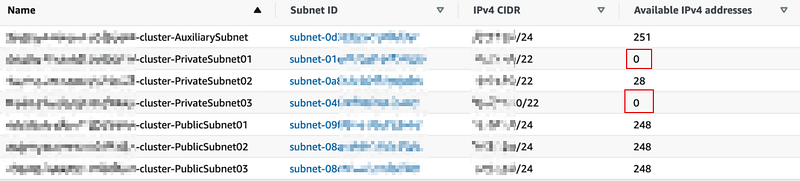
There are two Subnets where IP addresses are already exhausted.
After draining nodes:
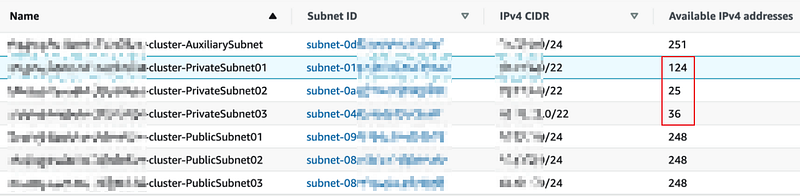
There are 157 IP addresses released after draining nodes. No deployments fail with the reason of IP addresses running out.
Create Another Kubernetes Cluster
In the meantime, we also create a new Kubernetes cluster with a larger CIDR block and then block all new apps deploying to the current cluster. All new apps are asked to be deployed to the new cluster.
No perfect solutions, but it is fun to explore and think about which one fits your situation, either short team and long term.


