avatarYitaek Hwang

Free AI web copilot to create summaries, insights and extended knowledge, download it at here

6833

Abstract

n>.yaml</pre></div><p id="3feb">On GKE, an additional admin role is required to create new cluster roles:</p><div id="e787"><pre> <span class="hljs-string">kubectl</span> <span class="hljs-string">create</span> <span class="hljs-string">clusterrolebinding</span> <span class="hljs-string">cluster-admin-binding</span> <span class="hljs-built_in">--clusterrole=cluster-admin</span> <span class="hljs-built_in">--user="(gcloud</span> <span class="hljs-string">config</span> <span class="hljs-built_in">get-value</span> <span class="hljs-string">account</span>)<span class="hljs-string">"</span></pre></div><p id="1c79">To interact with the ArgoCD server, you need to first download the CLI (use <code>brew</code> or <a href="https://github.com/argoproj/argo-cd/releases">download directly from GitHub</a>):</p><div id="8d7c"><pre> <span class="hljs-keyword">brew </span><span class="hljs-keyword">install </span>argocd</pre></div><h2 id="e0cd">Initial Setup</h2><p id="5558">ArgoCD server exposes both gRPC (for CLI) and HTTPS (for UI). To access the server, you can port-forward or configure ArgoCD with an ingress:</p><div id="c57d"><pre><span class="hljs-meta prompt_"> </span><span class="language-bash">kubectl port-forward svc/argocd-server -n argocd 8080:443</span></pre></div><p id="bf37">Since we use Traefik with Cert Manager, we deployed the following IngressRoute and also added the <code>insecure</code> flag on the <code>argocd-server</code> deployment (<i>IMPORTANT: if you use Traefik, note the initial pod name of the argocd-server before updating the deployment since that’s the default password</i>):</p><div id="47fc"><pre><span class="hljs-attribute">apiVersion</span><span class="hljs-punctuation">:</span> <span class="hljs-string">traefik.containo.us/v1alpha1</span> <span class="hljs-attribute">kind</span><span class="hljs-punctuation">:</span> <span class="hljs-string">IngressRoute</span> <span class="hljs-attribute">metadata</span><span class="hljs-punctuation">:</span> <span class="hljs-attribute">name</span><span class="hljs-punctuation">:</span> <span class="hljs-string">argocd-server</span> <span class="hljs-attribute">namespace</span><span class="hljs-punctuation">:</span> <span class="hljs-string">argocd</span> <span class="hljs-attribute">spec</span><span class="hljs-punctuation">:</span> <span class="hljs-attribute">entryPoints</span><span class="hljs-punctuation">:</span> <span class="hljs-bullet">-</span> <span class="hljs-string">websecure</span> <span class="hljs-attribute">routes</span><span class="hljs-punctuation">:</span> <span class="hljs-bullet">-</span> <span class="hljs-string">kind: Rule</span> <span class="hljs-attribute">match</span><span class="hljs-punctuation">:</span> <span class="hljs-string">Host(argocd.example.com)</span> <span class="hljs-attribute">priority</span><span class="hljs-punctuation">:</span> <span class="hljs-string">10</span> <span class="hljs-attribute">services</span><span class="hljs-punctuation">:</span> <span class="hljs-bullet">-</span> <span class="hljs-string">name: argocd-server</span> <span class="hljs-attribute">port</span><span class="hljs-punctuation">:</span> <span class="hljs-string">80</span> <span class="hljs-bullet">-</span> <span class="hljs-string">kind: Rule</span> <span class="hljs-attribute">match</span><span class="hljs-punctuation">:</span> <span class="hljs-string">Host(argocd.example.com) && Headers(Content-Type, application/grpc)</span> <span class="hljs-attribute">priority</span><span class="hljs-punctuation">:</span> <span class="hljs-string">11</span> <span class="hljs-attribute">services</span><span class="hljs-punctuation">:</span> <span class="hljs-bullet">-</span> <span class="hljs-string">name: argocd-server</span> <span class="hljs-attribute">port</span><span class="hljs-punctuation">:</span> <span class="hljs-string">80</span> <span class="hljs-attribute">scheme</span><span class="hljs-punctuation">:</span> <span class="hljs-string">h2c</span> <span class="hljs-attribute">tls</span><span class="hljs-punctuation">:</span> <span class="hljs-attribute">secretName</span><span class="hljs-punctuation">:</span> <span class="hljs-string"><my-wildcard-cert></span></pre></div><p id="ffda"><i>Note: ArgoCD also supports <a href="https://argoproj.github.io/argo-cd/operator-manual/ingress/#kubernetesingress-nginx">ingress-nginx</a> and <a href="https://argoproj.github.io/argo-cd/operator-manual/ingress/#aws-application-load-balancers-albs-and-classic-elb-http-mode">AWS ALB/ELB</a></i></p><p id="5951">Once the server is exposed via Ingress or forwarded to localhost, grab the autogenerated password:</p><div id="7abf"><pre> kubectl <span class="hljs-keyword">get</span> pods -n argocd -l app.kubernetes.io/<span class="hljs-type">name</span>=argocd-<span class="hljs-keyword">server</span> -o <span class="hljs-type">name</span> | cut -d<span class="hljs-string">'/'</span> -f <span class="hljs-number">2</span></pre></div><p id="3d79">And login with username <code>admin</code> (if your ingress doesn’t support HTTPS/gRPC, add the following flag <code>--grpc-web</code> ):</p><div id="328f"><pre> argocd <span class="hljs-keyword">login</span> <<span class="hljs-keyword">server</span>></pre></div><p id="c9bd">Finally update the default password via:</p><div id="38cf"><pre> argocd account <span class="hljs-keyword">update</span>-<span class="hljs-keyword">password</span></pre></div><h2 id="225a">Adding a Cluster</h2><p id="1e69">Since ArgoCD is most likely installed on a utility cluster (at Leverege, it runs on the same cluster that hosts Vault, Chart Museum, and Prometheus/Grafana), ArgoCD first needs access to external clusters. ArgoCD installs a service account (<code>argocd-manager</code>) into <code>kube-system</code> namespace and binds to an admin ClusterRole:</p><div id="fcc1"><pre> argocd <span class="hljs-keyword">cluster</span> <span class="hljs-keyword">add</span> <context-<span class="hljs-type">name</span>> </pre></div><p id="b0dd">For internal clusters, the Kubernetes API server address can be set to <a href="https://kubernetes.default.svc"><code>https://kubernetes.default.</code>svc</a> without having to bind the service account. By repeating this step, you can add all the clusters that ArgoCD will have access to deploy. Currently, multi-cluster deployment (i.e. deploying the same application to multiple clusters in one pipeline) is not yet supported but is in active development under <a href="https://github.com/argoproj-labs/applicationset">ApplicationSet CRD</a>.</p><h2 id="4c6b">Connect to a Git Repo</h2><p id="a3e3">Unless the repo containing the manifests is public, ArgoCD needs to first

Options

authenticate with the private repository.</p><p id="9874">Generate the token for your Git hosting service:</p><ul><li><a href="https://help.github.com/en/articles/creating-a-personal-access-token-for-the-command-line">Github</a></li><li><a href="https://docs.gitlab.com/ee/user/project/deploy_tokens/">Gitlab</a></li><li><a href="https://confluence.atlassian.com/bitbucketserver/personal-access-tokens-939515499.html">Bitbucket</a></li></ul><p id="6135">Then add the repo via CLI:</p><div id="ec83"><pre>$ argocd repo <span class="hljs-built_in">add</span> https://github.<span class="hljs-keyword">com</span>/argoproj/argocd-example-apps --username <span class="hljs-symbol"><username></span> --password <span class="hljs-symbol"><token></span></pre></div><p id="abe2">Or via UI: <code>Settings/Repositories > Connect Repo using HTTPS</code></p><figure id="3e55"><img src="https://cdn-images-1.readmedium.com/v2/resize:fit:800/0*qoDee6oieg9388Js.png"><figcaption>Image Credit: <a href="https://argoproj.github.io/argo-cd/user-guide/private-repositories/">ArgoCD</a></figcaption></figure><h2 id="4033">Create an ArgoCD Application</h2><p id="ca71">Finally, we can deploy our application. If you don’t have an application or Git repo ready for test, you can choose from ArgoCD’s example apps:</p><ul><li><a href="https://github.com/argoproj/argocd-example-apps/blob/master/guestbook">Plain YAML</a></li><li><a href="https://github.com/argoproj/argocd-example-apps/blob/master/ksonnet-guestbook">Ksonnet</a></li><li><a href="https://github.com/argoproj/argocd-example-apps/blob/master/helm-guestbook">Helm</a></li><li><a href="https://github.com/argoproj/argocd-example-apps/blob/master/jsonnet-guestbook">Jsonnet</a></li><li><a href="https://github.com/argoproj/argocd-example-apps/blob/master/kustomize-guestbook">Kustomize</a></li></ul><p id="f271">To start, from the UI, click on <code>New App</code> :</p><figure id="34b7"><img src="https://cdn-images-1.readmedium.com/v2/resize:fit:800/0*kg-ky4cqonbTMneF.png"><figcaption>Image Credit: <a href="https://argoproj.github.io/argo-cd/getting_started/">ArgoCD</a></figcaption></figure><p id="c194">Give the app a name, select the <code>Default</code> project, and choose a sync policy (either automatic or manual). For production clusters, you can also create a separate project (via <code>Settings > Projects</code> ) to limit access to cluster resources and namespaces.</p><figure id="928a"><img src="https://cdn-images-1.readmedium.com/v2/resize:fit:800/0*IZf-LdVWIFmPjj81.png"><figcaption>Image Credit: <a href="https://argoproj.github.io/argo-cd/getting_started/">ArgoCD</a></figcaption></figure><p id="b024">Next, configure the <code>Source</code> with Git repository URL and path as well as the <code>Destination</code> to choose the cluster and namespace to deploy into.</p><p id="ffa3">Once the application is configured, the application is ready to be synced (deployed). From the UI, click on <code>Sync</code> and ArgoCD will apply the changes to the cluster.</p><figure id="471c"><img src="https://cdn-images-1.readmedium.com/v2/resize:fit:800/0*hf8tr8Vz7QH4sjlj.png"><figcaption>Image Credit: <a href="https://argoproj.github.io/argo-cd/getting_started/">ArgoCD</a></figcaption></figure><p id="97d9">When the sync is successful, the application will change its status from <code>OutOfSync</code> to <code>Healthy</code> :</p><figure id="7a80"><img src="https://cdn-images-1.readmedium.com/v2/resize:fit:800/0*Rt9_PgnU4ZFIMw6i.png"><figcaption>Image Credit: <a href="https://argoproj.github.io/argo-cd/getting_started/">ArgoCD</a></figcaption></figure><p id="7088">If you prefer a video walkthrough, you can watch a quick 10 min demo (between 1:04 and 9:57):</p> <figure id="8d56"> <div> <div> <img class="ratio" src="http://placehold.it/16x9"> <iframe class="" src="https://cdn.embedly.com/widgets/media.html?src=https%3A%2F%2Fwww.youtube.com%2Fembed%2FaWDIQMbp1cc%3Fstart%3D64%26feature%3Doembed%26start%3D64&amp;display_name=YouTube&amp;url=https%3A%2F%2Fwww.youtube.com%2Fwatch%3Fv%3DaWDIQMbp1cc&amp;image=https%3A%2F%2Fi.ytimg.com%2Fvi%2FaWDIQMbp1cc%2Fhqdefault.jpg&amp;key=a19fcc184b9711e1b4764040d3dc5c07&amp;type=text%2Fhtml&amp;schema=youtube" allowfullscreen="" frameborder="0" height="480" width="854"> </div> </div> </figure></iframe></div></div></figure><h1 id="4a35">Other Considerations</h1><p id="19be">Even though CircleCI and ArgoCD provide a ton of functionality for your CI/CD pipeline, as with any software, there are a few other considerations to discuss with your team as usage grows:</p><ol><li>Don’t rely on deployment failure to validate the manifests. At the very least, test the configuration code during the CI process using linting tools (e.g. <code>helm lint</code> ). Developers can also manually validate the correct values using tools such as <code>helm template</code> .</li><li>Secret management is tricky when it comes to GitOps. ArgoCD works with most popular solutions (e.g. <a href="https://github.com/bitnami-labs/sealed-secrets">Bitnami Sealed Secrets</a>, <a href="https://github.com/godaddy/kubernetes-external-secrets">Godaddy Kubernetes External Secrets</a>, <a href="https://github.com/ContainerSolutions/externalsecret-operator">External Secrets Operator</a>, <a href="https://www.vaultproject.io/">Hashicorp Vault</a>, <a href="https://github.com/banzaicloud/bank-vaults">Banzai Cloud Bank-Vaults</a>, <a href="https://github.com/futuresimple/helm-secrets">Helm Secrets</a>, <a href="https://github.com/kubernetes-sigs/kustomize/blob/fd7a353df6cece4629b8e8ad56b71e30636f38fc/examples/kvSourceGoPlugin.md#secret-values-from-anywhere">Kustomize secret generator plugins</a>, <a href="https://github.com/mumoshu/aws-secret-operator">aws-secret-operator</a>, <a href="https://github.com/viaduct-ai/kustomize-sops#argo-cd-integration">KSOPS</a>) with some community-driven examples listed on this <a href="https://github.com/argoproj/argo-cd/issues/1364">Github discussion</a>.</li><li>As the number of apps grows, it becomes a challenge to bootstrap a new cluster. ArgoCD presents a solution via <a href="https://argoproj.github.io/argo-cd/operator-manual/cluster-bootstrapping/"><b>apps of apps pattern</b></a><b> </b>where one ArgoCD application encompasses child apps. If there’s a logical grouping, this pattern works great. If not, until multi-cluster deployment is supported, you’ll have to write some scripts to programmatically create pipelines via the CLI.</li><li>Finally, don’t forget to back up ArgoCD data. Even though all the configuration is checked into Git, it’ll be easier to import from a backup then run through all the pipelines to recreate if ArgoCD goes down.</li></ol></article></body>

Kubernetes CI/CD with CircleCI and ArgoCD

An end-to-end setup for declaratively deploying applications to Kubernetes using GitOps principles.
One of the top DevOps trends in recent years has been the adoption of GitOps to manage Infrastructure as Code (IaC) and cloud-native applications on Kubernetes. GitOps was first introduced by WeaveWorks as a way to declaratively configure and manage infrastructure and application via Git. While GitOps is an opinionated approach to the CI/CD process, but the underlying ideas behind IaC and the convergence properties of Kubernetes mesh well with GitOps. In this post, we will look at a demo setup of an end-to-end CI/CD pipeline and discuss some important considerations based on your team size, roles, and needs.

Note: This guide uses CircleCI and ArgoCD, but the tools can be interchanged to establish a GitOps-driven CI/CD pipeline (e.g. JenkinsX, Spinnaker)

End-to-End CI/CD Architecture

At a high-level, the CI/CD pipeline will cover the following steps:

  1. Developer commits code to a Git repo (e.g. Github/Bitbucket/Gitlab).
  2. CircleCI runs through the CI workflow steps (i.e. security audit, linting, testing, etc).
  3. A Docker container is created and pushed to a container registry (e.g. Docker Hub, GCR, ECR).
  4. Kubernetes manifests are generated and committed to a separate repo that ArgoCD monitors.
  5. ArgoCD detects changes and deploys the new application/infrastructure to the configured Kubernetes clusters.
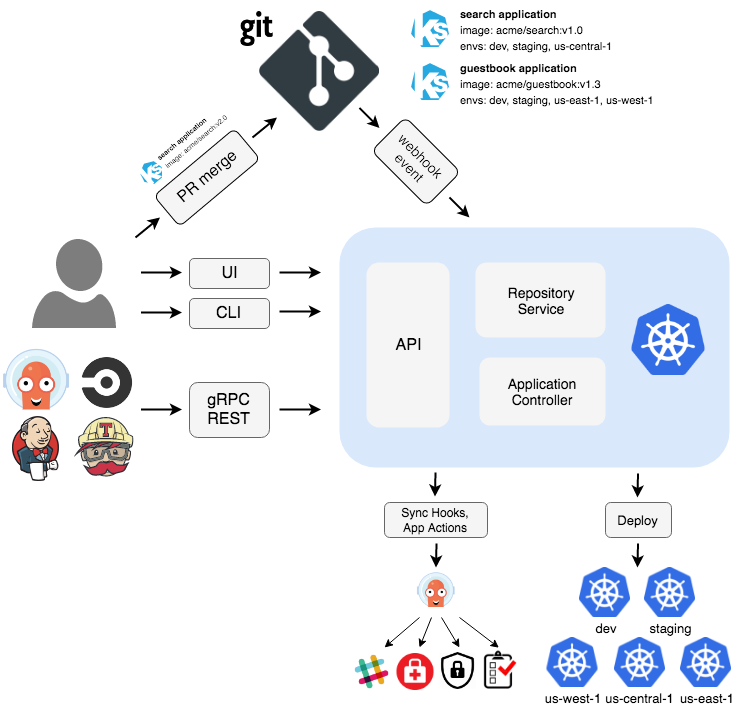
Image Credit: ArgoCD

CI Considerations

To keep this guide generic to apply to other CI tools, instead of focusing on CircleCI-specific syntax, I’ll lay out some important considerations for the CI pipeline to accommodate GitOps CD operations. For a concrete example of using CircleCI, you can follow this excellent guide by David-VTUK.

The first consideration for your CI pipeline is how to separate the source/application code and infrastructure. ArgoCD recommends keeping two separate repos: one for app code and another for manifests. The benefits of using separate Git repositories are:

  1. There is a clear separation between application and configuration code. This prevents the entire CI build from running, which could take a long time, when you wish to only modify the manifests (e.g. adding a new env variable or changing a configmap).
  2. If you have a separate Production Engineering/SRE team responsible for deployments, you can separate access and have a cleaner audit log.
  3. Some applications may be deployed as a single unit or have dependent components (e.g. ELK stack, Prometheus + Grafana). A separate configuration repo allows multiple application repos to push changes independently, but allow the CD tool to monitor a single repo and deploy all the components at the same time.

The exact point of separation, however, depends on the makeup of your team and the tools used to package Kubernetes manifests (e.g. Helm, Kustomize, Ksonnet, etc). At Leverege, we don’t have a dedicated SRE team in charge of deployments. Every developer is responsible for creating the Helm templates using an internal tool to bootstrap the manifests based on local config files. In our case, CircleCI builds the Docker image, packages the Helm file, and pushes it to our private ChartMuseum instance. Another mono-repo stores values.yaml files per environment/cluster and triggers the deployment process. A larger team with dedicated SREs may elect to track config files in dedicated repositories per team or product with Helm files also living in that repo.

Finally, even though one of the goals of GitOps is immutability, it is important to leave some freedom for imperative changes. On Kubernetes, this usually has to do with dynamic values (i.e. number of replicas for Horizontal Autoscaler or resource requests). For example, if you are relying on the Vertical Pod Autoscaler to dynamically change CPU/Memory requests and limits, don’t track those fields via Git or applications will constantly be out of sync. This is similar to ignoring the desired node count in Terraform to allow the Cluster Autoscaler to respond to Kubernetes workloads.

Setting Up ArgoCD

ArgoCD is a popular cloud-native CD tool used by Intuit, New Relic, NVIDIA, and more. With Flux CD from WeaveWorks joining forces with ArgoCD last year, ArgoCD became a great tool for users who don’t need all the robust features of Spinnaker.

Installation

Installing ArgoCD is very simple. Use the manifests on Github or the Helm chart maintained by the community:

$ kubectl create namespace argocd 
$ kubectl apply -n argocd -f https://raw.githubusercontent.com/argoproj/argo-cd/stable/manifests/install.yaml

On GKE, an additional admin role is required to create new cluster roles:

$ kubectl create clusterrolebinding cluster-admin-binding --clusterrole=cluster-admin --user="$(gcloud config get-value account)"

To interact with the ArgoCD server, you need to first download the CLI (use brew or download directly from GitHub):

$ brew install argocd

Initial Setup

ArgoCD server exposes both gRPC (for CLI) and HTTPS (for UI). To access the server, you can port-forward or configure ArgoCD with an ingress:

$ kubectl port-forward svc/argocd-server -n argocd 8080:443

Since we use Traefik with Cert Manager, we deployed the following IngressRoute and also added the insecure flag on the argocd-server deployment (IMPORTANT: if you use Traefik, note the initial pod name of the argocd-server before updating the deployment since that’s the default password):

apiVersion: traefik.containo.us/v1alpha1
kind: IngressRoute
metadata:
  name: argocd-server
  namespace: argocd
spec:
  entryPoints:
    - websecure
  routes:
    - kind: Rule
      match: Host(`argocd.example.com`)
      priority: 10
      services:
        - name: argocd-server
          port: 80
    - kind: Rule
      match: Host(`argocd.example.com`) && Headers(`Content-Type`, `application/grpc`)
      priority: 11
      services:
        - name: argocd-server
          port: 80
          scheme: h2c
  tls:
    secretName: <my-wildcard-cert>

Note: ArgoCD also supports ingress-nginx and AWS ALB/ELB

Once the server is exposed via Ingress or forwarded to localhost, grab the autogenerated password:

$ kubectl get pods -n argocd -l app.kubernetes.io/name=argocd-server -o name | cut -d'/' -f 2

And login with username admin (if your ingress doesn’t support HTTPS/gRPC, add the following flag --grpc-web ):

$ argocd login <server>

Finally update the default password via:

$ argocd account update-password

Adding a Cluster

Since ArgoCD is most likely installed on a utility cluster (at Leverege, it runs on the same cluster that hosts Vault, Chart Museum, and Prometheus/Grafana), ArgoCD first needs access to external clusters. ArgoCD installs a service account (argocd-manager) into kube-system namespace and binds to an admin ClusterRole:

$ argocd cluster add <context-name> 

For internal clusters, the Kubernetes API server address can be set to https://kubernetes.default.svc without having to bind the service account. By repeating this step, you can add all the clusters that ArgoCD will have access to deploy. Currently, multi-cluster deployment (i.e. deploying the same application to multiple clusters in one pipeline) is not yet supported but is in active development under ApplicationSet CRD.

Connect to a Git Repo

Unless the repo containing the manifests is public, ArgoCD needs to first authenticate with the private repository.

Generate the token for your Git hosting service:

Then add the repo via CLI:

$ argocd repo add https://github.com/argoproj/argocd-example-apps --username <username> --password <token>

Or via UI: Settings/Repositories > Connect Repo using HTTPS
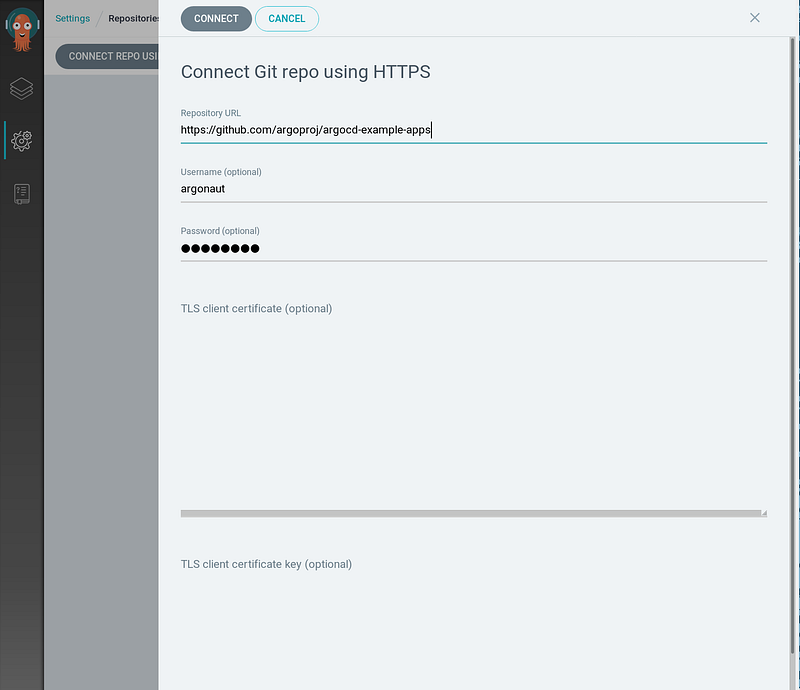
Image Credit: ArgoCD

Create an ArgoCD Application

Finally, we can deploy our application. If you don’t have an application or Git repo ready for test, you can choose from ArgoCD’s example apps:

To start, from the UI, click on New App :
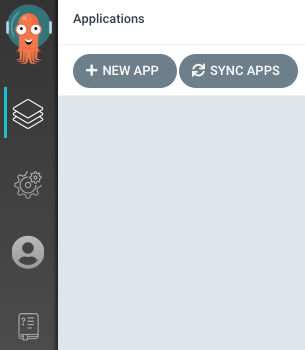
Image Credit: ArgoCD

Give the app a name, select the Default project, and choose a sync policy (either automatic or manual). For production clusters, you can also create a separate project (via Settings > Projects ) to limit access to cluster resources and namespaces.
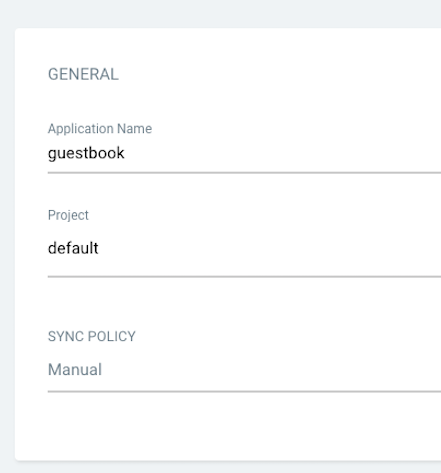
Image Credit: ArgoCD

Next, configure the Source with Git repository URL and path as well as the Destination to choose the cluster and namespace to deploy into.

Once the application is configured, the application is ready to be synced (deployed). From the UI, click on Sync and ArgoCD will apply the changes to the cluster.
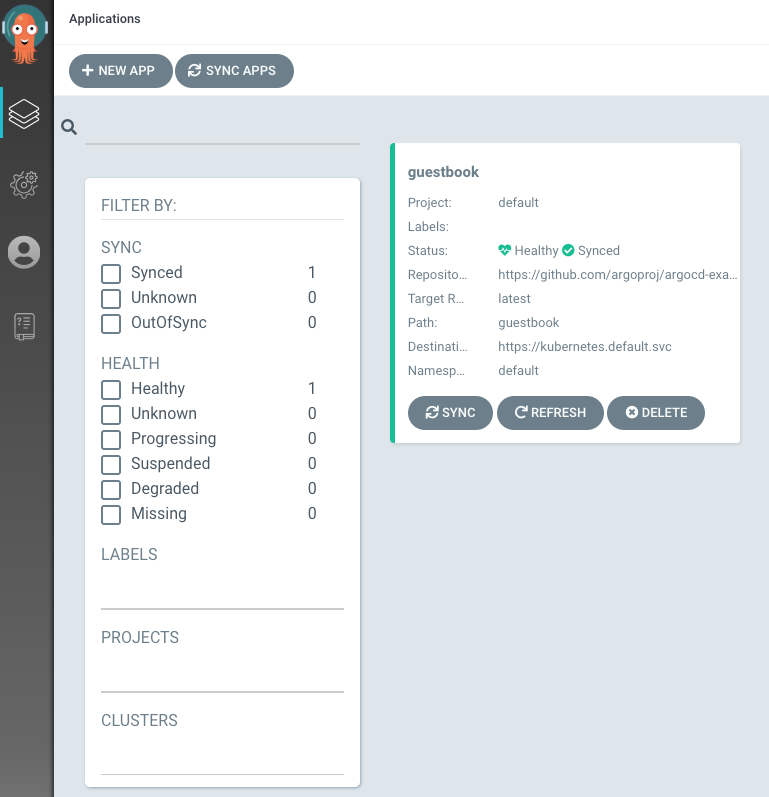
Image Credit: ArgoCD

When the sync is successful, the application will change its status from OutOfSync to Healthy :
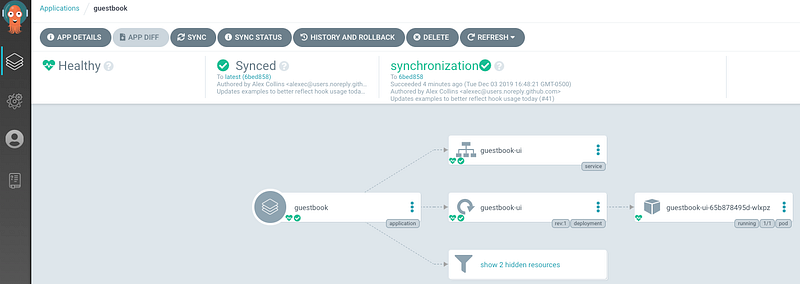
Image Credit: ArgoCD

If you prefer a video walkthrough, you can watch a quick 10 min demo (between 1:04 and 9:57):

Other Considerations

Even though CircleCI and ArgoCD provide a ton of functionality for your CI/CD pipeline, as with any software, there are a few other considerations to discuss with your team as usage grows:

  1. Don’t rely on deployment failure to validate the manifests. At the very least, test the configuration code during the CI process using linting tools (e.g. helm lint ). Developers can also manually validate the correct values using tools such as helm template .
  2. Secret management is tricky when it comes to GitOps. ArgoCD works with most popular solutions (e.g. Bitnami Sealed Secrets, Godaddy Kubernetes External Secrets, External Secrets Operator, Hashicorp Vault, Banzai Cloud Bank-Vaults, Helm Secrets, Kustomize secret generator plugins, aws-secret-operator, KSOPS) with some community-driven examples listed on this Github discussion.
  3. As the number of apps grows, it becomes a challenge to bootstrap a new cluster. ArgoCD presents a solution via apps of apps pattern where one ArgoCD application encompasses child apps. If there’s a logical grouping, this pattern works great. If not, until multi-cluster deployment is supported, you’ll have to write some scripts to programmatically create pipelines via the CLI.
  4. Finally, don’t forget to back up ArgoCD data. Even though all the configuration is checked into Git, it’ll be easier to import from a backup then run through all the pipelines to recreate if ArgoCD goes down.
Kubernetes
Software Engineering
Ci Cd Pipeline
Gitops
Coding
Recommended from ReadMedium