
Kubernetes Certifications (CKA, CKAD) — Prep Tip #2. Ready, Set, Cluster, and Code!
2. Check these options to have a cluster handy and all your codes accessible to try them out in the cluster at a moment's notice.
Table of Contents
- Introduction
- Kubernetes Tasks GitHub Repo
- Option #1 — Free Cluster by Killercoda
- Option #2 — Free Cluster by Tutorius
- Option #3 — KinD Cluster with Terraform
- Option #4 — Kubeadm Cluster with Terraform
- Option #5 — Kubeadm Cluster with AWS CLI
- Option #6 — Amazon EKS Cluster with 'eksctl'
- Conclusion
Introduction
One of the key takeaways from Tip #1 is that passing CKA and CKAD requires fast thinking, quick grasping, and nimble coding. That translates to keeping up with the rigor of practice, practice, and practice some more until your mind whispers, "I got it; I've done it before," as soon you start reading and processing the problem statement.
Attaining that degree of confidence requires that during the prep cycle, you're equipped with a ready and working cluster, you've kept all your code organized and able to access them in the cluster environment readily, you're intimately familiar with the anatomy of the Kubernetes.io documentation pages as relevant to the exam curriculum, and finally, you've established a practice rhythm every single day.
In this post, I plan to accomplish two goals —
- Provide a few cluster options that you can spin up in a matter of minutes, including free offerings.
- Show how to collect and organize your code (
yamlmanifests andkubectlcommands) and access them handily in the terminal environment connected to the cluster.
Let's get started.
Kubernetes Tasks GitHub Repo
Link — https://github.com/jdluther2020/jdluther-kubernetes-io-tasks
Before presenting the cluster options, let's look at the central GitHub repository housing all the working examples of Kubernetes tasks. It can be cloned in any development environment, including some cluster playgrounds I'll cover next.
Once cloned, these handy examples can be practiced easily, repeated as many times as required, and customized for other needs.
This repo is a work in progress and constantly evolving.
# Clone the jdluther-kubernetes-io-tasks github repo in a suitable folder
$ REPO=jdluther-kubernetes-io-tasks && \
    rm -rf && \
    git clone https://github.com/jdluther2020/$REPO.git && \
    cd $REPO

# Check the code files
# NOTE: This repo is a work in progress and constantly evolving.
$ ls -al

total 8
-rw-r--r--  1 jdl  wheel  2260 May 20 00:12 README.md
drwxr-xr-x  3 jdl  wheel    96 May 20 00:12 containers-and-pods
drwxr-xr-x  5 jdl  wheel   160 May 20 00:12 daemonsets-demonstration
drwxr-xr-x  6 jdl  wheel   192 May 20 00:12 ephemeral-volume-with-emptydir
drwxr-xr-x  6 jdl  wheel   192 May 20 00:12 exposing-a-stateless-app-via-clusterip-service
drwxr-xr-x  3 jdl  wheel    96 May 20 00:12 know-thy-cluster
drwxr-xr-x  3 jdl  wheel    96 May 20 00:12 know-thy-nodes
drwxr-xr-x  6 jdl  wheel   192 May 20 00:12 persistent-volume-with-hostpath
drwxr-xr-x  3 jdl  wheel    96 May 20 00:12 pods-deployments-replicasets
drwxr-xr-x  3 jdl  wheel    96 May 20 00:12 rbac-authz-with-x509-client-cert-authn
Option #1 — Free Cluster by Killercoda
Link — https://killercoda.com/playgrounds/scenario/kubernetes
This empty cluster playground is promoted on Kubernetes.io tasks pages, for example, in the Run a Stateless Application Using a Deployment task.
It only has two nodes, including the control-plane node with taints removed, so regular workloads can be scheduled on both nodes. The only con is that the free version comes with a 60-minute limit.
FYI — Killercoda’s PLUS membership offers cluster up to 4 hours.
See below how I performed a quick test from the code repo successfully.
#
# Killercoda cluster terminal
# Once the terminal starts, we can go in and do all our works here
#

# First check the node status
controlplane $ kubectl get nodes

NAME           STATUS   ROLES           AGE   VERSION
controlplane   Ready    control-plane   18d   v1.27.1
node01         Ready    <none>          18d   v1.27.1

# Quick overview of the cluster
controlplane $ kubectl cluster-info

Kubernetes control plane is running at https://172.30.1.2:6443
CoreDNS is running at https://172.30.1.2:6443/api/v1/namespaces/kube-system/services/kube-dns:dns/proxy

To further debug and diagnose cluster problems, use 'kubectl cluster-info dump'.

# Checking the pods across all namespaces
controlplane $ kubectl get pods -A

NAMESPACE            NAME                                       READY   STATUS    RESTARTS   AGE
kube-system          calico-kube-controllers-784cc4bcb7-b8bdm   1/1     Running   3          18d
kube-system          canal-c4n8n                                2/2     Running   0          110m
kube-system          canal-jsv8f                                2/2     Running   0          110m
kube-system          coredns-5d769bfcf4-j6wzd                   1/1     Running   0          18d
kube-system          coredns-5d769bfcf4-z4wqc                   1/1     Running   0          18d
kube-system          etcd-controlplane                          1/1     Running   0          18d
kube-system          kube-apiserver-controlplane                1/1     Running   2          18d
kube-system          kube-controller-manager-controlplane       1/1     Running   2          18d
kube-system          kube-proxy-4c8vx                           1/1     Running   0          18d
kube-system          kube-proxy-wdr48                           1/1     Running   0          18d
kube-system          kube-scheduler-controlplane                1/1     Running   2          18d
local-path-storage   local-path-provisioner-bf548cc96-wg2pr     1/1     Running   0          18d

# Everything looks good. Let's clone our code repo and get started
controlplane $ REPO=jdluther-kubernetes-io-tasks && \
    rm -rf $REPO && \
    git clone https://github.com/jdluther2020/$REPO.git && \
    cd $REPO

# Pick any working example directory
controlplane $ cd exposing-a-stateless-app-via-clusterip-service/
controlplane $ ls -1

client.yaml
clusterip-service.yaml
exposing-a-stateless-app-via-clusterip-service.sh
stateless-app-nginx.yaml

# Create a deployment
controlplane $ kubectl create namespace mkdemo
controlplane $ kubectl apply -f stateless-app-nginx.yaml

# Obtain the pod IPs of the deployment
controlplane $ pod_ips=$(kubectl get pods -o=jsonpath="{.items[*]['status.podIP']}" -n mkdemo)
controlplane $ echo $pod_ips
192.168.0.8 192.168.1.3 192.168.1.4

# The cluster is operating as expected. Try other examples from the repo.
Option #2 — Free Cluster by Tutorius
Link — http://labs.play-with-k8s.com/
This is also featured along with Killeracoda in Kubernetes.io tasks pages, for example, in the Run a Stateless Application Using a Deployment task.
This provides a 4-hour session which is a big plus. But the Kubernetes version it runs is v1.20.1 vs. Killercoda, which runs the latest stable version, v1.27.1, at the time of writing.
To spin up a cluster, it provides an option to add nodes dynamically and then bootstrap both control plane and worker nodes with kubeadm by running the self-guided commands.
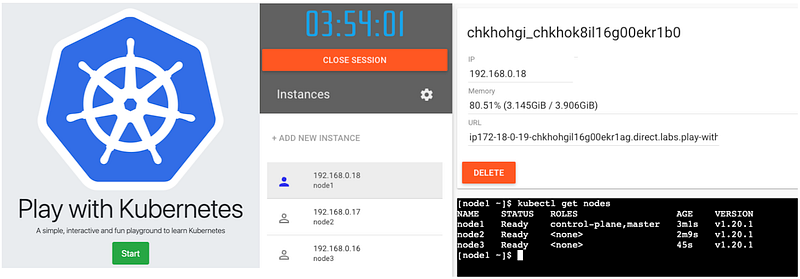
Let's spin up a cluster and perform a quick test using our code repo example, just like we did on the Killercoda cluster.
#
# Play With Kubernetes (PWK) cluster terminal
# Spin up a 3 node (1 CP, 2 W) cluster
#

# Initialize kubeadm and networking on control plane node
Controlplane $ kubeadm init --apiserver-advertise-address $(hostname -i) --pod-network-cidr 10.5.0.0/16
...
kubeadm join 192.168.0.18:6443 --token 6z5euy.9xl7sf7xf2dnk9a9 \
    --discovery-token-ca-cert-hash sha256:94670c9a7ea246b894ef949185d81dc542d3305d6f7d128f8a7bd6f2651af8d0
...

Control plane node $ kubectl apply -f https://raw.githubusercontent.com/cloudnativelabs/kube-router/master/daemonset/kubeadm-kuberouter.yaml

# kubeadm init provides node joining command
# Run it on each of the worker nodes
Worker Node 1 $  kubeadm join 192.168.0.18:6443 --token 6z5euy.9xl7sf7xf2dnk9a9 \
    --discovery-token-ca-cert-hash sha256:94670c9a7ea246b894ef949185d81dc542d3305d6f7d128f8a7bd6f2651af8d0

Worker node 2 $ kubeadm join 192.168.0.18:6443 --token 6z5euy.9xl7sf7xf2dnk9a9 \
    --discovery-token-ca-cert-hash sha256:94670c9a7ea246b894ef949185d81dc542d3305d6f7d128f8a7bd6f2651af8d0

# Back on control plane node, check the cluster is up and running
Controlplane $ kubectl get nodes
NAME    STATUS   ROLES                  AGE     VERSION
node1   Ready    control-plane,master   8m44s   v1.20.1
node2   Ready    <none>                 5m37s   v1.20.1
node3   Ready    <none>                 5m21s   v1.20.1

# Cluster is up, download code repo
Controlplane $ REPO=jdluther-kubernetes-io-tasks && \
    rm -rf $REPO && \
    git clone https://github.com/jdluther2020/$REPO.git && \
    cd $REPO

# Pick any working example directory
Controlplane $ cd ephemeral-volume-with-emptydir/
Controlplane $ ls -1

emptydir-memory.yaml
emptydir-shared-pod.yaml
emptydir-sizelimit.yaml
ephemeral-volume-with-emptydir.sh

# Testing OBJECTIVE 1 as given in ephemeral-volume-with-emptydir.sh
# Create pod
Controlplane $ kubectl apply -f emptydir-shared-pod.yaml

# Get pod status details and obtain POD_IP for next command
Controlplane $ kubectl get -f emptydir-shared-pod.yaml -o wide
NAME                  READY   STATUS     RESTARTS   AGE   IP         NODE    NOMINATED NODE   READINESS GATES
emptydir-shared-pod   2/3     NotReady   0          48s   10.5.1.3   node2   <none>           <none>

# Access nginx web server via busyboxplus container.
Controlplane $ kubectl exec emptydir-shared-pod -c busyboxplus-container -- curl -s 10.5.1.3
emptydir-shared-pod: Welcome to Nginx! Message written by Debian at Sun May 21 03:56:02 UTC 2023!!

# It worked as expected. Try others!
Option #3 — KinD Cluster with Terraform
This evolved from my own learning. It's a simple KinD cluster, as featured on https://kubernetes.io/docs/tasks/tools/#kind page. I automated it using Terraform.
You can run it from your development environment on any AWS account you have access to, including your personal account, or on an AWS playground offered by training vendors like A Cloud Guru or Cloud Academy.
I have a dedicated blog on this with more details.
The code below shows how to fire off the cluster ssh into the EC2 instance to access the cluster.
The code repo is already cloned inside the home directory of the EC2. So you can get started with the Kubernetes tasks right away.
#
# Create a KinD cluster on your own AWS account
# This setup runs in your own development machine
#

# Test AWS connectivity after running 'aws configure'
aws sts get-caller-identity

# Clone IaC code repo
REPO=terraform-ec2-with-docker-and-kind && \
    rm -rf $REPO && \
    git clone https://github.com/jdluther2020/$REPO.git && \
    cd $REPO

# Create cluster. At the end you will get the ssh command to go inside the EC2
terraform init && terraform apply -auto-approve -var my_ip=$(curl -s ifconfig.me)

ssh_info = "ssh -i ~/.ssh/docker-kind-kp.pem [email protected]"

# ssh into the node to access cluster
ssh -i ~/.ssh/docker-kind-kp.pem [email protected]

# Check cluster node status
[ec2-user@ip-172-31-7-37 ~]$ kubectl get nodes
NAME                                     STATUS   ROLES           AGE   VERSION
basic-multi-node-cluster-control-plane   Ready    control-plane   32m   v1.25.3
basic-multi-node-cluster-worker          Ready    <none>          32m   v1.25.3
basic-multi-node-cluster-worker2         Ready    <none>          32m   v1.25.3

# The code repo is already cloned here
[ec2-user@ip-172-31-7-37 ~]$ cd jdluther-kubernetes-io-tasks

[ec2-user@ip-172-31-7-37 jdluther-kubernetes-io-tasks]$ ls -l
total 12
drwxr-xr-x 12 ec2-user ec2-user 4096 May 20 07:16 .
drwx------  6 ec2-user ec2-user  160 May 20 07:16 ..
drwxr-xr-x  2 ec2-user ec2-user   36 May 20 07:16 containers-and-pods
drwxr-xr-x  2 ec2-user ec2-user  106 May 20 07:16 daemonsets-demonstration
drwxr-xr-x  2 ec2-user ec2-user  138 May 20 07:16 ephemeral-volume-with-emptydir
drwxr-xr-x  2 ec2-user ec2-user  144 May 20 07:16 exposing-a-stateless-app-via-clusterip-service
drwxr-xr-x  2 ec2-user ec2-user   33 May 20 07:16 know-thy-cluster
drwxr-xr-x  2 ec2-user ec2-user   31 May 20 07:16 know-thy-nodes
drwxr-xr-x  2 ec2-user ec2-user  127 May 20 07:16 persistent-volume-with-hostpath
drwxr-xr-x  2 ec2-user ec2-user   45 May 20 07:16 pods-deployments-replicasets
drwxr-xr-x  2 ec2-user ec2-user   55 May 20 07:16 rbac-authz-with-x509-client-cert-authn
-rw-r--r--  1 ec2-user ec2-user 2260 May 20 07:16 README.md

# Pick any folder to work with on the cluster!
Option #4— Kubeadm Cluster with Terraform
This is a full-fledged kubeadm cluster, also automated with Terraform. It has one controlplane node and two worker nodes.
It operates very much like the KinD cluster above, except the worker nodes are EC2 virtual servers instead of Docker containers acting as nodes.
The drill to experiment with Kubernetes tasks via the GitHub repo or with your own tasks is exactly the same as demonstrated in the above examples.
#
# Creating A Kubernetes Cluster with Kubeadm using Terraform
# This setup runs in your own development machine
#

# Test AWS connectivity after running 'aws configure'
aws sts get-caller-identity

# Clone code rep in a suitable location
REPO=terraform-k8s-kubeadm-ec2-cluster && \
    rm -rf $REPO && \
    git clone https://github.com/jdluther2020/$REPO.git && \
    cd $REPO

# Provision cluster. At the end you will receive the ssh command for each node
terraform init && terraform apply -auto-approve -var my_public_ip=$(curl -s ifconfig.me)

node_dns_info = [
  {
    "ssh_cmd" = "k8s-control-plane-node : ssh -i ~/.ssh/jdl-k8s-kp.pem [email protected] ; Run 'kubectl get nodes' to test cluster is up!"
  },
  {
    "ssh_cmd" = "k8s-worker-node : ssh -i ~/.ssh/jdl-k8s-kp.pem [email protected]"
  },
  {
    "ssh_cmd" = "k8s-worker-node : ssh -i ~/.ssh/jdl-k8s-kp.pem [email protected]"
  },
]

# ssh into the control plane node
ssh -i ~/.ssh/jdl-k8s-kp.pem [email protected]

# Check cluster node status
[ec2-user@ip-172-31-15-69 ~]$ kubectl get nodes
NAME                           STATUS   ROLES           AGE   VERSION
ip-172-31-14-45.ec2.internal   Ready    <none>          38m   v1.27.2
ip-172-31-15-69.ec2.internal   Ready    control-plane   40m   v1.27.2
ip-172-31-9-159.ec2.internal   Ready    <none>          38m   v1.27.2

# Cluster is up. Let's clone our code repo and get started
# It doesn't have git, so install it first
[ec2-user@ip-172-31-15-69 ~]$ sudo yum install -y git

[ec2-user@ip-172-31-15-69 ~]$ REPO=jdluther-kubernetes-io-tasks && \
    rm -rf $REPO && \
    git clone https://github.com/jdluther2020/$REPO.git && \
    cd $REPO

[ec2-user@ip-172-31-15-69 jdluther-kubernetes-io-tasks]$ ls -l
total 4
drwxrwxr-x 2 ec2-user ec2-user   36 May 20 08:12 containers-and-pods
drwxrwxr-x 2 ec2-user ec2-user  106 May 20 08:12 daemonsets-demonstration
drwxrwxr-x 2 ec2-user ec2-user  138 May 20 08:12 ephemeral-volume-with-emptydir
drwxrwxr-x 2 ec2-user ec2-user  144 May 20 08:12 exposing-a-stateless-app-via-clusterip-service
drwxrwxr-x 2 ec2-user ec2-user   33 May 20 08:12 know-thy-cluster
drwxrwxr-x 2 ec2-user ec2-user   31 May 20 08:12 know-thy-nodes
drwxrwxr-x 2 ec2-user ec2-user  127 May 20 08:12 persistent-volume-with-hostpath
drwxrwxr-x 2 ec2-user ec2-user   45 May 20 08:12 pods-deployments-replicasets
drwxrwxr-x 2 ec2-user ec2-user   55 May 20 08:12 rbac-authz-with-x509-client-cert-authn
-rw-rw-r-- 1 ec2-user ec2-user 2260 May 20 08:12 README.md

# Pick any folder to work with on the cluster!
Option #5 — Kubeadm Cluster with AWS CLI
This is the same kubeadm cluster as above, except it uses AWS CLI to provision the nodes and create the cluster instead of Terraform.
In addition to getting a fully functional cluster, it’s also a great learning guide to see how a Kubeadm cluster is built step by step following https://kubernetes.io/docs/setup/production-environment/tools/kubeadm/. CKA tests on this topic.
See my dedicated post on this.
Option #6 — Amazon EKS Cluster with 'eksctl'
This is yet another option to create a managed Amazon EKS cluster. In addition to getting a cluster up and running, it's also a great learning exercise if you're new to Amazon EKS.
The advantage of having the cluster on AWS cloud is that you can experiment with cloud provider features, including the simple illustration of a LoadBalancer type service as shown below.
I have a series of Amazon EKS Workshop chapters using this cluster, starting with the Chapter 1 link below.
Let's create the cluster and test a simple LoadBalancer type service.
#
# Purpose: Create a Amazon EKS cluster with eksctl (https://eksctl.io/)
#

# Test AWS connectivity after running 'aws configure'
aws sts get-caller-identity

# Define these variables for convenience of use
export CLUSTER_HOME=/tmp/eksctl-cluster
export ACCOUNT_ID=$(aws sts get-caller-identity --output text --query 'Account')
export CLUSTER_NAME="my-eks-cluster"
export INSTANCE_TYPE="t3.medium"
export AWS_DEFAULT_REGION="us-east-1"

# Get inside the main workship dir
mkdir -p $CLUSTER_HOME && cd $CLUSTER_HOME

# Create cluster using eksctl
eksctl create cluster -f - << EOF
---
apiVersion: eksctl.io/v1alpha5
kind: ClusterConfig
metadata:
  name: ${CLUSTER_NAME}
  region: ${AWS_DEFAULT_REGION}
managedNodeGroups:
  - name: ${CLUSTER_NAME}-ng
    instanceType: ${INSTANCE_TYPE}
    desiredCapacity: 3
    minSize: 2
    maxSize: 4
    ssh:
      allow: true
EOF

2023-05-20 20:16:40 [✔]  all EKS cluster resources for "my-eks-cluster" have been created
2023-05-20 20:16:41 [ℹ]  nodegroup "my-eks-cluster-ng" has 3 node(s)
2023-05-20 20:16:41 [ℹ]  node "ip-192-168-18-8.ec2.internal" is ready
2023-05-20 20:16:41 [ℹ]  node "ip-192-168-26-21.ec2.internal" is ready
2023-05-20 20:16:41 [ℹ]  node "ip-192-168-35-16.ec2.internal" is ready
2023-05-20 20:16:41 [ℹ]  waiting for at least 2 node(s) to become ready in "my-eks-cluster-ng"
2023-05-20 20:16:41 [ℹ]  nodegroup "my-eks-cluster-ng" has 3 node(s)
2023-05-20 20:16:41 [ℹ]  node "ip-192-168-18-8.ec2.internal" is ready
2023-05-20 20:16:41 [ℹ]  node "ip-192-168-26-21.ec2.internal" is ready
2023-05-20 20:16:41 [ℹ]  node "ip-192-168-35-16.ec2.internal" is ready
2023-05-20 20:16:42 [ℹ]  kubectl command should work with "/Users/jdl/.kube/config", try 'kubectl get nodes'
2023-05-20 20:16:42 [✔]  EKS cluster "my-eks-cluster" in "us-east-1" region is ready

# Check cluster up and running
$ kubectl get nodes

NAME                            STATUS   ROLES    AGE   VERSION
ip-192-168-18-8.ec2.internal    Ready    <none>   11m   v1.23.17-eks-0a21954
ip-192-168-26-21.ec2.internal   Ready    <none>   11m   v1.23.17-eks-0a21954
ip-192-168-35-16.ec2.internal   Ready    <none>   11m   v1.23.17-eks-0a21954

# Create a nginx deployment with three replicas
$ kubectl create deployment nginx-app --image=nginx --replicas=3

# Check pods are up
$ kubectl get pods

NAME                         READY   STATUS    RESTARTS   AGE
nginx-app-7f6fdf9556-97zxd   1/1     Running   0          6s
nginx-app-7f6fdf9556-f98kc   1/1     Running   0          6s
nginx-app-7f6fdf9556-z2hxv   1/1     Running   0          6s

# Create a LoadBalancer type service
$ kubectl expose -f nginx-app.yaml --name=nginx-svc --type=LoadBalancer --port=80

# Check service status
$ kubectl get service
NAME         TYPE           CLUSTER-IP       EXTERNAL-IP                                                               PORT(S)        AGE                                                                    443/TCP        127m
nginx-svc    LoadBalancer   10.100.238.110   a24252af1319241ccbea002fb218716c-1905990618.us-east-1.elb.amazonaws.com   80:31061/TCP   12m

# Access the nginx app with the loadbalancer URL via curl or on the browser
$ curl a24252af1319241ccbea002fb218716c-1905990618.us-east-1.elb.amazonaws.com
...
<h1>Welcome to nginx!</h1>
...

# Worked as expected. Try other tasks from the jdluther-kubernetes-io-tasks repo
Conclusion
I've presented several Kubernetes cluster options in Kubernetes Certifications (CKA, CKAD) — Prep Tip #2. Some of these clusters are free and readily available in a matter of minutes. Others can be provisioned on AWS accounts, either your own or you have access to, or AWS cloud playgrounds offered by training vendors like A Cloud Guru or Cloud Academy.
I've also shown my Kubernetes task collection GitHub repo, which can be cloned in all of these cluster environments for trying out the tasks. This repo is constantly evolving as I continue to add more tasks.
See you soon at Prep Tip #3.
If you benefited from reading the post, please 👏 a few times before parting, and help others by sharing it; I highly appreciate that!
Please follow to stay in touch, track, and be the first to get notified of all future writings on AWS Cloud, Containers, Kubernetes, and Machine Learning. Also, check all my stories on The AWS Way publication.