
arkade by example — apps for Kubernetes, the easy way
Gone are the days of contending with dozens of README files just to get the right version of helm and to install a chart with sane defaults.
arkade (ark for short) provides a simple CLI with strongly-typed flags to install Helm charts and Kubernetes apps to your cluster in a single command.

Get arkade
# Note: you can also run without `sudo` and move the binary yourself
curl -sLS https://dl.get-arkade.dev | sudo sh
arkade --help
ark --help # a handy aliasAn alias of ark is created at installation time, so you can also run ark install APP
Usage
Here’s a few examples of apps you can install, for a complete list run: arkade install --help.
arkade install- install an apparkade update- update arkadearkade info- the post-install screen for an app
Install an app
No need to worry about whether you’re installing to Intel or ARM architecture, the correct values will be set for you automatically.
The OpenFaaS app that makes serverless simple, can be installed to your Raspberry Pi, Graviton server, laptop, or a managed Kubernetes service, there are no changes required.
arkade install openfaas \
  --gateways 2 \
  --load-balancer false
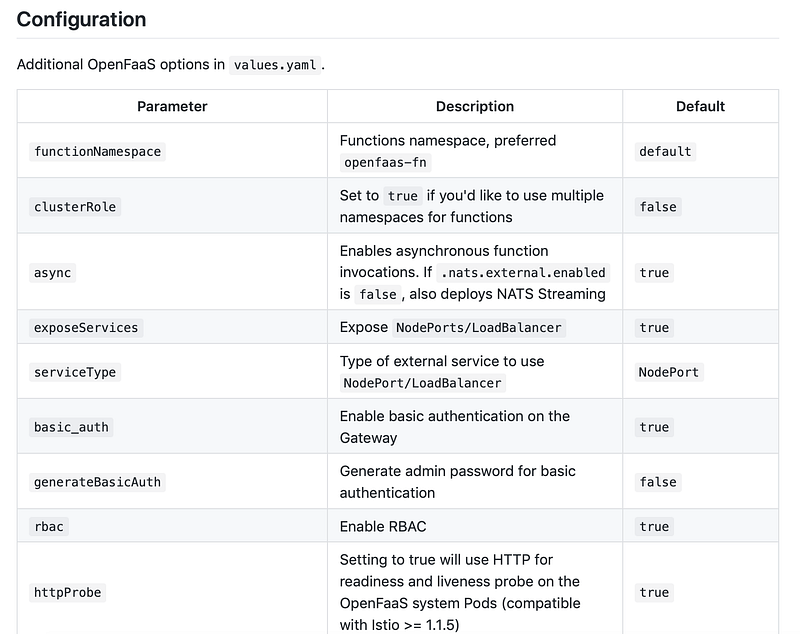
We think that these sorts of grids, should go away, replaced with more intuitive CLI flags.
Reduce the repetition
Normally up to a dozen commands (including finding and downloading helm), now just one. No searching for the correct CRD to apply, no trying to install helm, no trying to find the correct helm repo to add:
arkade install cert-managerGet me some metrics!
One of the best kept secrets of the Kubernetes community is the metrics-server, with this installed you gain access to two new commands
# Get the memory/CPU per podkubectl top pod --namespace NS
kubectl top pod --all-namespaces/-A# Get CPU / RAM utilizationkubectl top nodeBut there’s more, it also enables the use of Kubernetes Horizontal Pod Autoscaling (HPA).
What about if you wanted an IngressController?
We have that covered too. Now if you are running Kubernetes on a public cloud service such as EKS, AKS, or GKE, you can just install and get an IP via the LoadBalancer
arkade install nginx-ingress# The IP will show up under "EXTERNAL-IP"
kubectl get svcBut, if you’re running on a local machine, or via a VPS/VM, then you need to use an alternative. The chart for nginx-ingress does support using the IP of each node and port 80/443 (aka NodePorts), but the installation command is really long and complicated, so easy to get wrong and impossible to remember.
We’ve fixed that, I give you:
arkade install nginx-ingress --host-modeThat’s it, now port 80 and 443 on each node in your cluster will go to Nginx.
Bye-bye values.yaml, hello flags
We use strongly typed Go CLI flags, so that you can run --help instead of trawling through countless Helm chart README files to find the correct --set combination for what you want.
arkade install nginx-ingress --helpInstall nginx-ingress. This app can be installed with Host networking for
cases where an external LB is not available. please see the --host-mode
flag and the nginx-ingress docs for more infoUsage:
arkade install nginx-ingress [flags]Examples:
arkade install nginx-ingress --namespace defaultFlags:
--helm3 Use helm3, if set to false uses helm2 (default true)
-h, --help help for nginx-ingress
--host-mode If we should install nginx-ingress in host mode.
-n, --namespace string The namespace used for installation (default "default")
--update-repo Update the helm repo (default true)Override with --set
You can also set helm overrides, for apps which use helm via --set which allows us to “reach down” into the helm chart and set override values.
ark install openfaas --set=faasIdler.dryRun=falseThis is how we enable the scale to zero behaviour in OpenFaaS via its “faas-idler” component.
After installation, an info message will be printed with help for usage, you can get back to this at any time via:
$ arkade info <NAME>Here’s how it looks for openfaas — serverless that works on any cloud, whether Intel or ARM.
$ arkade info openfaasInfo for app: openfaas# Get the faas-clicurl -SLsf https://cli.openfaas.com | sudo sh# Forward the gateway to your machinekubectl rollout status -n openfaas deploy/gateway
kubectl port-forward -n openfaas svc/gateway 8080:8080 &# If basic auth is enabled, you can now log into your gateway:PASSWORD=$(kubectl get secret -n openfaas basic-auth -o jsonpath="{.data.basic-auth-password}" | base64 --decode; echo)echo -n $PASSWORD | faas-cli login --username admin --password-stdinfaas-cli store deploy figletfaas-cli list# For Raspberry Pifaas-cli store list --platform armhffaas-cli store deploy figlet --platform armhf# Find out more at:# https://github.com/openfaas/faasGet a self-hosted TLS registry with authentication
Here’s how you can get a self-hosted Docker registry with TLS and authentication in just 5 commands on an empty cluster:
arkade install nginx-ingress
arkade install cert-manager
arkade install docker-registry
arkade install docker-registry-ingress \
  --email [email protected] \
  --domain reg.example.com
To use your registry, you can now run:
docker login reg.example.com
docker pull reg.example.com/alpine:3.11
docker tag alpine:3.11 reg.example.com/alpine:3.11
docker push reg.example.com/alpine:3.11
To enable use within Kubernetes, see the guide for OpenFaaS, which shows how to use an ImagePullSecret for a service account.
Get OpenFaaS with TLS
Earlier we showed an example for how to install openfaas, but what if you also wanted TLS? (hint: you always want TLS)
Here we go — nginx-ingress for the IngressController, cert-manager to get TLS for us, openfaas, and openfaas-ingress (an Ingress and Issuer template):
arkade install nginx-ingress
arkade install cert-manager
arkade install openfaas
arkade install openfaas-ingress \
  --email [email protected] \
  --domain reg.example.com
You’re now set! Your gateway is https://reg.example.com and functions appear at https://reg.example.com/function/name.
But do you want custom vanity domains too like api.mycorp.com/v1/name? We have you covered through the IngressOperator.
Get a public IP for a private cluster and your IngressController
And if you’re running on a private cloud, on-premises or on your laptop, you can simply add the inlets-operator using inlets-pro to get a secure TCP tunnel and a public IP address.
arkade install inlets-operator \
  --access-token $HOME/digitalocean-token \
  --region lon1 \
  --license $(cat $HOME/license.txt)
Find out more about Inlets PRO in the docs
Explore the apps
arkade install --help
ark --helpcert-manager Install cert-manager
chart Install the specified helm chart
cron-connector Install cron-connector for OpenFaaS
crossplane Install Crossplane
docker-registry Install a Docker registry
docker-registry-ingress Install registry ingress with TLS
info Find info about a Kubernetes app
inlets-operator Install inlets-operator
istio Install istio
kafka-connector Install kafka-connector for OpenFaaS
kubernetes-dashboard Install kubernetes-dashboard
linkerd Install linkerd
metrics-server Install metrics-server
minio Install minio
mongodb Install mongodb
nginx-ingress Install nginx-ingress
openfaas Install openfaas
openfaas-ingress Install openfaas ingress with TLS
postgresql Install postgresqlInstall now, update later
curl -ssL https://dev.get-arkade.dev | sudo shWhen you want to update, simply run arkade update
That’s a wrap
Contributions are welcome as are suggestions for your favourite apps.
To sum up: arkade is the easy way to install apps to Kubernetes. We’ve spent a lot of time thinking about how to reduce duplication because our community members are running these steps every day, over and over.
Buy your own SWAG from the SWAG store to support the ongoing development of arkade

Next up we’ll be extending the functionality and reducing duplication across the codebase, you can also expect to see a GitOps style workflow for when you want to run arkade in production devops pipelines.