
Kubernetes Application Management with Shipa
An abstraction layer on top of Kubernetes to allow developers to focus on code and less on configuration.

Earlier this year I wrote about popular multi-cluster Kubernetes management solutions, including Rancher, Google Anthos, Volterra, and other open-source approaches. In the article, I focused on products solving the challenges of administrating and managing multiple clusters. Afterwards some of my readers pointed out that there are other challenges to operating multi-cluster Kubernetes, namely the development experience. Kubernetes already presents a steep learning curve for application developers who want to “simply deploy” their application. Developers may not have the time or the desire to learn a new infrastructure tool, let alone configure YAML files to get their application running on various clouds.
This was where I connected with Bruno Andrade, CEO and founder of Shipa, who has been focusing on creating a developer-centric Kubernetes application management framework. Bruno described Shipa as a development platform that abstracts away Kubernetes by automatically creating the Kubernetes objects, security/network policies, and resource management. I then came across a fireside chat with Kelsey Hightower, whom I respect especially regarding Kubernetes, so decided to test out Shipa.
Quickstart with Shipa
To start, I created two GKE clusters, one in us-west1 and one in us-central1, and installed Shipa via Helm as specified in the installation docs.
$ kubectl create namespace shipa-system$ helm repo add shipa-charts https://shipa-charts.storage.googleapis.com# values.override.yaml holds admin credentials
$ helm install shipa shipa-charts/shipa -n shipa-system --timeout=1000s -f values.override.yamlAfter installing the CLI client, I was able to attach my Shipa targets and start interacting with my clusters:
$ curl -s https://storage.googleapis.com/shipa-client/install.sh | bash$ shipa target add shipa <shipa-ip-addr> -s$ shipa loginAt a first glance, I was able to see a familiar dashboard for managing multiple Kubernetes clusters:
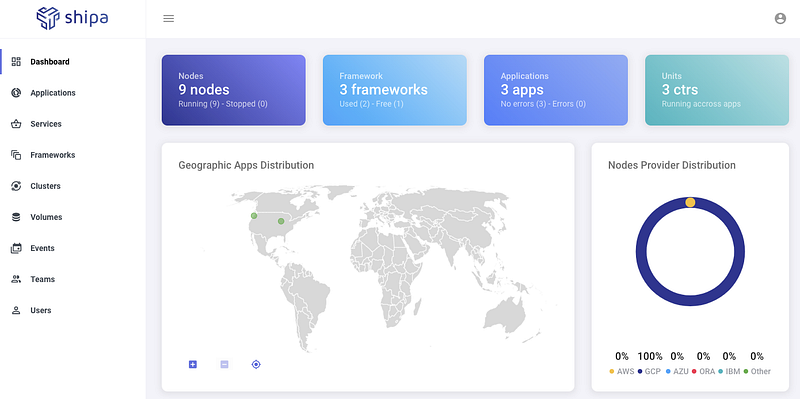
For platform/infrastructure engineers in charge of these Kubernetes clusters, Shipa provides a way to define teams, users, roles, and permissions via the dashboard or CLI. While these features make Shipa a competitive offering to multi-cluster management products, I wanted to test out the developer experience that sets Shipa apart.
Deploying Applications
Before I became a SRE/infrastructure engineer, I was a full-stack developer building servers and dashboards, frequently integrating with external parties to exchange data or to test some logic flow. A fairly common task for me was writing a REST service that would ingest data either directly from a sensor or from a data stream, transform into a standard format, and put it on a message queue for downstream processing. While it was easy to test on my local machine and create a Docker image, deploying my server to the cloud and sharing a public URL to test was much harder than simply pushing my code to Github or running docker build and docker run .
Platforms like Heroku and Netlify tackle this problem to a certain degree but do not target production workloads running on Kubernetes as their main use case. With Kubernetes becoming the de facto compute layer, companies are faced with the decision of building out a platform engineering team to build tools around Kubernetes or train developers to become familiar with Kubernetes concepts like pods or common tooling around it like Helm. For me, this was one of the driving factors to switch into platform engineering, building tools to bootstrap CI pipelines, wrap Helm charts with predefined variables, and integrate cert-manager, external-dns, and other Kubernetes tools to abstract away the plumbing underneath “simply deploying” a service.
Shipa achieves the same experience by supporting three common ways developers deploy services:
- Using CLI to deploy source code directly, relying on Shipa to containerize and add Kubernetes manifests
- Specifying Docker containers that Shipa wraps Kubernetes components to
- Integrating with existing CI/CD pipelines as a deployment target
Underneath the hood, Shipa uses Procfile and shipa.yml to define optional hooks and health checks that developers can template. We’re no completely free from YAML, but Shipa does abstract away the concepts of Kubernetes probes to a more relatable idea of a health check.
Without further ado, let’s deploy some sample applications:
Clone the Github repos with sample code. We then need to add language support to Shipa:
$ shipa platform add nodejs
$ shipa platform add ruby
Shipa groups applications into what’s called frameworks . Frameworks work similarly to a namespace on Kubernetes, where quotas, access, and security is enforced to that framework. From the fireside chat with Kelsey Hightower, it seemed like frameworks could be used to bundle dependent apps together, similar to ArgoCD’s apps-of-apps pattern or using dependencies in Helm charts.
$ shipa framework add dev-frameworkNow you can create applications and specify which team and framework this belongs to:
$ shipa app create node-app nodejs -t shipa-team -k dev-framework$ shipa app create sample-app ruby -t shipa-admin-team -k dev-frameworkThis puts these applications under Idle status until it is actually deployed:
$ shipa app deploy -a node-app -f .$ shipa app deploy -a sample-app -f .Now you should see the node-app and sample-app as Running :
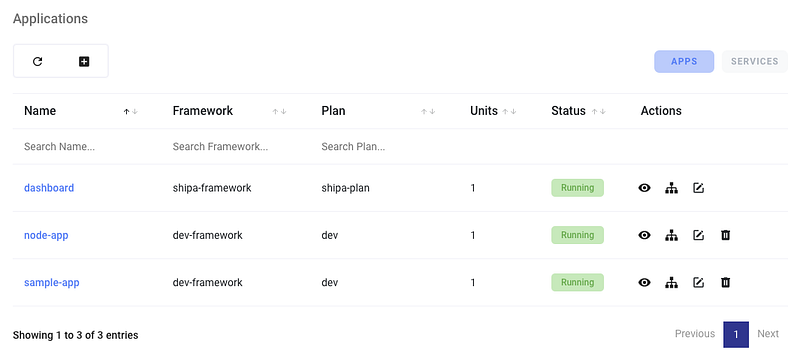
When you drill down into application, you can see the Kubernetes components that were created:
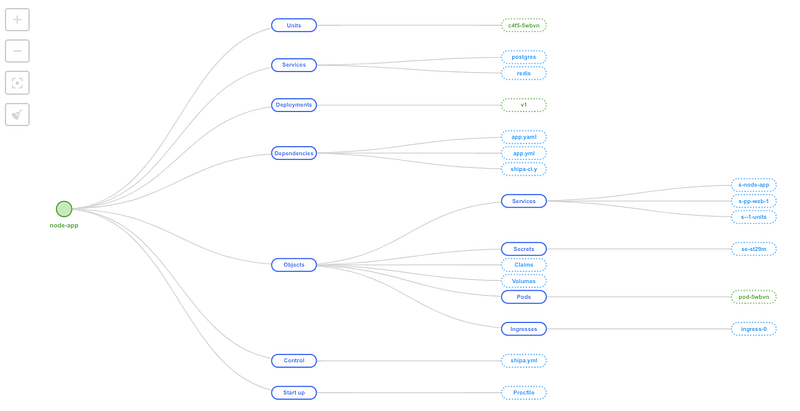
Behind the scenes, Shipa also configures Istio or Traefik to expose your service to the Internet. As a former fullstack developer, this was something I appreciate without having to create the ingress and update the DNS myself.
Finally, Shipa also has a component called Services , which is similar to Applications on GKE Marketplace (pre-packaged solutions from external vendors). Currently Shipa supports MongoDB, Redis, RabbitMQ, and PostgreSQL:
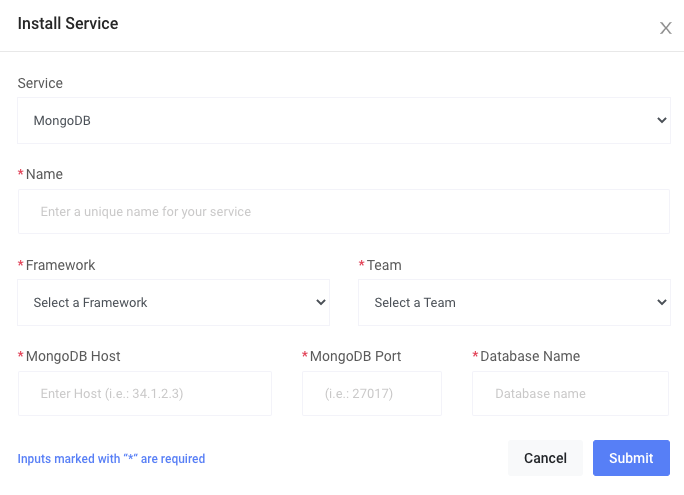
For a more complex example involving services, you can also try deploying the cinema application services on Github.
Use Cases
After exploring Shipa’s interface and development experience, I can see two primary use cases to help different organizations and teams accelerate Kubernetes adoption without having to invest a ton into tooling or training materials.
Developer Sandbox
For small teams or codebases, running applications on minikube or k3s works. But as the application grows in size and complexity, running end-to-end or integration tests starts to become problematic for lightweight Kubernetes distributions. Inevitably, development teams end up moving the developer sandbox to the cloud, either creating a EC2 machine that syncs with a text editor/IDE or providing a developer-specific namespace or a shared cluster with mock data pre-populated on various services. Complex CI/CD pipelines are needed to deploy the Helm charts or YAML files to initialize this workspace, even before the developer gets into package and deploy his or her application.
Shipa can excel in this use case where existing pipelines can continue to set up the environment and leave the new application to be managed by Shipa. The developer can run some smoke tests and manual testing to check the application behavior, prior to working with the platform team or QA team to productionize the application. Often times platform or infrastructure team has trouble helping the application developer to package the application into Kubernetes-ready versions, but a pre-packaged deployment via Shipa can bootstrap a lot of the behaviors that both platform and application engineers can use to fine-tune.
Internal Applications
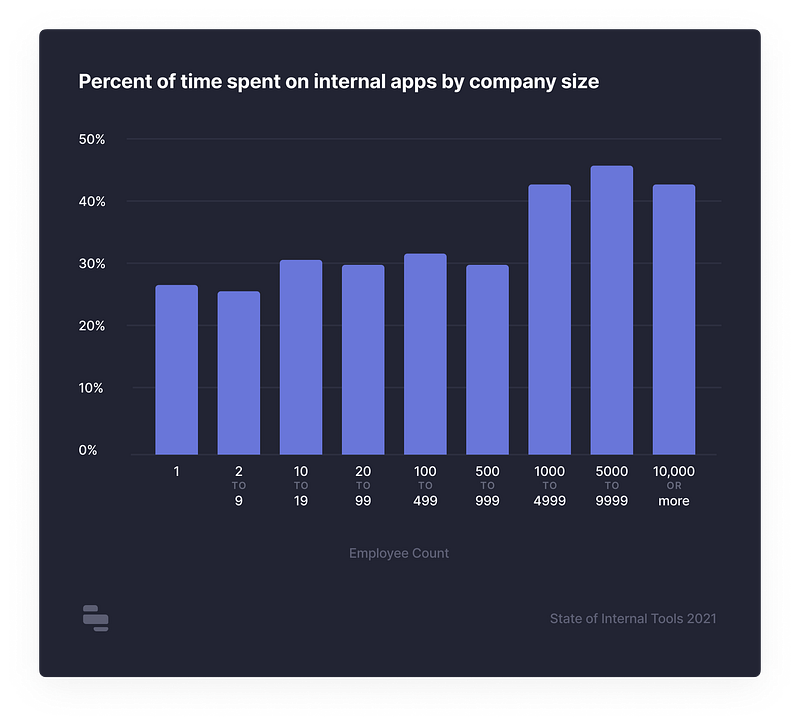
According to Retool’s State of Internal Tools 2021, developers spend between 25–45% of their time working on or maintaining internal apps (e.g. dashboards, admin panels, infra management, customer support).
A vast majority still rely on custom-built solutions despite the rise of low / no-code platforms:
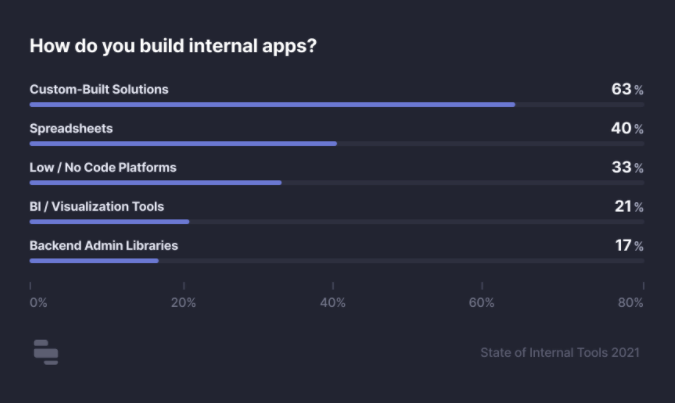
With 55% of the developers reporting that they struggle to find the time to build internal apps, any automation tool to reduce the time and resource burden for custom-built solutions will be greatly welcomed. Shipa can act as a low-code platform to reduce the deployment time for internal apps that can be already production-ready running inside Kubernetes that most likely exists already at the organization.
Final Thoughts
It will take more testing to see if Shipa can also handle Day 2 concerns. Shipa does provide integration with incident management tools and manages cluster upgrades, but enterprises will demand greater security and compliance measures (e.g. how to follow SOC-II for release management). Still, Shipa is worth a look either for the use cases I laid out above (developer sandbox, internal application management) or to reduce the learning curve to Kubernetes.


