avatarVincent Tsen

Free AI web copilot to create summaries, insights and extended knowledge, download it at here

2261

Abstract

lass="hljs-string">"[Flow2]: emitting <span class="hljs-variable">value</span>"</span>) emit(value) <span class="hljs-keyword">if</span> (value == <span class="hljs-string">'Z'</span>) { value = <span class="hljs-string">'A'</span> } <span class="hljs-keyword">else</span> { value += <span class="hljs-number">1</span> } } }</pre></div><h1 id="ab54">Combine Flow</h1><p id="f9bf">This combines <b>flow1</b> and <b>flow2</b> into <b>combineFlow</b> using the <code>Flow.combine()</code> <a href="https://vtsen.hashnode.dev/complete-c-to-kotlin-syntax-comparisons#heading-extension-methods-functions">extension function</a> flow operator.</p><div id="a674"><pre><span class="hljs-keyword">val</span> combineFlow = flow1.combine(flow2) { flow1Value,flow2Value -&gt; <span class="hljs-string">"<span class="hljs-subst">{flow1Value}</span><span class="hljs-subst">{flow2Value}</span>"</span> }</pre></div><p id="9aa7" type="7">The limitation of this Flow.combine() extension function is it is limited to combining 2 flows. To combine more than 2 flows, you can use combine() function directly which supports up to 5 flows.</p><div id="b572"><pre><span class="hljs-keyword">val</span> combineFlow = combine(flow1, flow2) { flow1Value, flow2Value -&gt; <span class="hljs-string">"<span class="hljs-subst">{flow1Value}</span><span class="hljs-subst">{flow2Value}</span>"</span> }</pre></div><p id="60bf">To collect the flow, I use the <a href="https://vtsen.hashnode.dev/side-effects-summary-in-jetpack-compose#heading-suspended-effect-handler">LaunchedEffect()</a> side effect for this demonstration purpose. The recommended way is either using <code>collectAsStateWithLifeCylce()</code>or <code>repeatOnLifecycle(Lifecycle.State.STARTED)</code>, see <a href="https://vtsen.hashnode.dev/exploring-different-ways-to-collect-kotlin-flow#heading-3-collect-flow-using-lifecyclerepeatonlifecycle">here</a>.</p><div id="1c29"><pre>LaunchedEffect(<span class="hljs-literal">true</span>) { viewModel.combineFlow.collect { value -&gt; Log.d(tag, <span class="hljs-string">"[Combine Flow]: <span class="hljs-variable">value</span>"</span>) } }</pre></div><p id="ed96">So this is the ou

Options

tput. It <b>combines</b> the <b>latest value</b> from <b>flow1</b> and <b>flow2</b>.</p><figure id="b587"><img src="https://cdn-images-1.readmedium.com/v2/resize:fit:800/0*IKKAu975dfsCqx0l"><figcaption></figcaption></figure><h1 id="b5f7">Merge Flow</h1><p id="8ebb">This merges <b>flow1</b> and <b>flow2</b> into <b>mergeFlow,</b></p><div id="efbc"><pre><span class="hljs-keyword">val</span> mergeFlow = merge(flow1, flow2)</pre></div><p id="7db5">and here is the output:</p><figure id="d9f6"><img src="https://cdn-images-1.readmedium.com/v2/resize:fit:800/0*cLeHn0v3GaoOU0E3"><figcaption></figcaption></figure><p id="8ee2"><code>1</code> and <code>A</code> are emitted at the same time, followed by <code>2</code>, then <code>3</code> and <code>B</code> and so on.</p><h1 id="7b13">Zip Flow</h1><p id="7bfb">This zips <b>flow1</b> and <b>flow2</b> into <b>zipFlow,</b></p><div id="c0ca"><pre><span class="hljs-keyword">val</span> zipFlow = flow1.zip(flow2) { flow1value,flow2value -> <span class="hljs-string">"<span class="hljs-subst">{flow1value}</span>_<span class="hljs-subst">{flow2value}</span>"</span> }</pre></div><p id="583c">and here is the output:</p><figure id="202e"><img src="https://cdn-images-1.readmedium.com/v2/resize:fit:800/0*XoAlpATr3QKtyeYZ"><figcaption></figcaption></figure><p id="16a0">As you can see from this output, <b>Zip pairs up the data</b> from <b>flow1</b> and <b>flow2</b>.</p><h1 id="3186">Conclusion</h1><p id="e109">The above diagrams help me to understand the difference between combine, merge and zip flow operators.</p><p id="fc65">I have been using <code>combine()</code> in this project <a href="https://github.com/vinchamp77/AndroidNews">here</a> which combines the flow from a ROOM database(articles) with another flow from a Proto DataStore(user settings). I do not have any chance to use <code>Merge()</code> and <code>Zip()</code>. :)</p><h1 id="4ab5">Source Code</h1><p id="464f">GitHub Repository: <a href="https://github.com/vinchamp77/Demo_AsyncFlow"><b>Demo_AsyncFlow</b></a> (see the <code>CombineMergeZipFlowActivity</code>)</p><p id="50ee"><i>Originally published at <a href="https://vtsen.hashnode.dev/kotlin-flow-combine-merge-and-zip">https://vtsen.hashnode.dev</a>.</i></p></article></body>

Kotlin Flow — Combine, Merge and Zip

Exploring the Power of Kotlin Flow: Combining, Merging, and Zipping Streams

This is part of the asynchronous flow series:

I have 2 flows here.

Flow1 emits int starting from 1 -> 1000 every 1 second.

private val flow1: Flow<Int> = flow {
    repeat(10000) { value ->
        delay(1000)
        Log.d(tag, "[Flow1]: emitting $value")
        emit(value)
    }
}

Flow 2 emits char from A to Z every 2 seconds.

private val flow2: Flow<Char> = flow {
    var value = 'A'
    while(true) {
        delay(2000)
        Log.d(tag, "[Flow2]: emitting $value")
        emit(value)
        if (value == 'Z') {
            value = 'A'
        } else {
            value += 1
        }
    }
}

Combine Flow

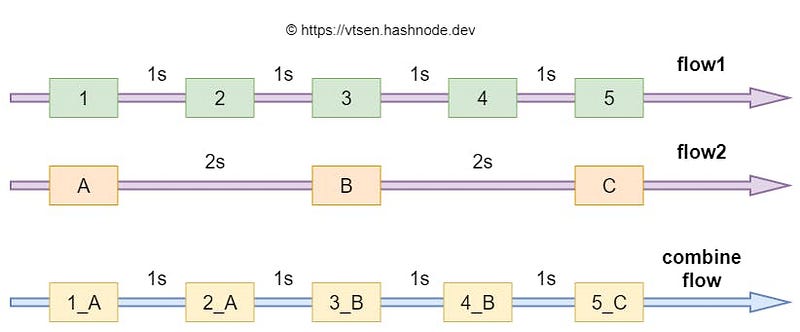
This combines flow1 and flow2 into combineFlow using the Flow.combine() extension function flow operator.

val combineFlow = flow1.combine(flow2) { flow1Value,flow2Value  ->
    "${flow1Value}_${flow2Value}"
}

The limitation of this Flow.combine() extension function is it is limited to combining 2 flows. To combine more than 2 flows, you can use combine() function directly which supports up to 5 flows.

val combineFlow = combine(flow1, flow2) { flow1Value, flow2Value ->
    "${flow1Value}_${flow2Value}"
}

To collect the flow, I use the LaunchedEffect() side effect for this demonstration purpose. The recommended way is either using collectAsStateWithLifeCylce()or repeatOnLifecycle(Lifecycle.State.STARTED), see here.

LaunchedEffect(true) {
    viewModel.combineFlow.collect { value ->
        Log.d(tag, "[Combine Flow]: $value")
    }
}

So this is the output. It combines the latest value from flow1 and flow2.
Merge Flow

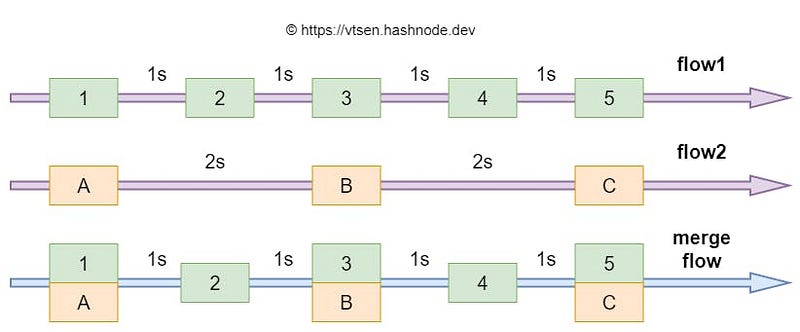
This merges flow1 and flow2 into mergeFlow,

val mergeFlow = merge(flow1, flow2)

and here is the output:

1 and A are emitted at the same time, followed by 2, then 3 and B and so on.

Zip Flow

This zips flow1 and flow2 into zipFlow,

val zipFlow = flow1.zip(flow2) { flow1value,flow2value  ->
    "${flow1value}_${flow2value}"
}

and here is the output:
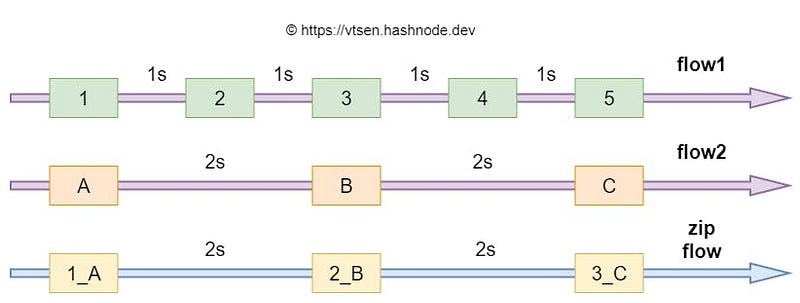
As you can see from this output, Zip pairs up the data from flow1 and flow2.

Conclusion

The above diagrams help me to understand the difference between combine, merge and zip flow operators.

I have been using combine() in this project here which combines the flow from a ROOM database(articles) with another flow from a Proto DataStore(user settings). I do not have any chance to use Merge() and Zip(). :)

Source Code

GitHub Repository: Demo_AsyncFlow (see the CombineMergeZipFlowActivity)

Originally published at https://vtsen.hashnode.dev.

Kotlin Beginners
Kotlin Flow
Kotlin
AndroidDev
Android App Development
Recommended from ReadMedium