
Learning Kotlin Programming
Kotlin Flow a much better version of Sequence?
Do we still need Sequence, after we have Flow?

Sometime back, I’m curious how is List different from Sequence. I explored into it, and notice Sequence is Lazy and List is Slow. Each have their advantage.
With Kotlin Flow now in place, it behaves like a Sequence.
runBlocking {
    (1..3).asSequence()
        .map { println("sequence mapping $it"); it * 2 }
        .first { it > 2 }
        .let { println("sequence $it") }

    (1..3).asFlow()
        .map { println("flow mapping $it"); it * 2 }
        .first { it > 2 }
        .let { println("flow result $it") }
}
For the code above, both also behave like below
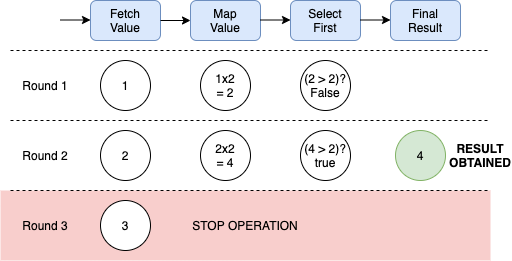
It will lazily process each item and terminate the process as soon as it get the result.
sequence mapping 1
sequence mapping 2
sequence 4
flow mapping 1
flow mapping 2
flow result 4
Compared to list, this saves time, as they (sequence and flow) don’t process all values . Hence in such behavior-wise, they are both the same.
Flow can do much more things than Sequence. Let’s fist look at the benefits of Flow compare to Sequence
1. Sequence is blocking; Flow can be non-blocking
Sequence
We can generate a sequence using sequence. But in sequence, we cannot have suspend function. Hence to emulate slow delay, we use Thread.sleep as shown below.
fun simple() = sequence {
    (1..3).forEach { Thread.sleep(100); yield(it) }
}

fun main() = runBlocking<Unit> {
    launch {
        for (k in 1..3) {
            println("From main $k")
            delay(100)
        }
    }

    simple().forEach { value -> println("From sequence $value") }
}
The result will show that
From sequence 1
From sequence 2
From sequence 3
From main 1
From main 2
From main 3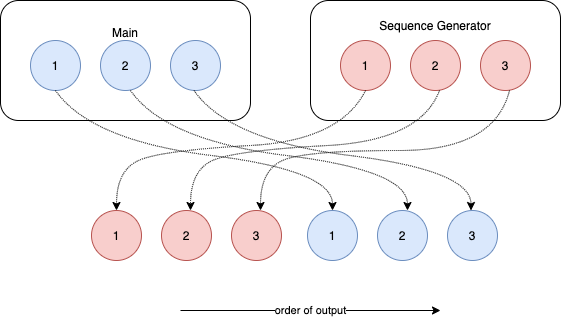
Flow
We can generate a sequence using flow. In sequence, we can suspend the function. Hence to emulate slow delay, we use delay as shown below.
fun simple() = flow {
    (1..3).forEach { delay(100); emit(it) }
}


fun main() = runBlocking<Unit> {
    launch {
        for (k in 1..3) {
            println("From main $k")
            delay(100)
        }
    }

    simple().collect { value -> println("From flow $value") }
}
The result will show as below
From main 1
From flow 1
From main 2
From flow 2
From main 3
From flow 3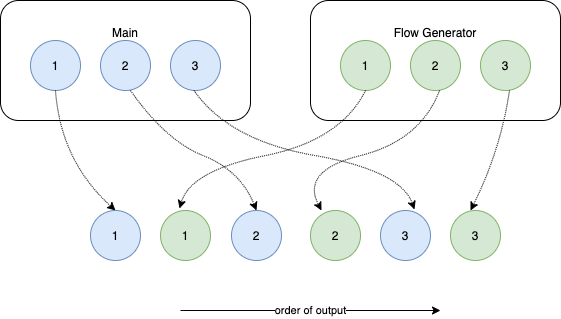
2. Sequence can't be easily canceled; Flow can be canceled
Sequence In sequence, even if the process is slow, it’s cannot be canceled.
fun simple() = sequence {
    (1..3).forEach {
        Thread.sleep(100)
        println("generating $it")
        yield(it)
    }
}

fun main() = runBlocking {
    withTimeoutOrNull(250) { // Timeout after 250ms
        simple().forEach { value -> println(value) }
    }
    println("Done")
}
The sequence continue getting out result after 250ms. Nothing is canceled.
generating 1
1
generating 2
2
generating 3
3
Done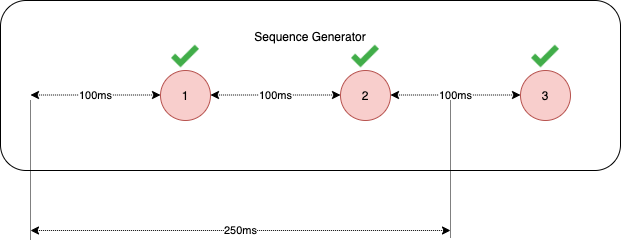
Flow We can generate a sequence using flow. In sequence, we can suspend the function.
fun simple() = flow {
    (1..3).forEach {
        delay(100);
        println("generating $it");
        emit(it)
    }
}

fun main() = runBlocking {
    withTimeoutOrNull(250) { // Timeout after 250ms
        simple().collect { value -> println(value) }
    }
    println("Done")
}
The flow got canceled after 250ms
generating 1
1
generating 2
2
Done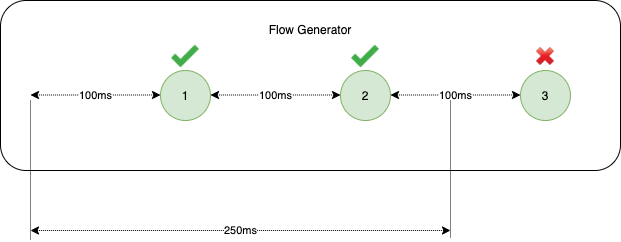
3. Sequence can’t expand itself easily; Flow can easily expand itself
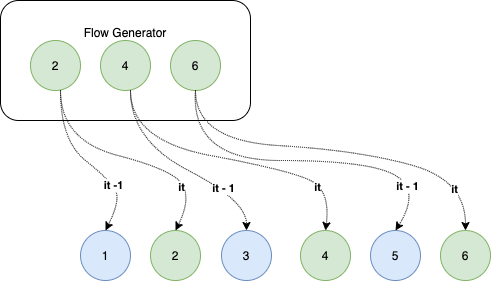
Imagine if we have a list of 2, 4, 6, and we want to make it to 1, 2, 3, 4, 5, 6, we can achieve this in flow using the transform operator
fun main() = runBlocking {
    (2..6 step 2).asFlow().transform {
        emit(it - 1)
        emit(it)
    }.collect { println(it) }
}
The output will be from 2, 4, 6 to 1, 2, 3, 4, 5, 6.
4. Sequence cannot be launch in another thread by itself; Flow can launch itself in another thread
Sequence If we want to launch our sequence in another thread, it has to be done by a separate tool e.g. coroutine.
fun main() {
    run()
    Thread.sleep(100) // To ensure the other thread finishes
}

fun run() {
    CoroutineScope(Dispatchers.IO).launch {
        (1..3).asSequence()
            .forEach {
                println("$it ${Thread.currentThread()}")
            }
    }
}
With that, we have an extra indentation to it as shown above.
Flow
In flow, we can easily get it to launch in another thread using launchIn, and provide the coroutineScope to it.
fun main() {
    run()
    Thread.sleep(100) // To ensure the other thread finishes
}

fun run() {
    (1..3).asFlow()
        .onEach {
            println("$it ${Thread.currentThread()}")
        }.launchIn(CoroutineScope(Dispatchers.IO))
}
That’s it. Short and sweet, without additional indentation.
5. Sequence can’t send operation in another thread; Flow can have its operation in another thread
Assuming we want to fire in one thread and operate in another thread, and finally collect the data in another thread, we can do that in flow using flowOn function provided.
fun main() = runBlocking {
    flow {
        (1..3).forEach {
            println("Fire $it ${Thread.currentThread()}")
            emit(it)
        }
    }
        .flowOn(Dispatchers.IO)
        .transform {
            println("Operate $it ${Thread.currentThread()}")
            emit(it)
        }
        .flowOn(Dispatchers.Default)
        .collect {
            println("Collect $it ${Thread.currentThread()}")
        }
}
The result is as below
Fire 1 Thread[DefaultDispatcher-worker-2,5,main]
Fire 2 Thread[DefaultDispatcher-worker-2,5,main]
Fire 3 Thread[DefaultDispatcher-worker-2,5,main]
Operate 1 Thread[DefaultDispatcher-worker-1,5,main]
Operate 2 Thread[DefaultDispatcher-worker-1,5,main]
Operate 3 Thread[DefaultDispatcher-worker-1,5,main]
Collect 1 Thread[main,5,main]
Collect 2 Thread[main,5,main]
Collect 3 Thread[main,5,main]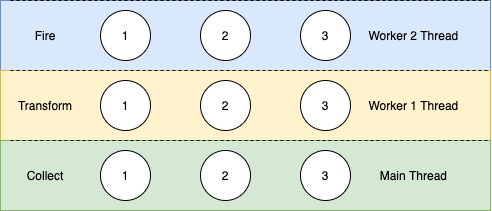
6. Sequence can’t process in parallel; Flow can process in parallel
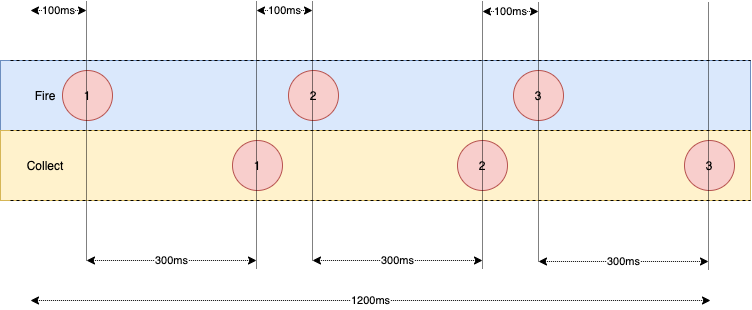
Sequence In Sequence, if the generation of each element takes 100ms, and the process of each element takes another 300ms, each round below will take about 400ms.
fun simple() = sequence {
    (1..3).forEach { Thread.sleep(100); yield(it) }
}

fun main() = runBlocking<Unit> {
    val time = measureTimeMillis {
        simple().forEach {
            delay(300)
        }
    }
    println("Collected in $time ms")
}
This result I collected is 1220ms.
By having 3 elements, it will take about 3 x 400ms = 1200ms.
Flow
In Flow, we can use buffer() to ask the emitter to continue its work without the need to wait for the processing to finish.
fun simple(): Flow<Int> = flow {
    for (i in 1..3) { delay(100); emit(i) }
}

fun main() = runBlocking<Unit> {
    val time = measureTimeMillis {
        simple().buffer().collect {
            delay(300)
        }
    }
    println("Collected in $time ms")
}
This result I collected is 1075ms.
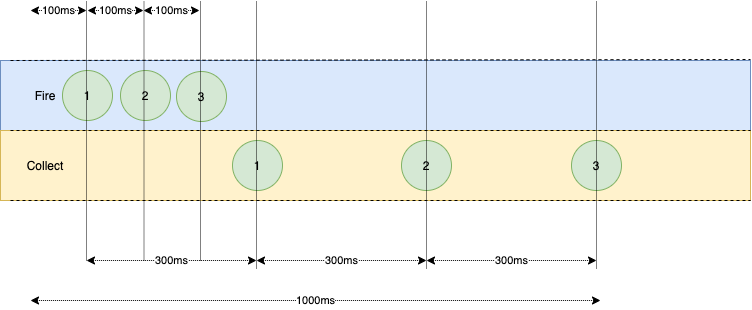
Using this, only the first element will take about 100ms + 300 ms, the sequence only takes 300ms, since the 100ms firing time is done in parallel with the processing.
7. Sequence can’t eliminate slow/fast item; Flow can eliminate slow/fast item
As shown above, Sequence will have to bear with the slow item. But for flow, it can process in parallel. Because of that, the emission can reach the processing before it is processed.
Based on this, we could eliminate the fast emitted element, or we can eliminate the slow process element
Conflate (Flow only)
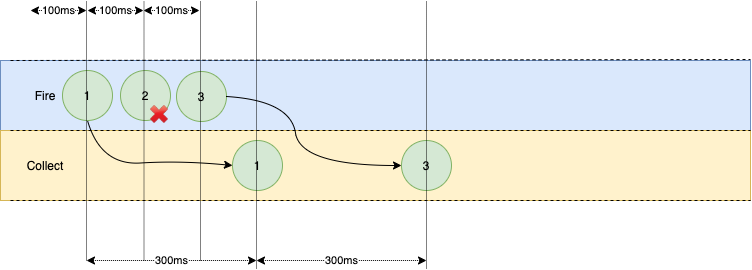
Using the conflate() function, we can choose to eliminate a fast emitted element, by collecting the latest element only.
fun simple(): Flow<Int> = flow {
    for (i in 1..3) { delay(100); emit(i) }
}

fun main() = runBlocking<Unit> {
    val time = measureTimeMillis {
        simple().conflate().collect {
            delay(300)
            println(it)
        }
    }
    println("Collected in $time ms")
}
The result is as below.
1
3
Collected in 766 ms
Element 2 is conflated as element 3 is ready before element 1 is fully processed. The diagram below will explain better.
CollectLatest (Flow only)
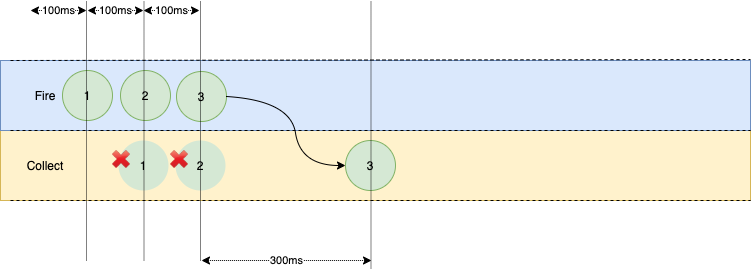
Using the collectLatest() function, we can choose to eliminate a currently slow process item, if a new emitted item arrive.
fun simple(): Flow<Int> = flow {
    for (i in 1..3) { delay(100); emit(i) }
}

fun main() = runBlocking<Unit> {
    val time = measureTimeMillis {
        simple().collectLatest {
            println("get $it")
            delay(300)
            println("done $it")
        }
    }
    println("Collected in $time ms")
}
The result is
get 1
get 2
get 3
done 3
Collected in 676 ms
All element 1, 2 and 3 was collected. But element 1 and 2 was eliminated as the next element arrived before they are completely processed. The diagram below illustrates that better.
You can get a better understanding of the above in the article below
8. Sequence can only synchronously combine; Flow can asynchronously combine
Zip Operator (Sequence and Flow)
Both sequence and flow, we have the zip operator that can combine two sequences or two flows.
It has to be synchronous though (i.e. order element by element) even if the elements of both sequences (or flows) are produced at a different rate.
fun firstSeq() = sequence {
    (1..3).forEach { Thread.sleep(100); yield(it) }
}

fun secondSeq() = sequence {
    (4..6).forEach { Thread.sleep(300); yield(it) }
}

fun main() = runBlocking<Unit> {
    val time = measureTimeMillis {
        firstSeq().zip(secondSeq()).forEach {
            println(it)
        }
    }
    println("Collected in $time ms")
}
The result as below
(1, 4)
(2, 5)
(3, 6)
Collected in 1229 ms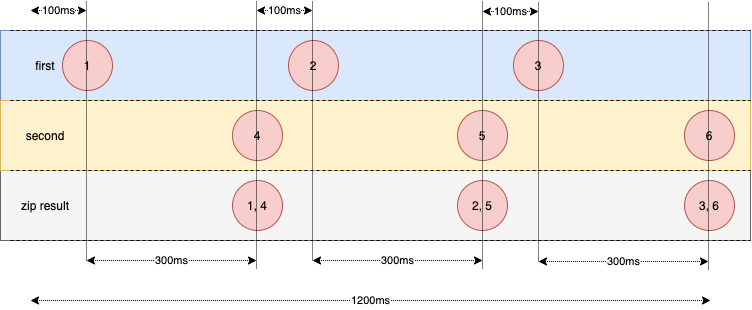
We can see from the illustration above, the elements are coordinate in series, for elements from first and second to be zipped together.
Hence, this blocks fast sequence and doesn’t asynchronously combine anything that was in place.
It slows the first sequence production down.
Combine Operator (Flow only)
Only in flow, we have the combine operator that can combine two flows that have different rate, without blocking any of them
fun firstFlow(): Flow<Int> = flow {
    for (i in 1..3) { delay(100); emit(i) }
}

fun secondFlow(): Flow<Int> = flow {
    for (i in 4..6) { delay(300); emit(i) }
}

fun main() = runBlocking<Unit> {
    val time = measureTimeMillis {
        firstFlow().combine(secondFlow()) { a, b -> Pair(a, b) }
            .collect { println(it) }
    }
    println("Collected in $time ms")
}
Then the result is
(2, 4)
(3, 4)
(3, 5)
(3, 6)
Collected in 962 ms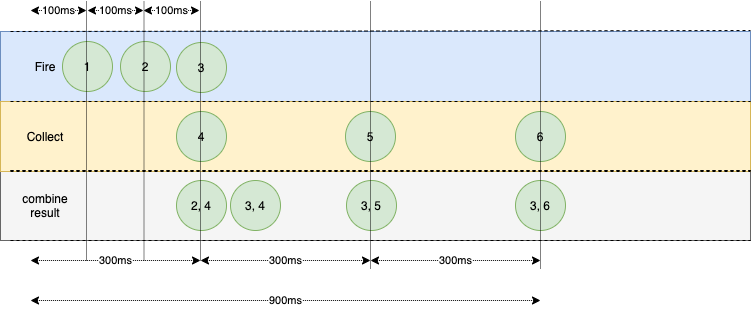
As illustrated above, the first flow continues to pump out elements. As the second flows come along, it takes whatever available (in this case 2 and combine with the 4 it has).
In our case above, the 4 is emitted in between the 2 and 3 (the diagram can’t show that clearly), hence it produces both (2, 4) and (3, 4).
9. Sequence only do synchronous flattening; Flow can do asynchronously flattening
FlatMap (Sequence and Flow)
In both sequence and flow, we can flat-map a sequence-of-sequence (using flatMap or flatten)or a flow-of-flow (using flatMapConcat).
Below is an example.
fun requestSequence(i: Int): Sequence<String> = sequence {
    yield("$i: First")
    Thread.sleep(300)
    yield("$i: Second")
}

fun main() = runBlocking<Unit> {
    val startTime = System.currentTimeMillis()
    (1..3).asSequence().onEach { Thread.sleep(100) }
        .flatMap { requestSequence(it) }
        .forEach { value -> // collect and print
            println("$value at ${System.currentTimeMillis()
                    - startTime} ms from start")
        }
}
The result
1: First at 120 ms from start
1: Second at 421 ms from start
2: First at 526 ms from start
2: Second at 830 ms from start
3: First at 930 ms from start
3: Second at 1232 ms from start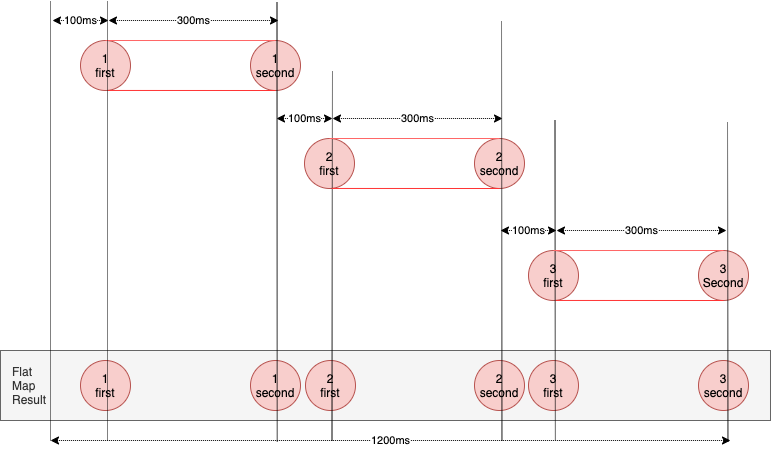
Since things can be done in parallel, hence it has to be handled sequence by sequence. The order is preserved, but also the time is the longest needed as each sequence is handled serially in the order provided.
FlatMapMerge (Flow only)
In flow, we process them parallelly, i.e. before one flow finishes the process, the other can begin. This can be done using flatMapMerge.
fun requestFlow(i: Int): Flow<String> = flow {
    emit("$i: First")
    delay(300)
    emit("$i: Second")
}

fun main() = runBlocking<Unit> {
    val startTime = System.currentTimeMillis()
    (1..3).asFlow().onEach { delay(100) }
        .flatMapMerge { requestFlow(it) }
        .collect { value -> // collect and print
            println("$value at ${System.currentTimeMillis()
                    - startTime} ms from start")
        }
}
The result
1: First at 168 ms from start
2: First at 263 ms from start
3: First at 368 ms from start
1: Second at 472 ms from start
2: Second at 568 ms from start
3: Second at 670 ms from start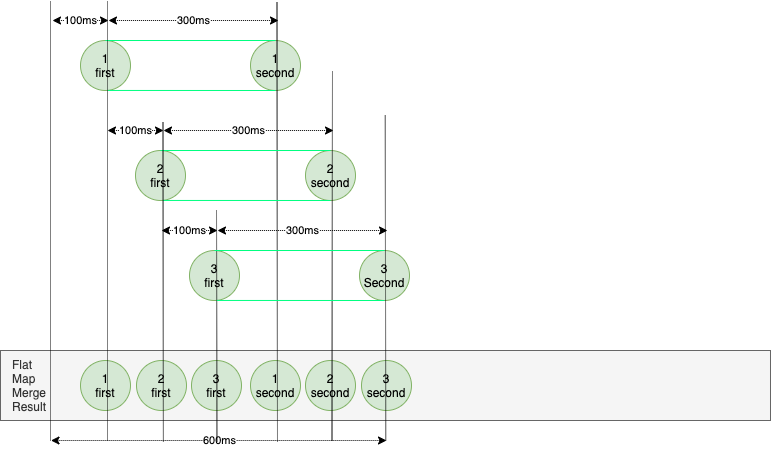
As shown in the diagram above, since each of the flow are handle in parallel, if any of the element is done process, can be flattened into the result first without waiting for the previous flow to complete.
Things are done in parallel, and thus it can produce the result faster.
FlatMapLatest (Flow only)
In flow, we process them parallelly, and eliminate the previous flow subsequent result, if it is slower than the next flow in line. This can be done using flatMapLatest.
fun requestFlow(i: Int): Flow<String> = flow {
    emit("$i: First")
    delay(300)
    emit("$i: Second")
}

fun main() = runBlocking<Unit> {
    val startTime = System.currentTimeMillis()
    (1..3).asFlow().onEach { delay(100) }
        .flatMapLatest { requestFlow(it) }
        .collect { value -> // collect and print
            println("$value at ${System.currentTimeMillis()
                    - startTime} ms from start")
        }
}
The result
1: First at 160 ms from start
2: First at 266 ms from start
3: First at 371 ms from start
3: Second at 674 ms from start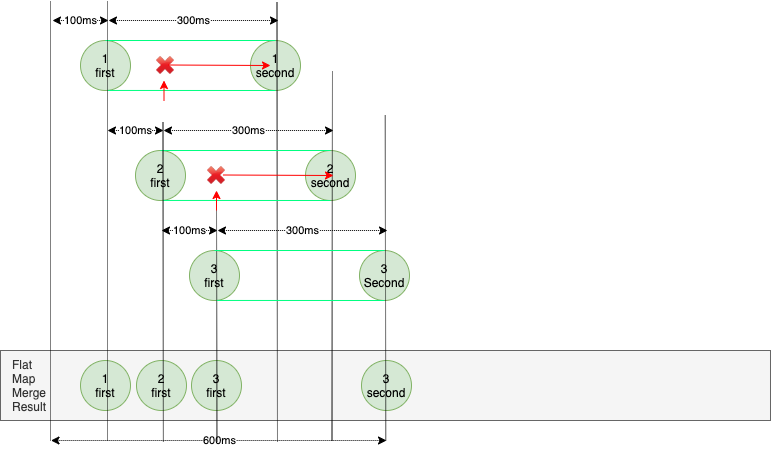
As shown above, the second flow first element is done before the first flow second element is done. hence that triggered the first flow cancelation, resulting in 1 second not flattened into the result.
Similarly for the second flow, the 2 second is canceled, as the 3 first is flattened first.
Things are done in parallel, and we can always get the latest flow result instead of the previous one.
10. Sequence exception has to be try-catch-finally; Flow exception can be encapsulated in the chain
Try-Catch (Sequence and Flow)
When we want to capture exception, we can use try-catch. This works for both Sequence and Flow.
fun simple(): Sequence<Int> = sequence {
    for (i in 1..3) { println("Generating $i"); yield(i) }
}

fun main() = runBlocking<Unit> {
    try {
        simple().forEach { value ->
            check(value <= 1) { "Crash on $value" }
            println("Got $value")
        }
    } catch (e: Throwable) {
        println("Caught $e")
    } finally {
        println("Done")
    }
}
The result as below
Generating 1
Got 1
Generating 2
Caught java.lang.IllegalStateException: Crash on 2
Done
It is not elegant, due to the extra indentation of try-catch.
Encapsulated Catch & onCompletion operator (Flow only)
With Flow we can encapsulate the catch within the chain of operation with catch and onCompletion operator.
fun simple(): Flow<Int> = flow {
    for (i in 1..3) { println("Generating $i"); emit(i) }
}

fun main() = runBlocking<Unit> {
    simple().onEach { value ->
        check(value <= 1) { "Crash on $value" }
        println("Got $value")
    }.catch { e ->
        println("Caught $e")
    }.onCompletion {
        println("Done")
    }.collect()
}
The result is still the same
Generating 1
Got 1
Generating 2
Caught java.lang.IllegalStateException: Crash on 2
Done
But the code looks much concise. There’s more to it, check out the below article.
From the 10 points above, clearly, Flow is so much better than Sequence. Flow is like Sequence on steroids and can do so much more e.g. threading, cancelation, asynchronous and parallel processing.
But does that mean we should just use Flow instead of Sequence? To be fair, Sequence does has it’s own simplicity and edge for now. Check out the below.


