
Knowledge Graph-Based Chatbot With GPT-3 and Neo4j
Learn how to develop a chatbot that provides answers based on data stored in a knowledge graph.
ChatGPT has changed how I, and probably most of you, look at AI and chatbots. We can use chatbots to help us find information, construct creative works, and more.
However, one problem with ChatGPT and similar chatbots is that they can hallucinate and return great-sounding — yet wildly inaccurate — results. The problem is that these large language models (LLM) are inherently black boxes, so it is hard to fix and retrain models to reduce hallucinations. Consequently, it might not be a good idea to depend on answers from ChatGPT if mission-critical tasks or lives are at stake.
On the other hand, there is tremendous value in having the ability to interact with chatbots and use them as an interface for various applications.
So I wanted to learn more about chatbots, and luckily Sixing Huang gave me a crash course on different ways of implementing a chatbot. I was especially intrigued by the knowledge graph-based approach to chatbots, where the chatbot returns answers based on information and facts stored in the knowledge graph.
Using a knowledge graph as a storage object for answers gives you explicit and complete control over the answers provided by the chatbot and allows you to avoid hallucinations. Additionally, Sixing has already written about and shared the code to implement a knowledge graph-based chatbot, which meant I could borrow some existing ideas and wouldn’t have to start from scratch.
My idea was to develop a chatbot that could be used to explore, analyze, and understand news articles.
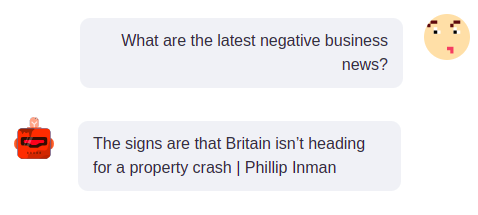
But first, I had to construct a knowledge graph based on news articles. Luckily, I have used and written about the information extraction pipeline numerous times, so I didn’t have to lose time doing that. Next, it was time to implement my first chatbot. It turned out that creating a knowledge graph-based chatbot is as easy as a walk in the park thanks to GPT-3. I constructed the following chatbot architecture.
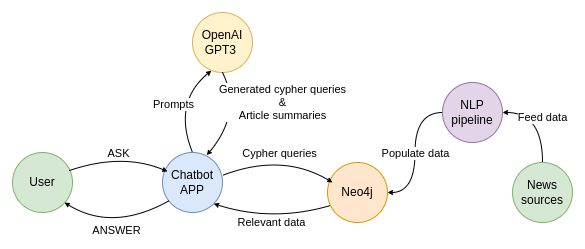
The user talks to a Chatbot on a simple Streamlit application. When the user inputs their question, the question gets sent to the OpenAI GPT-3 endpoint with a request to turn it into a Cypher statement. The OpenAI endpoint returns a Cypher statement, which is then used to retrieve the information from the knowledge graph stored in Neo4j. The retrieved data from the knowledge graph is then used to construct the answer to the user’s question. Additionally, I have added the option to summarize articles using the GPT-3 endpoint, which will be demonstrated later.
All the code is available on GitHub.
Constructing a knowledge graph
In order to be able to retrieve information from the knowledge graph, we first have to populate it. As mentioned, the idea is to construct a knowledge graph of news articles. Therefore, we need to find a source of quality and accurate news articles. For the purpose of this demonstration, I have used the latest 1000 articles available as a Kaggle repository. The articles are available under the CC BY-NC 4.0 license.
We won’t be delving into details about the information extraction pipeline, as I have already written about this subject many times.
- Information extraction pipeline with SpaCy and REBEL
- Biomedical information extraction pipeline
- Extracting information from news
For the most part, the idea behind the information extraction pipeline is to extract structured information about mentioned entities and relationships from unstructured text.
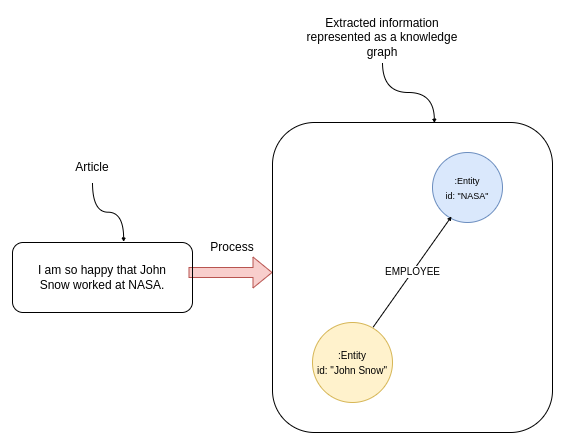
In this example, the information extraction pipeline would identify entities John Snow and NASA in the text. Additionally, most named entity recognition models can infer the entity type, meaning that it deduces whether the mentioned entity is a person, organization, or other.
In the next step, a relationship extraction model is used to detect any structured relationships between entities. The text in the above image clearly signifies the working relationship between John Snow and NASA, which can be represented as an EMPLOYEE relationship.
Interestingly, we could use GPT-3 to extract structured information from text. A project GraphGPT provides a simple prompt that can be used to generate structured data based on an input text.
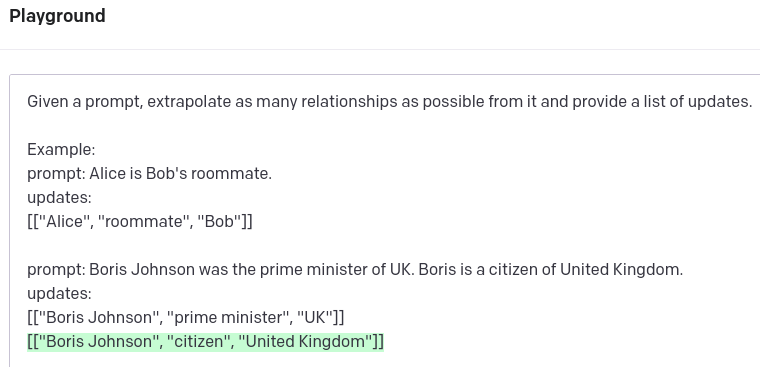
GPT-3 does a decent job of extracting relevant information from the text. It also knows that Boris in the second sentence references Boris Johnson, which is excellent. However, it does not recognize that the UK and the United Kingdom reference the same real-world entity. Entity disambiguation is a vital part of any information extraction pipeline. One approach could be to use an entity-linking strategy to map entities to a target knowledge base. Frequently, Wikipedia is used as a target knowledge base.
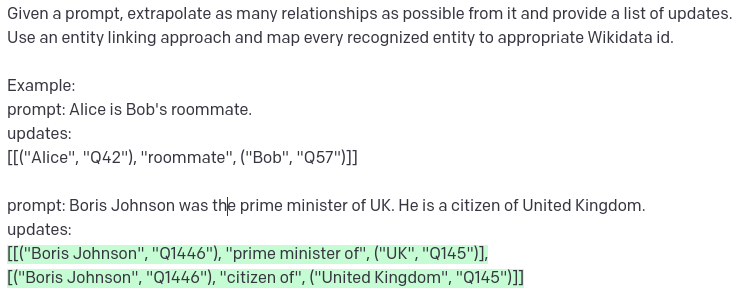
It is fantastic what we can achieve with a simple prompt using GPT-3 endpoint. Immediately, you can notice that both UK and United Kindom map to the same Q145 id, which can be used for entity disambiguation. On the other hand, Boris Johnson is linked to Q1446 in both instances. All that would be great, however, the id Q1446 refers to a roman emperor Caracalla.
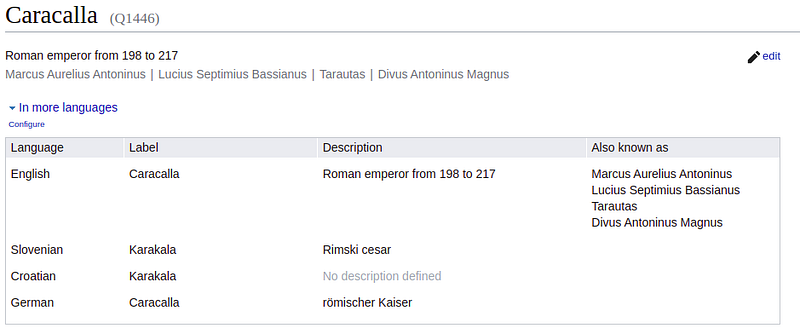
While GPT-3 is excellent at following prompts, it tends to hallucinate external information like WikiData ids. While we might provide a good prompt for entity disambiguation in a single paragraph, it is hard to construct a good way to disambiguate entities between various texts without entity linking.
We could develop our information extraction pipeline that deals with relation extraction and entity linking. I implemented such a pipeline two years ago. However, since two years is a lot in the field of NLP, we might find a solution that provides better accuracy.
To avoid developing a custom information pipeline, we will use a Diffbot NLP endpoint. The Diffbot NLP endpoint extracts relationships and provides entity linking out of the box. Additionally, it offers both paragraph and entity-level sentiments, which significantly expand the set of questions we can ask our chatbot, as we can ask it about positive or negative news regarding particular people or entities.
The code to run the information extraction pipeline using the Diffbot endpoint is available as a Jupyter notebook. For this demonstration, you don’t need to run it, as I have stored the output of the information extraction pipeline in the project’s data folder. However, if you want to test it on other datasets and evaluate how it performs, do give it a try.
Now that the new articles have been processed, we can import the output of the information extraction pipeline into a graph database. In this example, we will be using Neo4j. The GitHub repository is set up to run as two docker services, one for Neo4j and the other for the Streamlit application, so you don’t have to install Neo4j on your own.
You can either run the seed_database.sh script or execute the Import notebook to populate the graph database with news articles. The graph schema of the populated knowledge graph about the news is the following:
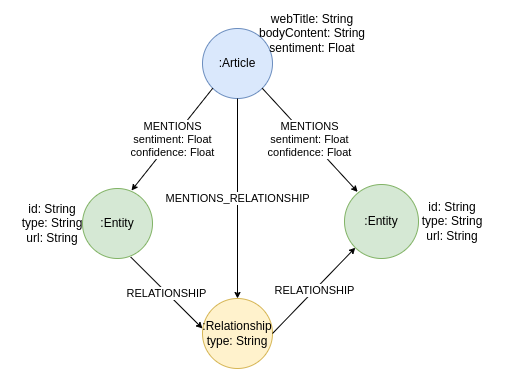
The knowledge graph contains Article nodes containing information about the article’s web title, body content or text, and sentiment. In addition, the articles can mention one or multiple Entity nodes. The Entity nodes contain the URL property, which is the output of the entity-linking process, along with their id and type.
Interestingly, the relationships between entities are not represented as connections in a graph but rather as separate Relationship nodes. The idea behind this graph modeling decision is that we want to track the text where the extracted relationships originate from. As we know, no NLP pipeline is perfect. Therefore it is essential to have the ability to verify if a relationship is accurately extracted by manually examining the originating text. In a labeled property graph database like Neo4j, we cannot have a connection pointing to another connection. Consequently, we model the extracted relationships between entities as an intermediate node.
Using a GPT-3 model to generate Cypher statements
We have already learned that GPT-3 does a great job of following orders given in a prompt. Additionally, Sixing Huang has already written about how easy it is to train the GPT-3 model to generate Cypher statements. The idea is to give the model a few examples and then let it generate a Cypher statement given the new user input. Specifically, I have prepared the following Cypher examples to train the GPT-3 model.
Unfortunately, the GPT-3 endpoint has no concept of context, so we need to send the training examples along with every user input. I wonder what the ChatGPT API endpoint will look like, as ChatGPT has a concept of the context of a dialogue and how it will affect end-user applications.
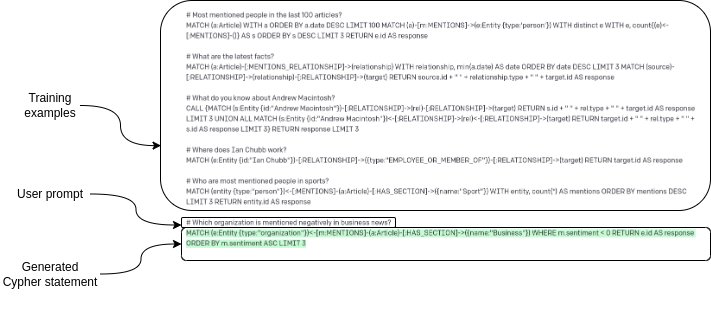
As shown in this image, every request to the GPT-3 endpoint starts with training examples. Interestingly, we don’t have to tell the model it should generate Cypher statements or anything — we just provide training examples along with a user prompt, and the model generates Cypher statements.
Chatbot implementation
Now that we have prepared all the pieces of the puzzle, we can combine them in a chatbot application. I have used a Streamlit application — specifically streamlit-chat — to implement the user interface for the chatbot. I like the Streamlit application as it keeps things simple, and I can use Python to develop the user interface while avoiding any meddling with CSS.
The application uses the following Python code to generate the chatbot responses.
# Make a request to GPT-3 endpoint
completions = openai.Completion.create(
      engine="text-davinci-003",
      # Construct the prompt using the training examples
      # combined with user input
      prompt=examples + "\n#" + prompt,
      max_tokens=1000,
      n=1,
      stop=None,
      temperature=0.5,
  )
  # Extract Cypher query from GPT-3 response
  cypher_query = completions.choices[0].text
  # Use the Cypher query to read the knowledge graph
  message = read_query(cypher_query)
  return message, cypher_query
As mentioned, all the code is available on GitHub if you are interested in more details. The repository also includes instructions to run the chatbot application.
Let’s now try the chatbot and see how well it behaves. We can start by using an example from the training set of questions. The question is: “What are the latest positive news?”
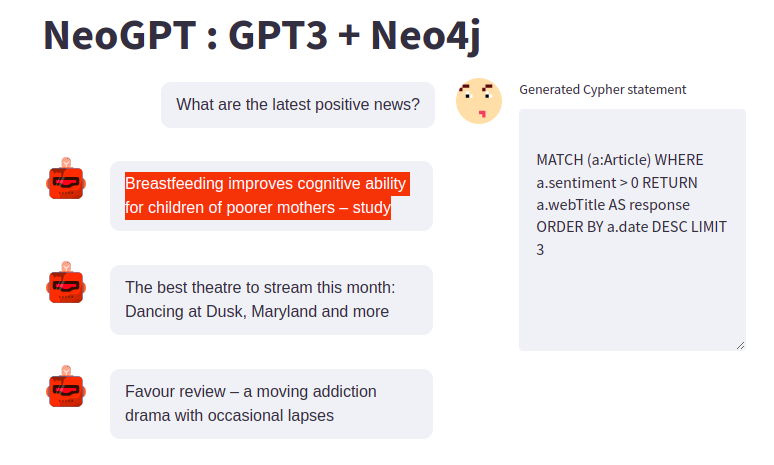
The generated Cypher query is available on the right side of the chatbot user interface to allow for easy evaluation of generated Cypher statements. The question is in the training set, and therefore, the generated Cypher statement is identical to the example we provided.
Next, we can try a variation of a question that is outside the training set. However, similar examples are provided, and GPT-3 needs to combine information from two examples to generate the Cypher statement.
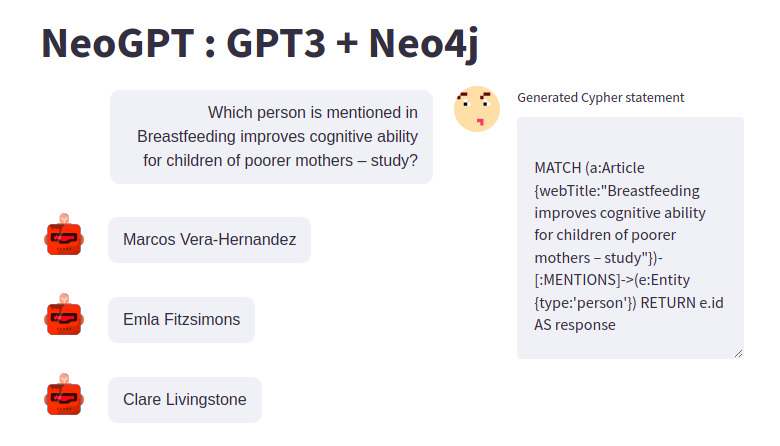
Given that we provided only 11 training examples, I am impressed with how well GPT-3 can generalize and construct appropriate Cypher statements. On the other hand, I am quite pleased with how easy it is to drill down the information provided in previous answers. It makes investigative work more fun and more accessible as you can use natural language to explore data instead of having to write Cypher statements.
We can follow up and ask the chatbot about the information we have stored about Emla Fitzsimons in the knowledge graph.
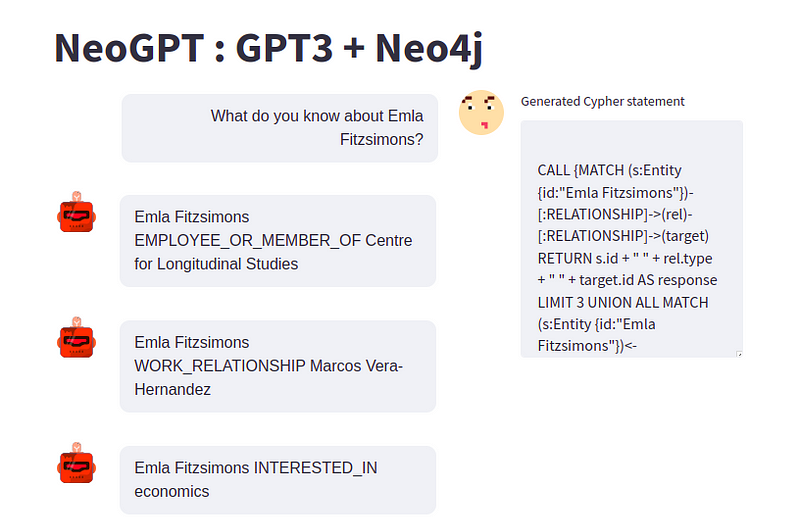
The chatbot provides information about the extracted relationships which involve the particular person. In this example, we know that Emla is an employee of the Centre for Longitudinal studies, works with Marcos Vera-Hernandez, and is interested in economics. This information was extracted using the Diffbot NLP endpoint and stored in the knowledge graph.
We can ask the chatbot if there are any more news about Emla.
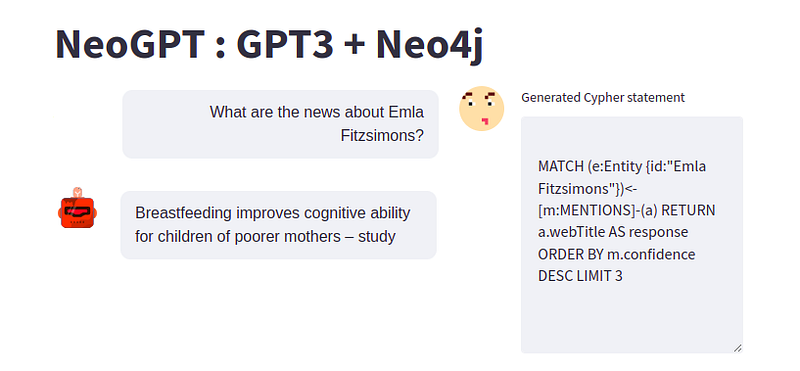
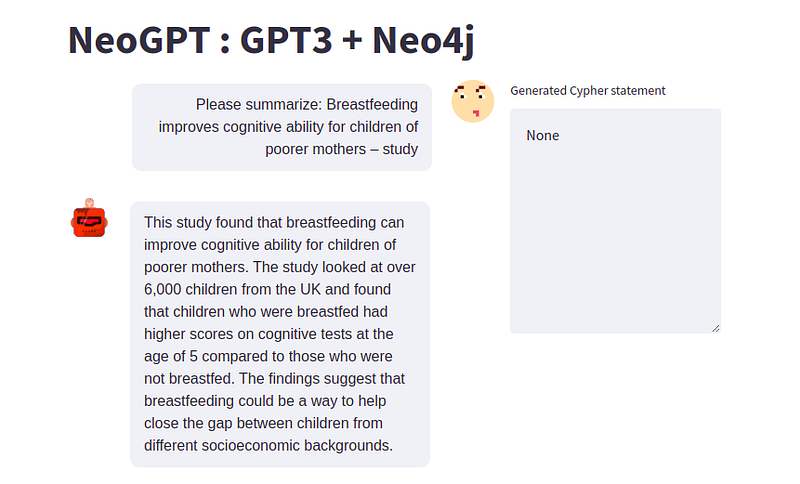
It seems Emla is mentioned only in one article. I thought it would be cool to add an option to summarize news articles using the GPT-3 endpoint. As GPT-3 model follows orders quite well, you only need to ask it to summarize text, which does the job.
# Make a request to GPT-3 endpoint
completions = openai.Completion.create(
    engine="text-davinci-003",
    # Prefix the prompt with a request to provide a summary
    prompt="Summarize the following article: \n" + prompt,
    max_tokens=256,
    n=1,
    stop=None,
    temperature=0.5,
)
message = completions.choices[0].text
return message, None
I have added a simple exception in the code. If the user input contains summar, then we assume the task is to provide a summary of the given article.
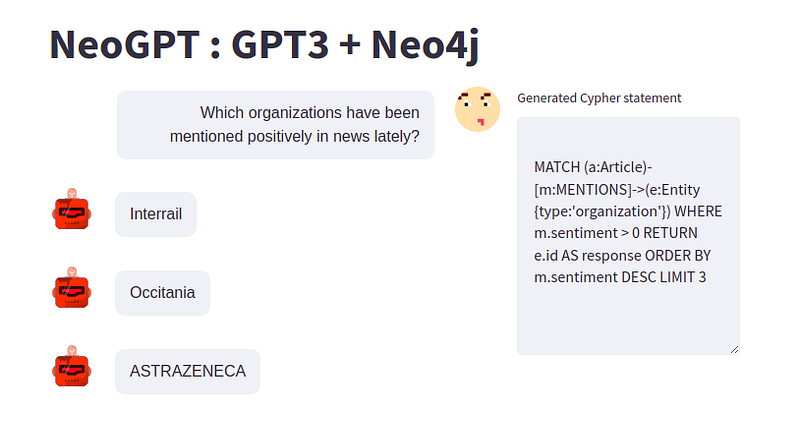
Since the knowledge graph contains both article and entity-level sentiment, we can search for any entities with positive or negative sentiment. For example, we can search for organizations that have been mentioned positively in the news.
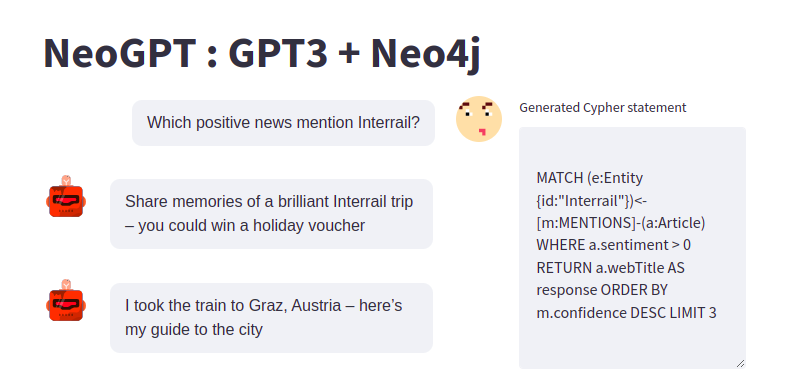
And similar to before, we can ask the chatbot follow-up questions and drill down on the information we are interested in.
Summary
I wanted to create a project that uses natural language to explore and analyze knowledge graphs for a long time. However, the barrier to entry was too high for me as I am not a machine learning expert, and developing and training a custom model that generates Cypher statements based on user inputs was too big of a task for me.
And frankly, until I joined the ChatGPT hype, I wasn’t genuinely aware of how incredible the underlying technology is and how well it works. For example, we only provided 10 training examples, and the chatbot behaves like it has worked with the given graph schema for the past five years.
Hopefully, this article will encourage you to implement your own chatbots and use them to make knowledge graphs and other technologies more accessible!
To learn more about this topic, join me at NODES 2023, a free online global conference about graph technologies. The CFP is open now until June 30. https://dev.neo4j.com/nodes23
The code is available as a GitHub repository.


