avatarhustlelead How S.

Free AI web copilot to create summaries, insights and extended knowledge, download it at here

2830

Abstract

, this may come as a surprise. Let this be a cautionary tale you don’t have to experience.</p><p id="c310">Therefore, I have compiled a list of reality checks.</p><h2 id="a25c">Private or public information</h2><p id="e927">Now for the great reveal. This is a non-exhaustive list of what I can know about your laptop use:</p><ol><li>That file you downloaded</li><li>That file you uploaded</li><li>That activity on your laptop, down to the .exe files.</li><li>That email you sent to yourself</li><li>That email you sent to your child</li><li>That email you sent to your child’s tutor (real-life example)</li><li>The link you clicked</li><li>The web pages you visited</li><li>The skype call you made</li><li>That Facebook call you made</li><li>That unusual time you turned on your laptop outside working hours.</li><li>That time you stick a USB drive</li><li>That time you tried to access Netflix</li><li>That music playlist you visited online</li></ol><p id="437d">These are all private information that people in the company can find out about you.</p><p id="5bc0">We are just scratching the tip of the iceberg! These are only what’s off the top of my head; I’m sure they are ways to dig more information. Now that you know how closely monitored that work device is, think twice before you send that email to yourself.</p><h2 id="cf38">Best Practice, The Do’s and Don’ts</h2><p id="0d23">With remote work blurring the lines between personal and work spaces, it has become imperative to distinguish how we use our devices.</p><p id="e7b9">Fortunately there are some guidelines to protect our privacy from leering eyes.</p><ol><li><b>Encrypt your attachments</b>: To avoid mail service scanning. This can be easily done by locking your PDF documents with a password.</li></ol><figure id="c7a4"><img src="https://cdn-images-1.readmedium.com/v2/resize:fit:800/0*TJanQ-F4HNzfjexI.png"><figcaption>Microsoft Word Protect Document Option | Taken by me</figcaption></figure><p id="489b">2. <b>Don't write sensitive or incriminating data on the body of an email: </b>It is visible to mail services.</p><p id="f881">3. <b>Or on the header(subject line) for that matter: </b>Ditto.</p><figure id="09e9"><img src="https://cdn-images-1.readmedium.com/v2/resize:fit:800/1*6Q1DvmBh1lklwbPoZclrUw.png"><figcaption>An email letter interface, featuring the subject line and body | Taken by me</figcaption></figure><p id="9133">4. <b>If you must download or upload, do it in small increments: </b>Rationale is that large traffic can trip off monitors as anomalies. Gradual increase of your web payload sneaks under the alert radar.</p><p id="79d2">5. <b>Don’t login to social media: </b>web traffic is monitored. Hostname requests can be tracked — that means visited websites are tracked.</p><p id="a971">6. <b>Sadly, don't listen to music on your w

Options

ork laptop: </b>Ditto. Still want to use Spotify? A workaround is to use your phone. Personal one.</p><p id="5102">7. <b>Don’t use your work laptop for personal use: </b>Software and multiple failsafe keep the machine closely tracked. These are local programs that reside in your work devices to detect abnormal user behaviors, such as theft.</p><figure id="bf55"><img src="https://cdn-images-1.readmedium.com/v2/resize:fit:800/0*TXDCzIua0AAiNkHP.png"><figcaption><a href="https://www.google.com.sg/url?sa=i&amp;url=https%3A%2F%2Fwww.secqureone.com%2Fmanaged-user-behavior-analytics&amp;psig=AOvVaw02BHGxW24slJUdPqkTtbmT&amp;ust=1590838316536000&amp;source=images&amp;cd=vfe&amp;ved=0CAkQjhxqFwoTCKCziOL82OkCFQAAAAAdAAAAABAJ">Managed User Behavior Analysis</a></figcaption></figure><h2 id="1f50">Destruction or epitome of privacy</h2><p id="a687">Are work technology assimilating onto our lives, or are our lives taken over by the corporate conglomerate? Yay or Nay to WFH?</p><p id="7364">Work devices are not private. WFH seems to erode privacy.</p><p id="1b89">Then again self-professed introverts went online to rejoice that the WFH lifestyle have excused(saved) them from face-to-face meetings, therefore, by extension, granted them more privacy.</p><p id="9cea">Well, my take on this is that whether WFH is destroying privacy or not largely depends on your type of work. Operations are well suited for this, while highly immersive work like development may cause blurring of work-life separation. Client-facing.. well, you can’t now.</p><p id="24b4" type="7">“…think twice before you send that email to yourself.”</p><p id="b737">No matter which line of work, <b>know the aforementioned best practices</b> and <b>stay aware of the devices</b>. Lest your Boss finds out about the Netflix show you’ve been watch alongside..</p><p id="032c"><i>Thanks for reading.</i></p><p id="90f8"><b><i>Read about URL Analysis: How To Determine Maliciousness <a href="https://medium.com/@hustle.lead/url-analysis-how-to-determine-maliciousness-f630b4e51b9e">here</a></i></b></p><div id="cdd6" class="link-block"> <a href="https://link.medium.com/kDqdMa8xc7"> <div> <div> <h2>URL Analysis: How to Determine Maliciousness</h2> <div><h3>URL analysis is a thorough examination of a web address to determine the risk of malicious intent upon visiting the…</h3></div> <div><p>link.medium.com</p></div> </div> <div> <div style="background-image: url(https://miro.readmedium.com/v2/resize:fit:320/0*9kje9DPTf168n0Jn.png)"></div> </div> </div> </a> </div><p id="68a1"><b><i>Follow me on <a href="https://medium.com/@hustle.lead">Medium</a> for more</i></b></p></article></body>

Cybersecurity

Who Watches on You as You Work From Home? I Do.

What your company laptop knows about you. That company issued phone? They know more than you think.

Photo by Martin Sanchez on Unsplash

Firstly, Congratulations! To those who are able to keep your job after quarantine. Twenty-twenty has been a truly wild ride.

Work-From-Home Devices

Since work began to move home due to COVID-19, company-issued devices have more than ever pervaded our personal space. Remote work or WFH as they like to call it these days does not seem to be just a fad. Some even call it the future of work.

If WFH is here to stay, then it is ever more relevant to be aware of its risk. Aside from the obvious invasion of our desk space, company-issued devices pose a greater privacy risk that new employees may be oblivious to.

An Incident

An introduction of my line of work: I work as the cyber security analyst, and I frequently look through machine data received from various sources.

For simplicity’s sake, let’s say these sources can be generalised into two group — external and internal. Our focal point is the internal source which includes employee host machines, emails, and web traffic.

I lament the fact that I occasionally observe evidence that employees use their work profiles to finish personal dealings or what-nots.

“The details of the payment receipt, tuition particulars, and her identity as a mother was, literally, projected onto a wall for all to see…”

Once, I was alerted to a possibly fraudulent transaction between an employee and an external party, when it was in actual fact a conversation between her and her child’s tutor. The details of the payment receipt, tuition particulars, and her identity as a mother were, literally, projected onto a wall for all to see during a cyber team meeting. It was an uncomfortable investigation.

Her details were spelt out on a dashboard such as this:
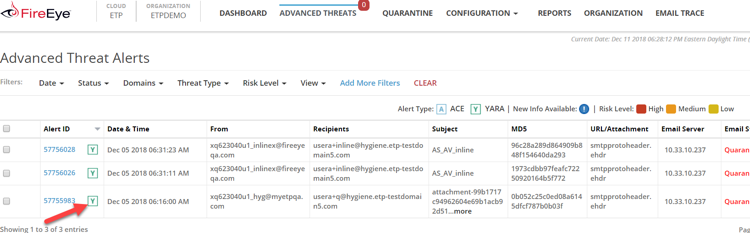
FireEye.com investigation

For that matter, the employee never found out that a cyber team had investigated her personal business, since the case is resolved before escalation.

To those who are new employees, this may come as a surprise. Let this be a cautionary tale you don’t have to experience.

Therefore, I have compiled a list of reality checks.

Private or public information

Now for the great reveal. This is a non-exhaustive list of what I can know about your laptop use:

  1. That file you downloaded
  2. That file you uploaded
  3. That activity on your laptop, down to the .exe files.
  4. That email you sent to yourself
  5. That email you sent to your child
  6. That email you sent to your child’s tutor (real-life example)
  7. The link you clicked
  8. The web pages you visited
  9. The skype call you made
  10. That Facebook call you made
  11. That unusual time you turned on your laptop outside working hours.
  12. That time you stick a USB drive
  13. That time you tried to access Netflix
  14. That music playlist you visited online

These are all private information that people in the company can find out about you.

We are just scratching the tip of the iceberg! These are only what’s off the top of my head; I’m sure they are ways to dig more information. Now that you know how closely monitored that work device is, think twice before you send that email to yourself.

Best Practice, The Do’s and Don’ts

With remote work blurring the lines between personal and work spaces, it has become imperative to distinguish how we use our devices.

Fortunately there are some guidelines to protect our privacy from leering eyes.

  1. Encrypt your attachments: To avoid mail service scanning. This can be easily done by locking your PDF documents with a password.
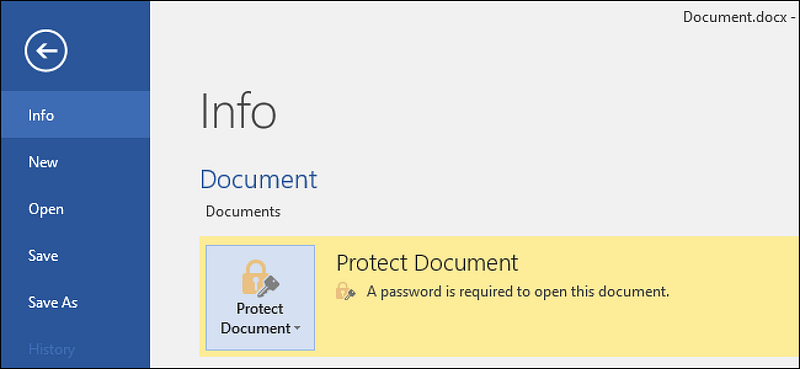
Microsoft Word Protect Document Option | Taken by me

2. Don't write sensitive or incriminating data on the body of an email: It is visible to mail services.

3. Or on the header(subject line) for that matter: Ditto.
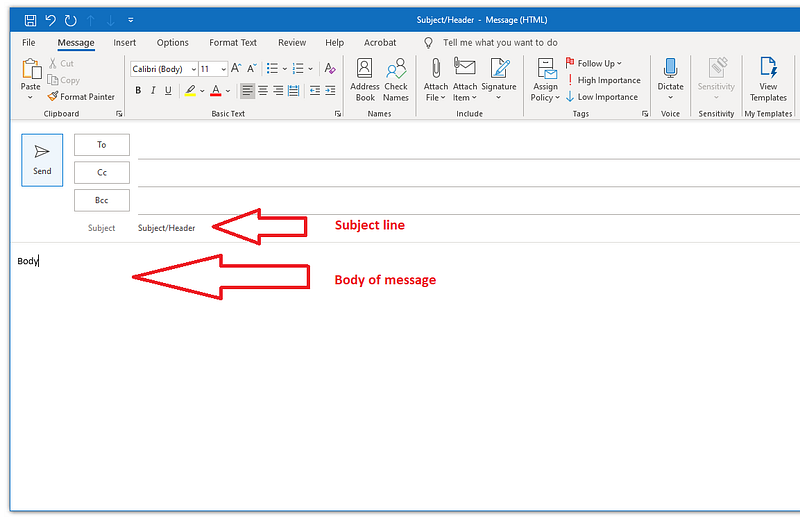
An email letter interface, featuring the subject line and body | Taken by me

4. If you must download or upload, do it in small increments: Rationale is that large traffic can trip off monitors as anomalies. Gradual increase of your web payload sneaks under the alert radar.

5. Don’t login to social media: web traffic is monitored. Hostname requests can be tracked — that means visited websites are tracked.

6. Sadly, don't listen to music on your work laptop: Ditto. Still want to use Spotify? A workaround is to use your phone. Personal one.

7. Don’t use your work laptop for personal use: Software and multiple failsafe keep the machine closely tracked. These are local programs that reside in your work devices to detect abnormal user behaviors, such as theft.
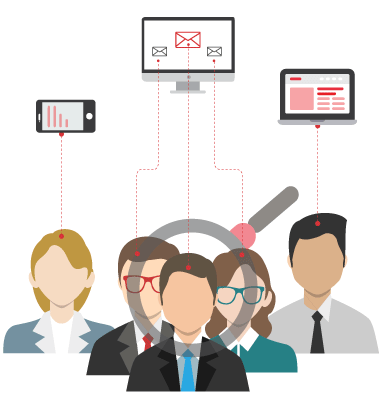
Managed User Behavior Analysis

Destruction or epitome of privacy

Are work technology assimilating onto our lives, or are our lives taken over by the corporate conglomerate? Yay or Nay to WFH?

Work devices are not private. WFH seems to erode privacy.

Then again self-professed introverts went online to rejoice that the WFH lifestyle have excused(saved) them from face-to-face meetings, therefore, by extension, granted them more privacy.

Well, my take on this is that whether WFH is destroying privacy or not largely depends on your type of work. Operations are well suited for this, while highly immersive work like development may cause blurring of work-life separation. Client-facing.. well, you can’t now.

“…think twice before you send that email to yourself.”

No matter which line of work, know the aforementioned best practices and stay aware of the devices. Lest your Boss finds out about the Netflix show you’ve been watch alongside..

Thanks for reading.

Read about URL Analysis: How To Determine Maliciousness here

Follow me on Medium for more

Privacy
Work From Home
Cybersecurity
Company Culture
Work Technology
Recommended from ReadMedium