avatarElye

Free AI web copilot to create summaries, insights and extended knowledge, download it at here

3018

Abstract

/figure><ol><li>Click on the <i>Network</i> tab</li><li>Select one of the URL for <code>stream?limit=8</code>… (if you don’t see it there, scroll down your follower list until it loads a new list of followers, you’ll see it appear)</li><li>Select the <i>Preview</i> tab</li><li>Then, open up the JSON data from <code>payload</code><i></i><code>Users</code><i> → “one of the numbers (which is your followers' user-id)” →</i><code>memberMediumAt</code></li></ol><p id="b607">This is where it stores if a user is also a medium member. If it is 0, then this user is not a member, else this user is a member.</p><h2 id="f5c0">How to load the follower pages?</h2><p id="deb5">Not sure if you know when your follower list first loaded, it loads only a small number of it. As you scroll down, it loads more. How could we know which URL link to load?</p><p id="36a3">But first of all, what’s the first URL to load? To know that, let’s head to the <i>Header</i> tab. You’ll see the <i>Request URL</i> as shown below.</p><figure id="4be7"><img src="https://cdn-images-1.readmedium.com/v2/resize:fit:800/1*zBL7IDfX5Icpxpl4dDVkoQ.png"><figcaption></figcaption></figure><p id="4691">From there, you’ll find the URL</p><div id="e3b4"><pre>https:<span class="hljs-regexp">//m</span>edium.com<span class="hljs-regexp">//</span>api<span class="hljs-regexp">/users/</span>{user_id}<span class="hljs-regexp">/profile/</span>stream?limit={follower_load_per_page}&to={last_follower_id}&source=followers&page={page_no}</pre></div><p id="d43f">From the above, you could extract the following</p><ol><li><i>user_id: </i>This is your id that you need to provide to the URL to load your follower information.</li><li><i>follower_load_per_page: </i>Medium load ten followers for the first page, and eight subsequently. The maximum number is 25. You could set a fixed number to load each time.</li><li><i>last_follower_id: T</i>his is the follower id loaded for the particular page. It is used by the Medium API to decide which next follower to load.</li><li><i>page_no: T</i>his is a field to indicate which page you are planning to load.</li></ol><p id="a293">That’s neat. The first page is simple, you have <i>user_id</i>. You could decide to load <code>10</code> followers per page. The <i>last_follower_id</i> is <code>0</code>, as this is your first page (i.e. <i>page_no </i><code>page=1</code>).</p><div id="8a8d"><pre>https:<span class="hljs-regexp">//m</span>edium.com<span class="hljs-regexp">//</span>api<span class="hljs-regexp">/users/</span>{your user_id}<span class="hljs-regexp">/profile/</span>stream?limit=<span class="hljs-number">10</span>&to=<span class="hljs-number">0</span>&source=followers&page=<span class="hljs-number">1</span></pre></div><p id="feb6">But then, the problem is what’s your subsequent page going to be? We could extract the information from the page, but it’s a little work. Medium has provided the info for you as well as shown below.</p><figure id="a9d2"><img src="https://cd

Options

n-images-1.readmedium.com/v2/resize:fit:800/1*DhOMNYHR1HoV7ne0h-uxYA.png"><figcaption>Image provided by author</figcaption></figure><ol><li>Go back to the <i>Preview</i> tab.</li><li>The expand into <code>Paging</code> and you’ll see the <code>next</code> JSON data. This is the data that provide the next parameter of the page you need to load. The most important is the <i>last_follower_id (i.e. the </i><code>to</code><i> field).</i></li></ol><p id="cbb3">When you reach a page where the <code>to</code> field (i.e. <i>last_follower_id)</i> is not there, then that’s the last page</p><p id="6f74">Thanks to <a href="undefined">Radu Raicea</a> for her <a href="https://readmedium.com/how-i-used-python-to-find-interesting-people-on-medium-be9261b924b0">blog </a>which unveils some of the information I shared above.</p><h2 id="b383">Writing the script</h2><p id="2a84">Based on the information above, you could use whatever programming knowledge you are most familiar with (e.g. python), and you could extract the information for your usage. But for simplicity purposes, I use a shell script instead.</p><p id="fa96">I have written the below 1-page script, which you could save as a medium-fan-check.sh file, and run it. It works on the MacOS Terminal. Hopefully, with no or minimal modification it could also run on Linux or another platform.</p><p id="7e8a">To do so, simply open Terminal, type ‘sh,’ add a Space, then drag and drop the script into Terminal to get the path where you downloaded it to show up. Then, add one more Space and your user id, then press Enter.</p> <figure id="23e2"> <div> <div>

            <iframe class="gist-iframe" src="/gist/elye/8828516dc0c500da5f931d0fcac35889.js" allowfullscreen="" frameborder="0" height="undefined" width="undefined">
          </div>
        </div>
    </figure></iframe></div></div></figure><p id="4e3c">When running it, the result will show something like this:</p><figure id="3a01"><img src="https://cdn-images-1.readmedium.com/v2/resize:fit:800/1*35iA0RqJq_btsXP1_dHl-w.gif"><figcaption>Image provided by author</figcaption></figure><p id="5dad">That’s it. Happy counting of your followers. Sorry, I mixed up fan and follower in the script, but you can change it to whatever you like.</p><p id="ba97">If you like to extract more tools, check out the below post.</p><div id="8b86" class="link-block">
      <a href="https://medium.com/@elye.project/handy-tools-for-medium-writers-c820aaf00f7b">
        <div>
          <div>
            <h2>Handy Tools for Medium Writers</h2>
            <div><h3>Don’t just write. Use some tools to help your writing</h3></div>
            <div><p>medium.com</p></div>
          </div>
          <div>
            <div style="background-image: url(https://miro.readmedium.com/v2/resize:fit:320/1*H40y3Zl5ec1rBmgKGPMM6Q.jpeg)"></div>
          </div>
        </div>
      </a>
    </div></article></body>

How to Know Which of Your Medium Followers Are Members

Understand your earning potential with a few clicks and simple code

Picture by Free-Photos on Pixarbay

If you are in the Medium Partner Program, it will be helpful to know what percentage of your followers have also joined Medium’s membership. Even if you are not on the Medium Partner Program, this information will help you to determine your next steps better.

Medium Does Let You Know

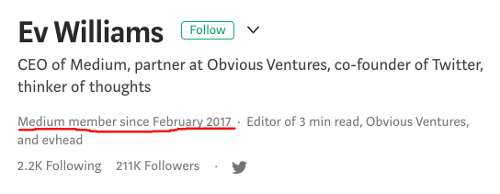
It is not a secret. Medium does let you know if a Medium subscriber is a member. Let’s look at the Medium CEO’s profile below. You can see this line: “Medium member since February 2017.” That means that he is a Medium member. If he reads your article, you’ll get paid by Medium.
https://medium.com/@ev

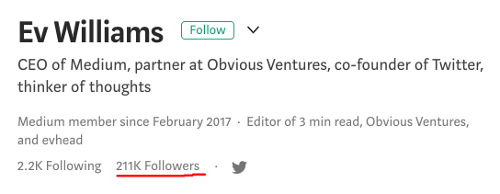
So for you to know if your follower is Medium member, you just need to go to your own profile and click on the Followers as shown below. This will list all your followers. From there, you could click into the profile of your followers, and know if they are Medium member or not.
https://medium.com/@ev

This is simple if you have fewer than ten followers. If you have more than that, you need to love clicking, have lots of patience, and a great ability to not lose count. This is just too hard for me, so I made a script to help me do that.

Let the Computer Help

Well, all the information is provided by Medium to you on the webpage, so as long as we could let the computer know where to get the information, it can help you to compile it.

Know where the information is stored
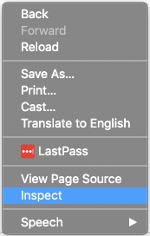
Image provided by author

To let the computer help you, you need to know where to get the information. Go to your follower list page, then right-click, and select the Inspect as shown on the diagram beside, assuming you are on the Chrome browser. This will bring you to the Inspection Console. Follow the steps below as indicated in the diagram.
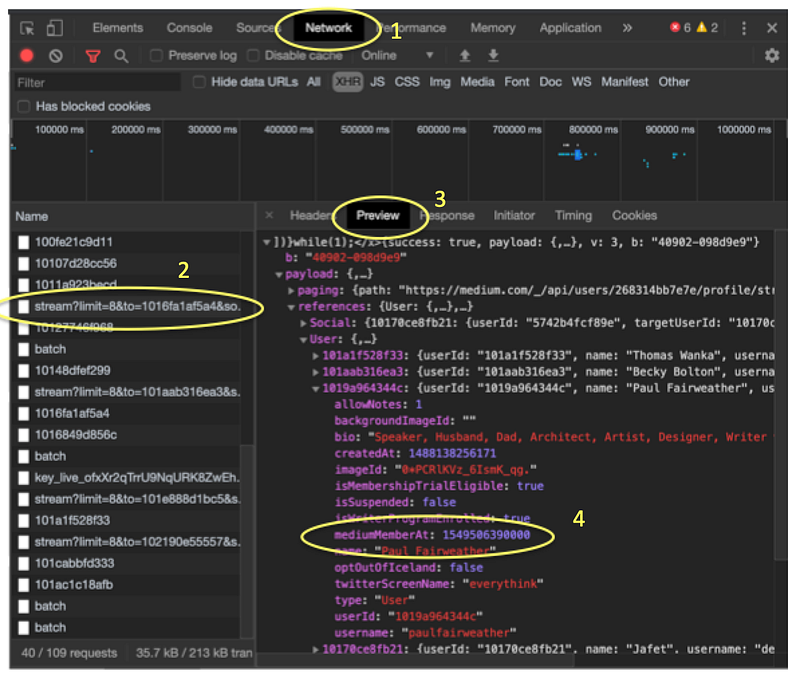
Image provided by author
  1. Click on the Network tab
  2. Select one of the URL for stream?limit=8… (if you don’t see it there, scroll down your follower list until it loads a new list of followers, you’ll see it appear)
  3. Select the Preview tab
  4. Then, open up the JSON data from payloadUsers → “one of the numbers (which is your followers' user-id)” →memberMediumAt

This is where it stores if a user is also a medium member. If it is 0, then this user is not a member, else this user is a member.

How to load the follower pages?

Not sure if you know when your follower list first loaded, it loads only a small number of it. As you scroll down, it loads more. How could we know which URL link to load?

But first of all, what’s the first URL to load? To know that, let’s head to the Header tab. You’ll see the Request URL as shown below.
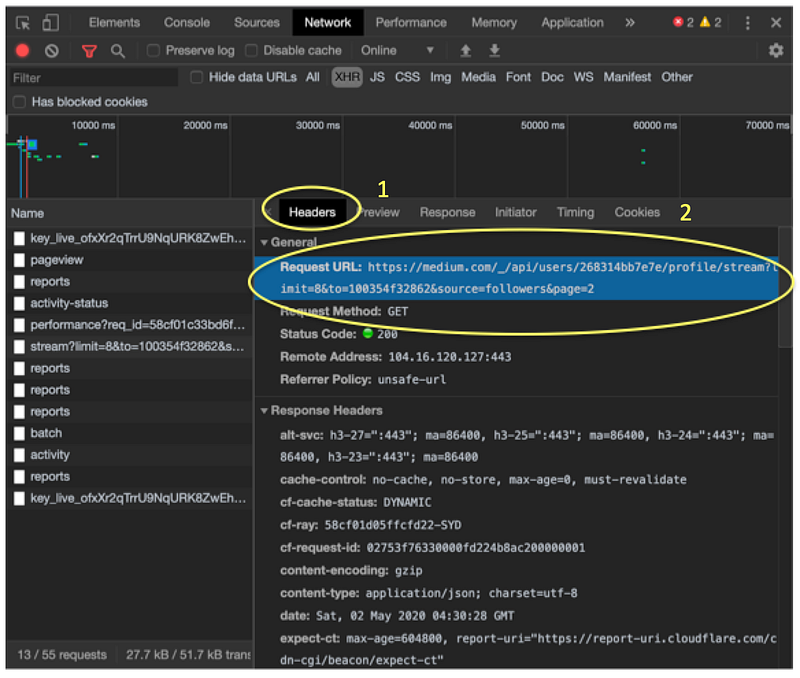
From there, you’ll find the URL

https://medium.com/_/api/users/{user_id}/profile/stream?limit={follower_load_per_page}&to={last_follower_id}&source=followers&page={page_no}

From the above, you could extract the following

  1. user_id: This is your id that you need to provide to the URL to load your follower information.
  2. follower_load_per_page: Medium load ten followers for the first page, and eight subsequently. The maximum number is 25. You could set a fixed number to load each time.
  3. last_follower_id: This is the follower id loaded for the particular page. It is used by the Medium API to decide which next follower to load.
  4. page_no: This is a field to indicate which page you are planning to load.

That’s neat. The first page is simple, you have user_id. You could decide to load 10 followers per page. The last_follower_id is 0, as this is your first page (i.e. page_no page=1).

https://medium.com/_/api/users/{your user_id}/profile/stream?limit=10&to=0&source=followers&page=1

But then, the problem is what’s your subsequent page going to be? We could extract the information from the page, but it’s a little work. Medium has provided the info for you as well as shown below.
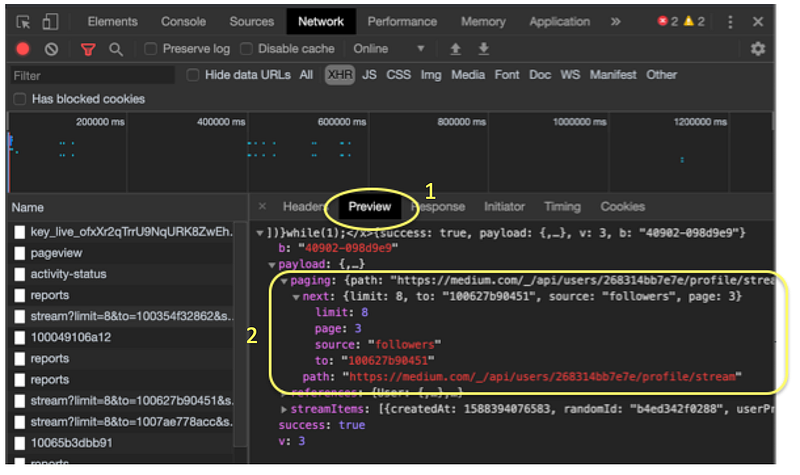
Image provided by author
  1. Go back to the Preview tab.
  2. The expand into Paging and you’ll see the next JSON data. This is the data that provide the next parameter of the page you need to load. The most important is the last_follower_id (i.e. the to field).

When you reach a page where the to field (i.e. last_follower_id) is not there, then that’s the last page

Thanks to Radu Raicea for her blog which unveils some of the information I shared above.

Writing the script

Based on the information above, you could use whatever programming knowledge you are most familiar with (e.g. python), and you could extract the information for your usage. But for simplicity purposes, I use a shell script instead.

I have written the below 1-page script, which you could save as a medium-fan-check.sh file, and run it. It works on the MacOS Terminal. Hopefully, with no or minimal modification it could also run on Linux or another platform.

To do so, simply open Terminal, type ‘sh,’ add a Space, then drag and drop the script into Terminal to get the path where you downloaded it to show up. Then, add one more Space and your user id, then press Enter.

When running it, the result will show something like this:
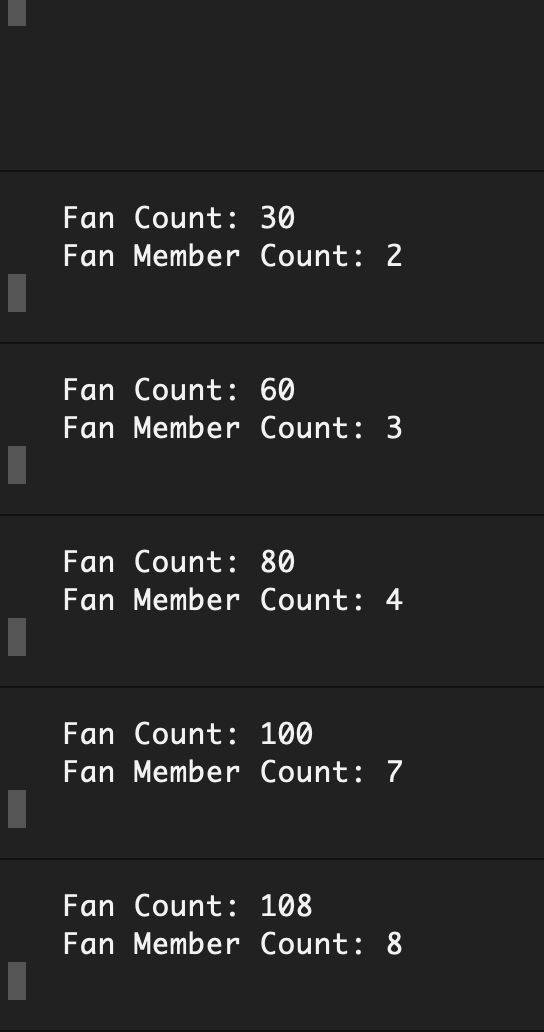
Image provided by author

That’s it. Happy counting of your followers. Sorry, I mixed up fan and follower in the script, but you can change it to whatever you like.

If you like to extract more tools, check out the below post.

Technology
Writer
Web Development
Medium
Blogging
Recommended from ReadMedium