
KeyUp Event and ⌘(cmd) Problem
Introduction
Frontend developers often face the task of handling keyboard events. Recently, I encountered an interesting problem that prompted me to explore the issue more deeply. This article will help you avoid unwanted behaviour in your application or correct it.
The problem arises on Mac OS when the “command” key is held down, which can cause some web browsers to interpret keyboard events unexpectedly. Usually, pressing a key triggers the “keydown” event, and releasing a key triggers the “keyup” event. But, when the “command” key is pressed, the browser ignores the “keyup” event.
How to check
We can verify this behaviour by using the key event viewer tool available at https://w3c.github.io/uievents/tools/key-event-viewer.html.
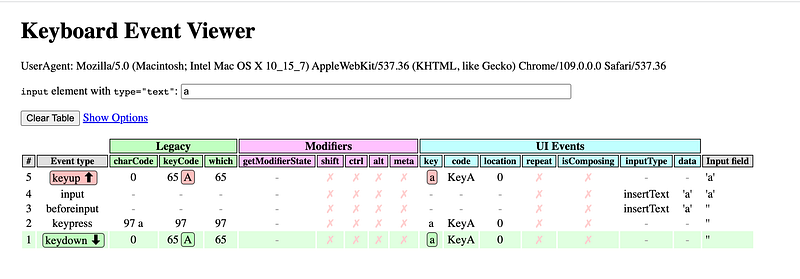
First, let’s test the normal behaviour of the events. Let’s press and release the “a” key, as shown in the first screenshot. We can see that the event handling is working as expected.
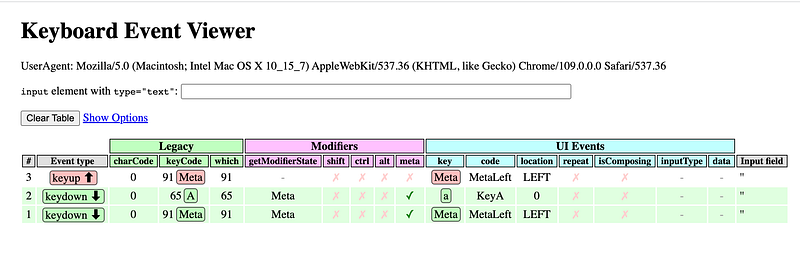
Now let’s try pressing and releasing the “a” key with the “command” key held down, as shown in the second screenshot. The “keyup” event for the “a” key does not work.
How to deal with it
The difficulty of working around this limitation depends on the situation. In most cases, subscribing to the “keydown” event instead of the “keyup” event will be enough, and the problem will not be noticed again. But, in some situations, it may be necessary to react only to the “keyup” event. In such cases, you can try to use popular keyboard event libraries like KeyboardJS, Mousetrap, or Keypress, or write your solution. The basic idea is to listen for the “keydown” event and if the “command” key is being held down, record the pressed keys and manually trigger the “keyup” event for each of them when the “command” key is released:
const typedText = document.getElementById('typed-text');
const pressedKeys = new Set();

document.addEventListener('keydown', event => {
 if (event.metaKey) {
  pressedKeys.add(event.key);
 }
});

document.addEventListener('keyup', event => {
 if (event.metaKey) {
  pressedKeys.delete(event.key);

  // Manually fire "keyup" event for all pressed keys
  pressedKeys.forEach(key => {
   const keyupEvent = new KeyboardEvent('keyup', {key});
   typedText.dispatchEvent(keyupEvent);
  });
 }
});

typedText.addEventListener('keyup', event => {
 console.log(`You typed: ${event.key}`);
});
Conclusion
The “Command” + “keyup” event problem can be a significant issue for developers working on web applications, particularly those that are targeted at Mac OS users. You can avoid it subscribing on “keydown” event, using specific libraries our writing your own solution.
What unusual problems have you encountered in your work? Write in the comments, I’d love to hear more similar cases!
Build apps with reusable components like Lego
Bit’s open-source tool help 250,000+ devs to build apps with components.
Turn any UI, feature, or page into a reusable component — and share it across your applications. It’s easier to collaborate and build faster.
Split apps into components to make app development easier, and enjoy the best experience for the workflows you want:


