avatarRob Golder

Free AI web copilot to create summaries, insights and extended knowledge, download it at here

5118

Abstract

re randomised Strings. The repetition of the field names in particular between the messages within a batch make these good candidates for compression.</p><h1 id="7503">Consumer</h1><p id="9c5a">When the Kafka consumer polls the topic for the message batches, the batches are decompressed when received. Spring Kafka hands each uncompressed message to the application handler <a href="https://github.com/lydtechconsulting/kafka-message-compression/blob/v1.0.0/src/main/java/demo/kafka/consumer/KafkaDemoConsumer.java">KafkaDemoConsumer</a>, so there is no explicit code required to be implemented by the developer for the decompression.</p><h1 id="6e3d">Demo Execution</h1><p id="0124">In order to run the application against a local instance of Kafka, <code>docker-compose</code> is used to start up Kafka and Zookeeper in docker containers, using the following command executed from the root of the project:</p><div id="649f"><pre>docker-compose.<span class="hljs-property">yml</span> up -d</pre></div><p id="9d08">Optionally <a href="https://www.conduktor.io/">Conduktor Platform</a> can also be started, which provides a UI over the broker, topics and messages, providing an option to see the impact of the compression. To also start Conduktor, use the following command in place of the one above:</p><div id="e2f8"><pre>docker-compose-conduktor.<span class="hljs-property">yml</span> up -d</pre></div><p id="82cc">The Spring Boot application is built using maven, and the application is started:</p><div id="86ec"><pre>mvn clean install java -jar target/kafka-message-compression-1.0.0.jar</pre></div><p id="bcc8">The REST request to the application can be sent using <b>curl</b>, and this specifies the number of events for the application to send. The Spring Boot application is running on port <code>9001</code>:</p><div id="c229"><pre>curl -v -d <span class="hljs-string">'{"numberOfEvents":10000}'</span> -H <span class="hljs-string">"Content-Type: application/json"</span> -X POST http://localhost:9001/v1/demo/trigger</pre></div><p id="0137">The request should be accepted immediately with a <b>202 ACCEPTED</b> response, as the application hands off processing the request to send events asynchronously.</p><h1 id="83e1">Observing Compression Effect</h1><p id="3d64">The effect of the compression can be observed via two methods. First of all, Kafka provides a command line tool that can be used to query the size of the topic that the messages have been written to. Jump on to the Kafka docker container, and run the <b>kafka-log-dirs</b> command as follows:</p><div id="0053"><pre>docker exec -it kafka /bin/sh usr/bin/kafka-<span class="hljs-built_in">log</span>-dirs
<span class="hljs-comment">--bootstrap-server 127.0.0.1:9092 </span> <span class="hljs-comment">--topic-list demo-topic </span> <span class="hljs-comment">--describe </span> | grep -oP <span class="hljs-string">'(?<=size":)\d+'</span>
| awk <span class="hljs-string">'{ sum += $1 } END { print sum }'</span></pre></div><p id="1007">The output is the size of the topic in bytes.</p><p id="111d">The second option is to log in to Conduktor, assuming this has been started as described above. Navigate in the browser to:</p><div id="07fd"><pre>http://localhost:8080</pre></div><p id="2c29">Login with the default credentials <code>[email protected]</code> / <code>admin</code>, and navigate to the <code>Console</code> to view the topics. Select the <b>demo-topic</b> to observe its size:</p><figure id="6e14"><img src="https://cdn-images-1.readmedium.com/v2/resize:fit:800/1*hMAKyir4k5FUQJKCZjtZfw.png"><figcaption><i>Figure 2: Observing topic size in Conduktor</i></figcaption></figure><h1 id="135f">Override Producer Configuration</h1><p id="9e86">It is straightforward to override the producer configuration in the <a href="https://github.com/lydtechconsulting/kafka-message-compression/blob/v1.0.0/src/main/resources/application.yml">application.yml</a> that is described above. For the changes to take affect the application must be rebuilt and restarted. Alternatively, a second <a href="https://github.com/lydtechconsulting/kafka-message-compression/blob/v1.0.0/application.yml">application.yml</a> file is provided in the root of the project. This can be edited to change relevant configurations such as the <b>compressionType</b>, <b>lingerMs</b>, and <b>async</b>. With these configurations updated, run the Spring Boot application with the following command in place of the one described above:</p><div id="b2ea"><pre>java -jar target/kafka-message-compression-1.0.0.jar -Dspring.config.additional-location=file:./application.yml</pre></div><h1 id="0fa8">Compression Comparison Results</h1><p id="4211">Two test runs were undertaken to first highlight the difference in effectiveness of the compression types, and second the impact of sending large batches against single message batches.</p><h1 id="ef2d">Large Batch</h1><p id="5b59">To maximize batch size, the producer send mode must be asynchronous. This means that the call to send for each message does not wait for the acknowledgement from the broker. This en

Options

ables the Kafka producer to build up a batch of messages which it sends in a single request. The producer <b>linger.ms</b> is set to <b>10 milliseconds</b>, which is the duration the producer waits while it builds up the message batch. This of course adds to latency.</p><ul><li>Mode: async</li><li>Producer linger.ms: 10</li><li>Number of events sent: 10000</li></ul><figure id="4370"><img src="https://cdn-images-1.readmedium.com/v2/resize:fit:800/1*g2d9ocCc0Do63TcFpDUcvw.png"><figcaption></figcaption></figure><h1 id="9bad">Small Batch</h1><p id="8290">To ensure each batch contains only a single message, the producer send mode is set to synchronous. The producer is not able to build up a batch of messages as the application will await the acknowledgement of the send from the broker for each individual message before it processes the next message. The producer <b>linger.ms</b> is therefore set to <b>0 milliseconds</b> to avoid any additional latency.</p><ul><li>Mode: sync</li><li>Producer linger.ms: 0</li><li>Number of events sent: 10000</li></ul><figure id="5d49"><img src="https://cdn-images-1.readmedium.com/v2/resize:fit:800/1*4de-5Xwva7EBYSgpkYF2mQ.png"><figcaption></figcaption></figure><h1 id="b1b9">Results</h1><p id="8313">With the data set used in this test, the compression types <b>zstd</b> and <b>gzip</b> proved to provide the most effective compression. It is also clear that for each compression type large batches of messages are compressed far more effectively than small batches (in this case, single message batches). This is expected as the amount of repeated data across the large message batches will allow for better compression.</p><p id="9ff0">Note this demonstration only compares the effectiveness of the compression type. The results will vary depending on the type of data used. It also does not show the other factors that must be considered when selecting a compression type including CPU usage and compression speed. These factors are compared and contrasted in the <a href="https://readmedium.com/kafka-message-compression-1-of-2-4b056a89a74f">first article</a>.</p><h1 id="4577">Conclusion</h1><p id="44fb">Spring Boot and Spring Kafka make it incredibly simple to apply compression to message batches sent by the producer. On the consumer side there are no changes required to the application, as the message batches consumed are transparently decompressed before the messages are passed through to the application handlers. The application demonstrated how the different compression types had a varying effectiveness on the amount of compression applied. There was also a significant difference evident on the effectiveness of the compression based on whether the message batches were large or small. Larger batches mean there is more repeated data that enables greater compression.</p><h1 id="c38e">Source Code</h1><p id="5323">The source code for the accompanying Spring Boot demo application is available here:</p><div id="3d79" class="link-block"> <a href="https://github.com/lydtechconsulting/kafka-message-compression/tree/v1.0.0"> <div> <div> <h2>GitHub - lydtechconsulting/kafka-message-compression at v1.0.0</h2> <div><h3>Spring Boot application demonstrating Kafka message compression. - GitHub - lydtechconsulting/kafka-message-compression…</h3></div> <div><p>github.com</p></div> </div> <div> <div style="background-image: url(https://miro.readmedium.com/v2/resize:fit:320/0*-1n_Xg4LTCn3aomU)"></div> </div> </div> </a> </div><h1 id="90ee">More On Kafka Message Compression</h1><p id="4c48"><a href="https://readmedium.com/kafka-message-compression-1-of-2-4b056a89a74f">Kafka Message Compression (1 of 2)</a>: looks at how and why message compression can be applied, and what impacts the effectiveness of the compression. It details the trade-offs to consider with applying message compression, and the trade-offs to consider when selecting the compression type.</p><p id="385d">Head over to <a href="https://www.lydtechconsulting.com/">Lydtech Consulting</a> to <a href="https://www.lydtechconsulting.com/blog-kafka-message-compression-pt2.html">read this article</a> and many more on Kafka and other interesting areas of software development.</p><h1 id="9cf5">Kafka & Spring Boot Udemy Course</h1><p id="d5f2">Lydtech’s Udemy course <a href="https://www.udemy.com/course/introduction-to-kafka-with-spring-boot/?referralCode=15118530CA63AD1AF16D">Introduction to Kafka with Spring Boot</a> covers everything from the core concepts of messaging and Kafka through to step by step code walkthroughs to build a fully functional Spring Boot application that integrates with Kafka.</p><figure id="123b"><img src="https://cdn-images-1.readmedium.com/v2/resize:fit:800/0*oOU-Fa4-vKc44Rce.jpeg"><figcaption></figcaption></figure><p id="e120">Put together by our team of Kafka and Spring experts, this course is the perfect introduction to using Kafka with Spring Boot.</p></article></body>

Kafka Message Compression (2 of 2): Spring Boot Demo
In the first part of this two part series the reasons to apply message compression and the trade-offs in doing so were considered. In this part the accompanying Spring Boot application is used to demonstrate how to configure compression on the producer, and how to observe the impact of applying the different compression types that are supported.

The source code for the Spring Boot application is here.

Spring Boot Demo Overview

The accompanying Spring Boot application is designed to demonstrate message compression. The application exposes a REST endpoint that allows a caller to request a configurable number of events to be produced. The application is configured to send each message asynchronously, and has a linger.ms of a few milliseconds configured. This enables the producer to batch up the messages which results in more effective compression. As the compressed batches are written to Kafka the consumer then receives these batches as it polls. It decompresses each batch so the messages are ready for processing.
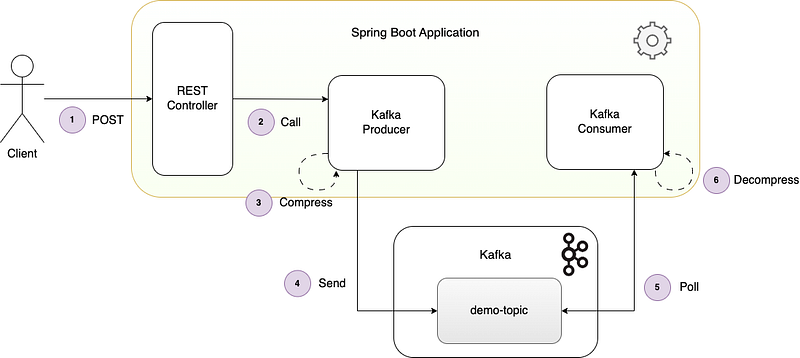
Figure 1: Spring Boot application overview
  1. The client sends a REST POST request to the application to trigger sending a number of events.
  2. The REST Controller calls the Kafka producer to send the events.
  3. The producer compresses each batch of messages using the configured compression codec.
  4. The producer sends each compressed batch of messages to the topic where it is written to disk.
  5. The Kafka consumer polls the topic and receives each batch of messages.
  6. The consumer decompresses each batch of messages.

Configuration

The producer configuration is declared in the application.yml.

kafka:
    producer:
	compressionType: gzip
	lingerMs: 10
	async: true

The properties lingerMs and compressionType are set on the ProducerFactory Spring bean that is used by the KafkaTemplate to send the events. This is configured in the KafkaDemoConfiguration configuration class.

config.put(ProducerConfig.LINGER_MS_CONFIG, lingerMs);
config.put(ProducerConfig.COMPRESSION_TYPE_CONFIG, compressionType);

Producer

The events are constructed in the DemoService, which delegates to the KafkaProducer to send using the KafkaTemplate:

final ProducerRecord record = new ProducerRecord<>(properties.getOutboundTopic(), key, payload);
final Future result = kafkaTemplate.send(record);

The call to send each message returns a Future, so if the result is not waited on before the next message is sent then the producer is able to batch these events. The async property in the application.yml determines whether to send asynchronously or not, and this is acted upon in the DemoService.

The events themselves have around 15 fields covering names, address and contact details, and the values are randomised Strings. The repetition of the field names in particular between the messages within a batch make these good candidates for compression.

Consumer

When the Kafka consumer polls the topic for the message batches, the batches are decompressed when received. Spring Kafka hands each uncompressed message to the application handler KafkaDemoConsumer, so there is no explicit code required to be implemented by the developer for the decompression.

Demo Execution

In order to run the application against a local instance of Kafka, docker-compose is used to start up Kafka and Zookeeper in docker containers, using the following command executed from the root of the project:

docker-compose.yml up -d

Optionally Conduktor Platform can also be started, which provides a UI over the broker, topics and messages, providing an option to see the impact of the compression. To also start Conduktor, use the following command in place of the one above:

docker-compose-conduktor.yml up -d

The Spring Boot application is built using maven, and the application is started:

mvn clean install
java -jar target/kafka-message-compression-1.0.0.jar

The REST request to the application can be sent using curl, and this specifies the number of events for the application to send. The Spring Boot application is running on port 9001:

curl -v -d '{"numberOfEvents":10000}' -H "Content-Type: application/json" -X POST http://localhost:9001/v1/demo/trigger

The request should be accepted immediately with a 202 ACCEPTED response, as the application hands off processing the request to send events asynchronously.

Observing Compression Effect

The effect of the compression can be observed via two methods. First of all, Kafka provides a command line tool that can be used to query the size of the topic that the messages have been written to. Jump on to the Kafka docker container, and run the kafka-log-dirs command as follows:

docker exec -it kafka /bin/sh
usr/bin/kafka-log-dirs \
--bootstrap-server 127.0.0.1:9092 \
--topic-list demo-topic \
--describe \
| grep -oP '(?<=size":)\d+' \
| awk '{ sum += $1 } END { print sum }'

The output is the size of the topic in bytes.

The second option is to log in to Conduktor, assuming this has been started as described above. Navigate in the browser to:

http://localhost:8080

Login with the default credentials [email protected] / admin, and navigate to the Console to view the topics. Select the demo-topic to observe its size:

Figure 2: Observing topic size in Conduktor

Override Producer Configuration

It is straightforward to override the producer configuration in the application.yml that is described above. For the changes to take affect the application must be rebuilt and restarted. Alternatively, a second application.yml file is provided in the root of the project. This can be edited to change relevant configurations such as the compressionType, lingerMs, and async. With these configurations updated, run the Spring Boot application with the following command in place of the one described above:

java -jar target/kafka-message-compression-1.0.0.jar -Dspring.config.additional-location=file:./application.yml

Compression Comparison Results

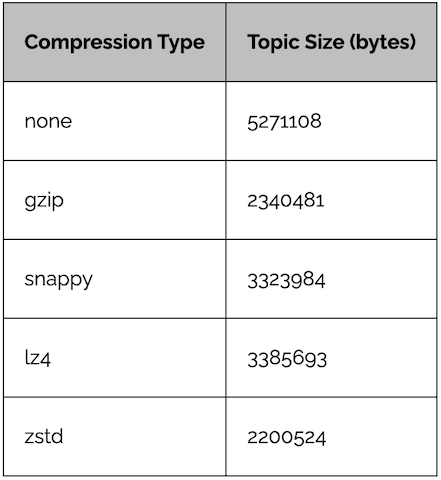
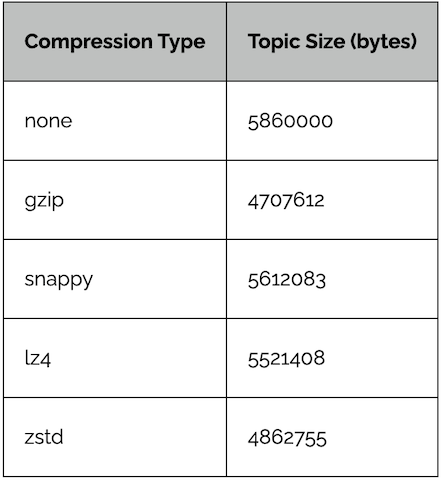
Two test runs were undertaken to first highlight the difference in effectiveness of the compression types, and second the impact of sending large batches against single message batches.

Large Batch

To maximize batch size, the producer send mode must be asynchronous. This means that the call to send for each message does not wait for the acknowledgement from the broker. This enables the Kafka producer to build up a batch of messages which it sends in a single request. The producer linger.ms is set to 10 milliseconds, which is the duration the producer waits while it builds up the message batch. This of course adds to latency.

  • Mode: async
  • Producer linger.ms: 10
  • Number of events sent: 10000

Small Batch

To ensure each batch contains only a single message, the producer send mode is set to synchronous. The producer is not able to build up a batch of messages as the application will await the acknowledgement of the send from the broker for each individual message before it processes the next message. The producer linger.ms is therefore set to 0 milliseconds to avoid any additional latency.

  • Mode: sync
  • Producer linger.ms: 0
  • Number of events sent: 10000

Results

With the data set used in this test, the compression types zstd and gzip proved to provide the most effective compression. It is also clear that for each compression type large batches of messages are compressed far more effectively than small batches (in this case, single message batches). This is expected as the amount of repeated data across the large message batches will allow for better compression.

Note this demonstration only compares the effectiveness of the compression type. The results will vary depending on the type of data used. It also does not show the other factors that must be considered when selecting a compression type including CPU usage and compression speed. These factors are compared and contrasted in the first article.

Conclusion

Spring Boot and Spring Kafka make it incredibly simple to apply compression to message batches sent by the producer. On the consumer side there are no changes required to the application, as the message batches consumed are transparently decompressed before the messages are passed through to the application handlers. The application demonstrated how the different compression types had a varying effectiveness on the amount of compression applied. There was also a significant difference evident on the effectiveness of the compression based on whether the message batches were large or small. Larger batches mean there is more repeated data that enables greater compression.

Source Code

The source code for the accompanying Spring Boot demo application is available here:

More On Kafka Message Compression

Kafka Message Compression (1 of 2): looks at how and why message compression can be applied, and what impacts the effectiveness of the compression. It details the trade-offs to consider with applying message compression, and the trade-offs to consider when selecting the compression type.

Head over to Lydtech Consulting to read this article and many more on Kafka and other interesting areas of software development.

Kafka & Spring Boot Udemy Course

Lydtech’s Udemy course Introduction to Kafka with Spring Boot covers everything from the core concepts of messaging and Kafka through to step by step code walkthroughs to build a fully functional Spring Boot application that integrates with Kafka.

Put together by our team of Kafka and Spring experts, this course is the perfect introduction to using Kafka with Spring Boot.

Kafka
Compression
Spring Boot
Java
Messaging
Recommended from ReadMedium