
Kafka Consumer Auto Offset Reset
The auto offset reset consumer configuration defines how a consumer should behave when consuming from a topic partition when there is no initial offset. This is most typically of interest when a new consumer group has been defined and is listening to a topic for the first time. This configuration will tell the consumers in the group whether to read from the beginning or end of the partition.
Consuming Messages
Every Kafka consumer belongs to a consumer group, grouped together by the consumer’s group.id configuration setting. A consumer group will contain one or more consumers. The consumers within the consumer group will be assigned to topic partitions in order to consume their messages. Each partition will have only one consumer assigned to it, although a consumer may be assigned to multiple partitions within any one topic, and similarly assigned to partitions in all the topics it is subscribed to.
When a new consumer group is first created and its consumers are assigned to topic partitions, they must decide from which point to start polling messages. Unless the consumer has been told to poll from a specific offset (a less common scenario), there are two main options. First a consumer may read messages from the beginning of the partition, processing every message present on the partition log. The second option is to only read new messages written to the topic once the consumer has begun listening.
Configuration
The decision on whether to consume from the beginning of a topic partition or to only consume new messages when there is no initial offset for the consumer group is controlled by the auto.offset.reset configuration parameter on the Kafka Consumer. The following table shows the valid values and their behaviour.
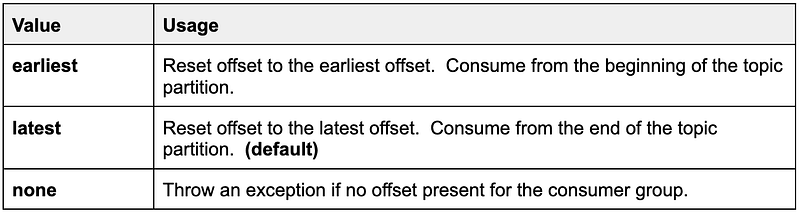
Once a consumer group has an offset written then this configuration parameter no longer applies. If the consumers in the consumer group are stopped and then restarted, they would pick up consuming from the last offset.
Earliest Behaviour
Configuring a new consumer to auto.offset.reset: earliest will result in all events from the beginning of the topic partitions it is assigned to being consumed. In the following example where a topic partition has two messages, ‘foo’ and ‘bar’, these messages would be consumed:
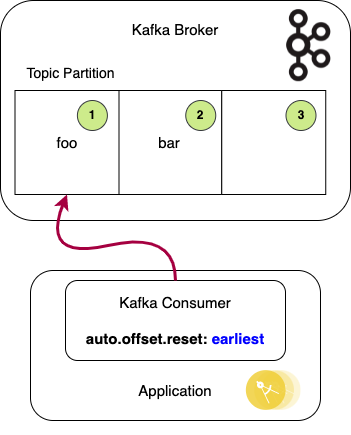
Of course a topic partition could contain many millions of messages, so ensure the data volume is understood and that processing this volume of messages will not overwhelm the system. These messages could date back weeks or months or to the beginning of the system depending on the retention period of the topic. A retention.ms setting of -1 means no old messages are discarded, so all will be polled.
Latest Behaviour
Configuring a new consumer to auto.offset.reset: latest will result in only new messages written to the topic partitions that the consumer is assigned to being consumed. In the above scenario only new messages from offset (3) will be consumed. The existing messages ‘foo’ and ‘bar’ will be skipped.
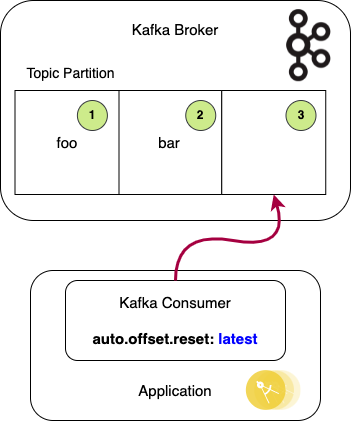
Whether a consumer should be configured to skip existing messages will of course come down to the requirements.
Data Loss Risk
There is an edge case that could result in data loss, whereby a message is not redelivered in a retryable exception scenario. This scenario applies to a new consumer group that is yet to have recorded any current offset (or the offset has been deleted).
- Two consumer instances, A and B, join a new consumer group.
- The consumer instances are configured with auto.offset.reset as latest (i.e. new messages only).
- Consumer A consumes a new message from the topic partition.
- Consumer A dies before processing of the message has completed. The consumer offsets are not updated to mark the message as consumed.
- The consumer group rebalances, and Consumer B is assigned to the topic partition.
- As there is no valid offset, and auto.offset.reset is set to latest, the message is not consumed.
As Consumer A had read the message the expectation is that in a failure scenario the message would be redelivered to the next consumer to be assigned to the topic partition. In this scenario however this does not happen, and the message is effectively lost.
Inspecting Offsets
Every consumer group stores its offsets for each topic partition. These are stored in the Kafka internal topic __consumer_offsets. Apache Kafka provides a number of admin scripts in its installation which can be used to query the state of the broker and topics and so on. To better understand what is happening in the data loss scenario the kafka-consumer-groups script can be used to query the state of the offsets for the active consumer groups.
Assuming a consumer group called demo-consumer-group and the topic demo-topic with a single partition. The partition has the two messages (‘foo’ and ‘bar’) already written.
Running the script:
kafka /bin/sh /usr/bin/kafka-consumer-groups — bootstrap-server localhost:9092 — describe — group demo-consumer-group
The results are:

This shows the partition has two messages as LOG-END-OFFSET is 2. As the consumer in the consumer group has been assigned to the partition, but has auto.offset.reset set to latest, it does not consume the messages, and has no valid offset set. This is reflected in the CURRENT-OFFSET value being unset. LAG refers to how far behind the consumer is from the tail of the log. In this case LAG is therefore unset as there is no valid offset.
In the data loss scenario above, when a failure occurs processing the first new message, LOG-END-OFFSET moves to 3 and CURRENT-OFFSET remains unset. When the consumer group rebalances and another consumer instance is assigned to the partition it therefore does not consume the new message either. It will wait until the next message is written.
A consumer group will have a valid CURRENT-OFFSET as soon as one or more messages have been successfully consumed, even if the consumers have since stopped listening for messages. When a consumer instance restarts in this scenario it will always start with the next offset, irrespective of the auto.offset.reset. For example, CURRENT-OFFSET here is 1, and the LAG shows it is 1 behind the tail of the log. The consumer would therefore consume the second message on the topic partition. CURRENT-OFFSET would move to 2 and LAG to 0.

If the consume fails before the message is processed and a new consumer is assigned to the topic partition, then the message would be re-consumed due to there being a valid CURRENT-OFFSET, resulting in loss of data.
Integration Testing
One scenario where the auto.offset.reset set to latest may cause unexpected behaviour is when integration testing against a real Kafka instance — perhaps spun up in a docker container. This can happen if the test starts the application and sends in its first message, and expects to receive a resulting outbound message produced by the application. However if the consumer group is still performing its first rebalancing (which can take tens of seconds), the consumer might not be ready when the outbound message is written. In which case, with auto.offset.reset set to latest, the message will not be consumed as expected.
Conclusion
Consumers listening to topic partitions for the first time can be configured to consume all messages on the topic or only new messages. Deciding which setting should be adopted in each case will be determined by the requirements of the application. If consuming all messages then understanding the volume of data and the impact on resources when processing the messages must be considered.
More On Kafka
Head over to Lydtech Consulting to read this article and many more on Kafka and other interesting areas of software development.
Kafka & Spring Boot Udemy Course
Lydtech’s Udemy course Introduction to Kafka with Spring Boot covers everything from the core concepts of messaging and Kafka through to step by step code walkthroughs to build a fully functional Spring Boot application that integrates with Kafka.

Put together by our team of Kafka and Spring experts, this course is the perfect introduction to using Kafka with Spring Boot.


