avatarKim Wuestkamp

Free AI web copilot to create summaries, insights and extended knowledge, download it at here

4731

Abstract

quests. (<a href="https://cloud.google.com/kubernetes-engine/docs/concepts/verticalpodautoscaler">source</a>)</p></blockquote><p id="6d3e">As far as I can see, in-place updating pod resources <a href="https://github.com/kubernetes/enhancements/pull/686">is planned</a>. Till then pods need to be deleted and recreated to achieve auto-adjusting.</p><h1 id="cfd4">Example App</h1><p id="e0d8">We use the example repo <a href="https://github.com/wuestkamp/k8s-example-vpa">https://github.com/wuestkamp/k8s-example-vpa</a> which comes with Prometheus, Grafana and an example deployment to stress resources.</p><h2 id="4ee6">App Image</h2><p id="3768">The app uses image <code>gcr.io/kubernetes-e2e-test-images/resource-consumer:1.5</code>. It provides an HTTP endpoint and can receive commands to use resources:</p><div id="81d0"><pre><span class="hljs-attribute">curl</span> --data <span class="hljs-string">"millicores=400&durationSec=600"</span> <span class="hljs-number">10.12.0.11:8080</span>/ConsumeCPU</pre></div><div id="c779"><pre><span class="hljs-attribute">curl</span> --data <span class="hljs-string">"megabytes=300&durationSec=600"</span> <span class="hljs-number">10.12.0.11:8080</span>/ConsumeMem</pre></div><h1 id="0308">Use VPA to FIND fitting resource requests</h1><h2 id="49ed">Set VPA recommendation mode YAML</h2><p id="24a4">We want to use VPA only in “suggestion” mode. This is great to see if we even would like to use it:</p><div id="57ee"><pre><span class="hljs-symbol">apiVersion:</span> autoscaling.k8s.io/v1beta2 <span class="hljs-symbol">kind:</span> VerticalPodAutoscaler <span class="hljs-symbol">metadata:</span> <span class="hljs-symbol"> name:</span> vpa <span class="hljs-symbol">spec:</span> <span class="hljs-symbol"> targetRef:</span> <span class="hljs-symbol"> apiVersion:</span> <span class="hljs-string">"extensions/v1beta1"</span> <span class="hljs-symbol"> kind:</span> Deployment <span class="hljs-symbol"> name:</span> compute <span class="hljs-symbol"> updatePolicy:</span> <span class="hljs-symbol"> updateMode:</span> <span class="hljs-string">"Off"</span> <span class="hljs-meta"># only recommodation mode</span></pre></div><h2 id="da3f">Resource usage in the test app</h2><p id="0362">We created some resource usage and monitored it using Prometheus and Grafana:</p><figure id="e1d1"><img src="https://cdn-images-1.readmedium.com/v2/resize:fit:800/1*tUCw6Jv73AipSHe_qFC1ww.png"><figcaption></figcaption></figure><p id="cb4f">We can see that the CPU got throttled (red) some times. Not easy to see is that the memory usage resulted in OOM kills at 13:07 and 13:16.</p><h2 id="67d5">VPA view recommendations</h2><p id="b877">To see the VPA request recommendations we wait a couple of minutes and then run:</p><div id="7a7f"><pre><span class="hljs-attribute">kubectl describe vpa vpa</span></pre></div><figure id="187a"><img src="https://cdn-images-1.readmedium.com/v2/resize:fit:800/1*zHOXwsCN9aYWzQ48swKXUQ.png"><figcaption>VPA suggestions for resource requests</figcaption></figure><p id="a1f5"><b>Lower Bound</b>: everything below won’t be sufficient.</p><p id="8f02"><b>Upper Bound</b>: everything close to or above is wasteful.</p><p id="8dda"><b>Target</b>: that's the best value for our requests</p><p id="b885">We see that for our example app, looking at the current state of metrics the VPA suggests setting CPU requests to 813m and memory requests to 628Mi.</p><h2 id="1ccd">What about limits?</h2><p id="ee4c">We only get a value to set requests, but what about limits? The limits will be set based on the initial <i>limits:requests</i> ratio that we defined in our Pod spec.</p><p id="3bc9">In our example app we defined:</p><div id="782d"><pre><span class="hljs-symbol">resources:</span> <span class="hljs-symbol"> limits:</span> <span class="hljs-symbol"> cpu:</span> <span class="hljs-string">"700m"</span> <span class="hljs-symbol"> memory:</span> <span class="hljs-string">"500Mi"</span> <span class="hljs-symbol"> requests:</span> <span class="hljs-symbol"> cpu:</span> <span class="hljs-string">"500m"</span> <span class="hljs-symbol"> memory:</span> <span class="hljs-string">"250Mi"</span></pre></div><p id="cec8">This means we have a CPU <i>limits:requests</i> ratio of 1.4 which the VPA uses:</p><div id="dfd5"><pre><span class="hljs-comment"># VPA raises limits based on ratio</span> <span class="hljs-attr">limits</span>=<span class="hljs-number">700</span> <span class="hljs-attr">requests</span>=<span class="hljs-number">500</span> <span class="hljs-attr">ratio</span> = limits / requests = <span class="hljs-number">1.4</span></pre></div><div id="8044"><pre>=> requests * ratio = limits => <span class="hljs-n

Options

umber">500</span> * <span class="hljs-number">1.4</span> = <span class="hljs-number">700</span></pre></div><p id="ab0e">So if the VPA raised our CPU requests to 800m it would raise the limits to (800*1.4) = 1120m.</p><h1 id="2026">Use VPA to SET fitting resource requests</h1><p id="8ce6">We update the VPA resource:</p><div id="d0a6"><pre><span class="hljs-symbol">apiVersion:</span> autoscaling.k8s.io/v1beta2 <span class="hljs-symbol">kind:</span> VerticalPodAutoscaler <span class="hljs-symbol">metadata:</span> <span class="hljs-symbol"> name:</span> vpa <span class="hljs-symbol">spec:</span> <span class="hljs-symbol"> targetRef:</span> <span class="hljs-symbol"> apiVersion:</span> <span class="hljs-string">"extensions/v1beta1"</span> <span class="hljs-symbol"> kind:</span> Deployment <span class="hljs-symbol"> name:</span> compute <span class="hljs-symbol"> updatePolicy:</span> <span class="hljs-symbol"> updateMode:</span> <span class="hljs-string">"Auto"</span></pre></div><p id="e450">This would terminate and recreate pods if their resource requests differ from the suggested target. Though I didn’t test this much. This will consider a <a href="https://kubernetes.io/docs/tasks/run-application/configure-pdb/">Pod Disruption Budget</a> set.</p><h1 id="a630">What if a pod has a CPU or memory leak?</h1><p id="6538">You can still define max values the pod’s resources will be scaled up to. This way your vertical scaled pod cannot for example request all available CPU and is still restricted. Just as you define min/max values for HPA for the replica amount. The advantage is that the requests automatically set via VPA are more dynamic.</p><h1 id="25ed">Can I use VPA with HPA?</h1><p id="7ae6">No.</p><blockquote id="d44e"><p>Vertical Pod Autoscaler should not be used with the <a href="https://kubernetes.io/docs/tasks/run-application/horizontal-pod-autoscale/">Horizontal Pod Autoscaler</a> (HPA) on CPU or memory at this moment. However, you can use VPA with <a href="https://kubernetes.io/docs/tasks/run-application/horizontal-pod-autoscale/#support-for-custom-metrics">HPA on custom and external metrics</a>. (<a href="https://github.com/kubernetes/autoscaler/tree/master/vertical-pod-autoscaler">source</a>)</p></blockquote><h1 id="6481">Can I use VPA with Istio?</h1><p id="23fd">Yes, but you need to disable VPA for the Istio sidecar proxies. I might look into and write another article about using VPA to control the resources of the Istio components because these request a lot of resources by default, which could be optimized.</p><h1 id="1474">Recap</h1><p id="e8af">The VPA idea is great, though it still needs some experience and feedback I believe. I’ll be curious to get the VPA recommendations for a production cluster and compare it to the currently implemented values. Also, once pod resources can be updated in-place this would be a great improvement.</p><p id="8225">Do you know more about VPA and resource limits? Let me know in the comments!</p><h1 id="a36c">More to read / Sources</h1><p id="5bb8"><a href="https://cloud.google.com/blog/products/containers-kubernetes/using-advanced-kubernetes-autoscaling-with-vertical-pod-autoscaler-and-node-auto-provisioning">https://cloud.google.com/blog/products/containers-kubernetes/using-advanced-kubernetes-autoscaling-with-vertical-pod-autoscaler-and-node-auto-provisioning</a></p><p id="5d39"><a href="https://cloud.google.com/kubernetes-engine/docs/concepts/verticalpodautoscaler">https://cloud.google.com/kubernetes-engine/docs/concepts/verticalpodautoscaler</a></p><p id="3e92"><a href="https://github.com/kubernetes/autoscaler/tree/master/vertical-pod-autoscaler#known-limitations-of-the-alpha-version">https://github.com/kubernetes/autoscaler/tree/master/vertical-pod-autoscaler</a></p> <figure id="e82a"> <div> <div> <img class="ratio" src="http://placehold.it/16x9"> <iframe class="" src="https://cdn.embedly.com/widgets/media.html?src=https%3A%2F%2Fwww.youtube.com%2Fembed%2FY4vnYaqhS74%3Ffeature%3Doembed&amp;display_name=YouTube&amp;url=https%3A%2F%2Fwww.youtube.com%2Fwatch%3Fv%3DY4vnYaqhS74&amp;image=https%3A%2F%2Fi.ytimg.com%2Fvi%2FY4vnYaqhS74%2Fhqdefault.jpg&amp;key=a19fcc184b9711e1b4764040d3dc5c07&amp;type=text%2Fhtml&amp;schema=youtube" allowfullscreen="" frameborder="0" height="480" width="854"> </div> </div> </figure></iframe></div></div></figure><h1 id="d9d5">Become Kubernetes Certified</h1><figure id="f82d"><img src="https://cdn-images-1.readmedium.com/v2/resize:fit:800/1*7Kbj17_6VncUuoBqNsAzzg.png"><figcaption><a href="https://killer.sh">https://killer.sh</a></figcaption></figure></article></body>

K8s Vertical Pod Autoscaling

We configure Kubernetes VPA and monitor the effects with Prometheus on an example app

https://unsplash.com/photos/WEQbe2jBg40

Parts

  1. Manually monitor pod resources
  2. Automatically set pod resources with Vertical Pod Autoscaling (this article)

Related

  1. Practical Guide to Kubernetes Horizontal Pod Autoscaling
  2. Practical Guide to Kubernetes Node Autoscaling

TL;DR

VPA (Vertical Pod Autoscaling) will suggest or even automatically set values for resource requests and limits for pods inside the cluster.

Resource requests and limits

What?

What are resource requests and limits? This great blog post and video will get you up to date.

Why?

Kubernetes clusters work best when all containers of all pods have resource requests+limits for CPU+memory assigned. This effects pod scheduling, lifetime, termination and priority.

Though often it’s hard to know the resources for your application. If you set these too low, your application might get throttled or even gets terminated. If you set these too high, you might waste costly resources. It’s possible to monitor the resource usage of pods as we did in part 1.

But what if your cluster could set the requests and limits automatically for you?

Horizontal vs Vertical scaling
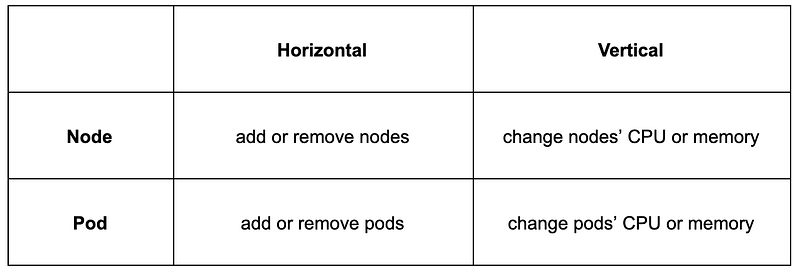
Horizontal scaling means raising the amount of your instance. For example adding new nodes to a cluster/pool. Or adding new pods by raising the replica count (Horizontal Pod Autoscaler).

Vertical scaling means raising the resources (like CPU or memory) of each node in the cluster (or in a pool). This is rarely possible without creating a completely new node pool. When it comes to pods though, vertical scaling would mean to dynamically adjust the resource requests and limits based on the current application needs (Vertical Pod Autoscaler).

VPA components

VerticalPodAutoscaler (VPA) is a Kubernetes resource which can be created. It references a specific deployment and some more options in the spec: section. The status: section will contain information and recommendations about the scaling process going on.
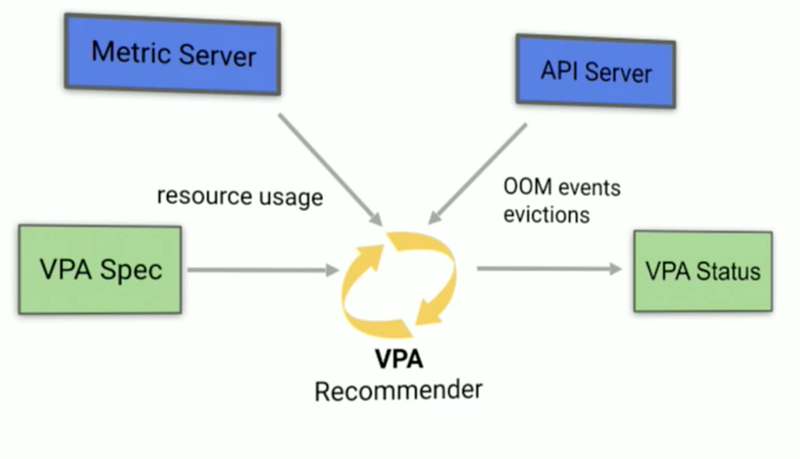
https://www.youtube.com/watch?v=Y4vnYaqhS74

VPA Recommender

The Recommender looks at the metric history, OOM events and the VPA spec of a deployment and suggests fitting values for requests. The limits raised/lowered based on the limits:requests (more further down) proportion defined. Hence the Recommender could just be used by itself if one is unsure what the application actually needs. Further down we see resource suggestions for our example app.

VPA Auto Adjuster

Whatever the Recommender will recommend, the Adjuster will implement if the updateMode: Auto is defined.

Due to Kubernetes limitations, the only way to modify the resource requests of a running Pod is to recreate the Pod. If you create a VerticalPodAutoscaler with an updateMode of "Auto", the VerticalPodAutoscaler evicts a Pod if it needs to change the Pod's resource requests. (source)

As far as I can see, in-place updating pod resources is planned. Till then pods need to be deleted and recreated to achieve auto-adjusting.

Example App

We use the example repo https://github.com/wuestkamp/k8s-example-vpa which comes with Prometheus, Grafana and an example deployment to stress resources.

App Image

The app uses image gcr.io/kubernetes-e2e-test-images/resource-consumer:1.5. It provides an HTTP endpoint and can receive commands to use resources:

curl --data "millicores=400&durationSec=600" 10.12.0.11:8080/ConsumeCPU
curl --data "megabytes=300&durationSec=600" 10.12.0.11:8080/ConsumeMem

Use VPA to FIND fitting resource requests

Set VPA recommendation mode YAML

We want to use VPA only in “suggestion” mode. This is great to see if we even would like to use it:

apiVersion: autoscaling.k8s.io/v1beta2
kind: VerticalPodAutoscaler
metadata:
  name: vpa
spec:
  targetRef:
    apiVersion: "extensions/v1beta1"
    kind: Deployment
    name: compute
  updatePolicy:
    updateMode: "Off"      # only recommodation mode

Resource usage in the test app

We created some resource usage and monitored it using Prometheus and Grafana:
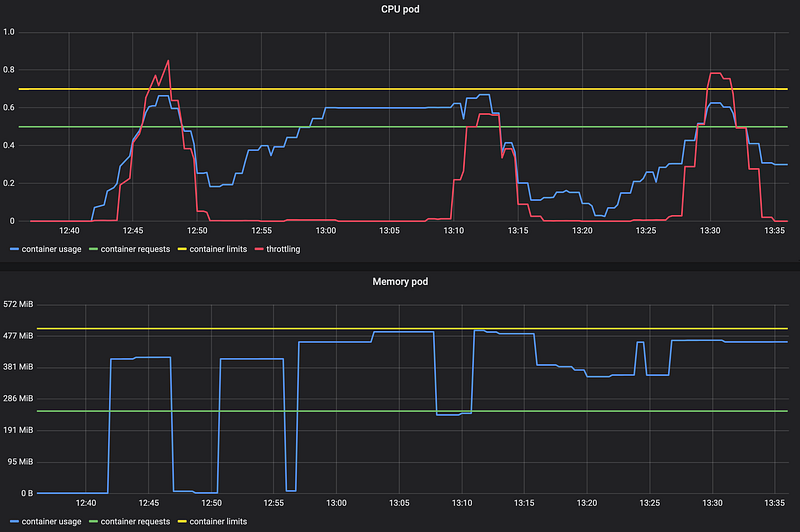
We can see that the CPU got throttled (red) some times. Not easy to see is that the memory usage resulted in OOM kills at 13:07 and 13:16.

VPA view recommendations

To see the VPA request recommendations we wait a couple of minutes and then run:

kubectl describe vpa vpa
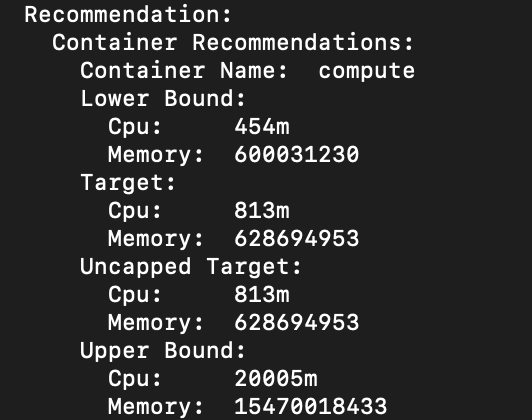
VPA suggestions for resource requests

Lower Bound: everything below won’t be sufficient.

Upper Bound: everything close to or above is wasteful.

Target: that's the best value for our requests

We see that for our example app, looking at the current state of metrics the VPA suggests setting CPU requests to 813m and memory requests to 628Mi.

What about limits?

We only get a value to set requests, but what about limits? The limits will be set based on the initial limits:requests ratio that we defined in our Pod spec.

In our example app we defined:

resources:
  limits:
    cpu: "700m"
    memory: "500Mi"
  requests:
    cpu: "500m"
    memory: "250Mi"

This means we have a CPU limits:requests ratio of 1.4 which the VPA uses:

# VPA raises limits based on ratio
limits=700
requests=500
ratio = limits / requests = 1.4
=> requests * ratio = limits
=> 500 * 1.4 = 700

So if the VPA raised our CPU requests to 800m it would raise the limits to (800*1.4) = 1120m.

Use VPA to SET fitting resource requests

We update the VPA resource:

apiVersion: autoscaling.k8s.io/v1beta2
kind: VerticalPodAutoscaler
metadata:
  name: vpa
spec:
  targetRef:
    apiVersion: "extensions/v1beta1"
    kind: Deployment
    name: compute
  updatePolicy:
    updateMode: "Auto"

This would terminate and recreate pods if their resource requests differ from the suggested target. Though I didn’t test this much. This will consider a Pod Disruption Budget set.

What if a pod has a CPU or memory leak?

You can still define max values the pod’s resources will be scaled up to. This way your vertical scaled pod cannot for example request all available CPU and is still restricted. Just as you define min/max values for HPA for the replica amount. The advantage is that the requests automatically set via VPA are more dynamic.

Can I use VPA with HPA?

No.

Vertical Pod Autoscaler should not be used with the Horizontal Pod Autoscaler (HPA) on CPU or memory at this moment. However, you can use VPA with HPA on custom and external metrics. (source)

Can I use VPA with Istio?

Yes, but you need to disable VPA for the Istio sidecar proxies. I might look into and write another article about using VPA to control the resources of the Istio components because these request a lot of resources by default, which could be optimized.

Recap

The VPA idea is great, though it still needs some experience and feedback I believe. I’ll be curious to get the VPA recommendations for a production cluster and compare it to the currently implemented values. Also, once pod resources can be updated in-place this would be a great improvement.

Do you know more about VPA and resource limits? Let me know in the comments!

More to read / Sources

https://cloud.google.com/blog/products/containers-kubernetes/using-advanced-kubernetes-autoscaling-with-vertical-pod-autoscaler-and-node-auto-provisioning

https://cloud.google.com/kubernetes-engine/docs/concepts/verticalpodautoscaler

https://github.com/kubernetes/autoscaler/tree/master/vertical-pod-autoscaler

Become Kubernetes Certified

https://killer.sh
Kubernetes
Prometheus
DevOps
Monitoring
Continuous Delivery
Recommended from ReadMedium