K8s Troubleshooting: Volume Node Affinity Conflict Error
K8s Troubleshooting handbook
💡 Note: Full K8s troubleshooting mind map is available at: “K8s Troubleshooting MindMap”
What is Volume Node Affinity Conflict?
In K8s, the “volume node affinity conflict error” refers to a situation when a Persistent Volume (PV) cannot be bound to a Persistent Volume Claim (PVC) because of node affinity constraints that prevent the PV from being used by a Pod running on a specific node.
Node affinity is a set of rules used by the K8s scheduler to determine which nodes a Pod can be scheduled on. Similarly, volume node affinity defines the constraints for a PV to be available for use by a Pod running on a specific node.
The error occurs when the Pod’s node affinity constraints don’t match the volume node affinity constraints, making it impossible to satisfy both the Pod’s scheduling requirements and the volume’s accessibility requirements simultaneously.
Real World Example
Suppose you have a cluster with three availability zones: zone-a, zone-b, and zone-c. You have a StatefulSet application that requires persistent storage, and the Persistent Volume Claims (PVCs) are created with a StorageClass that dynamically provisions volumes in the respective zones.
Let’s say the following constraints are defined:
- A Persistent Volume (PV) with the label
failure-domain.beta.kubernetes.io/zone: zone-ais created in zone-a. - A Pod with node affinity to run only on nodes in zone-b, using the following affinity configuration:
affinity:
  nodeAffinity:
    requiredDuringSchedulingIgnoredDuringExecution:
      nodeSelectorTerms:
      - matchExpressions:
        - key: failure-domain.beta.kubernetes.io/zone
          operator: In
          values:
          - zone-b
In this case, the Pod will only be scheduled on nodes in zone-b, while the available PV is in zone-a. The scheduler won’t be able to find a suitable PV for the PVC in the desired zone, leading to a “volume node affinity conflict error.”
How to Troubleshoot
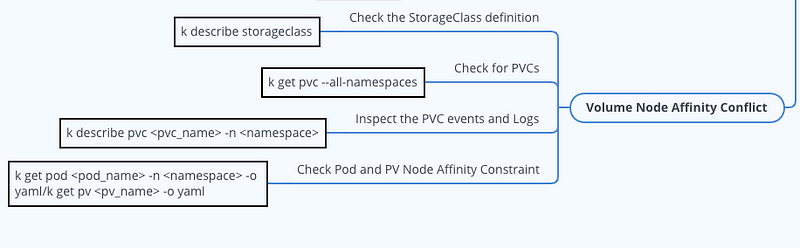
Check for PVCs
Use the following command to list all PVCs and their statuses:
$ kubectl get pvc --all-namespacesCheck any PVCs in the ‘Pending’ state, it might be an indication of a volume node affinity conflict.
Inspect the PVC events and Logs
Use the following command to view the events associated with a pending PVC:
$ kubectl describe pvc <pvc_name> -n <namespace>Look for any error messages or warnings related to the volume node affinity conflict.
Check Pod and PV Node Affinity Constraint
Inspect the node affinity settings in the Pod spec and the PV spec to check if there’s a mismatch between them.
$ kubectl get pod <pod_name> -n <namespace> -o yamlCheck the affinity.nodeAffinity field settings in the output.
To inspect the PV’s node affinity settings, run:
$ kubectl get pv <pv_name> -o yamlIf you find a mismatch between the Pod’s node affinity settings and the PV’s node affinity settings, update either the Pod or PV configuration to resolve the conflict. Make sure that the Pod’s node affinity constraints match the PV’s node affinity constraints or that they are compatible with the available nodes.
Conclusion