K8s Troubleshooting — ReplicaSet “0 out of X replicas created”
K8s Troubleshooting handbook
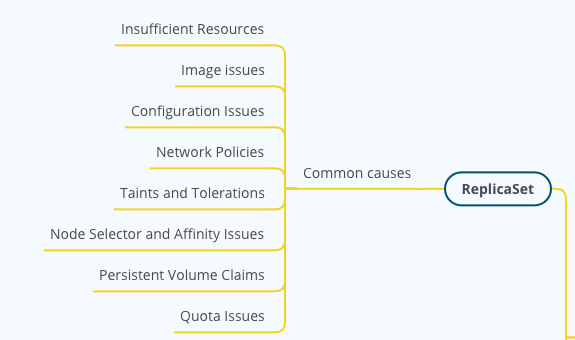
Note, full K8s troubleshooting mind map is available at: “K8s Troubleshooting MindMap”
What is “0 Out of X Replicas Created” Error
In K8s, if you encounter an error message like “0 out of X replicas created”, it means the ReplicaSet has been unable to create the desired number of Pod replicas. Instead of having the expected number (X) of Pods running, none have been successfully created.
Sample use case
Let’s consider a scenario in which you’re trying to deploy a simple web application using a Deployment, which internally uses a ReplicaSet to manage replicas of the application pods.
apiVersion: apps/v1
kind: Deployment
metadata:
  name: my-web-app
spec:
  replicas: 3
  selector:
    matchLabels:
      app: web-app
  template:
    metadata:
      labels:
        app: web-app
    spec:
      containers:
      - name: app-container
        image: myrepo/mywebapp:1.0
In the above deployment definition, you expect this deployment to create three replicas of my-web-app. After applying the deployment using kubectl apply -f deployment.yaml, you check the status using:
$ kubectl get deployments
NAME         READY   UP-TO-DATE   AVAILABLE   AGE
my-web-app   0/3     3            0           10m
Clearly, none of the expected replicas are running, so you dive deeper:
$ kubectl describe deployment my-web-app
...
OldReplicaSets:  <none>
NewReplicaSet:   my-web-app-abc1234 (0/3 replicas created)
Events:
  Type     Reason        Age                From                   Message
  ----     ------        ----               ----                   -------
  Warning  FailedCreate  3m (x25 over 10m)  replicaset-controller  Error creating: pods "my-web-app-abc1234-" is forbidden: exceeded quota: cpu, requested: 1, used: 2, limited: 2
In the example output, under the “Events” section, there’s a warning message that indicates the reason for the failure. The pods for the deployment are being prevented from being created due to CPU quota limitations.
Potential Causes
There are several potential reasons why this error might occur:
- Insufficient Resources: The node or nodes where the Pods are supposed to run might not have enough CPU, memory, or other resources available.
- Image Issues: The Docker image specified in the Pod’s container might not be found, or there might be errors pulling it due to network issues, image name typos, or authentication problems with the image registry.
- Configuration Issues: There could be misconfigurations in the Pod specifications. This can include issues with environment variables, config maps, secrets, or volume mounts.
- Network Policies: Restrictive network policies might be preventing the Pod from starting up correctly, especially if the Pod needs to communicate with other services on startup.
- Taints and Tolerations: The nodes might have taints that are preventing the Pods from being scheduled, and the Pods don’t have the corresponding tolerations.
- Node Selector and Affinity Issues: The Pods might have node selectors or affinity rules that don’t match any nodes in the cluster.
- Persistent Volume Claims: If the Pods require persistent storage and the PVCs aren’t available or bound, this can prevent the Pods from starting.
- Quota Issues: If there are resource quotas set up in the namespace where you’re trying to deploy, and the quotas are exhausted, this could prevent new Pods from being created.
Common Troubleshoot Steps
- Check the Deployment Status:
$ kubectl get deployments
NAME         READY   UP-TO-DATE   AVAILABLE   AGE
my-web-app 0/3 0 0 10m- Describe the Deployment: This can provide more context on why the ReplicaSet might not be creating the desired number of pods.
$ kubectl describe deployment my-web-app
...
Replicas:               3 desired | 0 updated | 0 total | 0 available | 3 unavailable
...
NewReplicaSet:          my-web-app-abc1234 (0/3 replicas created)
Events:
  Type     Reason        Age   From                   Message
  ----     ------        ----  ----                   -------
Warning FailedCreate 3m replicaset-controller Error creating: [reason for failure]- Check the ReplicaSet’s events and describe the ReplicaSet:
$ kubectl describe rs <replicaset-name>
...
Pods Status:  0 Running / 3 Waiting / 0 Succeeded / 0 Failed
...
Events:
  Type     Reason        Age   From                   Message
  ----     ------        ----  ----                   -------
Warning FailedCreate 3m replicaset-controller Error creating: [reason for failure]- Check the pod status:
$ kubectl get pods -l [selector-label-key]=[selector-label-value]
NAME                          READY   STATUS             RESTARTS   AGE
my-web-app-abc1234-xxxxx      0/1     ImagePullBackOff   0          10m
my-web-app-abc1234-yyyyy      0/1     ImagePullBackOff   0          10m
my-web-app-abc1234-zzzzz 0/1 ImagePullBackOff 0 10m- Describe a Failed Pod:
$ kubectl describe pod [pod-name]
...
...
Containers:
  app-container:
    Image:        myrepo/mywebapp:1.0
    ...
    State:          Waiting
    Reason:         ImagePullBackOff
    ...
Events:
  Type     Reason                 Age   From                    Message
  ----     ------                 ----  ----                    -------
  Warning  Failed                 10m   kubelet, node-name      Failed to pull image "myrepo/mywebapp:1.0": [reason for failure]
  Warning  ImagePullBackOff       5m    kubelet, node-name      Back-off pulling image "myrepo/mywebapp:1.0"
Conclusion