K8s — kube-proxy Introduction
Like kubelet, kube-proxy is also a daemon that runs on each node within a Kubernetes system. It’s responsible for basic load balancing within the cluster. The operation of kube-proxy is based on Services and Endpoints/EndpointSlices:
- Services: These act as a load balancer for a group of pods.
- Endpoints (and EndpointSlices): These enumerate a series of ready pod IPs, which are automatically generated from a service using the same pod selector as the service.
The majority of service types in Kubernetes possess an internal IP address, known as the cluster IP address, which is inaccessible from outside the cluster.
The kube-proxy is tasked with directing requests to this cluster IP address and ensuring they reach healthy pods. kube-proxy has four modes, which change its runtime mode and exact feature set:
- Userspace mode (deprecated): In this mode,
kube-proxylistens on a port for each service. When it receives traffic, it proxies the traffic to one of the backend Pods. This method is not commonly used due to its performance implications. - iptables mode: In this mode, kube-proxy configures network rules to direct traffic for services to the correct backend Pods. This mode is faster and more reliable than userspace mode. It is the default mode for operating kube-proxy.
- IPVS mode: IPVS (IP Virtual Server) mode is similar to iptables, but uses a hash table as the backend making it much more scalable and efficient in terms of network traffic.
- Kernelspace proxy mode: This proxy mode is only available on Windows nodes. The kube-proxy configures packet filtering rules in the Windows Virtual Filtering Platform (VFP), an extension to Windows vSwitch.
Userspace Mode (deprecated)
The initial and most ancient mode of operation is the userspace mode. With this mode, kube-proxy operates a web server and directs all service IP addresses towards this server, leveraging iptables for this purpose. This web server concludes connections and acts as a proxy, channeling the request to a pod listed in the service’s endpoints. However, userspace mode is now rarely employed, and it’s advisable to steer clear of it unless there is a compelling reason for its utilization.
For example: Let’s say we have a Service S with cluster IP 10.0.0.1 and it has 3 backend Pods (A, B, C). Now, when a client wants to connect to the Service S, it will connect to 10.0.0.1.
kube-proxyin userspace mode, which is running on each node, intercepts this connection. It maintains an iptables rule that forwards traffic coming to10.0.0.1to its own proxy server running in the user space.- The proxy server, maintaining a list of healthy backend Pods (A, B, C), chooses one Pod to forward the request to, based on the service’s configured session affinity and load balancing algorithm.
- The proxy server then establishes a new connection to the chosen Pod, sends the client’s request, receives the response from the Pod, and forwards the response back to the client.
This process, while functional, introduces an additional hop in the network path (the user space proxy server), which can lead to performance overhead and is therefore not as efficient as other modes. Due to these reasons, userspace mode is rarely used nowadays. The default mode for kube-proxy is iptables, and ipvs mode is used when high-performance, kernel-level load balancing is required.
iptables Mode
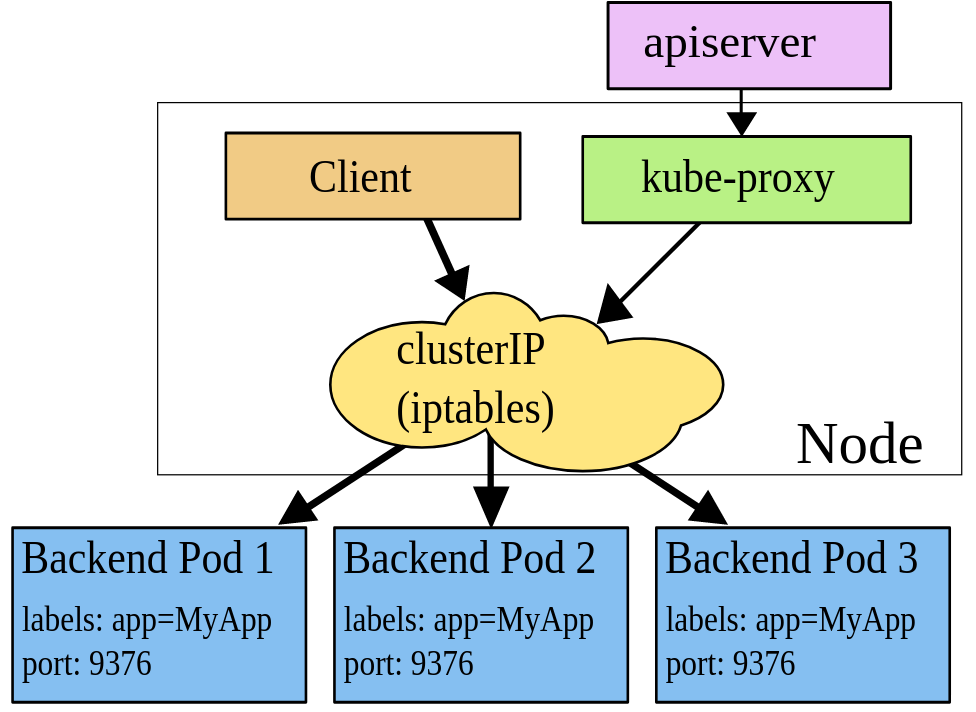
The iptables mode relies solely on iptables for its operations. It is the default mode and the most widely employed one. This may be partly due to the fact that the IPVS mode only recently achieved General Availability (GA) stability, while iptables is a well-established Linux technology.
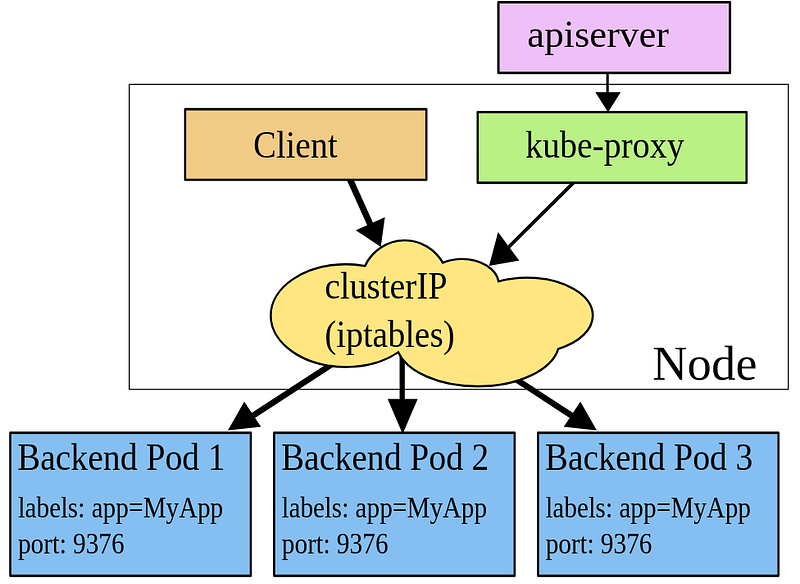
Instead of offering genuine load balancing, iptables mode facilitates connection distribution. That is, once iptables mode routes a connection to a backend pod, all subsequent requests via that connection will continue to be directed to the same pod until the connection ends. In optimal scenarios, this behavior is straightforward and predictable, as consecutive requests within the same connection can take advantage of local caching in backend pods.
However, this approach can lead to unpredictable behavior with long-lived connections, such as HTTP/2 connections, which is especially noteworthy as HTTP/2 is the transport protocol for gRPC.
For instance, consider a service being served by two pods, X and Y. During a typical rolling update, X is replaced with Z. The older pod Y now retains all existing connections and also takes over half of the connections that needed to be re-established when pod X was terminated. This can result in significantly higher traffic being served by pod Y. There are many situations like this that could lead to an uneven distribution of traffic.
For example: Let’s again consider we have a Service S with cluster IP 10.0.0.1 and it has 3 backend Pods A, B, and C.
In iptables mode, When a client wants to connect to the Service S at 10.0.0.1, the connection request is intercepted by kube-proxy.
kube-proxy, running on every node, maintains iptables rules that transparently direct the traffic coming to 10.0.0.1 to one of the backend Pods (A, B, or C). It does this by creating NAT rules that change the destination IP address of the packet to the IP address of one of the Pods. kube-proxy selects the backend Pod based on the Service’s configured session affinity and load balancing algorithm. This decision is made when the connection is established.
Once the iptables rule is hit and the destination of the packet is changed, the Linux kernel itself forwards the packet to the selected Pod. The key point here is that once the connection is established, all packets for that connection are automatically forwarded by the Linux kernel to the selected Pod, based on the iptables rules. There’s no need for kube-proxy to handle each packet, which makes iptables mode more efficient than userspace mode.
Sample iptables rules for above scenario:
# Rule to match traffic destined for Service S and change the destination
iptables -t nat -A PREROUTING -p tcp -d 10.0.0.1 --dport 80 -j DNAT --to-destination 172.17.0.2:80
iptables -t nat -A PREROUTING -p tcp -d 10.0.0.1 --dport 80 -j DNAT --to-destination 172.17.0.3:80
iptables -t nat -A PREROUTING -p tcp -d 10.0.0.1 --dport 80 -j DNAT --to-destination 172.17.0.4:80

# Rule to masquerade the traffic from the pods to make it look like it originated from the node itself
iptables -t nat -A POSTROUTING -s 172.17.0.0/16 -j MASQUERADE- The first set of rules are in the
PREROUTINGchain of the nat table. These rules match the traffic coming to the service IP10.0.0.1and going to port 80 and change the destination of the packet to one of the backend pods. - The
MASQUERADErule in thePOSTROUTINGchain changes the source IP of the packets coming from the pods to the node’s IP so that replies can be correctly routed back to the node and then back to the client.
IPVS Mode
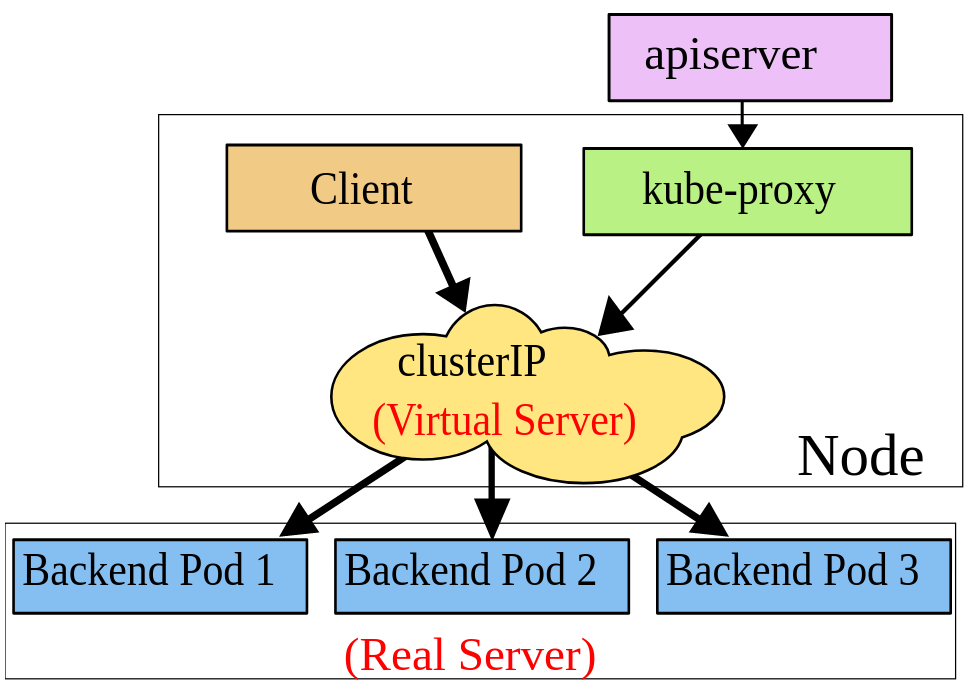
The IPVS mode for kube-proxy in Kubernetes stands for IP Virtual Server. This mode provides high-performance, kernel-level load balancing and more sophisticated load balancing algorithms than iptables or userspace mode.
In IPVS mode, kube-proxy uses the netfilter hook to capture packets, and then hands them over to the IPVS module in the Linux kernel. The IPVS module performs IP-based load balancing and then forwards the packet to the backend Pod based on the selected load balancing algorithm. The IPVS load balancing algorithms can include round-robin, least connections, shortest expected delay, and more.
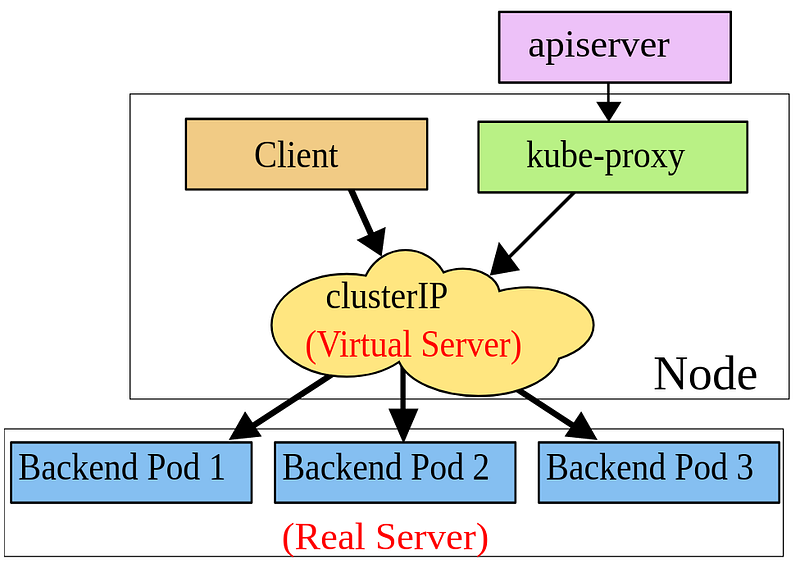
IPVS mode is designed for massive services scale and more consistent hashing than iptables. It also provides better network throughput, better programmability, and the ability to balance loads based on more than just the IP address and port.
Let’s say we have a Service S with cluster IP 10.0.0.1 and it has 3 backend Pods A, B, and C.
In IPVS mode:
- When a client wants to connect to the Service S at
10.0.0.1, the connection request is captured bykube-proxy. kube-proxy, running on every node, uses the IPVS module in the Linux kernel to direct the traffic coming to 10.0.0.1 to one of the backend Pods (A, B, or C).- The IPVS module selects the backend Pod based on the Service’s configured session affinity and load balancing algorithm.
- Once the IPVS module updates the packet’s destination, the Linux kernel itself forwards the packet to the selected Pod. Overall, IPVS mode provides advanced load balancing features and can handle larger amounts of services and backends than iptables or userspace mode.
Here’s a simulation of the IPVS commands that kube-proxy might use to set up the load balancing:
# Add the IPVS service
ipvsadm -A -t 10.0.0.1:80 -s rr

# Add the backend servers (pods)
ipvsadm -a -t 10.0.0.1:80 -r 172.17.0.2:80 -m
ipvsadm -a -t 10.0.0.1:80 -r 172.17.0.3:80 -m
ipvsadm -a -t 10.0.0.1:80 -r 172.17.0.4:80 -m
The -s rr option sets the scheduling method to round-robin. The -m option sets the forwarding method to masquerading, which is similar to SNAT. After setting up the rules with these commands, here’s what you might see when you display the rules:
# Display the IPVS rules
ipvsadm -L -n

IP Virtual Server version 1.2.1 (size=4096)
Prot LocalAddress:Port Scheduler Flags
  -> RemoteAddress:Port           Forward Weight ActiveConn InActConn
TCP  10.0.0.1:80 rr
  -> 172.17.0.2:80                Masq    1      0          0
  -> 172.17.0.3:80                Masq    1      0          0
  -> 172.17.0.4:80                Masq    1      0          0
KernelSpace Mode
KernelSpace mode is the most recent addition and is exclusive to Windows systems. It offers a substitute for the userspace mode when working with Kubernetes on Windows because iptables and ipvs are Linux-specific features.