
JWT and Social Authentication using Spring Boot
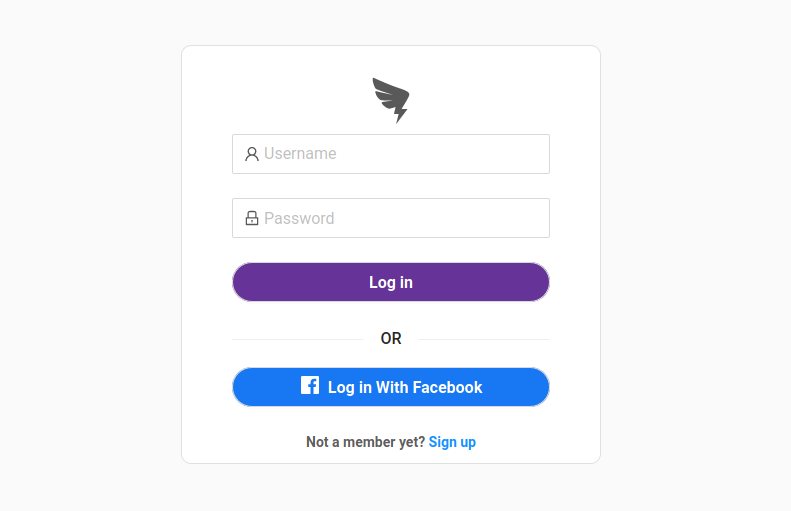
This article is a guide on how to implement JSON Web Token (JWT) authentication and integrate it with Facebook authentication using Spring Boot and Facebook Graph API.
In this article, we focus on Facebook authentication, but the same concept can apply on other social platforms like Google, LinkedIn, and Twitter.
A grasp on the following is recommended:
The below video shows what will be implemented by the end of this article.
You can find the source code here.
JWT authentication
The first part of the article will focus on implementing JWT authentication using Spring security.
To understand the JWT authentication flow, let’s look at the below diagram.
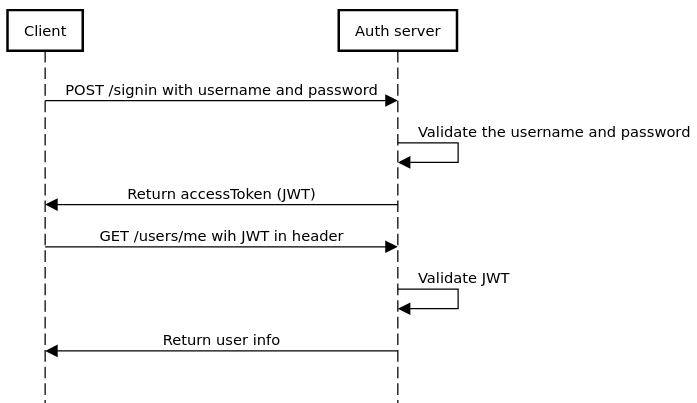
To get the access token (JWT), the client sends a login-in request to the auth server with the username and password in the request body. The server validates the username and password, then returns an access token (JWT) to the client.
The client has to store the access token somewhere and should send it with every request to the server in the Authorization header.
The server then validates the access token and, if valid, it serves the request for the client .
Implementing JWT authentication
Simply we need to configure Spring security to intercept each request and validates the access token.
Let’s look into spring security configuration.
As you can see at line 10, it configures the JwtTokenAuthenticationFilter to intercept each request and validate the token.
Let’s dive deep into JwtTokenAuthenticationFilter
Line 4–9, It checks if the token header is exist, if it is not exist, it is OK, maybe the user is accessing a public resource like “/signin” or “/signup”.
At line 13, it delegates the token validation to the tokenProvider service, If valid, It gets the username from the token, loads user details from the DB and creates a security context for the user.
This concludes the JWT authentication flow, next, we will see how social authentication works with JWT authentication.
Social authentication
Social authentication allows users to access websites using their existing social account IDs, such as Facebook, Twitter, and LinkedIn.
It enhances the user experience on the website since there is no need to fill in a registration form or remember a password.
The diagram below illustrates the social authentication flow.

When the user clicks on Login with Facebook, the user is redirected to Facebook to login to their account and give permission to our website to access profile info. The Facebook then redirects the user back to our website and returns an access token.
The client send a Facebook login request to the authorization server with the Facebook access token and the authorization server does the following:
- Sends a request to Facebook to get user profile with the access token.
- Creates an account for the user if it doesn’t exist.
- Returns JWT token to the client.
Then the Client stores the JWT token, and sends it with each request to the server.
Facebook Graph API
All the information on Facebook are represented in a form of graph, which is consists of nodes (like User or Photo), edges (like comments on Photo) and fields (like User’s birthday or email). This graph is called social graph.
Facebook provides an HTTP-based APIs that allow you to get data into and out of the Facebook platform.
You can know more about Facebook Graph API from here.
Implementing the Facebook authentication
Implementing the front-end
First, the front-end (the client) get the access token from the Facebook and sends it to the authorization server.
You will need to create a Facebook developer account and an app, to create them follow the instructions here.
Then to include the Facebook SDK, Add the below script right after the body tag in index.html
In login.js page, add the below code to initialize the Facebook APIs.
Replace {app_id} with your app id.
The “Login with Facebook” button should trigger the below function
The above function triggers the Facebook login, gets the access token, and then calls the authorization server to log the user in, and stores the JWT token in the localStorage.
The “scope” part of it, asks the user to give a permission to access the email.
Implementing the authorization service
Let’s look into FacebookService and see how the server follow is implemented
Line 2, it calls getUser of FacebookClient, which we will look into in a moment.
Line 4, It check if the user already exists in the DB.
Line 5, registers the user if it is not found.
Line 7–9, It generates an access token and return it to the client.
Also, notice in the above function, it generates a random username and password to register the user.
Finally, let’s look into FacebookClient
Which is a simple GET call to the following Facebook Graph API.
https://graph.facebook.com/me?fields=email,first_name,last_name,id,picture.width(720).height(720)&access_token={access_token}The interesting part is fields, where you specify the required fields.
Conclusion
Integrating a social login with JWT authentication is a quite a lot of work, but it enhances the user experience and make it easier for the user to register to your website without having to fill in a registration form.
Other Java and Spring Articles you may like


