
Julia’s IO is SUPERIOR.
An overview of some nuances and oddities of Julia input and output.

Introduction
Input and output is the essential structure of software. From the highest level of software to the lowest level of hardware, the definition of a computer is less “ a digital electronic machine that can be programmed to carry out sequences of arithmetic or logical operations automatically” (wikipedia), but much more-so a pipeline of inputs that result in an output. That being said, if one wants to work with and program computers, something that needs to be well understood is the concept of input and output, or IO if you are a computer nerd like myself.
Of course, I mostly write Julia; and compared to a lot of other languages Julia has some dramatically different input and output. There are a lot of different methods and types you should probably be aware of when it comes to Julia input and output, and it goes a lot deeper than standard input or standard output, so without further ado lets dive into the details on Julia’s IO, and what makes it so great in my subjective views, especially when compared to other high-level languages like JavaScript and Python!
notebook
Input and Output basics
The first concept we should probably touch on in regards to input and output is standard input and output. This is the standard way that Julia receives information and of course returns information. This is of done via print, show, for output, and readline (along with some other more specific methods.) Lets look at a basic example of using prints to create some basic output.
println("hello")
print("hi")
hello
hiThis is pretty standard in most programming languages. The identifiable difference between println(::IO, ::Any) and print(::IO, ::Any) is that println will append a \n to the end of the string. Two other output bindings are display, and show. The former method can also be provided with a mime in the second positional argument. A mime will allow us to determine how we want the output displayed. Let’s first look at show, which is probably the most popular of these bindings:
show("hello")
     "hello"
The show binding is the binding that is going to be called by default by stdout in Julia. Consider that the quotation marks that delimit the String type in the print example are missing entirely, but this is not the case with show. This same result will be returned if we were to set a String to a variable:
he = "hello"
"hello"
The other method we can use to show different things is display. Display is a little different, as it can be used along with a mime. A mime is a symbol that represents a way that a display should interpret our output. For example, we can display a string as markdown using the “text/markdown” Mime:
display("text/markdown", "hello")helloThere are also several other mimes, such as images, html, and of course way more. If you would like to learn more about mimes as a concept, I wrote an entire article on this which you may read that article here:
Briefly, we should also discuss input. Anytime you present some code, that is input. Of course, there might be times where a REPL-bound end-user might also need to provide some sort of data directly into the standard input of Julia. When this is the case, we can use the readline() function, which will return a String.
name = readline(); println(name)stdin> steve
steveCreating your own input and output
This is where things get interesting, and why I believe that Julia’s input and output is really great. Firstly, we can directly import Base.show, or Base.display respectively in order to add new capabilities to showing our type. Here is the structure we will be working with in order to demonstrate this:
mutable struct MyStructure
    name::String
    x::String
end
First, let’s bind this to show, and we will simply use print in order to print these values individually:
import Base: display, showfunction show(x::MyStructure)
println("MyStructure")
print("name: $(x.name) x: $(x.x)")
endNow we will try it!
show(MyStructure("emmy", "hello"))MyStructure
name: emmy x: helloNow let’s try the same thing, but instead, we will bind this to display, and provide a mime. In order to create a mime, we need to be aware of how a mime is constructed. The MIME type takes a parameter, which is a symbol of the string used to create it.
m = MIME("text/html")
MIME type text/html
This text/html string that we provided to the MIME constructor is now a parameter, take a look at the typeof(::Type) output:
typeof(m)

MIME{Symbol("text/html")}
As a result, if we want to write a display function for text/html, this is the type we are going to want to pass as an argument into dispatch.
function display(m::MIME{Symbol("text/html")}, ms::MyStructure)
    display("text/html", "<h1>MyStructure</h1><b>$(ms.name)</b></br><p>$(ms.x)</p>")
end
We then call display(::MIME{Symbol(“text/html”)}, ::String) with our HTML:
display("text/html", MyStructure("emmy", "hi"))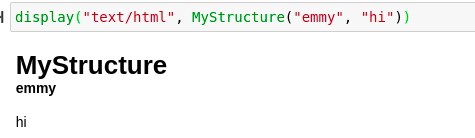
When it comes to other languages, a big problem is that standard input and output is quite limited. If you want to make a plot, and have the plot display in the terminal, it will only have one method of doing so. This makes a big problem, as there either has to be some sort of weird conditional check to see if the current IO is actually capable of displaying the plot or not. Needless to say, that can be quite problematic when you are trying to create some sort of structure that can be used in both a terminal and a web-view. In Julia’s example, though, we can simply dispatch two different IO’s to work with both scenarios. The IO for a Julia terminal is called Base.TTY.
show(x::MyStructure) = display("text/html", x)show(t::Base.TTY, x::MyStructure) = println(x)Pretty cool, right?
One last thing — we can also provide all sorts of different IO into show, which could provide a new output as opposed to standard output in Julia. A great example of an application for this would be something like IJulia. I also used this in a Toolips.jl extension, where I wanted to write a plot as HTML in order to then output it into a DIV. Consider the following example!
io = IOBuffer()
IOBuffer(data=UInt8[...], readable=true, writable=true, seekable=true, append=false, size=0, maxsize=Inf, ptr=1, mark=-1)show(io, MyStructure)Notice how the output now does not appear. That is because of having an implicitly passed IO, we have passed our own, this buffer. The data has instead been written into our buffer:
io.data
32-element Vector{UInt8}:
 0x4d
 0x79
 0x53
 0x74
.....
Now we can construct a string from this buffer’s data field in order to get our data!
String(io.data)
"MyStructure\0\0\0\0\0\0\0\0\0\0\0\0\0\0\0\0\0\0\0\0\0"
Conclusion
Compared to other programming languages I have used, getting the output in different manors, and adjusting input and output accordingly in Julia is incredibly easy. The real kicker here is that it all works off of the amazing multiple dispatch that Julia already pushes, so all of this code is very typical of Julia and in paradigm. Thank you for reading, if you have never tried Julia, I would highly suggest it — as multiple dispatch magic such as this is sprinkled all over the language! Happy programming!