avatarGwang Jin Kim, PhD

Free AI web copilot to create summaries, insights and extended knowledge, download it at here

11153

Abstract

kes the function of <code>*</code> or <code>**</code>.</p><div id="1703"><pre><span class="hljs-comment"># *args</span>

<span class="hljs-keyword">function</span> myvariadic_sum(args...) reduce(+, args) <span class="hljs-comment"># reduce is like Python functools' reduce</span> end

myvariadic_sum(1, 2, 3) <span class="hljs-comment">## 6</span> myvariadic_sum(1, 2, 3, 4, 5, 6) <span class="hljs-comment">## 21</span>

myargs = [1, 2, 3] my_variadic_sum(myargs...) <span class="hljs-comment">## 6</span>

<span class="hljs-comment"># **kwargs</span>

<span class="hljs-keyword">function</span> myvariadic_func(args...; kwargs...) println(<span class="hljs-string">"args: <span class="hljs-subst">(join([x for x in args], <span class="hljs-string">","</span>)</span>)"</span>) println(<span class="hljs-string">"kwargs: <span class="hljs-variable">kwargs</span>"</span>) end

myvariadic_func(1, 2, 3; Dict(:a => 1, :b => 2)...) <span class="hljs-comment">## args: 1,2,3</span> <span class="hljs-comment">## kwargs: Base.Pairs(:a => 1, :b => 2)</span></pre></div><h1 id="e275">Python’s dir() Command For Introspection</h1><p id="e548">The Julia equivalent would be <code>names()</code> when introspecting a module and <code>fieldnames()</code> when introspecting object’s (Structure’s — equivalent of Python’s classes) fields.</p><p id="5090">As a functional language implementing multiple dispatch, however, the methods of a class are not defined inside the class, but outside the class.</p><p id="0e5c">So while in Python, with a single <code>dir(PythonObject)</code> command, one could see all fields (attributes, properties) and methods of the class at once,</p><p id="6b23">in Julia, you have to run <code>fieldnames(JuliaObject)</code> to see the fields of the object and <code>methodswith(JuliaObject)</code>to see all methods listed which use the class (struct) in any form in the method.</p><p id="4d9f">This is important to know for me, because I use introspection a lot when programming with Python.</p><h1 id="b4c8">Control Structures</h1><p id="2ef8">While in Python, changing the indentation marks the beginning or end of a new block, in Julia, the keyword <code>end</code> is marking the end of a block and not some whitespaces.</p><h2 id="4f21">Conditionals</h2><p id="58c8">Are like Python, except that <code>and</code> is <code>&&</code> and <code>or</code> is <code>||</code></p><h2 id="f368">If-elseif-else</h2><p id="0b48">Instead of <code>elif</code> in Python, use <code>elseif</code> and don’t forget to end the entire block with an <code>end</code> (like in Ruby).</p><div id="b1d2"><pre>a = <span class="hljs-number">1</span> b = <span class="hljs-number">3</span> <span class="hljs-keyword">if</span> a > b <span class="hljs-title function_ invoke__">println</span>(<span class="hljs-string">"<span class="hljs-subst">a</span> &gt; <span class="hljs-subst">b</span>"</span>) <span class="hljs-keyword">elseif</span> a == b <span class="hljs-title function_ invoke__">println</span>(<span class="hljs-string">"<span class="hljs-subst">a</span> == <span class="hljs-subst">b</span>"</span>) <span class="hljs-keyword">else</span> <span class="hljs-title function_ invoke__">println</span>(<span class="hljs-string">"<span class="hljs-subst">a</span> &lt; <span class="hljs-subst">b</span>"</span>) end

<span class="hljs-comment">## a < b</span></pre></div><h2 id="82ea">If-Oneliner</h2><p id="d7ca">In python, we can have one-liner <code>x if 1 == 1 else y</code> . In Julia, one can use the one-liner conditional as we know from C:</p><div id="f35d"><pre><span class="hljs-attr">1</span> == <span class="hljs-number">1</span>? <span class="hljs-literal">true</span> : <span class="hljs-literal">false</span> <span class="hljs-comment">## this returns true</span></pre></div><h2 id="daa5">For Loop</h2><p id="01f9">For loops are probably the most useful looping in Python. Also here, don’t forget to use <code>end</code> at the end when you leave the indentation.</p><p id="fd23">You can use for loops exactly like in Python.</p><div id="d11b"><pre>for x in [1, 2, 3] println(x) end <span class="hljs-meta prompt_"> #</span><span class="language-bash"><span class="hljs-comment"># prints</span></span> <span class="hljs-meta prompt_">#</span><span class="language-bash"><span class="hljs-comment"># 1</span></span> <span class="hljs-meta prompt_">#</span><span class="language-bash"><span class="hljs-comment"># 2</span></span> <span class="hljs-meta prompt_">#</span><span class="language-bash"><span class="hljs-comment"># 3</span></span>

for (i, x) in enumerate(['a', 'b', 'c']) println(i, x) end <span class="hljs-meta prompt_"> #</span><span class="language-bash"><span class="hljs-comment"># 1a</span></span> <span class="hljs-meta prompt_">#</span><span class="language-bash"><span class="hljs-comment"># 2b</span></span> <span class="hljs-meta prompt_">#</span><span class="language-bash"><span class="hljs-comment"># 3c</span></span></pre></div><h2 id="de0c">While Loop</h2><p id="8afe">Is also just the difference that you don’t need a <code>:</code> at the end of the condition and you need <code>end</code> at the end of the block.</p><div id="0993"><pre>counter = <span class="hljs-number">1</span> <span class="hljs-keyword">while</span> counter < <span class="hljs-number">10</span> println(counter) counter += <span class="hljs-number">1</span> <span class="hljs-keyword">end</span>

prints <span class="hljs-number">1</span> <span class="hljs-keyword">to</span> <span class="hljs-number">9</span> <span class="hljs-keyword">each</span> number <span class="hljs-keyword">in</span> a <span class="hljs-built_in">new</span> line</pre></div><h2 id="e37c">List Comprehension</h2><p id="37ab">Julia overtook List Comprehensions from Python.</p><div id="feb9"><pre>julia> <span class="hljs-selector-attr">[x for x in [1, 2, 3, 4, 5]</span>]

<span class="hljs-number">5</span>-element Vector{Int32}: <span class="hljs-number">1</span> <span class="hljs-number">2</span> <span class="hljs-number">3</span> <span class="hljs-number">4</span> <span class="hljs-number">5</span>

julia> [x for x in [<span class="hljs-number">1</span>, <span class="hljs-number">2</span>, <span class="hljs-number">3</span>, <span class="hljs-number">4</span>, <span class="hljs-number">5</span>] if x < <span class="hljs-number">3</span>] <span class="hljs-number">2</span>-element Vector{Int32}: <span class="hljs-number">1</span> <span class="hljs-number">2</span>

julia> [x < <span class="hljs-number">3</span> ? x : <span class="hljs-number">10</span> for x in [<span class="hljs-number">1</span>, <span class="hljs-number">2</span>, <span class="hljs-number">3</span>, <span class="hljs-number">4</span>, <span class="hljs-number">5</span>]] <span class="hljs-number">5</span>-element Vector{Int32}: <span class="hljs-number">1</span> <span class="hljs-number">2</span> <span class="hljs-number">10</span> <span class="hljs-number">10</span> <span class="hljs-number">10</span>

nested for loop

julia> [(x, y) for x in [<span class="hljs-number">1</span>, <span class="hljs-number">2</span>, <span class="hljs-number">3</span>, <span class="hljs-number">4</span>, <span class="hljs-number">5</span>], y in <span class="hljs-string">"abcdef"</span>] <span class="hljs-number">5</span>×<span class="hljs-number">6</span> Matrix{Tuple{Int32, Char}}: (<span class="hljs-number">1</span>, <span class="hljs-string">'a'</span>) (<span class="hljs-number">1</span>, <span class="hljs-string">'b'</span>) (<span class="hljs-number">1</span>, <span class="hljs-string">'c'</span>) (<span class="hljs-number">1</span>, <span class="hljs-string">'d'</span>) (<span class="hljs-number">1</span>, <span class="hljs-string">'e'</span>) (<span class="hljs-number">1</span>, <span class="hljs-string">'f'</span>) (<span class="hljs-number">2</span>, <span class="hljs-string">'a'</span>) (<span class="hljs-number">2</span>, <span class="hljs-string">'b'</span>) (<span class="hljs-number">2</span>, <span class="hljs-string">'c'</span>) (<span class="hljs-number">2</span>, <span class="hljs-string">'d'</span>) (<span class="hljs-number">2</span>, <span class="hljs-string">'e'</span>) (<span class="hljs-number">2</span>, <span class="hljs-string">'f'</span>) (<span class="hljs-number">3</span>, <span class="hljs-string">'a'</span>) (<span class="hljs-number">3</span>, <span class="hljs-string">'b'</span>) (<span class="hljs-number">3</span>, <span class="hljs-string">'c'</span>) (<span class="hljs-number">3</span>, <span class="hljs-string">'d'</span>) (<span class="hljs-number">3</span>, <span class="hljs-string">'e'</span>) (<span class="hljs-number">3</span>, <span class="hljs-string">'f'</span>) (<span class="hljs-number">4</span>, <span class="hljs-string">'a'</span>) (<span class="hljs-number">4</span>, <span class="hljs-string">'b'</span>) (<span class="hljs-number">4</span>, <span class="hljs-string">'c'</span>) (<span class="hljs-number">4</span>, <span class="hljs-string">'d'</span>) (<span class="hljs-number">4</span>, <span class="hljs-string">'e'</span>) (<span class="hljs-number">4</span>, <span class="hljs-string">'f'</span>) (<span class="hljs-number">5</span>, <span class="hljs-string">'a'</span>) (<span class="hljs-number">5</span>, <span class="hljs-string">'b'</span>) (<span class="hljs-number">5</span>, <span class="hljs-string">'c'</span>) (<span class="hljs-number">5</span>, <span class="hljs-string">'d'</span>) (<span class="hljs-number">5</span>, <span class="hljs-string">'e'</span>) (<span class="hljs-number">5</span>, <span class="hljs-string">'f'</span>)

[(x, y) for x in [<span class="hljs-number">1</span>, <span class="hljs-number">2</span>, <span class="hljs-number">3</span>, <span class="hljs-number">4</span>, <span class="hljs-number">5</span>] for y in <span class="hljs-string">"abcdef"</span>] <span class="hljs-number">30</span>-element Vector{Tuple{Int32, Char}}: (<span class="hljs-number">1</span>, <span class="hljs-string">'a'</span>) (<span class="hljs-number">1</span>, <span class="hljs-string">'b'</span>) (<span class="hljs-number">1</span>, <span class="hljs-string">'c'</span>) (<span class="hljs-number">1</span>, <span class="hljs-string">'d'</span>) (<span class="hljs-number">1</span>, <span class="hljs-string">'e'</span>) (<span class="hljs-number">1</span>, <span class="hljs-string">'f'</span>) (<span class="hljs-number">2</span>, <span class="hljs-string">'a'</span>) (<span class="hljs-number">2</span>, <span class="hljs-string">'b'</span>) (<span class="hljs-number">2</span>, <span class="hljs-string">'c'</span>) ⋮ (<span class="hljs-number">4</span>, <span class="hljs-string">'e'</span>) (<span class="hljs-number">4</span>, <span class="hljs-string">'f'</span>) (<span class="hljs-number">5</span>, <span class="hljs-string">'a'</span>) (<span class="hljs-number">5</span>, <span class="hljs-string">'b'</span>) (<span class="hljs-number">5</span>, <span cla

Options

ss="hljs-string">'c'</span>) (<span class="hljs-number">5</span>, <span class="hljs-string">'d'</span>) (<span class="hljs-number">5</span>, <span class="hljs-string">'e'</span>) (<span class="hljs-number">5</span>, <span class="hljs-string">'f'</span>)

parallel looping with <span class="hljs-built_in">zip</span>()

julia> [(x, y) for (x, y) in <span class="hljs-built_in">zip</span>([<span class="hljs-number">1</span>, <span class="hljs-number">2</span>, <span class="hljs-number">3</span>, <span class="hljs-number">4</span>, <span class="hljs-number">5</span>], <span class="hljs-string">"abcdef"</span>)] <span class="hljs-number">5</span>-element Vector{Tuple{Int32, Char}}: (<span class="hljs-number">1</span>, <span class="hljs-string">'a'</span>) (<span class="hljs-number">2</span>, <span class="hljs-string">'b'</span>) (<span class="hljs-number">3</span>, <span class="hljs-string">'c'</span>) (<span class="hljs-number">4</span>, <span class="hljs-string">'d'</span>) (<span class="hljs-number">5</span>, <span class="hljs-string">'e'</span>)</pre></div><h1 id="32d2">Variable Assignment</h1><p id="329e">Multiassignment is possible like in Python:</p><div id="dd86"><pre>a<span class="hljs-punctuation">,</span> b<span class="hljs-punctuation">,</span> <span class="hljs-built_in">c</span> <span class="hljs-operator">=</span> <span class="hljs-number">1</span><span class="hljs-punctuation">,</span> <span class="hljs-number">2</span><span class="hljs-punctuation">,</span> <span class="hljs-number">3</span> <span class="hljs-comment"># swap</span> a<span class="hljs-punctuation">,</span> b <span class="hljs-operator">=</span> b<span class="hljs-punctuation">,</span> a</pre></div><h2 id="fbf0">With Optional Typing</h2><p id="d33f">Like Python’s optional Types, but much more performant, since compiled, Julia gives you the possibility to add Type hints for the compiler which mostly leads to significant speed gains, since type-checks become unnecessar this way. The most basic type is <code>T</code> from which all types are originating. Julia has a hierarchically ordered Typing system. (Similar to Haskell). But in contrast to Haskell, the typing is optional. Types can be attached to variables using the <code>::</code> operator. An can be composed (e.g. in arrays and nested arrays or Vectors). Also the type hints of Python can expressed composed types.</p><div id="6c10"><pre>a::<span class="hljs-variable constant_">Int64</span>, b::<span class="hljs-variable constant_">Int8</span>, c::<span class="hljs-variable constant_">Float64</span> = <span class="hljs-number">1</span>, <span class="hljs-number">2</span>, <span class="hljs-number">3</span> <span class="hljs-title function_ invoke__">typeof</span>(a) <span class="hljs-comment">## In64</span> <span class="hljs-title function_ invoke__">typeof</span>(b) <span class="hljs-comment">## Int8</span> <span class="hljs-title function_ invoke__">typeof</span>(c) <span class="hljs-comment">## Float64</span></pre></div><h1 id="5f9a">Define New (Composite) Types Using Structs and Apply Multiple Dispatch</h1><p id="c692">Python classes can be created by Structures/Structs. Different than Python, all functions are methods. And not just methods, but multiple dispatch methods. Therefore, when defining functions, you can determine which type an argument should be of. And the definition you give will be only used, when the function/method call was done with the matching set of argument types.</p><div id="a13e"><pre>struct <span class="hljs-title class_">Point</span> x::<span class="hljs-title class_">Float64</span> y::<span class="hljs-title class_">Float64</span> <span class="hljs-keyword">end</span>

p1 = <span class="hljs-title class_">Point</span>(<span class="hljs-number">1</span>, <span class="hljs-number">3</span>) <span class="hljs-comment">## Point(1.0, 3.0)</span> p2 = <span class="hljs-title class_">Point</span>(<span class="hljs-number">5</span>, <span class="hljs-number">9</span>) <span class="hljs-comment">## Point(5.0, 9.0)</span>

<span class="hljs-comment"># define a method which deterines how to add them</span> function add(point1::<span class="hljs-title class_">Point</span>, point2::<span class="hljs-title class_">Point</span>) <span class="hljs-title class_">Point</span>(point1.x + point2.x, point1.y + point2.y) <span class="hljs-keyword">end</span>

add(p1, p2) <span class="hljs-comment">## Point(6.0, 12.0)</span>

<span class="hljs-comment"># The beauty of multiple dispatch is, you can import any existing methods</span> <span class="hljs-comment"># and extend them for your type.</span> <span class="hljs-comment"># e.g. + is from the Base package.</span> <span class="hljs-comment"># if you try to extend directly:</span> julia> function +(point1::<span class="hljs-title class_">Point</span>, point2::<span class="hljs-title class_">Point</span>) <span class="hljs-title class_">Point</span>(point1.x + point2.x, point1.y + point2.y) <span class="hljs-keyword">end</span> <span class="hljs-variable constant_">ERROR</span>: error <span class="hljs-keyword">in</span> method <span class="hljs-symbol">definition:</span> function <span class="hljs-title class_">Base</span>.+ must be explicitly imported to be extended

<span class="hljs-comment"># you get this error.</span> <span class="hljs-comment"># you do it correctly by:</span>

import <span class="hljs-title class_">Base</span>.+

julia> function +(point1::<span class="hljs-title class_">Point</span>, point2::<span class="hljs-title class_">Point</span>) <span class="hljs-title class_">Point</span>(point1.x + point2.x, point1.y + point2.y) <span class="hljs-keyword">end</span>

  • (generic function with <span class="hljs-number">208</span> methods)

<span class="hljs-comment"># and now you can use the + operator for the points</span> p1 + p2 <span class="hljs-comment">## Point(6.0, 12.0)</span></pre></div><p id="cee6">Multiple Dispatch makes the Object system very powerful, because in contrast to traditional C/C++, Java, thus also Python-like single dispatch OOP, it allows you to really implement the Open-Closed Principle and true Polymorphism which is truly extensible.</p><h1 id="ce2b">Types and Structures We Know From Python</h1><p id="67ac">Most of the types we know from Python exist also in Julia. We don’t have to use Type hints and could use Julia just like Python (and would be still much faster than Python).</p><div id="50fc"><pre><span class="hljs-comment"># Python's int</span> <span class="hljs-comment"># Julia has signed and unsigned integers</span> <span class="hljs-comment"># default is Int64</span> <span class="hljs-comment"># Int8, Int16, Int32, Int64, Int128</span> <span class="hljs-comment"># UInt8, UInt16, UInt32, UInt64, UInt128</span>

<span class="hljs-comment"># Python's float</span> <span class="hljs-comment"># Julia has floats</span> <span class="hljs-comment"># Float16, Float32, Float64</span>

<span class="hljs-comment"># Python's str</span> <span class="hljs-comment"># Julia uses only double quotes for strings</span> <span class="hljs-comment"># String</span> <span class="hljs-string">"This is a string"</span> <span class="hljs-string">"""This is a multiline string"""</span>

<span class="hljs-comment"># in contrast to Python, we have char's which a single quoted</span> <span class="hljs-comment"># Char</span> <span class="hljs-string">'a'</span>, <span class="hljs-string">'b'</span>, <span class="hljs-string">'c'</span> <span class="hljs-comment">## ('a', 'b', 'c')</span>

<span class="hljs-comment"># and of course Bool</span> true, false

<span class="hljs-comment"># and we have</span> Nothing <span class="hljs-comment">## probably equivalent of None</span></pre></div><p id="fc9e">One can define — using <code>Union</code> — some composite Types:</p><div id="e53c"><pre><span class="hljs-attr">IntOrString</span> = Union{Int,AbstractString}</pre></div><p id="3911">We have Lists, Tuples, Dictionaries:</p><div id="dd63"><pre><span class="hljs-comment"># Python's Lists correspond to one-dimensional Arrays with elements </span> <span class="hljs-comment"># of the Type Any - so Array{Any, 1} - which are also called Vectors</span> <span class="hljs-comment"># in Julia and also use the [ ] notation like in Python.</span> julia_vector = [1, 2, 'a', <span class="hljs-string">"abc"</span>, 1.23] <span class="hljs-comment"># Vector{Any} or Array{Any, 1}</span>

<span class="hljs-comment"># Tuples are like Tuples in Python and use () - they are immutable</span> julia_tuple = (1, 2, 'a', <span class="hljs-string">"abc"</span>, 1.23) <span class="hljs-comment"># Tuple{Any}</span>

<span class="hljs-comment"># Dictinoaries are a little bit more bulky in their notation.</span> empty_dct = Dict() <span class="hljs-comment"># Dict{Any, Any}</span> untyped_dct = Dict(<span class="hljs-string">"a"</span> => 1, <span class="hljs-string">"b"</span> => 2, <span class="hljs-string">"c"</span> => 3) <span class="hljs-comment"># Python's dictionaries</span>

typed_dct = Dict{String, Integer}(<span class="hljs-string">"a"</span> => 1, <span class="hljs-string">"b"</span> => 2, <span class="hljs-string">"c"</span> => 3) <span class="hljs-comment"># Type-hinted dictionary</span>

<span class="hljs-comment"># we have get() method like in Python</span> get(untyped_dct, <span class="hljs-string">"a"</span>) <span class="hljs-comment">## 1</span> get(untyped_dct, <span class="hljs-string">"d"</span>, Nothing) <span class="hljs-comment">## Nothing</span>

<span class="hljs-comment"># keys and values methods like in Python</span> keys(untyped_dct) <span class="hljs-comment">## ("a", "b", "c")</span> values(untyped_dct) <span class="hljs-comment">## (1, 2, 3)</span>

<span class="hljs-comment"># loop over a dictionary</span> [(k, v) for (k, v) in untyped_dct]

<span class="hljs-comment"># check existence of key</span> <span class="hljs-string">"a"</span> in keys(untyped_dct) <span class="hljs-comment">## true</span>

<span class="hljs-comment"># access value</span> untyped_dct[<span class="hljs-string">"b"</span>] <span class="hljs-comment">## 2</span>

<span class="hljs-comment"># merge dicts</span> merge(Dict(<span class="hljs-string">"a"</span> => 1), Dict(<span class="hljs-string">"a"</span> => 2, <span class="hljs-string">"b"</span> => 3))

Dict{String, Int32} with 2 entries: <span class="hljs-string">"a"</span> => 2 <span class="hljs-string">"b"</span> => 3</pre></div><p id="4bf8">So, this was a glance into Julia. Obviously the Typing system requires a closer look from our side.</p><p id="bb2f">Further articles will follow. Please follow me and email subscribe to get noticed when I publish the next article about Julia.</p><p id="c7bb">Read about how to handle the packaging manager of Julia in <a href="https://readmedium.com/exploring-julias-package-manager-892ad1e7e7d1">https://readmedium.com/exploring-julias-package-manager-892ad1e7e7d1</a> .</p></article></body>

A Julia Primer for Python Programmers

Learn Julia With Me!

Photo by Kelly Sikkema on Unsplash

Nowadays I started learning Julia, the lightning fast data science language, which looks like a mix of many known languages (Python, R, Ruby, …) and is under the hood a Lisp (homoiconic — meaning the code consists of data structures which are valid data structures of the language; this allows metaprogramming since the code can be treated as data — a feature of Lisp languages).

Installation of Julia

Installing Julia into a conda environment

I like conda and I installed conda in my Ubuntu Linux and my Windows computer (which I use rarely).

Once conda is installed it is a breeze to install Julia.

I highly recommend you to use juliaup which helps you to manage different Julia versions on your machine.

conda create --name juliaup
conda activate juliaup
conda install -c conda-forge juliaup

# then, once Juliaup is installed, I recommend you to install the newest Julia
# and the most recent LTS version
juliaup add release
juliaup add lts
# you can install any version of julia e.g. 1.9.1
juliaup add 1.9.1

# you can check which versions are available for juliaup to download for you
juliaup list

# after installation, check which versions are installed
juliaup status    # that with the star is default

# run a juliaup-installed julia by: julia +<version-number-or-release-name>
julia +release
julia +lts
julia +1.9.1

Don’t use conda install -c conda-forge julia!! Because it seems fine, but later, when you install packages like Genie, it has problems with MbedTLS installation and subsequently HTTP. So avoid it!

Anything installed with juliaup however, worked fine!

Installing Julia in Ubuntu Linux

You can install the Julia in the OS’s repository:

$ sudo snap install julia --classic

However, I favor to use a conda environment and install there juliaup as described above.

Installing Julia in MacOS

I guess it is (I don’t have a MacOS, only Ubuntu and Windows):

$ brew install julia

# or probably better:
$ brew install homebrew/cask-versions/julia-lts
# this might however install an older Julia version!

However, also here I would recommend conda -> juliaup . Install conda e.g. by brew install --cask miniconda .

Installing Julia in Windows

In windows, I would first install scoop,

> # install scoop in PowerShell
> Set-ExecutionPolicy RemoteSigned -scope CurrentUser
> iwr -useb get.scoop.sh | iex

and then do

> # install julia
> scoop install julia

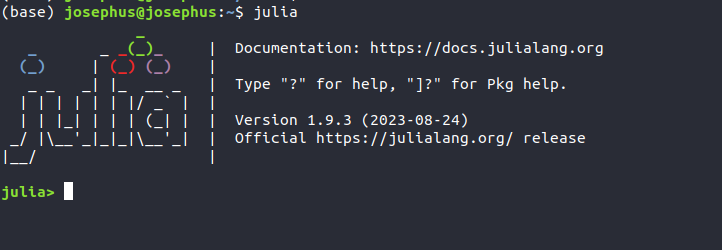
This all should install Julia v1.9.3 in your computer.

But also here I would rather recommend:

scoop install miniconda
conda init

And then to follow the instructions for conda.

Julia REPL

After installation, fire on your console the command julia . — You will then be in the REPL of Julia — similar to how you know it from Python, R, Ruby, etc.
Installing Some Julia Packages

Let us install some useful packages for handling packages (we won’t use them in this session, but probably in a later session):

# import Pkg
using Pkg       # or: import Pkg

# install Package Templates (for creating Julia Packages later)
Pkg.add("PkgTemplates")

# install also a useful package for Julia Package development
Pkg.add("Revise")

# install the Web framework
Pkg.add("Genie")

# and from then on, after successful installation, you can import them:
using PkgTemplates
using Revise
using Genie

# other useful packages
Pkg.add("Plots")                     # for plots

You can import packages either by using packagename or import packagename. In case of using, all variables, functions and objects which were declared to be export-ed are directly available for the rest of the session, while import requires you to use dot notation after the packagename, which can be annoying.

# let's say MyPackage is exporting a function and a variable: 
# my_func, my_var

using MyPackage
my_func(my_var)      # immediately avilable after `using`
import MyPackage
MyPackage.my_func(MyPackage.my_var) # more specific, but one has to write
# the packagename explicitely
# you could however explicitely import, to not to have 
# to type always `MyPckage.` 
import MyPackage: my_func, my_var

# after that, one can directly call the function or variable
my_func(my_var)

Let’s Define Functions

function mysum(x, y)
    x + y
end

mysum(3, 5)  ## 8

So the function definition is very similar to Python, just that we use function instead of def, we don’t need a : at the end of the first line, but an end which marks in Julia the end of a block (which Python usually marks by using indentation changes).

Like all functional languages, the last expression’s value gets returned implicitly.

In contrast to Python, positional arguments and keyword arguments are strictly distinguished from each other through a ; and when calling the function, you are allowed to use x= only for keyword arguments.

Optional Arguments

work like in Python.

function mysum1(x, y=3)
    x + y
end

mysum1(3)    ## 6
mysum1(x=1)  ## error, since you can use `=` only for keyword arguments
mysum1(3, 4) ## 7


# define y as keyword argument
function mysum2(x; y, z=3)     # only arguments after the `;` are keyword arguments
    x + y
end

mysum2(1, 3)   ## error, because keyword args have to be called using `=`
mysum2(1, y=3) ## 7

Explicit return() or return like in Python is possible, but should be only used when it is not so clear otherwise that a value would be returned (e.g. if the value is not a final expression of a block).

function example_func(x, y)
    if x == 2 && y == 3
        println("Returning explicitely")
        return 5
    end
    
    # some other code
    
    # and then the return value:
    x + y
end

example_func(2, 3)
## Returning explicitely
## => 5

example_func(2, 4)
## => 6

Python’s *args and **kwargs

Using the splat operator — 3 dots following the variable — in contrast to Python’s variable-preceding * or **. It depends on whether the splat-ted variable is before or after the ; in the lambda-list (the arguments area) of a function, whether it takes the function of * or **.

# *args

function myvariadic_sum(args...)
    reduce(+, args)              # reduce is like Python functools' reduce
end

myvariadic_sum(1, 2, 3)          ## 6
myvariadic_sum(1, 2, 3, 4, 5, 6) ## 21

myargs = [1, 2, 3]
my_variadic_sum(myargs...)       ## 6

# **kwargs

function myvariadic_func(args...; kwargs...)
    println("args: $(join([x for x in args], ","))")
    println("kwargs: $kwargs")
end

myvariadic_func(1, 2, 3; Dict(:a => 1, :b => 2)...)
## args: 1,2,3
## kwargs: Base.Pairs(:a => 1, :b => 2)

Python’s dir() Command For Introspection

The Julia equivalent would be names() when introspecting a module and fieldnames() when introspecting object’s (Structure’s — equivalent of Python’s classes) fields.

As a functional language implementing multiple dispatch, however, the methods of a class are not defined inside the class, but outside the class.

So while in Python, with a single dir(PythonObject) command, one could see all fields (attributes, properties) and methods of the class at once,

in Julia, you have to run fieldnames(JuliaObject) to see the fields of the object and methodswith(JuliaObject)to see all methods listed which use the class (struct) in any form in the method.

This is important to know for me, because I use introspection a lot when programming with Python.

Control Structures

While in Python, changing the indentation marks the beginning or end of a new block, in Julia, the keyword end is marking the end of a block and not some whitespaces.

Conditionals

Are like Python, except that and is && and or is ||

If-elseif-else

Instead of elif in Python, use elseif and don’t forget to end the entire block with an end (like in Ruby).

a = 1
b = 3
if a > b
    println("$a > $b")
elseif a == b
    println("$a == $b")
else
    println("$a < $b")
end

## a < b

If-Oneliner

In python, we can have one-liner x if 1 == 1 else y . In Julia, one can use the one-liner conditional as we know from C:

1 == 1? true : false ## this returns true

For Loop

For loops are probably the most useful looping in Python. Also here, don’t forget to use end at the end when you leave the indentation.

You can use for loops exactly like in Python.

for x in [1, 2, 3]
    println(x)
end

## prints
## 1
## 2
## 3

for (i, x) in enumerate(['a', 'b', 'c'])
    println(i, x)
end

## 1a
## 2b
## 3c

While Loop

Is also just the difference that you don’t need a : at the end of the condition and you need end at the end of the block.

counter = 1
while counter < 10
    println(counter)
    counter += 1
end

## prints 1 to 9 each number in a new line

List Comprehension

Julia overtook List Comprehensions from Python.

julia> [x for x in [1, 2, 3, 4, 5]]
5-element Vector{Int32}:
 1
 2
 3
 4
 5

julia> [x for x in [1, 2, 3, 4, 5] if x < 3]
2-element Vector{Int32}:
 1
 2

julia> [x < 3 ? x : 10 for x in [1, 2, 3, 4, 5]]
5-element Vector{Int32}:
  1
  2
 10
 10
 10

# nested for loop
julia> [(x, y) for x in [1, 2, 3, 4, 5], y in "abcdef"]
5×6 Matrix{Tuple{Int32, Char}}:
 (1, 'a')  (1, 'b')  (1, 'c')  (1, 'd')  (1, 'e')  (1, 'f')
 (2, 'a')  (2, 'b')  (2, 'c')  (2, 'd')  (2, 'e')  (2, 'f')
 (3, 'a')  (3, 'b')  (3, 'c')  (3, 'd')  (3, 'e')  (3, 'f')
 (4, 'a')  (4, 'b')  (4, 'c')  (4, 'd')  (4, 'e')  (4, 'f')
 (5, 'a')  (5, 'b')  (5, 'c')  (5, 'd')  (5, 'e')  (5, 'f')

 [(x, y) for x in [1, 2, 3, 4, 5] for y in "abcdef"]
30-element Vector{Tuple{Int32, Char}}:
 (1, 'a')
 (1, 'b')
 (1, 'c')
 (1, 'd')
 (1, 'e')
 (1, 'f')
 (2, 'a')
 (2, 'b')
 (2, 'c')
 ⋮
 (4, 'e')
 (4, 'f')
 (5, 'a')
 (5, 'b')
 (5, 'c')
 (5, 'd')
 (5, 'e')
 (5, 'f')

# parallel looping with zip()
julia> [(x, y) for (x, y) in zip([1, 2, 3, 4, 5], "abcdef")]
5-element Vector{Tuple{Int32, Char}}:
 (1, 'a')
 (2, 'b')
 (3, 'c')
 (4, 'd')
 (5, 'e')

Variable Assignment

Multiassignment is possible like in Python:

a, b, c = 1, 2, 3
# swap
a, b = b, a

With Optional Typing

Like Python’s optional Types, but much more performant, since compiled, Julia gives you the possibility to add Type hints for the compiler which mostly leads to significant speed gains, since type-checks become unnecessar this way. The most basic type is T from which all types are originating. Julia has a hierarchically ordered Typing system. (Similar to Haskell). But in contrast to Haskell, the typing is optional. Types can be attached to variables using the :: operator. An can be composed (e.g. in arrays and nested arrays or Vectors). Also the type hints of Python can expressed composed types.

a::Int64, b::Int8, c::Float64 = 1, 2, 3
typeof(a) ## In64
typeof(b) ## Int8
typeof(c) ## Float64

Define New (Composite) Types Using Structs and Apply Multiple Dispatch

Python classes can be created by Structures/Structs. Different than Python, all functions are methods. And not just methods, but multiple dispatch methods. Therefore, when defining functions, you can determine which type an argument should be of. And the definition you give will be only used, when the function/method call was done with the matching set of argument types.

struct Point
    x::Float64
    y::Float64
end

p1 = Point(1, 3)  ## Point(1.0, 3.0)
p2 = Point(5, 9)  ## Point(5.0, 9.0)

# define a method which deterines how to add them
function add(point1::Point, point2::Point)
    Point(point1.x + point2.x, point1.y + point2.y)
end

add(p1, p2)    ## Point(6.0, 12.0)

# The beauty of multiple dispatch is, you can import any existing methods
# and extend them for your type.
# e.g. + is from the Base package.
# if you try to extend directly:
julia> function +(point1::Point, point2::Point)
           Point(point1.x + point2.x, point1.y + point2.y)
       end
ERROR: error in method definition: function Base.+ must be explicitly imported to be extended

# you get this error.
# you do it correctly by:

import Base.+

julia> function +(point1::Point, point2::Point)
           Point(point1.x + point2.x, point1.y + point2.y)
       end
+ (generic function with 208 methods)

# and now you can use the + operator for the points
p1 + p2       ## Point(6.0, 12.0)

Multiple Dispatch makes the Object system very powerful, because in contrast to traditional C/C++, Java, thus also Python-like single dispatch OOP, it allows you to really implement the Open-Closed Principle and true Polymorphism which is truly extensible.

Types and Structures We Know From Python

Most of the types we know from Python exist also in Julia. We don’t have to use Type hints and could use Julia just like Python (and would be still much faster than Python).

# Python's `int`
# Julia has signed and unsigned integers
# default is Int64
# Int8, Int16, Int32, Int64, Int128
# UInt8, UInt16, UInt32, UInt64, UInt128

# Python's `float`
# Julia has floats
# Float16, Float32, Float64

# Python's `str`
# Julia uses only double quotes for strings
# String
"This is a string"
"""This is
a
multiline
string"""

# in contrast to Python, we have char's which a single quoted
# Char
'a', 'b', 'c'     ## ('a', 'b', 'c')

# and of course Bool
true, false

# and we have
Nothing               ## probably equivalent of None

One can define — using Union — some composite Types:

IntOrString = Union{Int,AbstractString}

We have Lists, Tuples, Dictionaries:

# Python's Lists correspond to one-dimensional Arrays with elements 
# of the Type Any - so Array{Any, 1} - which are also called Vectors
# in Julia and also use the [ ] notation like in Python.
julia_vector = [1, 2, 'a', "abc", 1.23]   # Vector{Any} or Array{Any, 1}

# Tuples are like Tuples in Python and use () - they are immutable
julia_tuple = (1, 2, 'a', "abc", 1.23)    # Tuple{Any}

# Dictinoaries are a little bit more bulky in their notation.
empty_dct = Dict()                        # Dict{Any, Any}
untyped_dct = Dict("a" => 1, "b" => 2, "c" => 3) # Python's dictionaries

typed_dct = Dict{String, Integer}("a" => 1, "b" => 2, "c" => 3) 
# Type-hinted dictionary

# we have get() method like in Python
get(untyped_dct, "a")          ## 1
get(untyped_dct, "d", Nothing) ## Nothing

# keys and values methods like in Python
keys(untyped_dct)              ## ("a", "b", "c")
values(untyped_dct)            ## (1, 2, 3)

# loop over a dictionary
[(k, v) for (k, v) in untyped_dct]

# check existence of key
"a" in keys(untyped_dct)
## true

# access value
untyped_dct["b"] ## 2

# merge dicts
merge(Dict("a" => 1), Dict("a" => 2, "b" => 3))

Dict{String, Int32} with 2 entries:
  "a" => 2
  "b" => 3

So, this was a glance into Julia. Obviously the Typing system requires a closer look from our side.

Further articles will follow. Please follow me and email subscribe to get noticed when I publish the next article about Julia.

Read about how to handle the packaging manager of Julia in https://readmedium.com/exploring-julias-package-manager-892ad1e7e7d1 .

Julia
Julialang
Python
Recommended from ReadMedium