avatarErik Engheim

Free AI web copilot to create summaries, insights and extended knowledge, download it at here

6332

Abstract

, '</span>splitlines<span class="hljs-string">', '</span>startswith<span class="hljs-string">', '</span>str ip<span class="hljs-string">', '</span>swapcas<span class="hljs-string">e', '</span>titl<span class="hljs-string">e', '</span>translat<span class="hljs-string">e', '</span>upper<span class="hljs-string">', '</span>zfill<span class="hljs-string">']</span></pre></div><p id="fff3">I had to edit this or the list would be too long. Of course, with more capable Python REPL environments such as <a href="https://bpython-interpreter.org">bpython</a> you can just type a string, write a dot and hit tab to get a list of relevant methods:</p><div id="510f"><pre>>>> <span class="hljs-string">"hello"</span>. ┌────────────────────────────────────────────────────────┐ │ capitalize casefold <span class="hljs-keyword">center</span> <span class="hljs-built_in">count</span> │ │ encode endswith expandtabs <span class="hljs-keyword">find</span> │ │ format format_map <span class="hljs-built_in">index</span> isalnum │ └────────────────────────────────────────────────────────┘</pre></div><p id="5bcd">In Python if you want to lookup some online help on a function or method you can use the <code>help</code> function. To get info about how to use the <code>print</code> function, I would write:</p><div id="83d2"><pre><span class="hljs-meta prompt_">>>></span> <span class="language-python"><span class="hljs-built_in">help</span>(<span class="hljs-built_in">print</span>)</span></pre></div><p id="e8d9">This would produce the following output:</p><figure id="2882"><img src="https://cdn-images-1.readmedium.com/v2/resize:fit:800/1*qCWZPqzm-9FxxTRhivRaEg.png"><figcaption>Showing online help in Python</figcaption></figure><h2 id="2f21">Julia Documentation</h2><p id="00d8">Documentation in Julia is both a strength and weakness. Being a much younger language, the developers have not gotten time to document every library to the same extent as with Python. However, being younger also gives an opportunity to think fresh about documentation. Julia doc strings, which are used to document Julia functions and types, use markdown and are thus styled when looked up.</p><p id="a443">Compare the documentation of <code>print</code> in Julia with that of Python. I would argue this is much more helpful, as it gives nice REPL session examples to help you understand how the function is used.</p><figure id="3705"><img src="https://cdn-images-1.readmedium.com/v2/resize:fit:800/1*YS-2FAYgYHeGBu3odIW9ag.png"><figcaption></figcaption></figure><p id="2cb7">In addition, example code is heavily used and this code in typically run in unit-tests to make sure it is always valid. Julia has support for marking of code examples inside text strings to be tested. Here is another arbitrary example showing the <code>capitalize</code> function for strings. Again you can see helpful code examples. There are even mentions of similar types of functions such as <code>lowercase</code>, <code>titlecase</code> and <code>uppercasefirst</code>.</p><figure id="88c5"><img src="https://cdn-images-1.readmedium.com/v2/resize:fit:800/1*Z4y6cdImZ4378oKgSwWXCQ.png"><figcaption></figcaption></figure><p id="1f75">In Python you find much less helpful information. There are no code examples or references to related method:</p><div id="7527"><pre><span class="hljs-attribute">Help</span> <span class="hljs-literal">on</span> method_descriptor:</pre></div><div id="d4c8"><pre><span class="hljs-built_in">upper</span>(self, /) Return <span class="hljs-keyword">a</span> copy <span class="hljs-keyword">of</span> <span class="hljs-keyword">the</span> <span class="hljs-keyword">string</span> converted <span class="hljs-built_in">to</span> uppercase.</pre></div><p id="d5df">However, as soon as you go outside of the standard libraries, you may get frustrated by lacking documentation in Julia. It varies. For the more popular libraries, I think the documentation is very good.</p><p id="290d">It is also worth understanding that Julia documentation lookup is not based on calling a function like <code>help</code>, but on issuing statement in help mode. Hence you could write any kind of expression on the Julia REPL and decide you want help for it. Just jump to the start of the line and hit <code>?</code>, this will take you into help mode and the prompt changes to a yellow <code>help></code>. Thus you could ask for help for something like an addition:</p><figure id="6731"><img src="https://cdn-images-1.readmedium.com/v2/resize:fit:800/1*NVnJrfeP5l4RVtN4NcmkKA.png"><figcaption></figcaption></figure><p id="edd6">Julia deduces that you want help for the <code>+</code> operator from this expression. In fact this is very much a necessity for Julia as functions in Julia have multiple methods. Every combination of arguments calls a different method which has different behavior and documentation. For example, the multiply operator could be used to multiply numbers or concatenate strings.</p><h2 id="93a7">Julia Function and Method Lookup</h2><p id="c3cb">In object-oriented language, you typically type an object, write a dot and hit tab to get some completions.</p><figure id="bcb3"><img src="https://cdn-images-1.readmedium.com/v2/resize:fit:800/1*-Qp8F3ml1kBGA0bpXWhY_A.png"><figcaption>Completions in Python for range object.</figcaption></figure><p id="66ff">But Julia is not object-oriented. It is more functional, so how do you discover functionality? You can lookup what methods involve a particular type with the <code>methodswith</code> function call. I have edit this output slightly for clarity and highlighted the method names.</p><div id="b40d"><pre><span class="hljs-keyword">julia> </span>methodswith(StepRange) [<span class="hljs-number">1</span>] findfirst(p::Union) in <span class="hljs-keyword">Base </span><span class="hljs-built_in">at</span> array.<span class="hljs-keyword">jl:1915 </span>[<span class="hljs-number">2</span>] firstindex(::StepRange) in <span class="hljs-keyword">Base </span><span class="hljs-built_in">at</span> range.<span class="hljs-keyword">jl:568 </span>[<span class="hljs-number">3</span>] float(r::StepRange) in <span class="hljs-keyword">Base </span><span class="hljs-built_in">at</span> float.<span class="h

Options

ljs-keyword">jl:899 </span>[<span class="hljs-number">4</span>] getindex(r::StepRange, s::AbstractRange) in <span class="hljs-keyword">Base </span><span class="hljs-built_in">at</span> range.<span class="hljs-keyword">jl:766 </span>[<span class="hljs-number">5</span>] intersect(r::StepRange, s::StepRange) in <span class="hljs-keyword">Base </span><span class="hljs-built_in">at</span> range.<span class="hljs-keyword">jl:873 </span>[<span class="hljs-number">6</span>] isempty(r::StepRange) in <span class="hljs-keyword">Base </span><span class="hljs-built_in">at</span> range.<span class="hljs-keyword">jl:517 </span>[<span class="hljs-number">7</span>] length(r::StepRange) in <span class="hljs-keyword">Base </span><span class="hljs-built_in">at</span> range.<span class="hljs-keyword">jl:558 </span>[<span class="hljs-number">8</span>] map(::Type{T}, r::StepRange) where T<:Real in <span class="hljs-keyword">Base </span><span class="hljs-built_in">at</span> abstractarray.<span class="hljs-keyword">jl:1104 </span>[<span class="hljs-number">9</span>] step(r::StepRange) in <span class="hljs-keyword">Base </span><span class="hljs-built_in">at</span> range.<span class="hljs-keyword">jl:543 </span>[<span class="hljs-number">10</span>] view(r1::StepRange, r2::AbstractRange) in <span class="hljs-keyword">Base </span><span class="hljs-built_in">at</span> <span class="hljs-keyword">subarray.jl:194</span></pre></div><p id="3f8b">While less convenient than the Python counterpart, it is worth observing that this lets you discover more functionality. For example, the Python version never lets you know that ranges can be used with the <code>map</code> function. Julia however does because it is not limited to methods attached to an object. It shows all methods which may involved the range type.</p><p id="5cf1">However, this is not how a functional programmer thinks anyway. I know this is hard to grasp if you have done OOP for many years. I know because that was what I was used to. I could not fathom for years how people could organize anything with just functions or find functionality. OOP way of doing things seems like the natural way. But as you get accustomed to functional programming, you realize that it isn’t the natural way. It is just what you happen to be used to. Now I am used to functional programming and find OOP style difficult to deal with. I want to search for a function to call, but it is hidden behind an object as a method. I have to figure out what type the function I am looking for is attached to. That seems like a detour.</p><h1 id="3b8a">Introspection</h1><p id="4cd0">In Python there are various ways to check what variables exit in current scope in various IDEs. How does this work in Julia? You can lookup this kind of information on the REPL with the <code>varinfo</code> function.</p><div id="dcdc"><pre><span class="hljs-meta prompt_">julia></span><span class="language-julia"> r = Rect(<span class="hljs-number">2</span>, <span class="hljs-number">4</span>, <span class="hljs-number">20</span>, <span class="hljs-number">40</span>) </span>Rect{Int64}(2, 4, 20, 40)</pre></div><div id="274e"><pre><span class="hljs-meta prompt_">julia></span><span class="language-julia"> p = Point(<span class="hljs-number">8</span>, <span class="hljs-number">4</span>) </span>Point{Int64}(8, 4)</pre></div><div id="f054"><pre><span class="hljs-meta prompt_">julia></span><span class="language-julia"> v = Vec2D(<span class="hljs-number">10</span>, <span class="hljs-number">20</span>) </span>Vec2D{Int64}(10, 20)</pre></div><div id="025e"><pre><span class="hljs-meta prompt_">julia></span><span class="language-julia"> varinfo() </span> name size summary
–––––––––––––––– ––––––––––– ––––––––––––––– Base Module
Core Module
InteractiveUtils 266.594 KiB Module
Main Module
ans 0 bytes typeof(varinfo) p 16 bytes Point{Int64}
r 32 bytes Rect{Int64}
v 16 bytes Vec2D{Int64}</pre></div><p id="381d">Julia IDE functionality through VS Code gives similar capability.</p><figure id="6085"><img src="https://cdn-images-1.readmedium.com/v2/resize:fit:800/1*VX-aXRLZdLHS6AhBOxEN1w.png"><figcaption></figcaption></figure><h1 id="d7cf">Is Julia Really Fast?</h1><p id="2a67">This is the big question for a lot of newcomers to Julia. Many come from Python, Matlab and R looking for higher performance. They may consider Go, Rust, C/C++, Swift and Julia. Why pick Julia? It is big enough topic that I moved this into its own story: <a href="https://erik-engheim.medium.com/is-julia-really-fast-12cd7caef96b">Is Julia Really Fast?</a></p><p id="3bfb">But we can cover the major selling points here. Julia allows similar workflows as in Python, Matlab and R because it is a dynamic language as well. You can modify code on the fly, re-run your functions, plot new data etc, all without recompile and reloading your whole program as C/C++, Rust and Go would require. And of course Julia has a rich set of libraries for scientific computing missing in many of the other languages. E.g. I did a lot of Swift programming in the past. Swift is great for GUI programming, but it really lacks scientific libraries.</p><h2 id="57cb">Julia is a First Class Numerical Programming Language</h2><p id="5530">Julia unlike the other languages is also optimized for numerical computing. Below you can e.g. see the number hierarchy in Julia. You can even add your own custom number types and use in algorithms without any performance penalty. You can write algorithms specifically for signed integers without specifying bit sizes. You can use fractions instead of floating point numbers for accurate calculations.</p><figure id="5dbe"><img src="https://cdn-images-1.readmedium.com/v2/resize:fit:800/1*-KqTYRHo7Xp2oKaJ9qe1eQ.png"><figcaption></figcaption></figure><h1 id="6125">Work in Progress…</h1><p id="f94e">This was a bigger topic than I first realized, so I am cutting in short for now, but will add a lot more info here later. I will have to discuss, for example, how you can learn a lot of Julia coding by looking at the source code and how easy that is.</p></article></body>

Julia Advice to Curious Python Developers

Are you a long term Python developer and interested in exploring Julia?
This is an random assortment or remarks based on questions and observations I have made of people transitioning to Julia from Python.

What Julia Version Does a Course or Book Need to Cover?

The current version of Julia is 1.6, and certainly you want to learn the latest version. However, good books or courses may not have been made for the very latest version. What to look out for?

Anything made prior to 1.0 will be more difficult as there has been a number of syntax changes. Curiously, I still get positive feedback from people who have watched my video course: Getting Started With Julia.

It has surprised me since that course was made for Julia v0.5, but many viewers have made it work anyway, by simply looking up the changes. However, this may not work for all. The safest bet is any course or video made for Julia 1.0 or higher. Above 1.3 is ideal as some important changes happened then. My more up-to-date Julia for Beginners book mostly targets v1.5.

Ultimately you have to balance how good you think the teaching material is against how up-to-date you want it.

What Development Environment Should I Use?

Today the most recommended environment is VS Code. It has the strongest Julia support and lots of people already use it. But what if you think VS Code is a bloated memory hog and don’t want to use it? Will Julia be impractical to use without it? Not at all. In fact, I personally use a much simpler text editor TextMate. The trick is to understand how you use simple editors effectively together with Julia’s interactive command line (REPL).

I made this video specifically because it is hard to get across in writing how you work effectively with a dynamic language in a command line. Even if you are an experienced Python developer, there is likely a lot of useful tricks for you to learn in this video. In fact I have a whole series of videos help you get use to the Julia REPL:

Documentation and Discovering Functionality

Python developers are used to extensive documentation and use a lot of introspection features such as dir to get what methods are available on an object.

Python

For instance a Python developer can look up methods on an object with the dir() method:

>>> dir("hello")
[capitalize', 'casefold', 'center', 'count', 'encode', 'endswith', 'expandtabs
', 'find', 'format', 'format_map', 'index', 'isalnum', 'isalpha', 'isasci
i', 'isdecimal', 'isdigit', 'isidentifier', 'islower', 'isnumeric', 'ispr
intable', 'isspace', 'istitle', 'isupper', 'join', 'ljust', 'lower', 'lst
rip', 'maketrans', 'partition', 'replace', 'rfind', 'rindex', 'rjust', 'r
partition', 'rsplit', 'rstrip', 'split', 'splitlines', 'startswith', 'str
ip', 'swapcase', 'title', 'translate', 'upper', 'zfill']

I had to edit this or the list would be too long. Of course, with more capable Python REPL environments such as bpython you can just type a string, write a dot and hit tab to get a list of relevant methods:

>>> "hello".
┌────────────────────────────────────────────────────────┐
│ capitalize   casefold     center       count           │
│ encode       endswith     expandtabs   find            │
│ format       format_map   index        isalnum         │
└────────────────────────────────────────────────────────┘

In Python if you want to lookup some online help on a function or method you can use the help function. To get info about how to use the print function, I would write:

>>> help(print)

This would produce the following output:
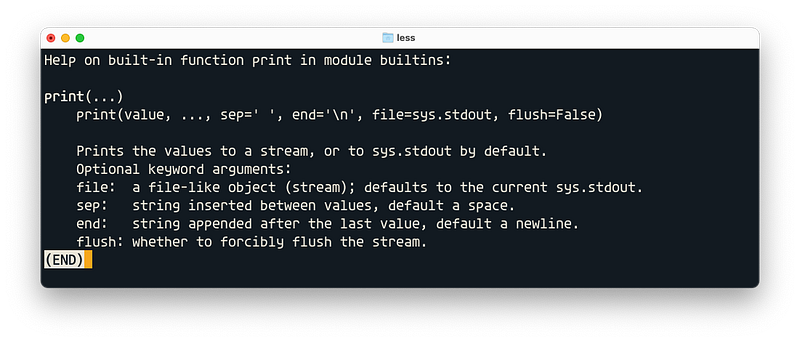
Showing online help in Python

Julia Documentation

Documentation in Julia is both a strength and weakness. Being a much younger language, the developers have not gotten time to document every library to the same extent as with Python. However, being younger also gives an opportunity to think fresh about documentation. Julia doc strings, which are used to document Julia functions and types, use markdown and are thus styled when looked up.

Compare the documentation of print in Julia with that of Python. I would argue this is much more helpful, as it gives nice REPL session examples to help you understand how the function is used.
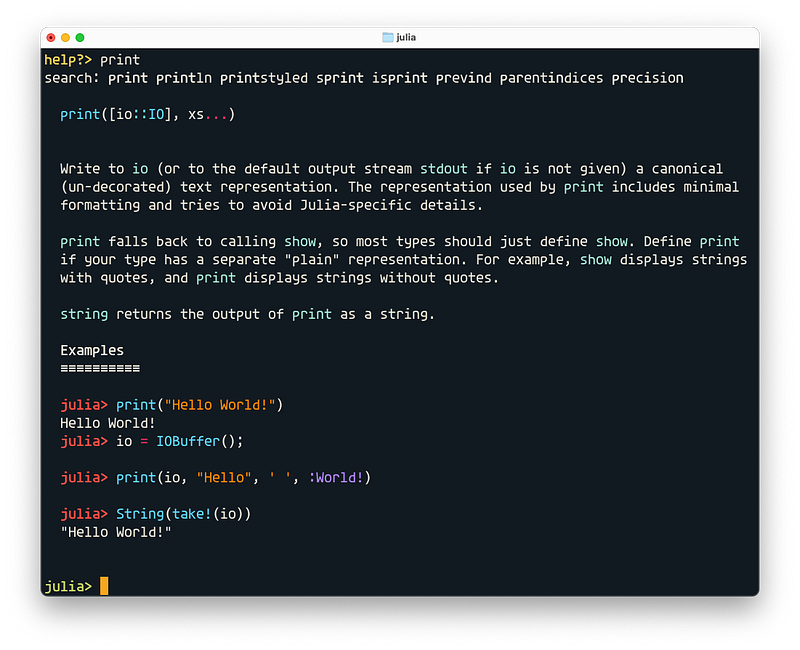
In addition, example code is heavily used and this code in typically run in unit-tests to make sure it is always valid. Julia has support for marking of code examples inside text strings to be tested. Here is another arbitrary example showing the capitalize function for strings. Again you can see helpful code examples. There are even mentions of similar types of functions such as lowercase, titlecase and uppercasefirst.
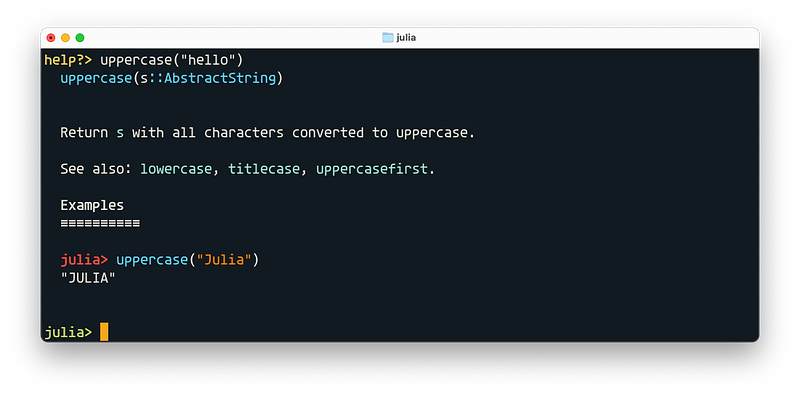
In Python you find much less helpful information. There are no code examples or references to related method:

Help on method_descriptor:
upper(self, /)
    Return a copy of the string converted to uppercase.

However, as soon as you go outside of the standard libraries, you may get frustrated by lacking documentation in Julia. It varies. For the more popular libraries, I think the documentation is very good.

It is also worth understanding that Julia documentation lookup is not based on calling a function like help, but on issuing statement in help mode. Hence you could write any kind of expression on the Julia REPL and decide you want help for it. Just jump to the start of the line and hit ?, this will take you into help mode and the prompt changes to a yellow help>. Thus you could ask for help for something like an addition:
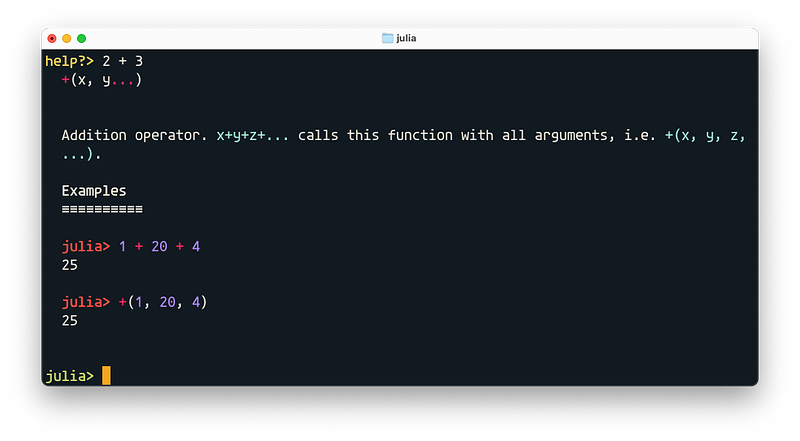
Julia deduces that you want help for the + operator from this expression. In fact this is very much a necessity for Julia as functions in Julia have multiple methods. Every combination of arguments calls a different method which has different behavior and documentation. For example, the multiply operator could be used to multiply numbers or concatenate strings.

Julia Function and Method Lookup

In object-oriented language, you typically type an object, write a dot and hit tab to get some completions.
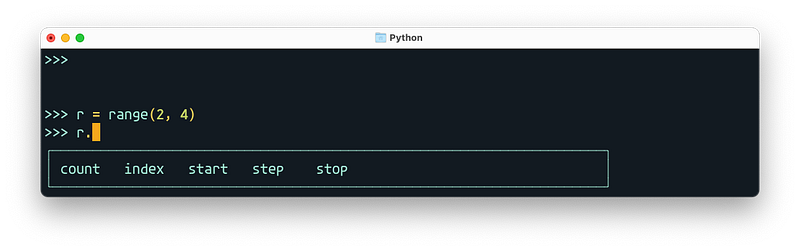
Completions in Python for range object.

But Julia is not object-oriented. It is more functional, so how do you discover functionality? You can lookup what methods involve a particular type with the methodswith function call. I have edit this output slightly for clarity and highlighted the method names.

julia> methodswith(StepRange)
[1] findfirst(p::Union) in Base at array.jl:1915
[2] firstindex(::StepRange) in Base at range.jl:568
[3] float(r::StepRange) in Base at float.jl:899
[4] getindex(r::StepRange, s::AbstractRange) in Base at range.jl:766
[5] intersect(r::StepRange, s::StepRange) in Base at range.jl:873
[6] isempty(r::StepRange) in Base at range.jl:517
[7] length(r::StepRange) in Base at range.jl:558
[8] map(::Type{T}, r::StepRange) where T<:Real in Base at abstractarray.jl:1104
[9] step(r::StepRange) in Base at range.jl:543
[10] view(r1::StepRange, r2::AbstractRange) in Base at subarray.jl:194

While less convenient than the Python counterpart, it is worth observing that this lets you discover more functionality. For example, the Python version never lets you know that ranges can be used with the map function. Julia however does because it is not limited to methods attached to an object. It shows all methods which may involved the range type.

However, this is not how a functional programmer thinks anyway. I know this is hard to grasp if you have done OOP for many years. I know because that was what I was used to. I could not fathom for years how people could organize anything with just functions or find functionality. OOP way of doing things seems like the natural way. But as you get accustomed to functional programming, you realize that it isn’t the natural way. It is just what you happen to be used to. Now I am used to functional programming and find OOP style difficult to deal with. I want to search for a function to call, but it is hidden behind an object as a method. I have to figure out what type the function I am looking for is attached to. That seems like a detour.

Introspection

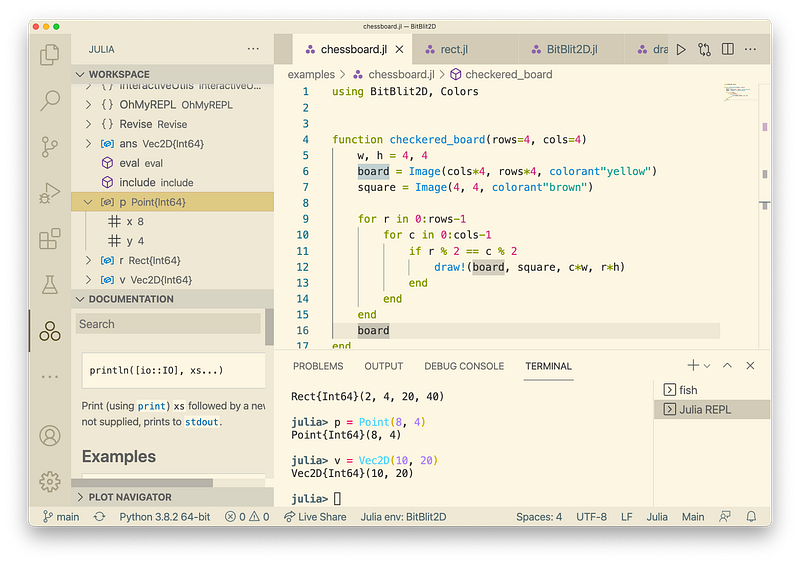
In Python there are various ways to check what variables exit in current scope in various IDEs. How does this work in Julia? You can lookup this kind of information on the REPL with the varinfo function.

julia> r = Rect(2, 4, 20, 40)
Rect{Int64}(2, 4, 20, 40)
julia> p = Point(8, 4)
Point{Int64}(8, 4)
julia> v = Vec2D(10, 20)
Vec2D{Int64}(10, 20)
julia> varinfo()
  name                    size summary        
  –––––––––––––––– ––––––––––– –––––––––––––––
  Base                         Module         
  Core                         Module         
  InteractiveUtils 266.594 KiB Module         
  Main                         Module         
  ans                  0 bytes typeof(varinfo)
  p                   16 bytes Point{Int64}   
  r                   32 bytes Rect{Int64}    
  v                   16 bytes Vec2D{Int64}

Julia IDE functionality through VS Code gives similar capability.
Is Julia Really Fast?

This is the big question for a lot of newcomers to Julia. Many come from Python, Matlab and R looking for higher performance. They may consider Go, Rust, C/C++, Swift and Julia. Why pick Julia? It is big enough topic that I moved this into its own story: Is Julia Really Fast?

But we can cover the major selling points here. Julia allows similar workflows as in Python, Matlab and R because it is a dynamic language as well. You can modify code on the fly, re-run your functions, plot new data etc, all without recompile and reloading your whole program as C/C++, Rust and Go would require. And of course Julia has a rich set of libraries for scientific computing missing in many of the other languages. E.g. I did a lot of Swift programming in the past. Swift is great for GUI programming, but it really lacks scientific libraries.

Julia is a First Class Numerical Programming Language

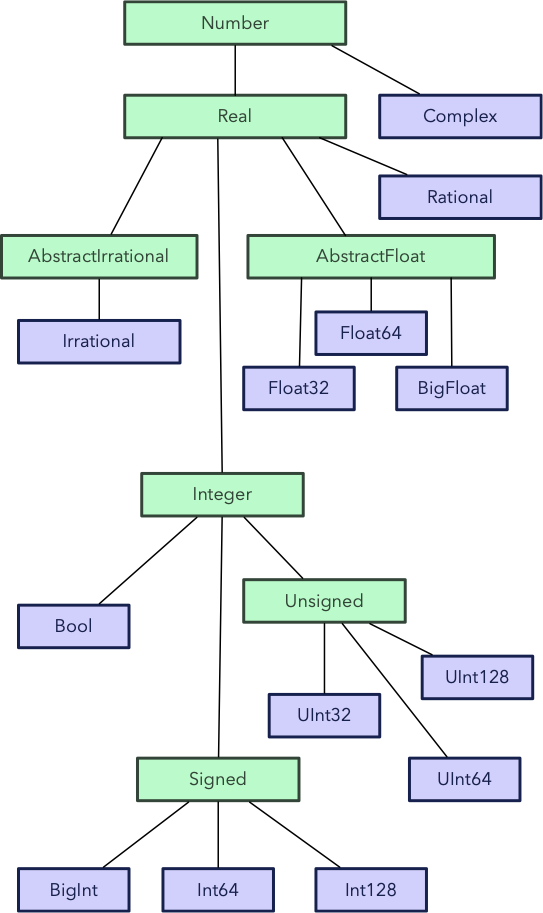
Julia unlike the other languages is also optimized for numerical computing. Below you can e.g. see the number hierarchy in Julia. You can even add your own custom number types and use in algorithms without any performance penalty. You can write algorithms specifically for signed integers without specifying bit sizes. You can use fractions instead of floating point numbers for accurate calculations.
Work in Progress…

This was a bigger topic than I first realized, so I am cutting in short for now, but will add a lot more info here later. I will have to discuss, for example, how you can learn a lot of Julia coding by looking at the source code and how easy that is.

Julialang
Python
Beginner
Advice
Programming
Recommended from ReadMedium