
Curated and distributed into JavaScript
JavaScript Variables Explained With Love Triangles
If you can change your girlfriend, she is a variable

If your girlfriend replaces you with someone else, you are a variable in her life program. But I can assure you that JavaScript coding is not as hard as a break-up.
Maybe .NET Framework is harder than break-ups, but I don’t know much about dot net.
Variable is something that can vary. JavaScript variables are boxes for storing different values at different times. A variable’s journey begins when you first declare it in the code.
For example, if you have no girlfriend, it means that your girlfriend is undefined at this time. In JavaScript, you declare variables with the keyword, ‘var.’
var girlfriend;Here,
1. If you are using Google Chrome, just hit "Command + Shift + i" on Mac and "Ctrl + Shift + i" on PC, to open developer tools. When developer tools open, click on Console in the top row. Then click in front of the arrow > sign. You'll see a blinking cursor; it's a command prompt. Google Chrome comes with the v8 JavaScript Engine to understand and interpret all commands.
2. Type: var girlfriend;
3. When you hit enter key, the console shows: undefined. It means that variable girlfriend is undefined. Every variable is undefined before it is assigned a value.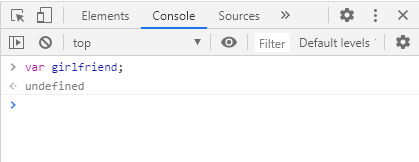
Strings of text in the variables
Suppose you have a girlfriend, and her name is Stephanie. If you are thinking about some other girl, when you are with her, she is of type variable.
girlfriend = 'Stephenie';Here,
1. The sign "=" is not an equal to sign but an "assignment operator". The left side is for variables, and the right side is for the values of those variables.
2. You have assigned the variable the text Stephenie at this time, but it can change in the future.
3. The name of your girlfriend is in single quotes because it is a "String" of letters. For text data, don't forget to use the single quotes.
4. The last semicolon is optional. The line of code that ends with a semicolon is called a statement.
5. When you think about your girlfriend, your mind always provides you the name and image of Stephenie. Similarly, the computer also provides the value of 'Stephenie' whenever you call the variable girlfriend.
6. Now type: girlfriend = 'Stephenie';
7. Notice that you did not use the keyword "var" this time because you don't need to declare the variable again to change its value.
9. Hit enter, and you will see the response; it should be 'Stephenie.'Once your girlfriend realizes that you are not interested in her because your eyes are wandering towards Emma, she dumps you. But since Emma has a boyfriend she loves, you end up having no girlfriend at all.
JavaScript can handle such sad scenarios as well:
girlfriend = null;Here,1. The keyword 'null' means no value.
2. If you write this in the developer console and then call the variable by typing girlfriend, you will notice that the value of the variable has changed to null.
3. There is a subtle difference between undefined and null. Undefined means the variable has been declared but has not been assigned a value. But null is an assigned value.
4. In the console, type: girlfriend = null;
5. The response should show 'null.'
6. Notice that we don't use the keyword 'var' after the first declaration.Then because of your genuine desire for Emma — or your bad wishes for the couple, Emma leaves her boyfriend and becomes your girlfriend.
JavaScript can manage this state of affairs easily.
girlfriend = 'Emma';Here,
1. When you type above in the console, it shows 'Emma' as the new value of the variable girlfriend.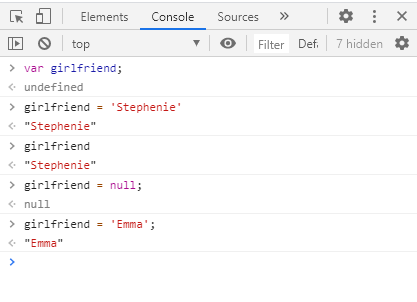
Numbers stored in variables
JavaScript can handle text values like names as well as numbers. If Stephenie was your girlfriend for six months, and Emma went back to her old boyfriend after breaking your heart, JavaScript can tackle this betrayal as well.
var timeWithStephenie = 6;
var timeWithEmma = 4;
Here,
1. Notice how we can use long names of variables. The style of formatting is called Camel Case; you capitalize every first letter of a new word except the very first letter.
2. Type the above in the console command prompt.
3. When you hit enter, the console returns undefined, but the variables have been assigned value, and if you call them, correct values will be displayed. How to call a variable? Just type its name in the console.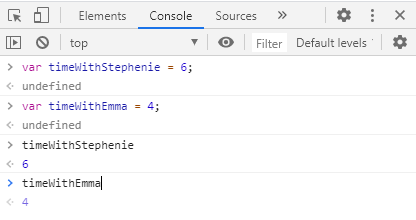
You can also find out the total length of your love life using JavaScript; add the two variables using a plus ‘+’ sign. The result should be ten months of love life.
var loveLife;
lovelife = timeWithStephenie + timeWithEmma;
Here,
1. You defined the loveLife variable.
2. You assigned loveLife to the sum of timeWithStephenie and timeWithEmma.
3. The console will return the value: 10.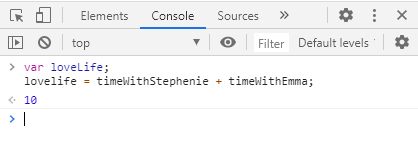
Different types of data can be stored in variables
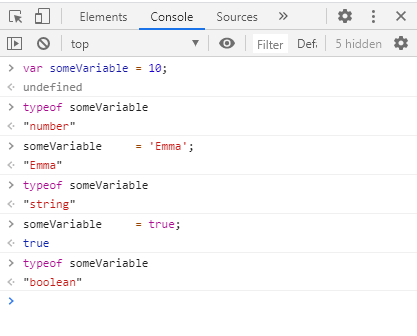
JavaScript is a loosely typed and dynamic language.
The variables do not have a strict type — it is loosely typed. It means the variable can have a number value stored in it at one time, and then a string value can be stored in it as well when needed — it is a dynamic language.
var someVariable = 10;    // someVariable is a number at start
someVariable     = 'Emma'; // someVariable is now a string
someVariable     = true;  // someVariable is now a boolean
Six primitive types of data values that can be stored in a variable: Number, String, Boolean, BigInt, undefined, and Symbol. Other special primitives include null, object, and function types.
Naming conventions for JavaScript variables
Variable names can be short — like x and y — or more descriptive — like timeWithStephenie.
You have to follow some rules when naming JavaScript variables:
- Letters, digits, underscores, and $ signs can be used.
- A variable name must begin with a letter, underscore, or $ sign.
- Names are case sensitive — girlfriend and girlFriend are different variables.
- JavaScript keywords — also called reserved words — cannot be used as variable names. For example: null, undefined, var, function, and more. The JavaScript parser has special meanings for each of these keywords.
Which variable names are valid?var apples = 1; is valid.
var $apples = 3; is valid.
var _apples = 4; is valid.
var 5apples = 8; is not valid as it starts with a digit
var null = 9; is not valid as it uses a JavaScript keyword as name. If you type the last two in console, you get a red colored Syntax Error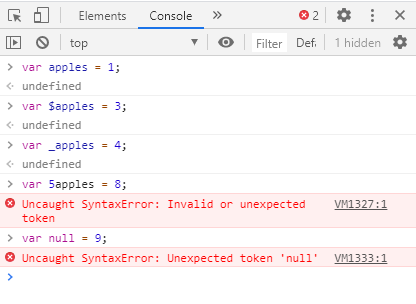
You can declare multiple variables in a single line by separating them with a comma and ending the statement with a semicolon.
var apples = 1, bananas = 3, oranges = 12;Here,
1. Notice that you use keyword 'var' only once at the start of the statement.
2. The statement returns undefined.
3. Calling all variables confirms that these have been assigned correctly.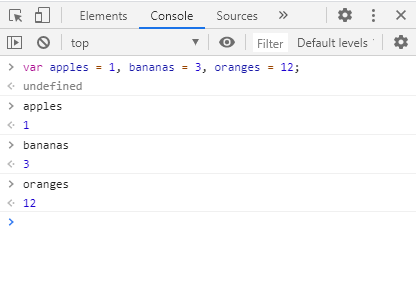
Conclusion
It is easy to learn JavaScript because every browser comes with developer tools. The tools make it easy to write JavaScript code and test it in the browser.
Variables can vary, and you can name them according to rules. You can assign them an undefined, null, text, or number value. You can store only certain data types in a variable, though JavaScript variables can be dynamically assigned different data types when needed. You can perform mathematical operations on numbers and concatenation operations on strings.
Keep trying and you’ll learn JavaScript coding. Happy hacking.


