avatarAlpha Orange

Free AI web copilot to create summaries, insights and extended knowledge, download it at here

10792

Abstract

id="a6ac">3. 使用Webpack 整合所有必要模組檔案。</p><figure id="11b6"><img src="https://cdn-images-1.readmedium.com/v2/resize:fit:800/1*P5WF1F3PLBHt47tNAF4xjQ.png"><figcaption></figcaption></figure><p id="e14e">可以看到打包好的檔案為 bundle.js 與 1.bundle.js 。</p><p id="5260">可以看到,打包好的檔案不是只有一個。合理的推斷就是webpack把AMD模組分離出去成為1.bundle.js。而從Chunks欄位(上圖黃色字部分)可以對應什麼js檔案會被打包在哪一個Chunk。</p><p id="8f09">5. 在網頁 index.html 載入 bundle.js</p><figure id="0162"><img src="https://cdn-images-1.readmedium.com/v2/resize:fit:800/1*4OY6GIR4unRivNzKS4mSDA.png"><figcaption>index.html</figcaption></figure><p id="e4a7">接這打開網頁,可以看到add()後的結果。</p><figure id="2667"><img src="https://cdn-images-1.readmedium.com/v2/resize:fit:800/1*qNKyIhuxcIzXAiJFShHDrA.png"><figcaption></figcaption></figure><p id="d923">F12進入Console</p><figure id="d6e7"><img src="https://cdn-images-1.readmedium.com/v2/resize:fit:800/1*DlC4-wCja7fQdDuAtH7bGQ.png"><figcaption>Chrome DEV Tools</figcaption></figure><p id="a186"><b>1.bundle.js</b> 是在 bundle.js 之後載入的。 如此也就說明了Webpack有容乃大,既能支援<b>同步方式(CommonJS)</b>也能<b>支援非同步(AMD)</b>方式載入模組。</p><h1 id="8013">詳細解說:</h1><p id="43c0">這個範例其實就是啟用了 Webpack 的 <b><a href="https://webpack.github.io/docs/code-splitting.html">Code Splitting</a>” 分拆程式碼功能。</b></p><blockquote id="71b7"><p><b><a href="https://webpack.github.io/docs/code-splitting.html">Code Splitting</a>” 分拆程式碼功能能把你的code依據語法把部分模組分離成區塊”chunks”檔案而不只是bundle,最後執行階段時會依照需求讀取部分區塊,這也就是Webpack非同步載入模組的實現。</b></p></blockquote><p id="1345">這篇範例中, bundle.js 是在看到require之後(如下)才下載 1.bundle.js。 而1.bundle.js 就是 myModule2.js 經過webpack 打包過後的內容。</p><p id="6a32"><b>AMD 非同步方式載入 AMD 模組:</b></p><div id="2ed5"><pre>require([<span class="hljs-string">'./myModule2'</span>], <span class="hljs-keyword">function</span> (<span class="hljs-params">math2</span>){ <span class="hljs-built_in">console</span>.<span class="hljs-built_in">log</span>(math2.add(<span class="hljs-number">5</span>,<span class="hljs-number">6</span>)); });</pre></div><figure id="c985"><img src="https://cdn-images-1.readmedium.com/v2/resize:fit:800/1*jLIMFtvxIlsimV6TqGhAjw.png"><figcaption>1.bundle.js (bundled from myModule2.js)</figcaption></figure><p id="6c53"><b>— — — — — — — — — — — — — — — — — — — — — — — — — — — — — —</b></p><h1 id="a21c">Ex 2a : CommonJS-style Load AMD Module</h1><p id="497b">如果改成</p><p id="3d81"><b>CommonJS 同步方式載入 AMD 模組:</b></p><div id="8f88"><pre><span class="hljs-keyword">var</span> math2 = <span class="hljs-built_in">require</span>(<span class="hljs-string">'./myModule2'</span>);</pre></div><ol><li>也就是 main.js改成如下</li></ol><figure id="bc65"><img src="https://cdn-images-1.readmedium.com/v2/resize:fit:800/1*WYYY6S0hyCstoh5_a-WjVw.png"><figcaption>main.js</figcaption></figure><p id="7519">2. 使用Webpack 整合所有必要模組檔案。</p><figure id="66b5"><img src="https://cdn-images-1.readmedium.com/v2/resize:fit:800/1*aYApUbI98-jRCmgdTle_uQ.png"><figcaption></figcaption></figure><p id="b1b4">可以看到 不再有 1.bundle.js 而是全部打包成 bundle.js。</p><p id="7309">結論:</p><blockquote id="05b6"><p><b>也就是說 Webpack 自動參考 語法 而判斷哪些模組是要被非同步載入,那些模組是同步載入。</b></p></blockquote><p id="570b"><b>AMD 非同步方式載入 AMD 模組:</b></p><div id="2cb0"><pre>require([<span class="hljs-string">'./myModule2'</span>], <span class="hljs-keyword">function</span> (<span class="hljs-params">math2</span>){ <span class="hljs-built_in">console</span>.<span class="hljs-built_in">log</span>(math2.add(<span class="hljs-number">5</span>,<span class="hljs-number">6</span>)); });</pre></div><p id="885f"><b>CommonJS 同步方式載入 AMD 模組:</b></p><div id="3cf2"><pre><span class="hljs-keyword">var</span> math2 = <span class="hljs-built_in">require</span>(<span class="hljs-string">'./myModule2'</span>);</pre></div><p id="2de8">除此之外,</p><blockquote id="90b9"><p>Webpack更還定義了 ★ <b>AMD 非同步方式載入 CommonJS 模組</b>,真的很妙!</p></blockquote><p id="81a3"><b>— — — — — — — — — — — — — — — — — — — — — — — — — — — — — —</b></p><h1 id="0a17">Ex 2b : Load CommonJS Module Asynchronous</h1><p id="a0f8"><b>CommonJS 同步方式載入 CommonJS 模組:</b></p><div id="bde8"><pre><span class="hljs-keyword">var</span> math1 = <span class="hljs-built_in">require</span>(<span class="hljs-string">'./myModule1'</span>);</pre></div><p id="2d5f"><b>Webpack定義之非同步方式(</b>require.ensure<b>)載入 CommonJS 模組:</b></p><div id="5c29"><pre><span class="hljs-built_in">require</span>.<span class="hljs-title function_">ensure</span>(<span class="hljs-string">'./myModule1'</span>,<span class="hljs-keyword">function</span>(<span class="hljs-params"><span class="hljs-built_in">require</span></span>){ <span class="hljs-keyword">var</span> math1 = <span class="hljs-built_in">require</span>(<span class="hljs-string">'./myModule1'</span>); <span class="hljs-variable language_">console</span>.<span class="hljs-title function_">log</span>(math1.<span class="hljs-title function_">add</span>(<span class="hljs-number">1</span>,<span class="hljs-number">5</span>)); });</pre></div><ol><li>也就是 main.js改成如下</li></ol><figure id="7ac0"><img src="https://cdn-images-1.readmedium.com/v2/resize:fit:800/1*5Q2mNPT0QCoJLDDeFWDIgg.png"><figcaption>main.js</figcaption></figure><p id="ea78">2. 使用Webpack 整合所有必要模組檔案。</p><figure id="addb"><img src="https://cdn-images-1.readmedium.com/v2/resize:fit:800/1*WSiLonJ09mpya5p1H3eW0w.png"><figcaption></figcaption></figure><p id="3ad1">可以看到 myModule1.js 和 myModule2.js 被個別打包成 1.bundle.js與2.bundle.js。</p><p id="4deb">F12進入Console</p><figure id="6044"><img src="https://cdn-images-1.readmedium.com/v2/resize:fit:800/1*F83V_6SpQbyjIBmH2lZQOA.png"><figcaption></figcaption></figure><p id="fbd8"><b>1.bundle.js 與 2.bundle.js 都</b>是在 bundle.js 之後載入的。</p><blockquote id="8c18"><p><b>Webpack 給了開發者很大的彈性,不管 CommonJS 或是 AMD 定義的模組都可以使用 同步 或 非同步方式載入模組,而這個分拆程式碼功能稱為 "Code Splitting”。 <a href="https://webpack.github.io/docs/code-splitting.html"></a></b><a href="https://webpack.github.io/docs/code-splitting.html">https://webpack.github.io/docs/code-splitting.html</a></p></blockquote><p id="f814"><b>— — — — — — — — — — — — — — — — — — — — — — — — — — — — — —</b></p><h1 id="509a">● — 接著我要們把 jQuery 踢出去。</h1><h1 id="f0be">Ex 2c : Split app and vendor code (CommonsChunkPlugin)</h1><p id="1b2b">因為會用到Webpack Plugin(外掛),所以要把webpack安裝在專案目錄內。</p><div id="a4ac"><pre>npm install webpack --<span class="hljs-built_in">save</span>-<span class="hljs-built_in">dev</span></pre></div><div id="809b"><pre>--<span class="hljs-built_in">save</span>-<span class="hljs-built_in">dev</span> : 代表專案開發時與webpack相依。如果沒有使用 --<span class="hljs-built_in">save</span>-<span class="hljs-built_in">dev</span> 這個參數,不會更新 package.json,npm只會單純地把套件安裝進去node_moudels資料夾裡。</pre></div><blockquote id="2663"><p><b>CommonsChunkPlugin </b>通常用作來將<b>共同部分</b>提取出來為一支共用JS檔案或是 建立 <b>VENDOR 區塊</b>之用(也稱第三方區塊),目的是為了將更新頻率較低的檔案從主要專案內部程式碼提取出來,可防止程式碼快取失效的太頻繁,進而增加使用者體驗。</p></blockquote><ol><li><b>接續 Ex2b 的檔案,修改webpack.config.js</b></li></ol><figure id="2631"><img src="https://cdn-images-1.readmedium.com/v2/resize:fit:800/1*-km1GKQMPQwfdPrO-7jMdA.png"><figcaption>webpack.config.js</figcaption></figure><p id="9034">這裡必須設定 plugin 與 vendor 檔案來源。 CommonsChunkPlugin 就是會用到的外掛,意旨生成一個共用包。</p><blockquote id="f1df"><p><b>例如各個模組都會用到的第三方套件或其他共用模組,會使用CommonsChunkPlugin 打包起來,打包起來的檔案最先使用<script>同步載入。</b></p></blockquote><p id="1a90">vendor: ["jquery"] 可以不只一個,它可以很多個套件。如 vendor: [“jquery”, “underscore”, …]</p><div id="c2a9"><pre>var webpack <span class="hljs-operator">=</span> require(<span class="hljs-string">"webpack"</span>)<span class="hljs-comment">;</span></pre></div><div id="b8f9"><pre>module.<span class="hljs-attr">exports</span> <span class="hljs-operator">=</span> <span class="hljs-punctuation">{</span> <span class="hljs-symbol"> entry:</span> <span class="hljs-punctuation">{</span> <span class="hljs-symbol"> app:</span> <span class="hljs-string">"./main.js"</span>, <span class="hljs-symbol"> vendor:</span> [<span class="hljs-string">"jquery"</span>], <span class="hljs-punctuation">}</span>, <span class="hljs-symbol"> output:</span> <span class="hljs-punctuation">{</span> <span class="hljs-symbol"> filename:</span> <span class="hljs-string">"bundle.js"</span> <span class="hljs-punctuation">}</span>, <span class="hljs-symbol"> plugins:</span> [ new webpack.optimize.CommonsChunkPlugin(<span class="hljs-string">"vendor"</span>, <span class="hljs-string">"vendor.bundle.js"</span>) ] <span class="hljs-punctuation">}</span></pre></div><blockquote id="bbc7"><p><b>entry多了一個vendor的欄位設定,然後再用vendor包裝成vendor.bundle.js</b></p></blockquote><p id="4d1c"><b>2. 使用Webpack 整合所有必要模組檔案。</b></p><figure id="e0b3"><img src="https://cdn-images-1.readmedium.com/v2/resize:fit:800/1*Cbambo-k4dw_bUOSxwcxsg.png"><figcaption></figcaption></figure><p id="5ade">可以看到 jQuery 已經被打包成 vendor.bundle.js</p><p id="f363"><b>3. 不是這樣就好囉!! 因為 是踢出去,所以要另寫<script>載入。</b></p><p id="22ec">修改index.html 增加 <script src="”vendor.bundle.js”"></script> 這裡請注意它的載入順序等於script的先後。這裡要把踢出去的放在bundle.js前面。</p><figure id="5600"><img src="https://cdn-images-1.readmedium.com/v2/resize:fit:800/1*ZiBhspVz_zhnqJcZV2hhWw.png"><figcaption>index.html</figcaption></figure><p id="8d48">F12進入Console</p><figure id="9910"><img src="https://cdn-images-1.readmedium.com/v2/resize:fit:800/1*OpEZjGYgqoA70Gv-RoA5pQ.png"><figcaption></figcaption></figure><p id="becd">可以看到 vendor.bundle.js 是同步方式載入的。(因為是<script>阿XD)</script></p><p id="3ecc"><b>— — — — — — — — — — — — — — — — — — — — — — — — — — — — — —</b></p><h1 id="015b">Ex 2d : Library and Externals</h1><p id="75da">使用Split app and vendor code的方式可以把多個第3方js檔合併再一起,但是卻需要使用到<b>CommonsChunkPlugin</b></p><p id="2b97">Webpack還提供另一種方法讓 “ <b>模組內可使用第3方js檔案 </b>”。</p><ol><li>首先我們從Ex2b範例中修改 index.html檔案。jquery就使用一般script-tag 方法載入。</li></ol><figure id="f1a8"><img src="https://cdn-images-1.readmedium.com/v2/resize:fit:800/1*cOdiG6ngzIiCpnhWXIC7KA.png"><figcaption>index.html</figcaption></figure><p id="76ba">2. 為了證明可以使用第3方js檔案,我們把jquery相依性移到各模組裡面。</p><figure id="0a59"><img src="https://cdn-images-1.readmedium.com/v2/resize:fit:800/1*BJCQWj-zsPynh1dLPpaNHQ.png"><figcaption>3myModule1.js (CommonJS) & myModule2.js (AMD)</figcaption></figure><p id="bbda">3. 接下來最重要的就是要修改 webpack.config.js ,多加一個 externals 設定,為 "jquery":"" ,前面的jquery只是暫時給他一個名稱,之後各模組必須用這個名稱載入jquery模組 (當然也不是真的這時候才載入,是script-tag時就已經載入模組),而webpack的邏輯就是把後面的"" 這個變數,回傳給module.exports,也就是module.exports = $;</p><figure id="715f"><img src="https://cdn-images-1.readmedium.com/v2/resize:fit:800/1*WQAUXOu9lce-LVcAD8OUXg.png"><figcaption>webpack.config.js</figcaption></figure><p id="b571">4.<b>使用Webpack 整合所有必要模組檔案。</b></p><p id="a349">可以看到 bundle.js的size已經從276kB 降到 3.94kB,因為 jquery 已被Webpack當成externals 外部檔案方式載入,所以也不需要再打包進去。</p><figure id="346f"><img src="https://cdn-images-1.readmedium.com/v2/resize:fit:800/1*1KjwdtUgpgi16nFDTwyiIg.png"><figcaption></figcaption></figure><p id="94

Options

34"><b>— — — — — — — — — — — — — — — — — — — — — — — — — — — — — —</b></p><h1 id="4b74">Ex3 : UMD Module</h1><p id="e889">先前的範例已經針對Webpack如何使用CommonJS 與 AMD ,那麼UMD呢?對於UMD模組來說。</p><blockquote id="9481"><p><b>UMD說 「我是變色龍,既是 CommonJS也是 AMD,我是隨環境而變的。」</b></p></blockquote><figure id="072d"><img src="https://cdn-images-1.readmedium.com/v2/resize:fit:800/1*5OIpBnUSqcJ8oCNexe04Rg.png"><figcaption>myModule1.js (UMD)</figcaption></figure><p id="141c"><i>(從UMD的寫法來看,因為加了很多判斷,所以可以隨環境而變。)</i></p><h1 id="cc8e">但是</h1><blockquote id="6774"><p><b>Webpack 也說 : 「朕要你當AMD你就是AMD,要你是CommonJS你就是CommonJS」。</b></p></blockquote><p id="98b6">以上這句只是笑笑,說的看似很對,但不是那麼準確。</p><blockquote id="23c3"><p><b>Webpack 應該說 : 「朕要你當Asynchronous你就是Asynchronous,要你是 Synchronous你就是 Synchronous」。</b></p></blockquote><p id="66fd">原因在於AMD的精神就是<b>非同步載入模組</b>。CommonJS的精神就是<b>同步載入模組</b>。而經過之前的範例,我們知道 Webpack 可以根據寫法不同而包裝成同步或非同步。</p><p id="2a4d">★1. <b>同步方式載入 UMD 、AMD、CommonJS 模組:</b></p><div id="1763"><pre><span class="hljs-keyword">var</span> math1 = require(<span class="hljs-string">'./myModule1'</span>); <span class="hljs-built_in">console</span>.<span class="hljs-built_in">log</span>(math1.add(<span class="hljs-number">1</span>,<span class="hljs-number">5</span>));</pre></div><p id="0595">★2. <b>非同步方式載入 UMD 、AMD 模組:</b></p><div id="f08a"><pre>require([<span class="hljs-string">'./myModul1'</span>], <span class="hljs-keyword">function</span> (<span class="hljs-params">math1</span>){ <span class="hljs-built_in">console</span>.<span class="hljs-built_in">log</span>(math1.add(<span class="hljs-number">1</span>,<span class="hljs-number">5</span>)); });</pre></div><p id="d848">★3. <b>非同步方式載入 UMD、CommonJS 模組:</b></p><div id="b673"><pre><span class="hljs-built_in">require</span>.<span class="hljs-title function_">ensure</span>(<span class="hljs-string">'./myModule1'</span>,<span class="hljs-keyword">function</span>(<span class="hljs-params"><span class="hljs-built_in">require</span></span>){ <span class="hljs-keyword">var</span> math1 = <span class="hljs-built_in">require</span>(<span class="hljs-string">'./myModule1'</span>); <span class="hljs-variable language_">console</span>.<span class="hljs-title function_">log</span>(math1.<span class="hljs-title function_">add</span>(<span class="hljs-number">1</span>,<span class="hljs-number">5</span>)); });</pre></div><ol><li>根據需要撰寫main.js</li></ol><figure id="29f4"><img src="https://cdn-images-1.readmedium.com/v2/resize:fit:800/1*7GwbYNfXf6QVs1Eg1LUwYQ.png"><figcaption>main.js</figcaption></figure><p id="4f93">2. <b>使用Webpack 整合所有必要模組檔案。</b></p><figure id="da9a"><img src="https://cdn-images-1.readmedium.com/v2/resize:fit:800/1*xR08xiErHA1S24Oh7BOIHg.png"><figcaption>bundle.js</figcaption></figure><p id="4aba">打開bundle.js來看,Webpack 很聰明地把</p><div id="5ea9"><pre>if (typeof define === 'function' <span class="hljs-meta">&& define.amd) {</span></pre></div><p id="f4fb">擅自替換成</p><div id="bfac"><pre><span class="hljs-attribute">if</span> (<span class="hljs-literal">true</span>) {</pre></div><p id="183d">可見 Webpack 故意強制滿足了AMD的條件,但是沒有真的去定義 define 這個物件,這麼做有個好處,不會像 RequireJS 一樣,一但載入後就無法再使用 <script>載入UMD模組。</script></p><blockquote id="6c57"><p><b>Webpack 只能說 : 「朕要你當AMD你就是AMD,要你是CommonJS你還是 AMD…….XD」。</b></p></blockquote><p id="4cda"><b>— — — — — — — — — — — — — — — — — — — — — — — — — — — — — —</b></p><h1 id="aee4">Ex4a : Non-Module JS file (Shimming Modules)-1</h1><p id="7f08">最後兩個範例,是讓非模組化的JS檔案也能讓Webpack打包。一共有兩種Shim的設定方法。一個是在require動手腳,另一個是在Webpack.config.js這邊動手腳。</p><p id="38c1">因為會用到<a href="https://github.com/webpack/exports-loader">exports-loader</a>,所以要把<a href="https://github.com/webpack/exports-loader">exports-loader</a>安裝在專案目錄內。</p><div id="3e29"><pre><span class="hljs-built_in">npm</span> install <span class="hljs-built_in">exports</span>-loader --save-dev</pre></div><div id="9513"><pre>--<span class="hljs-built_in">save</span>-<span class="hljs-built_in">dev</span> : 代表專案開發時與webpack相依。</pre></div><blockquote id="bc47"><p><a href="https://github.com/webpack/exports-loader"><b>exports-loader</b></a>通常用來將模組內的變數導出,等同於CommonJS的 module.exports = xxx 或是 AMD中的 return xxx。</p></blockquote><ol><li>首先準備一個非模組化的JS檔</li></ol><figure id="18e2"><img src="https://cdn-images-1.readmedium.com/v2/resize:fit:800/1*VwK9W0gNu0hosNOiaEvi7Q.png"><figcaption>myModule1.js</figcaption></figure><p id="32ee">2. Webpack.config.js 檔案依舊。</p><figure id="d042"><img src="https://cdn-images-1.readmedium.com/v2/resize:fit:800/1*WgKHuxfkBfOawpneY-TyJA.png"><figcaption>webpack.config.js</figcaption></figure><p id="deaa">3. 在main.js 使用 <b>exports </b>的寫法導出變數</p><figure id="e7be"><img src="https://cdn-images-1.readmedium.com/v2/resize:fit:800/1*CXhxfUhAW71WqhtSaEYKPQ.png"><figcaption></figcaption></figure><p id="b478"><b>exports?myMath1 </b>代表要導出myModule1.js裡的 myMath1變數給 main.js裡的 var myMath1 這個變數。</p><blockquote id="731a"><p>! 是webpack的語法串接器,!./myModule1.js 代表要require這個js檔案。</p></blockquote><p id="9452">4. 使用Webpack 整合所有必要模組檔案。</p><figure id="d879"><img src="https://cdn-images-1.readmedium.com/v2/resize:fit:800/1*yaHRCYm0nAqn2tuAL7hriQ.png"><figcaption></figcaption></figure><p id="63a2"><b>— — — — — — — — — — — — — — — — — — — — — — — — — — — — — —</b></p><h1 id="bccc">Ex4a : Non-Module JS file (Shimming Modules)-2</h1><p id="c5d5">另外一種Shim的設定方法是在Webpack.config.js這邊動手腳。</p><p id="bebf">因為會用到<a href="https://github.com/webpack/exports-loader">exports-loader</a>,所以要把<a href="https://github.com/webpack/exports-loader">exports-loader</a>安裝在專案目錄內。</p><div id="97b3"><pre><span class="hljs-built_in">npm</span> install <span class="hljs-built_in">exports</span>-loader --save-dev</pre></div><div id="21ee"><pre>--<span class="hljs-built_in">save</span>-<span class="hljs-built_in">dev</span> : 代表專案開發時與webpack相依。</pre></div><blockquote id="a468"><p><a href="https://github.com/webpack/exports-loader"><b>exports-loader</b></a>通常用來將模組內的變數導出,等同於CommonJS的 module.exports = xxx 或是 AMD中的 return xxx。</p></blockquote><ol><li>首先準備一個非模組化的JS檔</li></ol><figure id="1469"><img src="https://cdn-images-1.readmedium.com/v2/resize:fit:800/1*VwK9W0gNu0hosNOiaEvi7Q.png"><figcaption>myModule1.js</figcaption></figure><p id="b335">2. 在main.js 的require用法依舊。</p><figure id="9219"><img src="https://cdn-images-1.readmedium.com/v2/resize:fit:800/1*i2Kn_lvoLjeyjyzaFqCz8A.png"><figcaption>main.js</figcaption></figure><p id="8c55">3. <b>在Webpack.config.js使用exports-loader</b></p><figure id="2277"><img src="https://cdn-images-1.readmedium.com/v2/resize:fit:800/1*1ZA53fLBcZ4iWHcCPaxRMA.png"><figcaption>webpack.config.js</figcaption></figure><p id="4775"><b>exports?myMath1 </b>代表要使用exports-loader,並且導出myMath1變數。 而require.resolve 帶的參數要與 main.js裡的 require所帶的參數要一致。 代表 在require('./myModule1.js)時,會自動帶入loader,而變成</p><div id="644c"><pre>require(<span class="hljs-string">"exports?myMath1!./myModule1.js"</span>)<span class="hljs-comment">;</span></pre></div><p id="b22a">4. 使用Webpack 整合所有必要模組檔案。</p><figure id="4935"><img src="https://cdn-images-1.readmedium.com/v2/resize:fit:800/1*yaHRCYm0nAqn2tuAL7hriQ.png"><figcaption></figcaption></figure><p id="0c2f">更多 Shimming modules 請參考官網 : <a href="http://webpack.github.io/docs/shimming-modules.html">http://webpack.github.io/docs/shimming-modules.html</a></p><p id="1094"><b>— — — — — — — — — — — — — — — — — — — — — — — — — — — — — —</b></p><h1 id="7cb6">關於 global. = require(‘jquery’) 的替代:</h1><p id="edc3">jQuery的在很多第三方模組都會用到,如bootstrap,由於之前的範例想減少學習難度,故沒有用其他的寫法,在webpack裡 ,提供了幾種方法讓所有模組能參考到這個global變數。</p><figure id="7405"><img src="https://cdn-images-1.readmedium.com/v2/resize:fit:800/1*WYYY6S0hyCstoh5_a-WjVw.png"><figcaption>main.js</figcaption></figure><h1 id="c1ee">1. 使用 expose-loader</h1><p id="3f32">直接替換成 require(‘expose?!expose?jQuery!jqury) ,代表把jQuery與都暴露成global變數。</p><figure id="5eb7"><img src="https://cdn-images-1.readmedium.com/v2/resize:fit:800/1*_ad0SEqXAqSjM6OG2HiLOg.png"><figcaption>main.js</figcaption></figure><h1 id="c7d6">2. 使用 ProvidePlugin</h1><p id="5970">這個與expose直接暴露成global變數不同,使用 ProvidePlugin 可使模組內的變數讓 <b>"所有的模組" </b>都能參考到模組內的變數。</p><p id="7016">也因此這樣所以main.js不用任何require('jquery’)的方法。</p><figure id="a085"><img src="https://cdn-images-1.readmedium.com/v2/resize:fit:800/1*2QQZrkDtpIk05UrKz7KKkg.png"><figcaption>main.js</figcaption></figure><p id="f146">取而代之的是在webpack.config.js設定要使用到的模組與</p><figure id="e08f"><img src="https://cdn-images-1.readmedium.com/v2/resize:fit:800/1*SN9hL1pQzEgJkliUoF68SA.png"><figcaption>webpack.config.js</figcaption></figure><div id="d91f"><pre><span class="hljs-attribute">var webpack</span> = require(<span class="hljs-string">'webpack'</span>);</pre></div><div id="1fd6"><pre>module.<span class="hljs-attr">exports</span> <span class="hljs-operator">=</span> <span class="hljs-punctuation">{</span> <span class="hljs-symbol"> entry:</span> <span class="hljs-punctuation">{</span> <span class="hljs-symbol"> app:</span> <span class="hljs-string">"./main.js"</span> <span class="hljs-punctuation">}</span>, <span class="hljs-symbol"> output:</span> <span class="hljs-punctuation">{</span> <span class="hljs-symbol"> filename:</span> <span class="hljs-string">"bundle.js"</span> <span class="hljs-punctuation">}</span>, <span class="hljs-symbol"> plugins:</span> [ new webpack.ProvidePlugin(<span class="hljs-punctuation">{</span> : <span class="hljs-string">"jquery"</span>, <span class="hljs-symbol"> jQuery:</span> <span class="hljs-string">"jquery"</span>, <span class="hljs-string">"window.jQuery"</span>: <span class="hljs-string">"jquery"</span> <span class="hljs-punctuation">}</span>) ] <span class="hljs-punctuation">}</span></pre></div><p id="36e1"><b>Webpack就自動的幫我們把jQuery模組包裝在bundle.js之中。</b></p><p id="62fe">文篇到這裡,有了很多範例,但也只是Webpack其中的幾項功能,Webpack功能強大,可替換多種工具。</p><ol><li>對CommonJS、AMD、UMD、ES6、React JSX 的語法相容性。</li><li>對js、css、image、json等的檔案都支援打包。</li><li>支援串聯式(!)模組loader與plugin機制,方便對CoffeeScript等的支援。</li><li>可將所有程式碼分割成不同的chunk,可按需要才載入,降低讀取檔案的大小,也降低網頁初始化的時間。</li><li>支援 SourceUrls 與 SourceMaps 。</li><li>使用非同步IO與多層Buffer,使得Webpack編譯較迅速。</li></ol><p id="6b8c">Refer:</p><ul><li><a href="http://webpack.toobug.net/">http://webpack.toobug.net/</a></li><li><a href="http://zhizhi.betahouse.us/2015/09/27/yi-webpackde-demos/">http://zhizhi.betahouse.us/2015/09/27/yi-webpackde-demos/</a></li><li><a href="http://www.slideshare.net/vintem/packing-for-the-web-with-webpack?qid=7cbb3d95-7dc4-470e-893a-26ff474b42cb&amp;v=&amp;b=&amp;from_search=5">http://www.slideshare.net/vintem/packing-for-the-web-with-webpack?qid=7cbb3d95-7dc4-470e-893a-26ff474b42cb&amp;v=&amp;b=&amp;from_search=5</a></li><li><a href="http://webpack.toobug.net/zh-cn/chapter4/exports-loader.html">http://webpack.toobug.net/zh-cn/chapter4/exports-loader.html</a></li></ul></article></body>

JavaScript Module(4) — Webpack (Module Bundler)

Webpack

前幾篇介紹 RequireJS 的專長是非同步載入模組(AMD Loader),而CommonJS因為本來就設定在後端使用,所以也就被設計成同步方式載入模組,所以若是整合的bundle檔案太大,直接採用CommonJS管理前端模組也是有存在缺點的,所以最好有兩者兼具的辦法。

最好的辦法應該趨向如下:

  • 每次都會載入的檔案 — 使用Bundler (如 Browserify)
  • 需要才會載入的檔案 — 使用AMD loader (如 RequireJS, Curl)

那有沒有更方便的工具可以一次完成兩種工作呢?

YES!! Webpack is the new kid on the block.

對應到 Webpack 的功能就是

  • 每次都會載入的檔案 — Bundler
  • 需要才會載入的檔案 — Chunk (Code Splitting)

關於特殊功能- "Code Splitting" 分拆程式碼,在EX2有詳細範例。

使用過Browerify的人,安裝Webpack後執行下列兩行指令會得到相同的結果:

browserify main.js > bundle.js
webpack main.js bundle.js

如果您已認知這一點,可以略過EX1不看。

本篇共有以下範例,請斟酌參考。

Ex1 : A Very Simple CommonJS Module Ex2 : CommonJS Module + AMD Module Ex 2a : CommonJS-style Load AMD Module Ex 2b : Load CommonJS Module Asynchronous Ex 2c : Split app and vendor code Ex 2d : Library and Externals Ex3 : UMD Module Ex4a : Non-Module JS file(Shimming Modules) -1 Ex4b : Non-Module JS file(Shimming Modules) -2

— — — — — — — — — — — — — — — — — — — — — — — — — — — — — —

Ex1 : A Very Simple CommonJS Module

這個範例說明了 webpack 取代了 Browserify 的工作。

  1. 首先一定要安裝 webpack 套件。請在任一資料夾打開進入 Git Bash 後, 使用 npm 安裝。

指令:

npm install webpack -g
-g : 全域安裝broserify這個npm套件。

接下來的檔案與 以下這篇的第一個範例 Ex 1 : A Very Simple CommonJS Module 最簡單的模組 一模一樣。
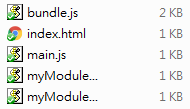
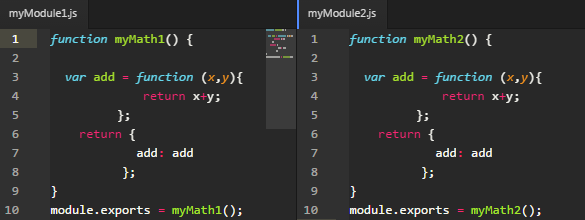
The files of EX1

2. 撰寫一個最簡單的 module

module.exports = XXXX
是 CommonJS 模組定義的方法,只匯出必要的 Object
myModule1.js & myModule2.js

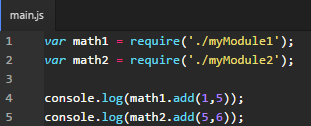
3. 撰寫主要程式進入點JS檔案

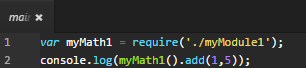
require('./XXXXX')
是 CommonJS 匯入模組的方法。
main.js

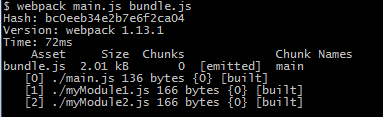
4. 使用Webpack 整合所有必要模組檔案。

webpack  main.js > bundle.js
自動靜態分析所有require的檔案

5. 在網頁 index.html 載入 bundle.js
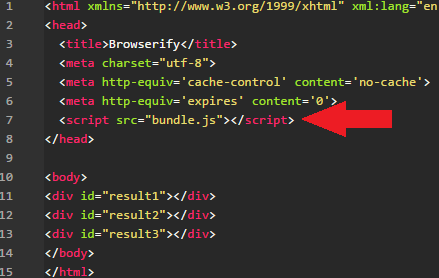
index.html

接這打開網頁,F12進入Console,可以看到add()後的結果。最簡單的Browserify範例就這麼完成了。

大家一定很好奇bundle.js到底裝了什麼? 跟Browserify轉出來的會是一樣嗎?

左邊是 Browserify 轉出來的 bundle.js 右邊是 Webpack 轉出來的 bundle.js

顯然 Webpack 的原始碼較為簡單,在require function內建立一個module物件之後,然後帶下去給原來的module。
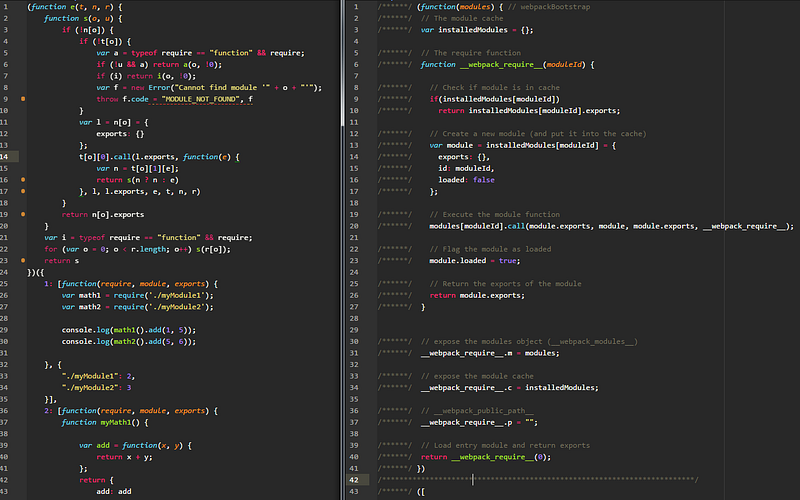
bundle.js

— — — — — — — — — — — — — — — — — — — — — — — — — — — — — —

討論:

你以為Webpack 只是單單取代Browerify嗎? 不! 他是集大成。

Webpack 也有專屬的設定檔來應付各種複雜的形況:

設定檔比較:

  • Browserify: 直接用package.json
  • Webpack: webpack.config.js
  • Gulp : gulpfile.js

且 Webpack 不只是 Module Bundler 同時也是 Task runner
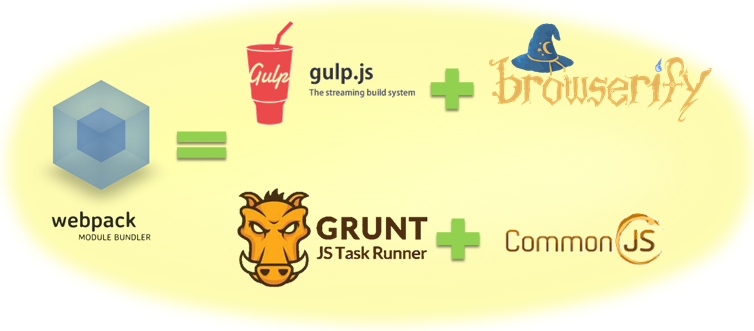
The Power of Webpack

Webpack 可支援的"Module定義"種類很多,如 CommonJS、AMD(RequireJS)、ES6(ES2015) 這些都支援。

各模組大致語法如下:

1. script-tags (without a module system)

<script type="text/javascript" src="src/myModule.js" charset="utf-8"></script>
<script type="text/javascript" src="src/main.js" charset="utf-8"></script>

2. CommonJS is used by Node.js

//myModule.js
module.exports = function(){ };
//main.js
require('./myModule.js');

3. AMD is used by RequireJS

//myModule.js
define(function (myModule) { … });
//main.js
require(['./myModule'], function (myModule) {}

4. ECMAScript 6 modules

//myModule.js
export function hello() { …}
module "localModule" {...}
//main.js
import { hello } from 'myModule';

— — — — — — — — — — — — — — — — — — — — — — — — — — — — — —

Ex2 : CommonJS Module + AMD Module

在 Ex1 已經示範了Webpack如何打包CommonJS模組,那麼AMD模組又是怎麼樣打包呢?

在開始範例之前,webpack 指令後面的參數是可以放在設定檔去設定的。

webpack  main.js > bundle.js 

等同

webpack.config.js
--------------------------------------------------------------------
module.exports = {
    entry: {
      app: "./main.js"
    },
    output: {
        filename: "bundle.js"
    }
}

如此一來,以後打包只要輸入 webpack 就行了。

接下來的檔案與JavaScript Module (2) — Browserify (CommonJS Bundler)這篇的第二個範例 Ex 2 : A CommonJS Module depends on jQuery (Bundle) 來開始做修改。

我們應該會有這些檔案
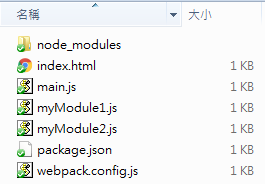
  1. 修改myModule2.js為AMD模組。

*myModule1.js為CommonJS模組。另外在module.exports時改寫成factory 的形式。
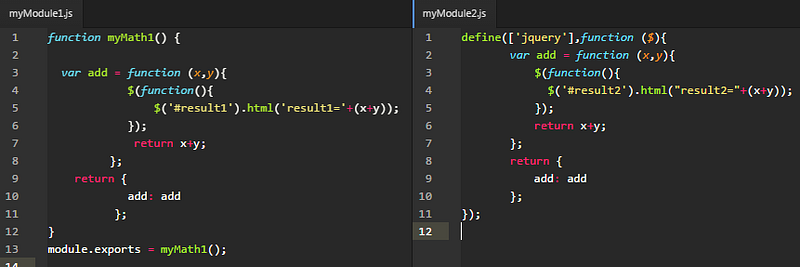
myModule1.js & myModule2.js

2. main.js修改myModule2的載入方式,改為AMD定義語法載入。
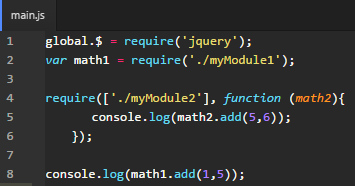
main.js

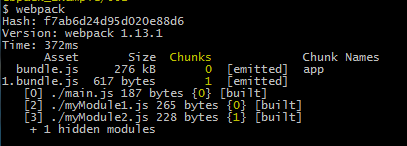
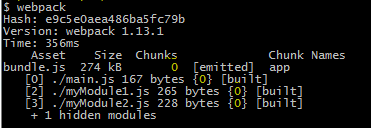
3. 使用Webpack 整合所有必要模組檔案。

可以看到打包好的檔案為 bundle.js 與 1.bundle.js 。

可以看到,打包好的檔案不是只有一個。合理的推斷就是webpack把AMD模組分離出去成為1.bundle.js。而從Chunks欄位(上圖黃色字部分)可以對應什麼js檔案會被打包在哪一個Chunk。

5. 在網頁 index.html 載入 bundle.js
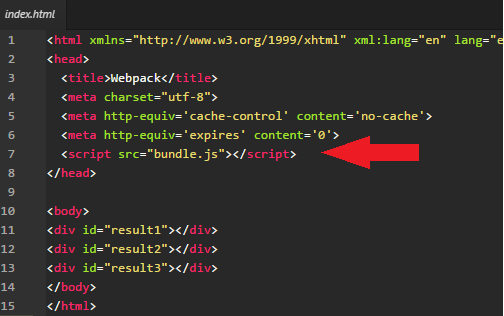
index.html

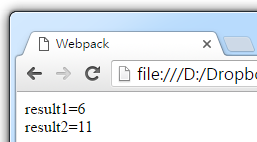
接這打開網頁,可以看到add()後的結果。

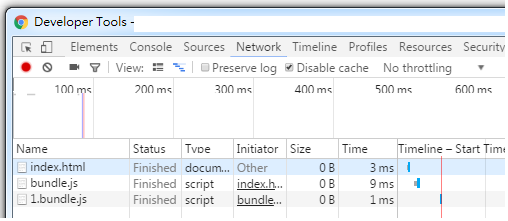
F12進入Console

Chrome DEV Tools

1.bundle.js 是在 bundle.js 之後載入的。 如此也就說明了Webpack有容乃大,既能支援同步方式(CommonJS)也能支援非同步(AMD)方式載入模組。

詳細解說:

這個範例其實就是啟用了 Webpack 的 Code Splitting” 分拆程式碼功能。

Code Splitting” 分拆程式碼功能能把你的code依據語法把部分模組分離成區塊”chunks”檔案而不只是bundle,最後執行階段時會依照需求讀取部分區塊,這也就是Webpack非同步載入模組的實現。

這篇範例中, bundle.js 是在看到require之後(如下)才下載 1.bundle.js。 而1.bundle.js 就是 myModule2.js 經過webpack 打包過後的內容。

AMD 非同步方式載入 AMD 模組:

require(['./myModule2'], function (math2){
    console.log(math2.add(5,6));
  });
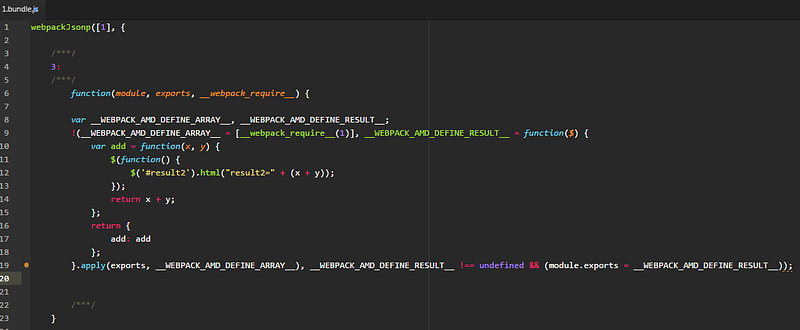
1.bundle.js (bundled from myModule2.js)

— — — — — — — — — — — — — — — — — — — — — — — — — — — — — —

Ex 2a : CommonJS-style Load AMD Module

如果改成

CommonJS 同步方式載入 AMD 模組:

var math2 = require('./myModule2');
  1. 也就是 main.js改成如下
main.js

2. 使用Webpack 整合所有必要模組檔案。

可以看到 不再有 1.bundle.js 而是全部打包成 bundle.js。

結論:

也就是說 Webpack 自動參考 語法 而判斷哪些模組是要被非同步載入,那些模組是同步載入。

AMD 非同步方式載入 AMD 模組:

require(['./myModule2'], function (math2){
    console.log(math2.add(5,6));
  });

CommonJS 同步方式載入 AMD 模組:

var math2 = require('./myModule2');

除此之外,

Webpack更還定義了 ★ AMD 非同步方式載入 CommonJS 模組,真的很妙!

— — — — — — — — — — — — — — — — — — — — — — — — — — — — — —

Ex 2b : Load CommonJS Module Asynchronous

CommonJS 同步方式載入 CommonJS 模組:

var math1 = require('./myModule1');

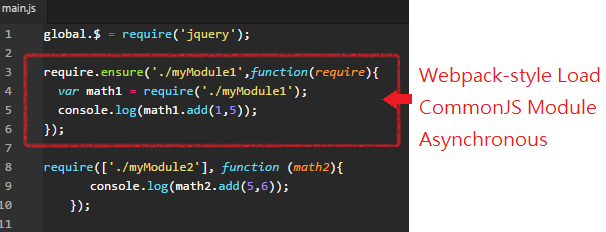
Webpack定義之非同步方式(require.ensure)載入 CommonJS 模組:

require.ensure('./myModule1',function(require){
  var math1 = require('./myModule1');
  console.log(math1.add(1,5));
});
  1. 也就是 main.js改成如下
main.js

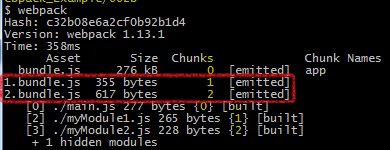
2. 使用Webpack 整合所有必要模組檔案。

可以看到 myModule1.js 和 myModule2.js 被個別打包成 1.bundle.js與2.bundle.js。

F12進入Console
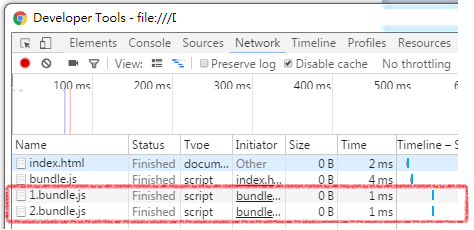
1.bundle.js 與 2.bundle.js 都是在 bundle.js 之後載入的。

Webpack 給了開發者很大的彈性,不管 CommonJS 或是 AMD 定義的模組都可以使用 同步 或 非同步方式載入模組,而這個分拆程式碼功能稱為 "Code Splitting”。 https://webpack.github.io/docs/code-splitting.html

— — — — — — — — — — — — — — — — — — — — — — — — — — — — — —

● — 接著我要們把 jQuery 踢出去。

Ex 2c : Split app and vendor code (CommonsChunkPlugin)

因為會用到Webpack Plugin(外掛),所以要把webpack安裝在專案目錄內。

npm install webpack --save-dev
--save-dev : 代表專案開發時與webpack相依。如果沒有使用 --save-dev 這個參數,不會更新 package.json,npm只會單純地把套件安裝進去node_moudels資料夾裡。

CommonsChunkPlugin 通常用作來將共同部分提取出來為一支共用JS檔案或是 建立 VENDOR 區塊之用(也稱第三方區塊),目的是為了將更新頻率較低的檔案從主要專案內部程式碼提取出來,可防止程式碼快取失效的太頻繁,進而增加使用者體驗。

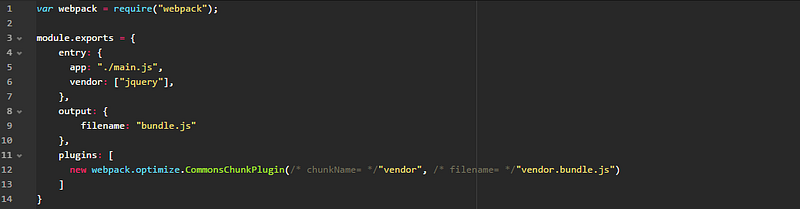
  1. 接續 Ex2b 的檔案,修改webpack.config.js
webpack.config.js

這裡必須設定 plugin 與 vendor 檔案來源。 CommonsChunkPlugin 就是會用到的外掛,意旨生成一個共用包。

例如各個模組都會用到的第三方套件或其他共用模組,會使用CommonsChunkPlugin 打包起來,打包起來的檔案最先使用<script>同步載入。

vendor: ["jquery"] 可以不只一個,它可以很多個套件。如 vendor: [“jquery”, “underscore”, …]

var webpack = require("webpack");
module.exports = {
    entry: {
      app: "./main.js",
      vendor: ["jquery"],
    },
    output: {
        filename: "bundle.js"
    },
    plugins: [
      new webpack.optimize.CommonsChunkPlugin("vendor", "vendor.bundle.js")
    ]
}

entry多了一個vendor的欄位設定,然後再用vendor包裝成vendor.bundle.js

2. 使用Webpack 整合所有必要模組檔案。
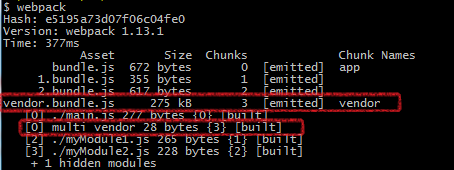
可以看到 jQuery 已經被打包成 vendor.bundle.js

3. 不是這樣就好囉!! 因為 是踢出去,所以要另寫<script>載入。

修改index.html 增加 這裡請注意它的載入順序等於script的先後。這裡要把踢出去的放在bundle.js前面。
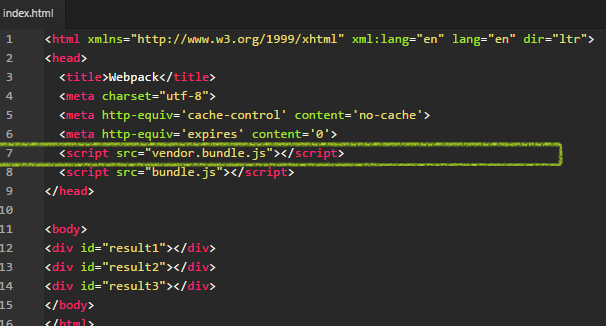
index.html

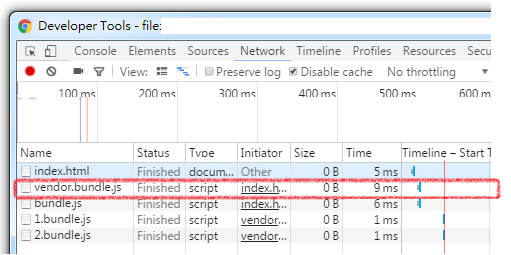
F12進入Console

可以看到 vendor.bundle.js 是同步方式載入的。(因為是

— — — — — — — — — — — — — — — — — — — — — — — — — — — — — —

Ex 2d : Library and Externals

使用Split app and vendor code的方式可以把多個第3方js檔合併再一起,但是卻需要使用到CommonsChunkPlugin

Webpack還提供另一種方法讓 “ 模組內可使用第3方js檔案 ”。

  1. 首先我們從Ex2b範例中修改 index.html檔案。jquery就使用一般script-tag 方法載入。
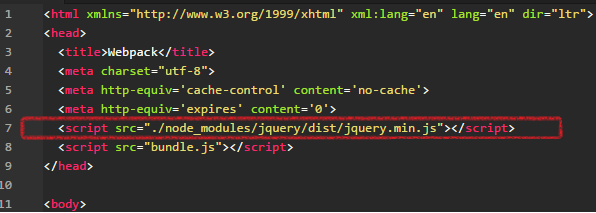
index.html

2. 為了證明可以使用第3方js檔案,我們把jquery相依性移到各模組裡面。
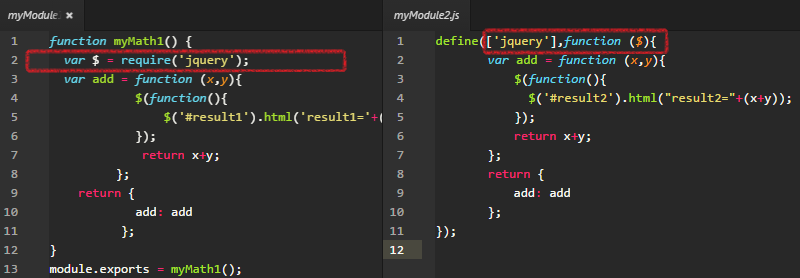
3myModule1.js (CommonJS) & myModule2.js (AMD)

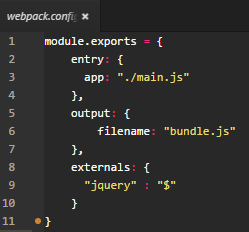
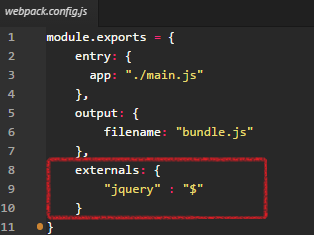
3. 接下來最重要的就是要修改 webpack.config.js ,多加一個 externals 設定,為 "jquery":"$" ,前面的jquery只是暫時給他一個名稱,之後各模組必須用這個名稱載入jquery模組 (當然也不是真的這時候才載入,是script-tag時就已經載入模組),而webpack的邏輯就是把後面的"$" 這個變數,回傳給module.exports,也就是module.exports = $;
webpack.config.js

4.使用Webpack 整合所有必要模組檔案。

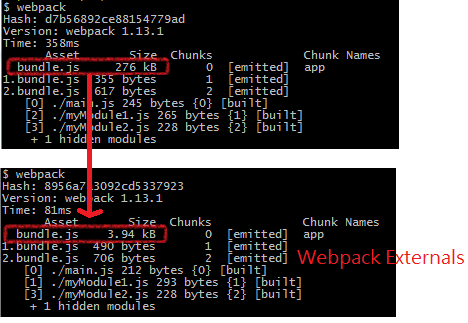
可以看到 bundle.js的size已經從276kB 降到 3.94kB,因為 jquery 已被Webpack當成externals 外部檔案方式載入,所以也不需要再打包進去。
— — — — — — — — — — — — — — — — — — — — — — — — — — — — — —

Ex3 : UMD Module

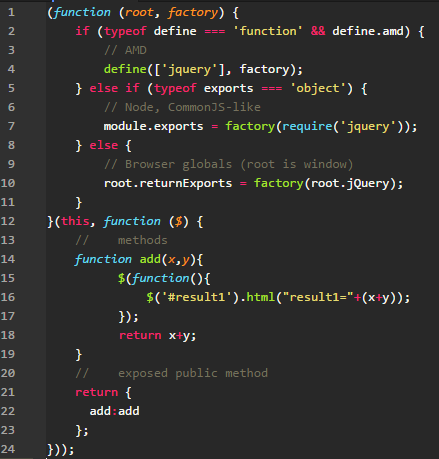
先前的範例已經針對Webpack如何使用CommonJS 與 AMD ,那麼UMD呢?對於UMD模組來說。

UMD說 「我是變色龍,既是 CommonJS也是 AMD,我是隨環境而變的。」
myModule1.js (UMD)

(從UMD的寫法來看,因為加了很多判斷,所以可以隨環境而變。)

但是

Webpack 也說 : 「朕要你當AMD你就是AMD,要你是CommonJS你就是CommonJS」。

以上這句只是笑笑,說的看似很對,但不是那麼準確。

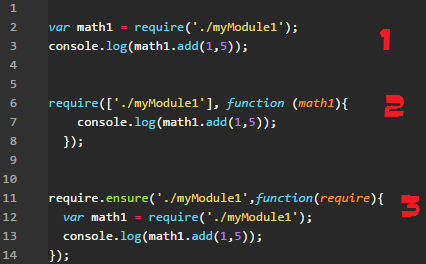
Webpack 應該說 : 「朕要你當Asynchronous你就是Asynchronous,要你是 Synchronous你就是 Synchronous」。

原因在於AMD的精神就是非同步載入模組。CommonJS的精神就是同步載入模組。而經過之前的範例,我們知道 Webpack 可以根據寫法不同而包裝成同步或非同步。

★1. 同步方式載入 UMD 、AMD、CommonJS 模組:

var math1 = require('./myModule1');
console.log(math1.add(1,5));

★2. 非同步方式載入 UMD 、AMD 模組:

require(['./myModul1'], function (math1){
    console.log(math1.add(1,5));
  });

★3. 非同步方式載入 UMD、CommonJS 模組:

require.ensure('./myModule1',function(require){
  var math1 = require('./myModule1');
  console.log(math1.add(1,5));
});
  1. 根據需要撰寫main.js
main.js

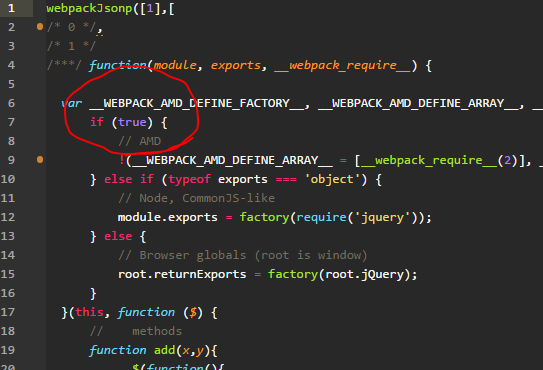
2. 使用Webpack 整合所有必要模組檔案。

bundle.js

打開bundle.js來看,Webpack 很聰明地把

if (typeof define === 'function' && define.amd) {

擅自替換成

if (true) {

可見 Webpack 故意強制滿足了AMD的條件,但是沒有真的去定義 define 這個物件,這麼做有個好處,不會像 RequireJS 一樣,一但載入後就無法再使用

Webpack 只能說 : 「朕要你當AMD你就是AMD,要你是CommonJS你還是 AMD…….XD」。

— — — — — — — — — — — — — — — — — — — — — — — — — — — — — —

Ex4a : Non-Module JS file (Shimming Modules)-1

最後兩個範例,是讓非模組化的JS檔案也能讓Webpack打包。一共有兩種Shim的設定方法。一個是在require動手腳,另一個是在Webpack.config.js這邊動手腳。

因為會用到exports-loader,所以要把exports-loader安裝在專案目錄內。

npm install exports-loader --save-dev
--save-dev : 代表專案開發時與webpack相依。

exports-loader通常用來將模組內的變數導出,等同於CommonJS的 module.exports = xxx 或是 AMD中的 return xxx。

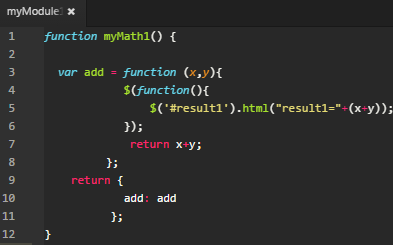
  1. 首先準備一個非模組化的JS檔
myModule1.js

2. Webpack.config.js 檔案依舊。

webpack.config.js

3. 在main.js 使用 exports 的寫法導出變數

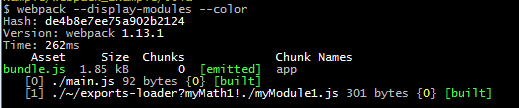
exports?myMath1 代表要導出myModule1.js裡的 myMath1變數給 main.js裡的 var myMath1 這個變數。

! 是webpack的語法串接器,!./myModule1.js 代表要require這個js檔案。

4. 使用Webpack 整合所有必要模組檔案。
— — — — — — — — — — — — — — — — — — — — — — — — — — — — — —

Ex4a : Non-Module JS file (Shimming Modules)-2

另外一種Shim的設定方法是在Webpack.config.js這邊動手腳。

因為會用到exports-loader,所以要把exports-loader安裝在專案目錄內。

npm install exports-loader --save-dev
--save-dev : 代表專案開發時與webpack相依。

exports-loader通常用來將模組內的變數導出,等同於CommonJS的 module.exports = xxx 或是 AMD中的 return xxx。

  1. 首先準備一個非模組化的JS檔
myModule1.js

2. 在main.js 的require用法依舊。

main.js

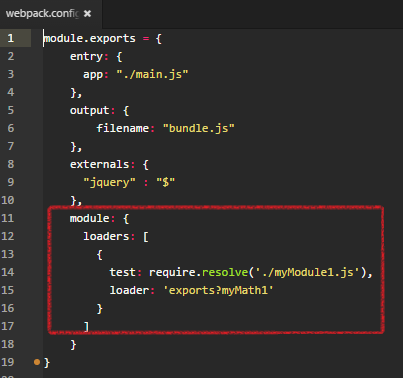
3. 在Webpack.config.js使用exports-loader
webpack.config.js

exports?myMath1 代表要使用exports-loader,並且導出myMath1變數。 而require.resolve 帶的參數要與 main.js裡的 require所帶的參數要一致。 代表 在require('./myModule1.js)時,會自動帶入loader,而變成

require("exports?myMath1!./myModule1.js");

4. 使用Webpack 整合所有必要模組檔案。

更多 Shimming modules 請參考官網 : http://webpack.github.io/docs/shimming-modules.html

— — — — — — — — — — — — — — — — — — — — — — — — — — — — — —

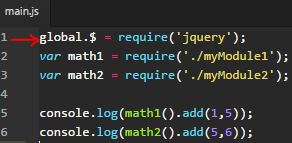
關於 global.$ = require(‘jquery’) 的替代:

jQuery的$在很多第三方模組都會用到,如bootstrap,由於之前的範例想減少學習難度,故沒有用其他的寫法,在webpack裡 ,提供了幾種方法讓所有模組能參考到$這個global變數。

main.js

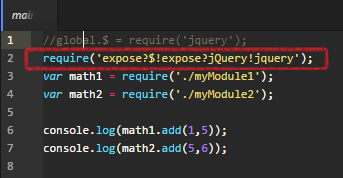
1. 使用 expose-loader

直接替換成 require(‘expose?$!expose?jQuery!jqury) ,代表把jQuery與$都暴露成global變數。
main.js

2. 使用 ProvidePlugin

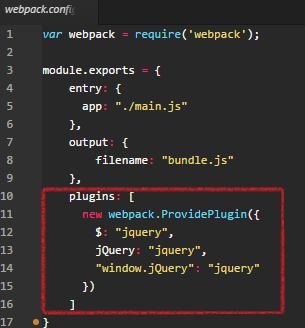
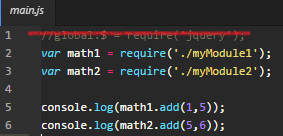
這個與expose直接暴露成global變數不同,使用 ProvidePlugin 可使模組內的變數讓 "所有的模組" 都能參考到模組內的變數。

也因此這樣所以main.js不用任何require('jquery’)的方法。
main.js

取而代之的是在webpack.config.js設定要使用到的模組與

webpack.config.js
var webpack = require('webpack');
module.exports = {
    entry: {
      app: "./main.js"
    },
    output: {
        filename: "bundle.js"
    },
    plugins: [
      new webpack.ProvidePlugin({
        $: "jquery",
        jQuery: "jquery",
        "window.jQuery": "jquery"
      })
    ]
}

Webpack就自動的幫我們把jQuery模組包裝在bundle.js之中。

文篇到這裡,有了很多範例,但也只是Webpack其中的幾項功能,Webpack功能強大,可替換多種工具。

  1. 對CommonJS、AMD、UMD、ES6、React JSX 的語法相容性。
  2. 對js、css、image、json等的檔案都支援打包。
  3. 支援串聯式(!)模組loader與plugin機制,方便對CoffeeScript等的支援。
  4. 可將所有程式碼分割成不同的chunk,可按需要才載入,降低讀取檔案的大小,也降低網頁初始化的時間。
  5. 支援 SourceUrls 與 SourceMaps 。
  6. 使用非同步IO與多層Buffer,使得Webpack編譯較迅速。

Refer:

JavaScript
Webpack
Recommended from ReadMedium