JavaScript Day 39 — Mastering JavaScript Basics: A Comprehensive Guide for Interview Preparation
100 Days of JavaScript Interview Prep: A Beginner’s Journey

Understanding the CSP (Content Security Policy)
Welcome to Day 39–100 Days of JavaScript Interview Prep: A Beginner’s Journey with understanding the CSP headers in an Express.js
How to implement Content Security Policy (CSP) headers in an Express.js application, step-by-step example?
Answer
How to implement Content Security Policy (CSP) headers in an Express.js application step by step
STEP 1
Set up an Express.js application
First, We need to create a basic Express.js application.
npm install express
// add new file - inside your folder
app.js
STEP 2
Inside app.js, set up your Express application:
const express = require('express');
const app = express();

const PORT = process.env.PORT || 3000;

app.get('/', (req, res) => {
    res.send('Hello World!');
});

app.listen(PORT, () => {
    console.log(`Server is running on port ${PORT}`);
});
STEP 3
Install Helmet
- Helmet is an Express.js middleware for securing HTTP headers.
- It provides convenient methods for setting various security-related HTTP headers, including CSP.
npm install helmet
Note — By default, Helmet sets the various headers. (By default, Helmet sets 12 HTTP headers that can improve your security)
To learn more, please click on below website for all default list and detail description of headers.
STEP 4
Implement CSP with Helmet:
Note — Each header can be configured, and let’s see how we can configure.
We’ve set a basic CSP header that allows resources to be loaded only from the same origin ('self'), test.com.
And styles — allowing from any website.
const express = require('express');
const helmet = require('helmet');
const app = express();

const PORT = process.env.PORT || 3000;

// Use the Helmet middleware
app.use(helmet());

app.use(helmet.contentSecurityPolicy({
    useDefaults: true,
    directives: {
      "font-src": ["'self'", "test.com"],
      // allowing styles from any website
      "style-src": null,
    },
  }))

app.get('/', (req, res) => {
    res.send('Hello World!');
});

app.listen(PORT, () => {
    console.log(`Server is running on port ${PORT}`);
});
STEP 6
Start the app and check the network tab
node app.js 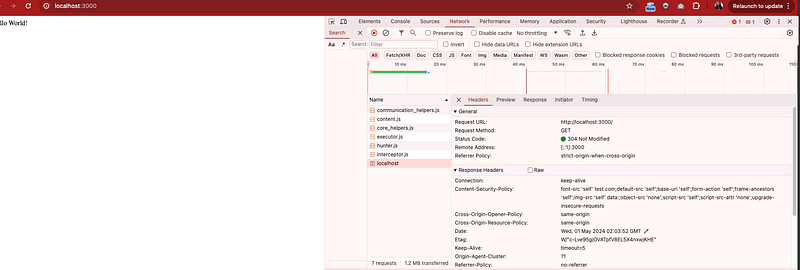
That’s it!
We’ve implemented Content Security Policy (CSP) headers in your Express.js application.
It helps enhance the security of your web application by mitigating risks such as Cross-Site Scripting (XSS) attacks.
Task for all reader (Homework-Implement other headers and provide update).