Free AI web copilot to create summaries, insights and extended knowledge, download it at here
4418
Abstract
Content-Type'</span>: <span class="hljs-string">'application/json'</span>,
<span class="hljs-comment">// Assuming JSON data</span>
<span class="hljs-comment">// Add any other headers if needed, like authorization headers</span>
},
};
<span class="hljs-title function_">fetch</span>(<span class="hljs-string">'https://jsonplaceholder.typicode.com/posts/1'</span>, {
<span class="hljs-attr">method</span>: <span class="hljs-string">'DELETE'</span>,
}).<span class="hljs-title function_">then</span>(<span class="hljs-function"><span class="hljs-params">response</span> =></span> {
<span class="hljs-comment">// Check if the response is successful</span>
<span class="hljs-keyword">if</span> (!response.<span class="hljs-property">ok</span>) {
<span class="hljs-keyword">throw</span> <span class="hljs-keyword">new</span> <span class="hljs-title class_">Error</span>(<span class="hljs-string">'Failed to delete resource'</span>);
}
<span class="hljs-keyword">return</span> response.<span class="hljs-title function_">json</span>(); <span class="hljs-comment">// Assuming the response is JSON</span>
}).<span class="hljs-title function_">then</span>(<span class="hljs-function"><span class="hljs-params">data</span> =></span> {
<span class="hljs-comment">// Handle the data returned from the server</span>
<span class="hljs-variable language_">console</span>.<span class="hljs-title function_">log</span>(<span class="hljs-string">'Resource deleted successfully'</span>, data);
})</pre></div><p id="030c"><b>STEP 4</b></p><p id="0a9a">Handle Errors or Exceptions</p><div id="8e67"><pre><span class="hljs-keyword">const</span> options = {
<span class="hljs-attr">method</span>: <span class="hljs-string">'DELETE'</span>,
<span class="hljs-attr">headers</span>: {
<span class="hljs-string">'Content-Type'</span>: <span class="hljs-string">'application/json'</span>,
<span class="hljs-comment">// Assuming JSON data</span>
<span class="hljs-comment">// Add any other headers if needed, like authorization headers</span>
},
};
<span class="hljs-title function_">fetch</span>(<span class="hljs-string">'https://jsonplaceholder.typicode.com/posts/1'</span>, options).<span class="hljs-title function_">then</span>(<span class="hljs-function"><span class="hljs-params">response</span> =></span> {
<span class="hljs-comment">// Check if the response is successful</span>
<span class="hljs-keyword">if</span> (!response.<span class="hljs-property">ok</span>) {
<span class="hljs-keyword">throw</span> <span class="hljs-keyword">new</span> <span class="hljs-title class_">Error</span>(<span class="hljs-string">'Failed to delete resource'</span>);
}
<span class="hljs-keyword">return</span> response.<span class="hljs-title function_">json</span>(); <span class="hljs-comment">// Assuming the response is JSON</span>
}).<span class="hljs-title function_">then</span>(<span class="hljs-function"><span class="hljs-params">data</span> =></span> {
<span class="hljs-comment">// Handle the data returned from the server</span>
<span class="hljs-variable language_">console</span>.<span class="hljs-title function_">log</span>(<span class="hljs-string">'Resource deleted successfully'</span>, data);
})
.<span class="hljs-title function_">catch</span>(<span class="hljs-function"><span class="hljs-params">error</span> =></span> {
<span class="hljs-comment">// Handle any errors that occurred during the fetch request</span>
<span class="hljs-variable language_">console</span>.<span class="hljs-title function_">error</span>(<span class="hljs-string">'Error deleting resource:'</span>, error);
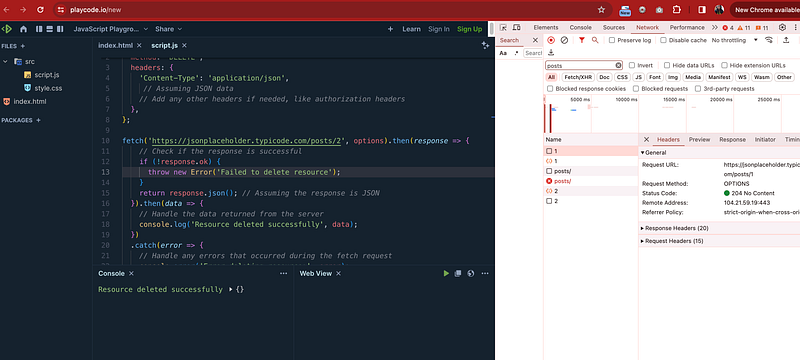
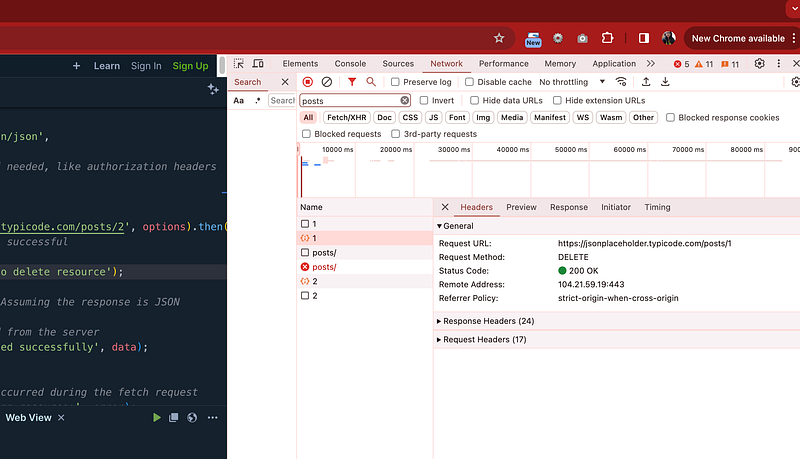
});</pre></div><h2 id="fb4a">STEP 5</h2><p id="b044">Test the above code in any JavaScript application running on local host or use any live JavaScript playground</p><p id="b423">We will use below JavaScript playground</p><div id="bf91" class="link-block">
<a href="https://playcode.io/new">
<div>
<div>
<h2>JavaScript Playground</h2>
<div><h3>Try this online JavaScript Playground playground with instant live preview and console. Easy & Fast. Experiment…</h3></div>
<div><p>playcode.io</p></div>
</div>
<div>
<div style="background-image: url(https://miro.readmedium.com/v2/re
Options
size:fit:320/)"></div>
</div>
</div>
</a>
</div><figure id="f62b"><img src="https://cdn-images-1.readmedium.com/v2/resize:fit:800/1*Uv4jM6uJM14ckZ8DwiTFOw.png"><figcaption>Welcome to Day 33–100 Days of JavaScript Interview Prep: A Beginner’s Journey with Fetch API — Live Playground Javscript with Delete Method Code</figcaption></figure><figure id="f6ef"><img src="https://cdn-images-1.readmedium.com/v2/resize:fit:800/1*kYeAU7Z1s3xyQ4t7tHy_Fg.png"><figcaption>Welcome to Day 33–100 Days of JavaScript Interview Prep: A Beginner’s Journey with Fetch API — Live Playground Javscript with Delete Method Code</figcaption></figure><p id="a06e" type="7">Finally, Today we completed our understanding different methods of fetching Data with Fetch API</p><p id="e42d" type="7">And tomorrow’s focus on HTTP error codes will further deepen your understanding of web development.</p><h1 id="0871">Happy Coding and Stay Tuned :)</h1><p id="4ddf" type="7">Kind is cool !!!</p><p id="3a75" type="7">Share knowledge to gain knowledge !!!!</p><p id="1cd3" type="7">Be kind and treat people with respect !</p><h1 id="d2ea">If you find my blog helpful, then please subscribe, claps and follow to support :)</h1><figure id="1f01"><img src="https://cdn-images-1.readmedium.com/v2/resize:fit:800/1*cw0wj4OStBvWMgFgtZ1T8g.png"><figcaption>Thank You JavaScript Day 33 — Mastering JavaScript Basics: A Comprehensive Guide for Interview Preparation with Kirti Kaushal</figcaption></figure><div id="f0a5" class="link-block">
<a href="https://kirtikau.medium.com/javascript-day-32-mastering-javascript-basics-a-comprehensive-guide-for-interview-preparation-580fd21261d7">
<div>
<div>
<h2>JavaScript Day 32 — Mastering JavaScript Basics: A Comprehensive Guide for Interview Preparation</h2>
<div><h3>100 Days of JavaScript Interview Prep: A Beginner’s Journey</h3></div>
<div><p>kirtikau.medium.com</p></div>
</div>
<div>
<div style="background-image: url(https://miro.readmedium.com/v2/resize:fit:320/1*OgVz0yesWW_DNLzy8-Oinw.png)"></div>
</div>
</div>
</a>
</div><div id="9a0c" class="link-block">
<a href="https://kirtikau.medium.com/list/953da44e71ce">
<div>
<div>
<h2>Explore OpenAI, ChatGPT , Next.js, the React framework</h2>
<div><h3>Explore OpenAI, ChatGPT , Next.js, the React framework that empowers developers with server-side rendering, static site…</h3></div>
<div><p>kirtikau.medium.com</p></div>
</div>
<div>
<div style="background-image: url(https://miro.readmedium.com/v2/resize:fit:320/0*2ad63dbb6593f826f599de4c13654700cb4eb24e.jpeg)"></div>
</div>
</div>
</a>
</div><div id="4e98" class="link-block">
<a href="https://kirtikau.medium.com/list/6d895127c989">
<div>
<div>
<h2>100 Days of JavaScript Interview Prep: A Beginner’s Journey</h2>
<div><h3>Mastering JavaScript Basics: A Comprehensive Guide for Interview Preparation (00 Days of JavaScript Interview Prep: A…</h3></div>
<div><p>kirtikau.medium.com</p></div>
</div>
<div>
<div style="background-image: url(https://miro.readmedium.com/v2/resize:fit:320/0*f6af887fe75696cfde3e7d63330d8dbb871447d1.jpeg)"></div>
</div>
</div>
</a>
</div><div id="037c" class="link-block">
<a href="https://rohitsportsphysiorehabclinic.co.in/?source=post_page-----580fd21261d7--------------------------------">
<div>
<div>
<h2>Home - Krishna Sports Injuries Physiotherapy & Rehab Clinic</h2>
<div><h3>Krishna Sports Injuries Physiotherapy & Rehab Clinic There are plenty ways how to make an appointment. You can call us…</h3></div>
<div><p>rohitsportsphysiorehabclinic.co.in</p></div>
</div>
<div>
<div style="background-image: url(https://miro.readmedium.com/v2/resize:fit:320/0*9j423rjsGQtZg9rD)"></div>
</div>
</div>
</a>
</div></article></body>