Free AI web copilot to create summaries, insights and extended knowledge, download it at here
5862
Abstract
s="hljs-title function_">json</span>(); <span class="hljs-comment">// Parse the JSON response</span>
})
</pre></div><h2 id="b66b">STEP 4</h2><p id="a725">Handle the Promise of Fetch</p><p id="377d"><i>Tip : to handle promise we need to add then.</i></p><p id="9207"><b>Please find complete code with promise handling</b></p><div id="9107"><pre><span class="hljs-keyword">const</span> url = <span class="hljs-string">'https://jsonplaceholder.typicode.com/posts'</span> ;
<span class="hljs-keyword">const</span> postData = {
<span class="hljs-attr">title</span>: <span class="hljs-string">'foo'</span>,
<span class="hljs-attr">body</span>: <span class="hljs-string">'bar'</span>,
<span class="hljs-attr">userId</span>: <span class="hljs-number">1</span>
}
<span class="hljs-keyword">const</span> options = {
<span class="hljs-attr">method</span>: <span class="hljs-string">'POST'</span>,
<span class="hljs-attr">headers</span>: {
<span class="hljs-string">'Content-Type'</span>: <span class="hljs-string">'application/json'</span> <span class="hljs-comment">// Specify the content type as JSON</span>
},
<span class="hljs-attr">body</span>: <span class="hljs-title class_">JSON</span>.<span class="hljs-title function_">stringify</span>(postData) <span class="hljs-comment">// Convert the data to JSON format</span>
};
<span class="hljs-title function_">fetch</span>(url, options)
.<span class="hljs-title function_">then</span>(<span class="hljs-function"><span class="hljs-params">response</span> =></span> {
<span class="hljs-keyword">if</span> (!response.<span class="hljs-property">ok</span>) {
<span class="hljs-keyword">throw</span> <span class="hljs-keyword">new</span> <span class="hljs-title class_">Error</span>(<span class="hljs-string">'Network response was not ok'</span>);
}
<span class="hljs-keyword">return</span> response.<span class="hljs-title function_">json</span>(); <span class="hljs-comment">// Parse the JSON response</span>
}).<span class="hljs-title function_">then</span>(<span class="hljs-function"><span class="hljs-params">data</span> =></span> {
<span class="hljs-comment">// Do something with the response data</span>
<span class="hljs-variable language_">console</span>.<span class="hljs-title function_">log</span>(data);
})</pre></div><h2 id="d144">STEP 5</h2><p id="cbe6">Handle the exceptions with catch</p><div id="b444"><pre><span class="hljs-keyword">const</span> url = <span class="hljs-string">'https://jsonplaceholder.typicode.com/posts'</span>
<span class="hljs-keyword">const</span> postData = {
<span class="hljs-attr">title</span>: <span class="hljs-string">'foo'</span>,
<span class="hljs-attr">body</span>: <span class="hljs-string">'bar'</span>,
<span class="hljs-attr">userId</span>: <span class="hljs-number">1</span>
}
<span class="hljs-keyword">const</span> options = {
<span class="hljs-attr">method</span>: <span class="hljs-string">'POST'</span>,
<span class="hljs-attr">headers</span>: {
<span class="hljs-string">'Content-Type'</span>: <span class="hljs-string">'application/json'</span> <span class="hljs-comment">// Specify the content type as JSON</span>
},
<span class="hljs-attr">body</span>: <span class="hljs-title class_">JSON</span>.<span class="hljs-title function_">stringify</span>(postData) <span class="hljs-comment">// Convert the data to JSON format</span>
};
<span class="hljs-title function_">fetch</span>(url, options)
.<span class="hljs-title function_">then</span>(<span class="hljs-function"><span class="hljs-params">response</span> =></span> {
<span class="hljs-keyword">if</span> (!response.<span class="hljs-property">ok</span>) {
<span class="hljs-keyword">throw</span> <span class="hljs-keyword">new</span> <span class="hljs-title class_">Error</span>(<span class="hljs-string">'Network response was not ok'</span>);
}
<span class="hljs-keyword">return</span> response.<span class="hljs-title function_">json</span>(); <span class="hljs-comment">// Parse the JSON response</span>
}).<span class="hljs-title function_">then</span>(<span class="hljs-function"><span class="hljs-params">data</span> =></span> {
<span class="hljs-comment">// Do something with the response data</span>
<span class="hljs-variable language_">console</span>.<span class="hljs-title function_">log</span>(data);
}).<span class="hljs-title function_">catch</span>(<span class="hljs-function"><span class="hljs-params">error</span> =></span> {
<span class="hljs-comment">// Handle any errors that occur during the fetch request</span>
<span class="hljs-variable language_">console</span>.<span class="hljs-title function_">error</span>(<span class="hljs-string">'There was a problem with the fetch operation:'</span>, error);
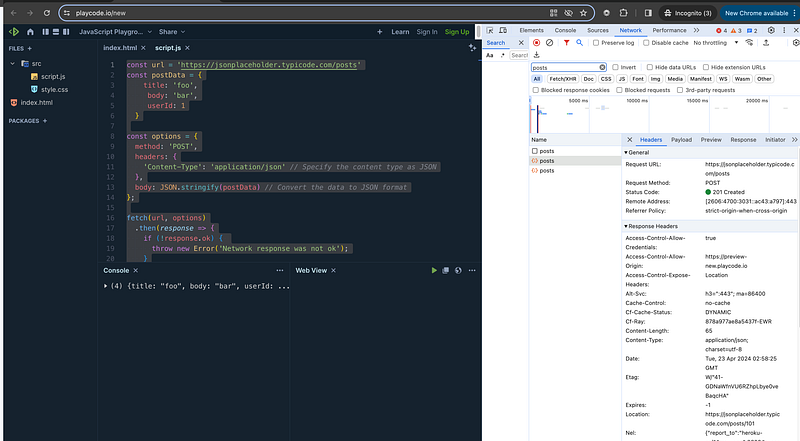
});</pre></div><h2 id="97db">STEP 6</h2><p id="abf2">Test the above code in any javascript application running on local host or use any live playground</p><p id="3246">We will use below javascript playground</p><div id="36c0" class="link-block">
<a href="https://playcode.io/new">
<div>
<div>
<h2>JavaScript Playground</h2>
<div><h3>Try this online JavaScript Playground playground with instant live preview and console. Easy & Fast. Experiment…</h3></div>
<div><p>playcode.io</p></div>
</div>
<div>
<div style="background-image: url(https://miro.readmedium.com/v2/resize:fit:320/)"></div>
</div>
</div>
</a>
</div><figure id="834d"><img src="https://cdn-images-1.readmedium.com/v2/resize:fit:800/1*s17MLXKmTR2_U-AK8La59A.png"><figcaption></figcaption></figure><h1 id="4e18">Step 7 Final Debugging in Network Tab</h1><p id="9264"><b>Op</b>en the
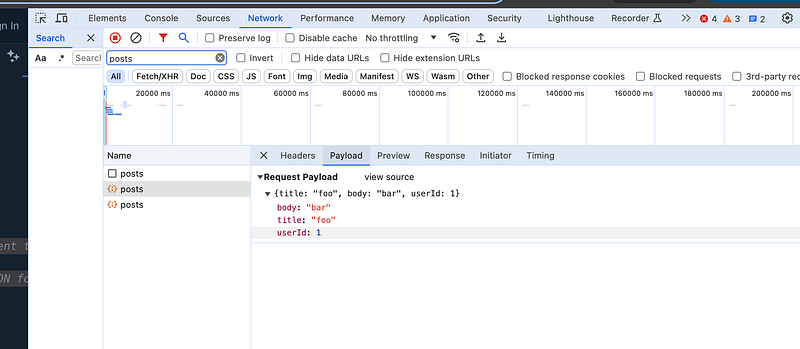
Options
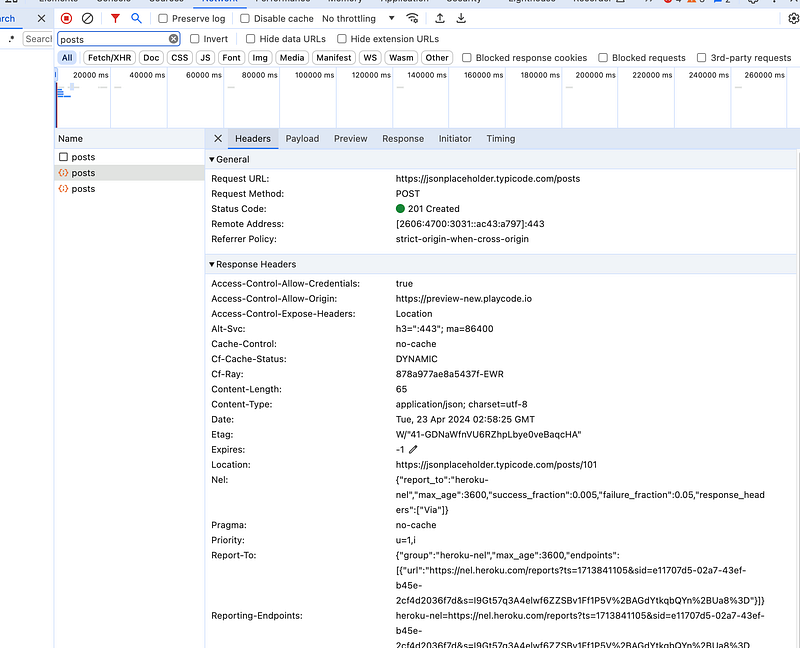
DevTools and click on Network tab</p><p id="644a"><i>You can see the call in network with all parameters and options</i></p><p id="bca8">In our POST Method — we will see request payload (body as per our above code reference)</p><figure id="ec13"><img src="https://cdn-images-1.readmedium.com/v2/resize:fit:800/1*EZWow3j3_5oIUxfwHUkwwg.png"><figcaption></figcaption></figure><p id="b579"><b>Status Code — 201 created (when new resource created)</b></p><figure id="2580"><img src="https://cdn-images-1.readmedium.com/v2/resize:fit:800/1*ASScDt1mM7cLY71ASQ_H-Q.png"><figcaption></figcaption></figure><h1 id="02cd">Conclusion</h1><p id="bd91"><i>Above code is sample example so remember to replace <code>'url'</code> with the actual URL you want to send the POST request to, and adjust the <code>postData</code> object accordingly with your desired data.</i></p><p id="d690"><b><i>Tomorrow we will learn more about fetch API with PUT(UPDATE) method examples.</i></b></p><figure id="fde0"><img src="https://cdn-images-1.readmedium.com/v2/resize:fit:800/1*P2yweWXW379cyVpU9XYuKw.png"><figcaption>JavaScript Day 31 — Mastering JavaScript Basics: A Comprehensive Guide for Interview Preparation with kirti kaushal</figcaption></figure><h1 id="b8e5">Happy Coding and Stay Tuned :)</h1><p id="6d8e" type="7">Kind is cool !!!</p><p id="965f" type="7">Share knowledge to gain knowledge !!!!</p><p id="34c6" type="7">Be kind and treat people with respect !!</p><h1 id="8916">If you find my blog helpful, then please subscribe, claps and follow to support :)</h1><h1 id="3673">Other Articles</h1><div id="a87a" class="link-block">
<a href="https://kirtikau.medium.com/list/953da44e71ce">
<div>
<div>
<h2>Explore OpenAI, ChatGPT , Next.js, the React framework</h2>
<div><h3>Explore OpenAI, ChatGPT , Next.js, the React framework that empowers developers with server-side rendering, static site…</h3></div>
<div><p>kirtikau.medium.com</p></div>
</div>
<div>
<div style="background-image: url(https://miro.readmedium.com/v2/resize:fit:320/0*2ad63dbb6593f826f599de4c13654700cb4eb24e.jpeg)"></div>
</div>
</div>
</a>
</div><div id="0621" class="link-block">
<a href="https://kirtikau.medium.com/javascript-day-30-mastering-javascript-basics-a-comprehensive-guide-for-interview-preparation-9b6e7f0a042d">
<div>
<div>
<h2>JavaScript Day 30— Mastering JavaScript Basics: A Comprehensive Guide for Interview Preparation</h2>
<div><h3>100 Days of JavaScript Interview Prep: A Beginner’s Journey</h3></div>
<div><p>kirtikau.medium.com</p></div>
</div>
<div>
<div style="background-image: url(https://miro.readmedium.com/v2/resize:fit:320/1*mUSJz_RX7vQ3Hs9lEjErOg.png)"></div>
</div>
</div>
</a>
</div><div id="6112" class="link-block">
<a href="https://kirtikau.medium.com/list/6d895127c989">
<div>
<div>
<h2>100 Days of JavaScript Interview Prep: A Beginner’s Journey</h2>
<div><h3>Mastering JavaScript Basics: A Comprehensive Guide for Interview Preparation (00 Days of JavaScript Interview Prep: A…</h3></div>
<div><p>kirtikau.medium.com</p></div>
</div>
<div>
<div style="background-image: url(https://miro.readmedium.com/v2/resize:fit:320/0*6e2070942cc3c11137c199c98b6ecfd70ed4914f.jpeg)"></div>
</div>
</div>
</a>
</div><div id="f423" class="link-block">
<a href="https://rohitsportsphysiorehabclinic.co.in/">
<div>
<div>
<h2>Home - Krishna Sports Injuries Physiotherapy & Rehab Clinic</h2>
<div><h3>Krishna Sports Injuries Physiotherapy & Rehab Clinic There are plenty ways how to make an appointment. You can call us…</h3></div>
<div><p>rohitsportsphysiorehabclinic.co.in</p></div>
</div>
<div>
<div style="background-image: url(https://miro.readmedium.com/v2/resize:fit:320/0*ruAc_n3EwNYGKhTL)"></div>
</div>
</div>
</a>
</div><div id="6336" class="link-block">
<a href="https://kirtikau.medium.com/javascript-day-29-mastering-javascript-basics-a-comprehensive-guide-for-interview-preparation-70462e07af2f">
<div>
<div>
<h2>JavaScript Day 29 — Mastering JavaScript Basics: A Comprehensive Guide for Interview Preparation</h2>
<div><h3>100 Days of JavaScript Interview Prep: A Beginner’s Journey</h3></div>
<div><p>kirtikau.medium.com</p></div>
</div>
<div>
<div style="background-image: url(https://miro.readmedium.com/v2/resize:fit:320/1*rZfifdGomkzKhAWo4TRxGw.png)"></div>
</div>
</div>
</a>
</div><div id="24eb" class="link-block">
<a href="https://kirtikau.medium.com/list/953da44e71ce">
<div>
<div>
<h2>Explore OpenAI, ChatGPT , Next.js, the React framework</h2>
<div><h3>Explore OpenAI, ChatGPT , Next.js, the React framework that empowers developers with server-side rendering, static site…</h3></div>
<div><p>kirtikau.medium.com</p></div>
</div>
<div>
<div style="background-image: url(https://miro.readmedium.com/v2/resize:fit:320/0*2ad63dbb6593f826f599de4c13654700cb4eb24e.jpeg)"></div>
</div>
</div>
</a>
</div></article></body>