
JavaScript Day 20— Mastering JavaScript Basics: A Comprehensive Guide for Interview Preparation
100 Days of JavaScript Interview Prep: A Beginner’s Journey
Welcome to Day 20–100 Days of JavaScript Interview Prep: A Beginner’s Journey
Embarking on a 100-day adventure focused on learning, practice, and growth sounds like an incredibly rewarding journey.
DAY 20 (April 11th, 2024) — ES6 Classes Part-2 Interview Questions ?
Note — Most important interview question
Question — Can we consider ES6 Classes as templates for creating objects ?
Answer — Yes indeed
Classes are a template for creating objects.
Tip : JavaScript is a protype-based language — an object’s behavior is specified by its own properties and its prototype’s properties.
How we can define classes — With class declarations
class MyCard{

}

// class declarations
Let’s now understanding different area’s of features of classes
class MyCard {
// how to define private field
  #myLastName = "testmylastName"
  constructor(){ // This is our constructor

  }
// Instance field
 email = "test.com" // defining a field

// how to define method /function
  getDetails(){
       // function body
  }
 // how to define Static field
   static myName = "test" // define with static keyword
  // how to define Static Method
   static myPersonalDetail(){
   }
   // how to define Static block
   static {
   }
}
Let’s now break down each feature to understand it easily
Question 1 — What is private field and why we need it ?
Answer — As we are aware now, ES6 introduced new syntax for class, and it also provides new syntax for creating private properties.
As name suggest, private means privacy /personal and in programming terms which ensure privacy and allow us to hide implementation details and only expose the necessary functionality to the outside class.
It provides data privacy and abstraction.
How to declare private field ?
We can declare a private field by prefixing the field name with a hash (#) symbol.
Private field is only visible to the class to which they belong
#mylastName = "test"How to Declare Static Field
class MyCard {
  #myLastName;

  constructor() {
    this.#myLastName = 'test';
  }
}

class MyDetail extends MyCard {
  #address;

  constructor() {
    super();
    this.#address = 'test road ';
  }
}

new MyDetail();
How to Access Private Static Field
class MyCard {
  #myLastName;

  constructor() {
    this.#myLastName = 'test';
  }
}

class MyDetail extends MyCard {
  #address;

  constructor() {
    super();
    this.#address = 'test road ';
  }
 // Public method to set the address
    getAddress() {
        return this.#address;
    }
}


const myCar = new MyDetail();
console.log('test')
console.log(myCar.getAddress()) // We can access static by adding public method
HTML File to TEST
<!DOCTYPE html>
<html>
<body>
<h1>JavaScript Class Method</h1>

<p id="demo"></p>

<script>
class MyCard {
  #myLastName;

  constructor() {
    this.#myLastName = 'test';
  }
}

class MyDetail extends MyCard {
  #address;

  constructor() {
    super();
    this.#address = 'test road ';
  }
  getAddress() {
        return this.#address;
    }
}


const myCar = new MyDetail();
console.log('test')
console.log(myCar)
document.getElementById("demo").innerHTML=
"My address is " + myCar.getAddress();
</script>

</body>
</html>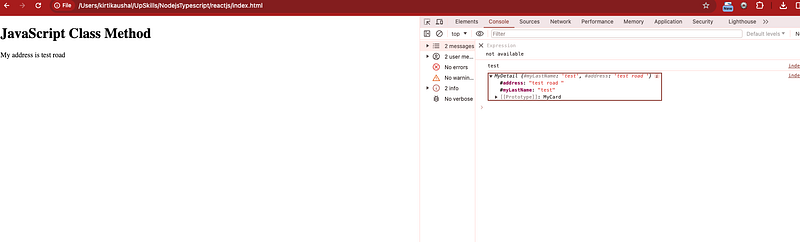
Important Tip
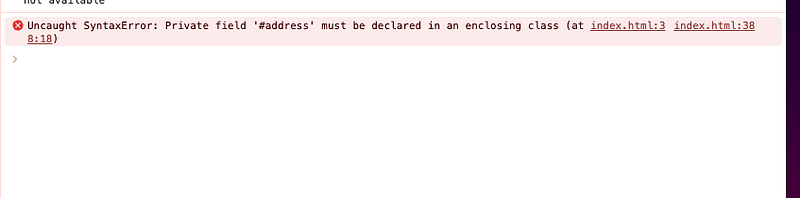
We can’t access or modify directly static field and attempts to do will always return an error
// Error way
console.log(myCar.#address)
myCar.#address = 'test'

// External code cannot access or modify the private property directly;
//attempts to do so will result in an error.

// Error - caught SyntaxError: Private field '#address' must be declared
// in an enclosing class
Tomorrow we will learn more about Static Private properties of ES6 with other examples.
Go slow always with Classes Concept — :)
Happy Coding and Stay Tuned :)
Kind is cool !!!
Share knowledge to gain knowledge !!!!
Be kind and treat people with respect !!
If you find my blog helpful, then please subscribe, claps and follow to support :)

Cheers
Kirti Kaushal


